
Best Practices for Level 2 Quantitative Factor Development and Simulated Trading
In high-frequency financial trading, tick-by-tick trade data and Level 2 snapshot data contain rich temporal features and market microstructure information. They form the foundation for building quantitative factors and designing trading strategies. As market structures grow more complex and algorithmic trading continues to expand, the ability to process massive volumes of high-frequency data in real time has become a core competitive advantage for quantitative teams. High-frequency trading systems process hundreds of millions of records each day. Their workflows include preprocessing, time alignment, minute-level aggregation, factor calculation, and model inference, all of which demand extremely low latency, high reliability, and scalability.
To meet these needs, DolphinDB introduced SnapTradeStream, a real-time factor calculation module for minute-level quantitative trading. Built on high-performance streaming engines, the module handles the entire workflow, from real-time market data collection and minute-level aggregation to factor calculation, model inference, signal generation, and order matching. Its low latency and high throughput improve real-time factor calculation efficiency and system stability.
1. Generate Minute-Level Factors from Snapshot Data
Level 2 snapshot data includes ten levels of bid and ask quotes, order volumes, and real-time trade prices. It reveals market depth, order book pressure, and bid-ask imbalances. However, raw snapshot data can arrive at thousands of records per second and contain complex fields. Using it directly in strategy calculations is computationally demanding and makes it difficult to extract useful minute-level features. This chapter explains how to aggregate high-frequency snapshot data into minute-level factors in real time, covering the data characteristics, calculation rules, and implementation steps.
1.1 Characteristics of Level 2 Stock Snapshot Data
Exchanges push snapshot data at fixed intervals, providing static market information for the entire market. This data is widely used for minute-level market data archiving, factor calculation, and quantitative strategy backtesting. Snapshot data has a rich field structure. In addition to basic market data, such as the last, high, and low prices and trading volume, it includes order queues (multiple levels of bid and ask prices and their corresponding order volumes), ETF subscription and redemption data, bid and ask statistics, and the number of trades. See Appendix for the snapshot data fields. These fields can be used to calculate the following common minute-level factors:
| Field Name | Data Type | Description |
|---|---|---|
| securityId | SYMBOL | Security symbol |
| rseComputeUs | LONG | Calculation time for the reactive stateful engine (microseconds) |
| batchSize | INT | Number of records processed per batch by the reactive stateful engine |
| snapTseComputeUs | LONG | Calculation time for the time-series engine (microseconds) |
| tradeTime | TIMESTAMP | Timestamp of the current aggregation window (start of the next minute) |
| market | SYMBOL | Trading market |
| high | DOUBLE | Highest trade price |
| open | DOUBLE | Opening price |
| low | DOUBLE | Lowest trade price |
| close | DOUBLE | Closing price |
| volume | LONG | Trading volume added in the current minute |
| amount | DOUBLE | Trading value added in the current minute |
| numTrades | LONG | Number of trades added in the current minute |
| totalSellVolume | LONG | Total ask order volume across the current ten price levels |
| totalBuyVolume | LONG | Total bid order volume across the current ten price levels |
| sellVolume | LONG | Total ask order volume across ten price levels |
| buyVolume | LONG | Total bid order volume across ten price levels |
| entrustSellAmount | DOUBLE | Current total ask order value |
| entrustBuyAmount | DOUBLE | Current total bid order value |
| sellAvgPrice | DOUBLE | Current weighted average ask price |
| buyAvgPrice | DOUBLE | Current weighted average bid price |
1.2 Calculation Rules for Minute-Level Factors
Converting high-frequency snapshot data into minute-level indicators reduces data dimensionality while preserving key market structure information. These indicators are important inputs for subsequent model inference and signal triggering. DolphinDB uses its time-series engine and reactive stateful engine to calculate minute-level indicators efficiently and with low latency. The following sections describe the calculation rules for prices, trades, and order book data.
1.2.1 Price Calculation Rules
Minute-level price movements provide a foundation for quantitative strategies to identify trends, assess strength, and detect turning points. For example, the closing price determines the model's prediction target, while the opening, high, and low prices affect decisions in drawdown and breakout strategies. You must also handle anomalies, such as an opening price of 0, and missing data appropriately. To ensure that strategies use consistent and reliable data, calculate minute-level price indicators as follows:
-
Opening price (open):
-
For minutes other than the opening and closing minutes, use the latest price from the first snapshot in the window as the opening price.
-
For the opening and closing minutes:
-
If the most recent opening price in the window is 0, use the last traded price from the first snapshot in the window.
-
Otherwise, use the most recent opening price in the window.
-
-
-
High price (high) and low price (low):
-
If the high price (or low price) in the last record of the window is 0, use the maximum (or minimum) last traded price in the window.
-
Otherwise, use the most recent high price (or low price) in the window.
-
-
Closing price (close):
-
Use the latest price from the last record of the current window as the closing price.
-
1.2.2 Handle Trading Volume, Trading Value, and Number of Trades
Trading indicators reflect market activity and are key indicators for distinguishing a valid breakout from a false rally. For example, rising trading volume often accompanies a continuing trend, while declining volume may signal a pullback. For intraday timing strategies in particular, real-time changes in trading volume often determine whether to execute a signal. Because snapshot trading volume is cumulative, calculate the actual change for each minute using differences between successive values:
-
Initially, use the values in the most recent record in the window for snapshot trading volume, trading value, and number of trades.
-
Use the
deltas()function to calculate the differences between adjacent minutes for each field. If a difference is null, retain the value from the most recent record in the window; otherwise, use the calculated difference. -
The fields include:
-
volume: the increase in trading volume.
-
amount: the increase in trading value.
-
numTrades: the increase in the number of trades.
-
1.2.3 Order Volume and Average Price Calculation Rules
One key benefit of snapshot data is that it provides order book information for the top 10 price levels, revealing the market's current supply and demand. Quantitative strategies focus on changes in order volume. For example, they may use order book volume-price imbalances to identify potential accumulation through sell pressure or distribution after driving prices up. Minute-level order statistics therefore provide an important window into the behavior of major market participants. To ensure that strategies capture the latest order book state at the end of each minute, process order book data using the following indicators:
-
When calculating indicators related to buy and sell order volume and value, use the most recent snapshot record in the current calculation window for every indicator:
-
totalSellVolume: total sell order volume, taken from the latest value of the totalOfferQuant field in the window.
-
totalBuyVolume: total buy order volume, taken from the latest value of the totalBuyQuant field in the window.
-
entrustSellAmount: total value of sell orders, calculated by multiplying the sell order volume by the weighted average sell price. Use the latest record in the window.
-
entrustBuyAmount: total value of buy orders, calculated in the same way as entrustSellAmount by multiplying the buy order volume by the weighted average buy price.
-
sellAvgPrice and buyAvgPrice: the weighted average sell and buy prices.
-
1.3 Calculate Minute-Level Factors
Building minute-level factors depends not only on precise calculation rules but also on high-quality streaming data processing and windowing. In live trading, raw snapshot data presents challenges such as complex trading sessions, inconsistent timestamps, and uneven data distribution. These issues can affect the accuracy and timeliness of minute-level calculations. To ensure stable, timely output of minute-level factors, DolphinDB uses snapshot preprocessing, time-series aggregation, and a reactive stateful engine to build a high-performance minute-level data pipeline. The following sections describe how to efficiently generate minute-level factor data from raw snapshots in three stages.
1.3.1 Clean Snapshot Data and Standardize Time
Snapshot data includes data from opening auction sessions, continuous trading sessions, irregular timestamps, and multiple markets. Without cleaning, these can significantly compromise the accuracy of minute-level factors. In particular, nonstandard timestamps near minute-bar trigger points can cause aggregation errors and missing minute-level data. Therefore, you need to clean and format the timestamps in raw snapshots to ensure that each record falls into the correct aggregation window. We use the following preprocessing logic to filter snapshot data and standardize its timestamps:
-
Filter data to trading sessions: Retain snapshots from the opening auction session (09:25–09:30) and the continuous trading sessions (09:30–11:30 and 13:00–14:57). Discard invalid data and data from outside trading hours.
-
Optimize minute-bar trigger timing: The latest snapshot for each minute arrives at second 59. To account for this, the calculation is triggered as soon as the snapshot for second 59 arrives.
The following code was developed for DolphinDB 3.00.4. We recommend using version 3.00.4 or later.
// tse: time-series engine
// msg: raw snapshot data
def handleRawSnapshot(mutable tse, mutable msg){
    msg = select * from msg
        where ((second(tradeTime) between 09:25:00:11:30:59) || (second(tradeTime) between 12:59:00:14:56:59))
    if (size(msg) == 0) return
    update msg set tradeTime =
        case
            when minute(tradeTime) in 09:25m..09:29m then concatDateTime(date(tradeTime), 09:30:00.000)
            else tradeTime
        end

    msg1 = select * from msg where second(tradeTime) % 60 >= 59
    update msg set tradeTime = timestamp(concatDateTime(date(tradeTime), second(minute(tradeTime)))) + 58 * 1000 + 999 where second(tradeTime) % 60 >= 59
    update msg1 set tradeTime = timestamp(concatDateTime(date(tradeTime), second(minute(tradeTime)))) + 59 * 1000 + 1
    append!(msg, msg1)
    msg.sortBy!(`tradeTime)
    append!(tse, msg)
}
1.3.2 Generate Minute-Level Data with the Time-Series Engine
After cleaning, snapshot data must be efficiently aggregated in one-minute windows to produce standardized minute-level market data. In quantitative trading, snapshot counts vary widely across stocks, so traditional aggregation methods can easily omit, miscount, or double-count data. DolphinDB's time-series engine instead ensures that each one-minute window is processed as soon as all its data arrives. The processing steps are as follows:
-
Set the window and step: Set both the window size and step to 60 seconds (1 minute) so that each minute bar is independent and non-overlapping.
-
Force-trigger mechanism: For one-minute windows containing only a small number of snapshots, set the forceTriggerTime parameter to force output of the minute bar.
tse = createTimeSeriesEngine(
    name= tseName,
    windowSize=60000,
    step=60000,
    metrics=tseMetrics,
    dummyTable=rawStream,
    outputTable=rse,
    timeColumn=`tradeTime,
    useSystemTime=false,
    keyColumn=`securityID,
    useWindowStartTime=false,
    parallelism=parallelTSE,
    lowLatency = ctx["lowLatency"],
    forceTriggerTime=100,
    outputElapsedMicroseconds = true
)
1.3.3 Generate Minute-Level Factors with the Reactive Stateful Engine
Although minute-level data provides a standardized market summary, it cannot be used directly to make strategy decisions. It must first be transformed into features that strategies can use, such as behavior of major market participants, order book strength, and trading deviations. Generating these factors requires stateful variables, sliding windows, and historical state, and involves complex calculations that must be completed with millisecond-level latency. To support this, DolphinDB provides a reactive stateful engine for processing minute-level factors in real time. The minute-level aggregation results from the previous step are fed into the reactive stateful engine, which generates the minute-level factors required by the strategy in real time:
rse = createReactiveStateEngine(
    name = rseName,
    metrics = rseMetrics,
    dummyTable = tseOutputDummy,
    outputTable = objByName(minStreamTbname, true),
    keyColumn = `securityId,
    parallelism = parallelRSE,
    lowLatency = ctx["lowLatency"],
    outputElapsedMicroseconds = true
)
2. Generate Minute-Level Factors from Tick-by-Tick Trades
Tick-by-tick trade data records the details of every trade in the market. It is essential for analyzing capital flows, identifying large-order activity, and understanding market microstructure. Quantitative strategies rely particularly on real-time assessments of institutional trading behavior, capital flow direction, and unusual order book activity. However, tick-by-tick data volumes are enormous, reaching hundreds of millions of records per day, and the records are irregularly spaced in time. This chapter focuses on using DolphinDB's powerful stream processing capabilities to clean, sort, and aggregate raw tick-by-tick trade data in real time. This produces accurate minute-level factors that reflect capital flows and provide data to support analysis of market sentiment and behavior of major market participants.
2.1 Characteristics of Tick-by-Tick Trade Data
Unlike snapshot data, tick-by-tick data has finer temporal granularity and records the price, quantity, direction, timestamp, and execution method of every trade. For details on the tick-by-tick trade data fields, see the Appendix. Using these fields, this article calculates the following commonly used minute-level factors:
| Field Name | Data Type | Description |
|---|---|---|
| securityId | SYMBOL | Security symbol |
| rseComputeUs | LONG | Calculation time for the reactive stateful engine (microseconds) |
| batchSize | INT | Number of records processed per batch by the reactive stateful engine |
| tradeTseComputeUs | LONG | Calculation time for the time-series engine (microseconds) |
| tradeTime | TIMESTAMP | Timestamp of the current aggregation window |
| buyAmount | DOUBLE | Total trading value of all buy trades |
| sellAmount | DOUBLE | Total trading value of all sell trades |
| buySmallAmount | DOUBLE | Trading value of small buy orders over the past minute, where the trading volume is no more than 50,000 shares. |
| buyBigAmount | DOUBLE | Trading value of large buy orders over the past minute, where the trading volume is greater than 50,000 shares. |
| sellSmallAmount | DOUBLE | Trading value of small sell orders over the past minute, where the trading volume is no more than 50,000 shares. |
| sellBigAmount | DOUBLE | Trading value of large sell orders over the past minute, where the trading volume is greater than 50,000 shares. |
| tradeBias | DOUBLE | Last trade trend |
2.2 Rules for Calculating Minute-Level Factors
DolphinDB uses a time-series engine and a reactive stateful engine to construct the following two types of minute-level factors from tick-by-tick trade data.
2.2.1 Trading Value-Based Factors
Quantitative strategies typically use capital flows to assess market strength and the trading direction of major market participants. Tick-by-tick data provides the most granular view of capital flows. It can be precisely decomposed into active buy and sell trading values, making it possible to determine whether major market participants are buying to support prices or selling to suppress them. In addition, analyzing how the last trade deviates from large- and small- order trades makes it possible to construct a microstructure-level behavioral bias factor. To address this requirement, the following factors measure the direction and scale of capital flows from trades executed during the current minute. The calculation logic is as follows:
-
sellAmount: trading value of active sell trades.
-
buyAmount: trading value of active buy trades.
-
TradeBias: a factor that measures whether the last trade is biased toward a large buy or sell order. It is calculated as: (lastAmount-sellMinAmount)/abs(sellMinAmount)-(lastAmount-buyMinAmount)/abs(buyMinAmount)
-
lastAmount: trading value of the last trade in the current minute.
-
buyMinAmount: minimum single-trade value among all active buy trades.
-
sellMinAmount: minimum single-trade value among all active sell trades.
-
2.2.2 Large- and Small-Order Decomposition Factors for Active Capital Flows
In market trading, major market participants typically execute trades through large orders, while small orders are more commonly associated with retail investors. Classifying active trades as large or small orders helps identify whether major market participants are quietly accumulating or distributing positions. In particular, when certain stocks are active, the continued appearance of large orders often indicates institutional activity and warrants close attention from the strategy. Accordingly, the following large- and small-order capital-flow factors are defined to quantify the structure of active capital flows at the minute frequency:
A single trade volume greater than 50,000 is used as the classification threshold:
-
buySmallAmount: total capital involved in active buy trades with a trading volume ≤50,000.
-
buyBigAmount: total capital involved in active buy trades with a trading volume >50,000.
-
sellSmallAmount: total capital involved in active sell trades with a trading volume ≤50,000.
-
sellBigAmount: total capital involved in active sell trades with a trading volume >50,000.
2.3 Calculate Minute-Frequency Factors
Tick-by-tick trade data is the smallest unit of order matching and records every actual trade executed in the market. Compared with snapshot data, tick-by-tick data provides a more accurate representation of actual capital flows and trading behavior. However, it also involves larger data volumes, finer time granularity, and more frequent out-of-order records. Therefore, dedicated data-processing and window-aggregation strategies must be designed before the data enters the minute-frequency aggregation workflow. The following sections describe how DolphinDB builds a real-time, tick-driven workflow for calculating minute-frequency factors through data standardization, a time-series engine, and a reactive stateful engine.
2.3.1 Trade Data Preprocessing and Standardization
Tick-by-tick trade data may contain out-of-order records, inconsistent time formats, and data from multiple markets. Aggregating the data directly can result in missing records or incorrect window assignments, affecting the accuracy and completeness of minute-frequency factors. Therefore, to assign tick-by-tick trade data to the correct minute-frequency windows and ensure that all trades are ordered correctly, the raw trade data must undergo cleansing and time standardization. The specific steps are as follows:
-
Sort and align: First, sort the tick-by-tick trade data by tradeTime in ascending order to ensure a consistent chronological sequence. This prevents the time-series engine from discarding out-of-order records, which could compromise the correctness of minute-frequency factors.
-
Write data: Convert the data to second-level frequency and write the data to the time-series engine for subsequent minute-frequency aggregation.
// tse: time-series engine
// msg: raw snapshot data
def handleRawTrade(mutable tse, mutable msg){
    msg.sortBy!(`tradeTime)
    // Convert the data to second-level frequency to prevent out-of-order records
    replaceColumn!(msg, `tradeTime, timestamp(datetime(msg.tradeTime)))
    tse.append!(msg)
}
2.3.2 Generate Minute-Frequency Data with the Time-Series Engine
The standardized trade data is ingested into the time-series engine, which divides it into minute-frequency windows and performs initial aggregation. Tick-by-tick trades are dense but unevenly distributed. Appropriate window settings and a forced-trigger mechanism are therefore required to ensure that every calendar minute produces an output. The time-series engine supports parallel sliding-window aggregation for multiple stocks through the parallelism parameter. It also provides trading-session controls and performance output to ensure real-time processing in live trading environments. The processing logic is as follows:
-
Window configuration: Set windowSize=60000 and step=60000. Each aggregation window is therefore 1 minute long, with a sliding step of 1 minute, producing non-overlapping calendar-minute windows.
-
Forced-trigger control: Set forceTriggerTime=100 to trigger minute-frequency calculations promptly for inactive stocks.
tse = createTimeSeriesEngine(
        name= tseName,
        windowSize=60000,
        step=60000,
        metrics=tseMetrics,
        dummyTable=rawStream,
        outputTable=rse,
        timeColumn=`tradeTime,
        useSystemTime=false,
        keyColumn=`securityID,
        useWindowStartTime=false,
        parallelism=parallelTSE,
        lowLatency = ctx["lowLatency"],
        forceTriggerTime=100,
        outputElapsedMicroseconds = true
)
2.3.3 Generate Minute-Frequency Factors with the Reactive Stateful Engine
Basic aggregated data provides only coarse-grained information such as total trading value and trade count, which cannot meet strategy requirements for features such as capital-flow structure, behavioral bias, and large-order trading. DolphinDB uses a reactive stateful engine to process minute-frequency trade data streams at a fine-grained level, construct interpretable factor features for strategies, and maintain real-time output. The minute-frequency aggregation results are fed into the stateful engine to calculate and output minute-frequency factors in real time:
rse = createReactiveStateEngine(
    name = rseName,
    metrics = rseMetrics,
    dummyTable = tseOutputDummy,
    outputTable = objByName(minStreamTbname, true),
    keyColumn = `securityId,
    parallelism = parallelRSE,
    lowLatency = ctx["lowLatency"],
    outputElapsedMicroseconds = true
)
3. Generate Derived Factors from Minute-Frequency Factors
Basic minute-frequency factors reflect the market's instantaneous state, but a single indicator cannot adequately capture complex dynamics and underlying trends. Quantitative strategies typically require derived features such as technical indicators, statistical characteristics, or multifactor combinations. Calculating these directly from raw data is inefficient and results in complex logic. In addition, calculating derived factors requires multiple heterogeneous data streams to be aligned and merged in real time, placing high demands on engine design and fault-tolerance mechanism. This chapter describes how to use DolphinDB's streaming engine to combine and calculate multiple factors based on the generated minute-frequency factor tables, producing the derived factors required by strategies in real time.
3.1 Definitions of Derived Factors
Based on minute-frequency factors derived from snapshots and tick-by-tick trades, this article calculates the following derived factors in real time:
| Field Name | Data Type | Description |
|---|---|---|
| securityId | SYMBOL | Security symbol |
| tradeTime | TIMESTAMP | Trading timestamp |
| dealToEntrustRatio | DOUBLE | Trading value-to-order ratio |
| bigOrderVsDepth | DOUBLE | Large-order trade and order book depth |
| priceDeviation | DOUBLE | Trade price deviation |
| priceImpactEfficiency | DOUBLE | Price impact efficiency |
| bigOrderSupport | DOUBLE | Large-order price support |
| tradeMatchEfficiency | DOUBLE | Order-book trade matching |
| priceDiscoveryEfficiency | DOUBLE | Price discovery efficiency |
| liquidityConsumption | DOUBLE | Liquidity consumption |
| capitalEfficiency | DOUBLE | Capital efficiency |
| marketPressure | DOUBLE | Composite market pressure |
3.2 Calculate Derived Factors
Snapshot-minute factors and trade-minute factors each capture a different aspect of the market. However, when designing actual strategies, information from a single source is often insufficient to support fine-grained trading decisions. For example, snapshots alone cannot fully capture the buying behavior of major market participants, while trades alone cannot adequately reflect order book pressure. Therefore, minute-level features from different sources must be combined to build higher-level derived factors. To support this process, DolphinDB provides the equi join engine to match data from multiple sources at the minute level and the reactive stateful engine to calculate complex composite features in real time. The complete derived-factor calculation pipeline is as follows:
3.2.1 Engine Architecture and Data Flow
Calculating derived factors requires both snapshot factors and trade factors, so the system must support cross-table merging, concurrent processing, and state management. The resulting derived factors must also be available to downstream inference modules in real time, which requires a consistent data structure and a clear processing path. DolphinDB therefore provides the following core components to build the stream processing pipeline:
-
Equi join engine: Matches two sources, snapshot-minute data and trade-minute data, by tradeTime and securityId to create a merged minute-level input stream.
-
Reactive stateful engine: Receives the merged streaming data output by the equi join engine and calculates derived factors from it. The engine maintains state and updates indicators by security symbol, while supporting concurrent processing.
-
Derived-factor stream table: Stores the minute-level factor stream output by the stateful engine and supports persistence, subscription, and subsequent inference for generating trading signals.
3.2.2 Merge Minute-Level Data Streams with Equi Join Engine
To enhance the expressive power of minute-level factors, minute-level data from different sources must be aligned to a common time frame. The equi join engine provides millisecond-level time alignment, ensuring that the merged data can be used directly to calculate derived factors in the downstream stateful engine. The engine connects to the minute-level factor tables generated from snapshots and trades, then merges the minute-level data tables from the two sources.
-
Data sources to be joined:
-
Left table: the minute-level factor table generated from snapshots.
-
Right table: the minute-level factor table generated from tick-by-tick trades.
-
-
Join conditions:
-
The matching field is securityId.
-
The time field used for alignment is tradeTime.
-
ejEngine = createEquiJoinEngine(
    name = "EquiJoinEngine",
    leftTable = snapMinDummy,
    rightTable = tradeMinDummy,
    outputTable = rse,
    metrics = sqlCol(colNames[2:]),
    matchingColumn = `securityId,
    timeColumn = `tradeTime
)
3.2.3 Calculate Minute-Level Derived Factors with the Reactive Stateful Engine
The merged minute-level data contains richer information and can be used to construct composite factors with greater strategic value, such as "trading value deviation from the average bid-ask price," "major-participant behavior versus order placement response," and "large-order-driven trends." These factors typically involve complex calculation logic, so the reactive stateful engine is used for efficient processing.
rse = createReactiveStateEngine(
    name = rseName,
    metrics = facMetrics,
    dummyTable = dummy,
    outputTable = objByName(factorTbname, true),
    keyColumn = `securityId,
    parallelism = parallelRSE,
    lowLatency = ctx["lowLatency"],
    outputElapsedMicroseconds = true
)
The results are ultimately written to the derived-factor stream table for real-time model inference and trading signal generation.
4. Real-Time Inference with a Model Trained on Derived Factors
Prediction is at the core of quantitative trading. After derived factors are generated, the ability to make real-time predictions and output trading signals within milliseconds is critical to the success of a live trading strategy. Traditional batch processing or high-latency inference pipelines can miss trading opportunities. This chapter explains how to perform inference with multiple models based on real-time derived factors within DolphinDB's stream processing framework and generate trading signals for subsequent execution.
4.1 Prepare the Models
In a quantitative trading system, model training and preparation are fundamental to accurate prediction. Model training extracts useful features from historical data and combines them with market microstructure information to build machine learning models. The training process includes data cleaning, feature engineering, and factor selection. It also uses model ensembles to combine information from different dimensions and generate predictions from multiple perspectives. This article prepares two demo models, one implemented in PyTorch and the other in LightGBM, for subsequent real-time inference.
4.2 Real-Time Inference Steps
Real-time inference must generate signals within milliseconds after data is produced to capture fleeting trading opportunities. This article uses DolphinDB's stream processing framework to integrate factor calculation with multi-model inference, allowing PyTorch- and LightGBM-based models to be loaded into memory for real-time inference. The main steps are as follows:
-
Data reception and preprocessing: Receive the derived-factor data generated by stream processing, then clean and transform it to ensure compliance with each model's input requirements.
-
Multi-model invocation and inference: Feed the preprocessed data into multiple models. Each model outputs its inference results independently; the results are then combined and pushed to the signal stream table for downstream subscribers.
5. Real-Time Simulated Trading
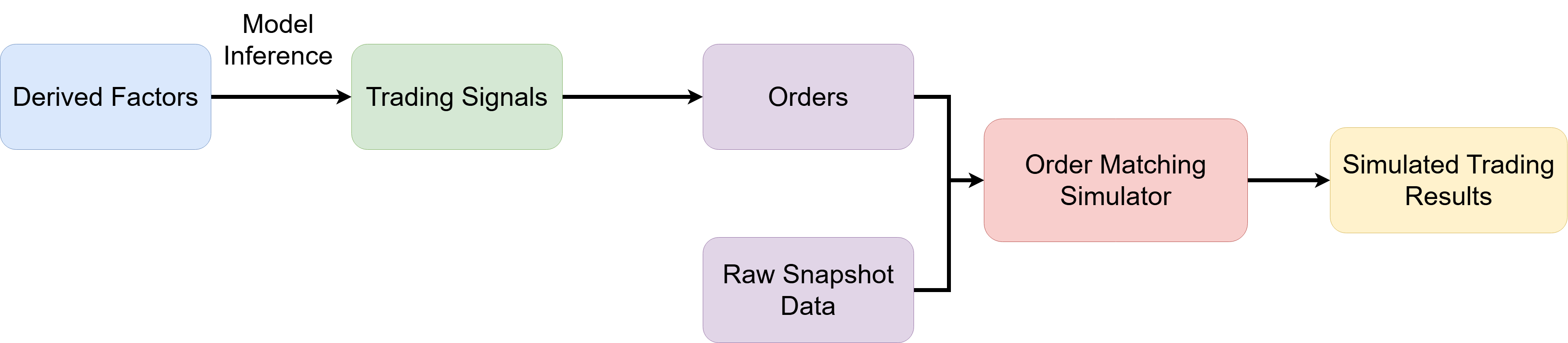
After real-time inference generates signals, simulated trading is used to validate the strategy's effectiveness and execution robustness and to identify potential risks before deploying actual capital. This chapter explains how to build a real-time simulated trading system with DolphinDB, reproduce market data and order matching, and perform closed-loop validation from signal generation through order execution.
Note: Real-time simulated trading depends on the MatchingEngineSimulator and OrderManagementEngine plugins, which must be installed and loaded in advance.
5.1 Steps for Building a Simulated Trading System
A simulated trading system reproduces the order matching and execution process in a real market environment, allowing you to evaluate strategy performance and execution efficiency under controlled risk. The specific steps are as follows:
-
Configure trading parameters and create the order matching simulator: Configure the instruments, time intervals, matching rules, and risk control parameters, then initialize the order matching simulator. The simulator supports order book management and price-time priority matching.
-
Subscribe to real-time snapshot market data: Subscribe to the raw snapshot stream table to obtain the latest prices and bid and ask order book depth, normalize the data, and then feed it into the order matching simulator.
-
Generate signals from derived factors and submit orders: Subscribe to the trading signals produced by derived-factor inference, generate orders based on the strategy logic, and push them to the order matching simulator in real time for dynamic matching.
-
Perform real-time order matching and generate execution reports: The order matching simulator continuously matches buy and sell orders in real time according to price-time priority, generates execution details, and outputs the results to a stream table, forming a closed loop from signals to executions.
5.2 Order Matching Simulator and Order Management
In the real-time simulated trading system based on DolphinDB, order management has been introduced alongside the order matching simulator, which reproduces the market order matching process. The following sections describe the role and benefits of order management in the order matching simulator.
5.2.1 Time-Window-Controlled Trade Execution
The order management feature allows you to specify a start time (effectiveTime) and end time (expireTime) for each order. The order can be matched and executed only during this interval. When the end time is reached, any unfilled or partially filled order triggers a cancellation.
-
Timely trade execution: Prevents orders from remaining open indefinitely and avoids exposing orders to risk after market conditions and the strategy's intent have changed.
-
Realistic simulation of the trading environment: In live trading, many orders have a specified validity period. Order management enables simulated trading to reflect these real-world constraints more accurately.
-
Improved simulation accuracy and risk control: Removes expired orders promptly, effectively controls trading risks, and prevents expired orders from causing erroneous judgments.
5.2.2 Partial Fills and Expiration Handling
In a simulated environment, a partially filled order may have an unfilled remainder. The order management feature is responsible for the following:
-
Automatically updates the status of the remaining order at the specified end time, preventing residual orders from interfering with subsequent strategy evolution.
-
Outputs complete execution and order status information to ensure the completeness and accuracy of the simulated data.
5.2.3 Applicable Scenarios
-
Orders in quantitative trading strategies often have extremely short lifecycles, making precise simulation of order validity periods essential.
-
Institutional strategies with strict capital management and risk control requirements need to closely monitor order execution time limits and fill status.
-
In market-making strategies, proactive order cancellation and validity-period control help ensure smooth order matching and real-time feedback.
-
Strategy testing and backtesting require detailed tracking and analysis of order-matching timeliness and partial-fill behavior.
6. Real-Time Factor Generation, Subsequent Inference, and Order Matching Simulation
Building a real-time factor calculation and prediction pipeline involves multiple
engines, stream table subscriptions, data merging, and model invocation. Manual
configuration is cumbersome and error-prone, making it difficult to meet the
robustness and scalability requirements of production environments. This chapter
introduces the SnapTradeStream module, which is developed based on
the DolphinDB module mechanism. The module implements the complete workflow from
minute-level factor calculation and derived-factor generation to model inference and
order matching simulation. It supports rapid deployment, flexible configuration, and
historical data replay, reducing the O&M costs of building a real-time
quantitative analytics platform.
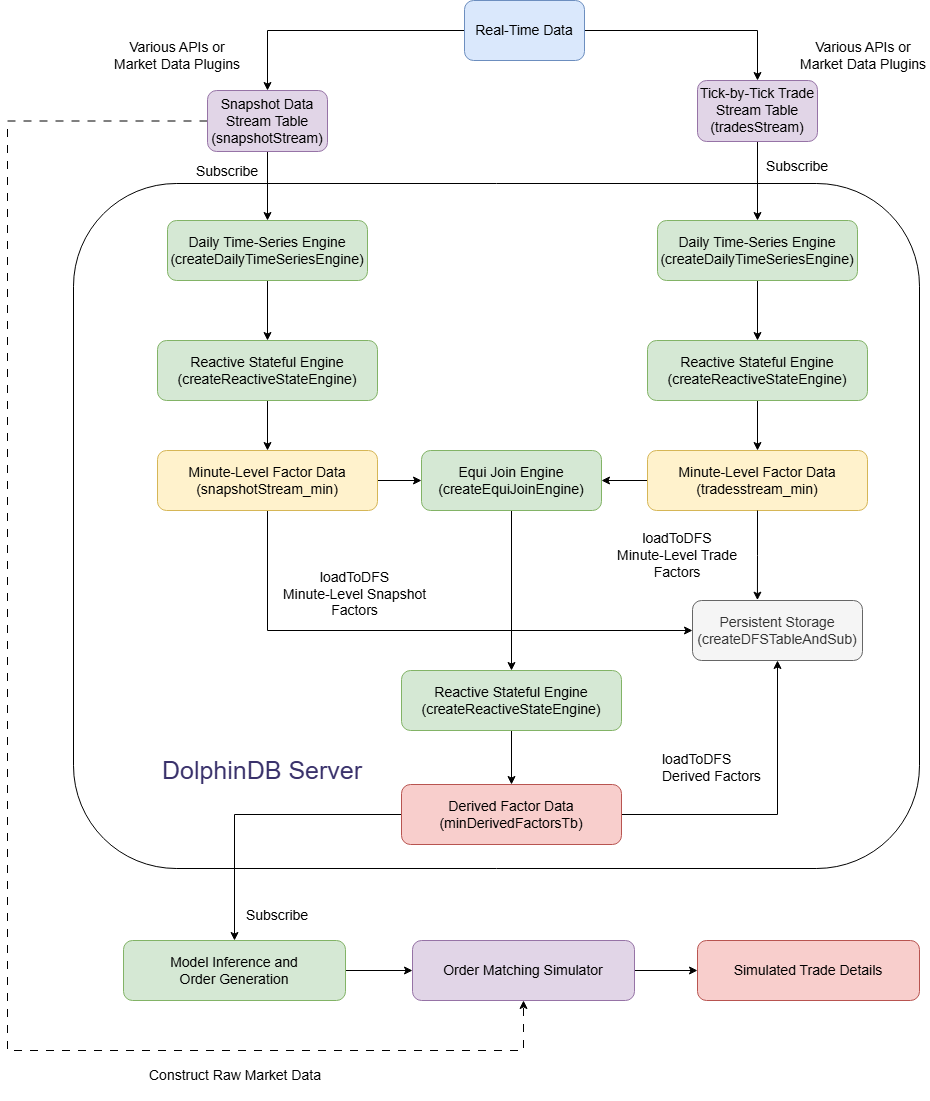
The following figure shows the overall architecture of the real-time stream processing workflow:
6.1 Stream Processing Framework and Features
The file structure of the SnapTradeStream module is as follows:
SnapTradeStream/
├── CreateTable.dos
├── OHLCFactors.dos
├── OrcaFrame.dos
├── StreamFrame.dos
├── StreamUtils.dos
└── utils.dos
The feature of each file is as follows:
| File Name | Description |
|---|---|
| utils.dos | Defines general utility functions used by the module. |
| StreamUtils.dos | Defines utility functions shared by traditional stream processing and Orca. |
| CreateTable.dos | Defines functions for creating the required database tables. |
| OHLCFactors.dos | Defines the field construction logic and factor expression functions for minute-level market data factors. |
| StreamFrame.dos | Defines the workflow functions for processing raw data into derived metrics, inference results, and simulated trades. |
| OrcaFrame.dos | Defines workflow functions in the Orca platform for processing raw data into derived metrics, inference results, and simulated trades. |
-
To use Orca, upgrade the DolphinDB server to version 3.00.3 or later.
-
In cluster mode, deploy a compute group. The Orca script runs on one of the group's compute nodes.
6.2 Steps for Building the Stream Processing Framework
A real-time processing system depends on a stable, low-latency end-to-end framework, especially during periods of sharp market volatility. This section describes the core workflow SnapTradeStream uses to build a real-time factor calculation framework. It covers the entire pipeline, from raw data through minute-frequency aggregation, multi-source joins, and derived factor calculation to inference and order matching simulation. The workflow is summarized as follows:
-
Minute-frequency factor processing: Sends tick-by-tick trades and snapshot data to a time-series engine (60-second rolling windows based on tradeTime) and a reactive stateful engine, respectively. The engines output standardized minute-frequency factor stream tables, with the data structurally aligned and supplemented with additional fields.
-
Derived factor calculation: Uses the equi join engine to join the minute-frequency snapshot and trade data on securityId and tradeTime. Sends the result to a reactive stateful engine to generate derived factors and write them to a stream table.
-
Inference and simulated trading: Subscribes to the derived factor stream table and passes its data to an inference model to generate trading signals. Uses these signals to create orders and submit them to the order matching simulator, which outputs execution details in real time.

6.3 Apply the Stream Processing Framework
This section shows how to build the stream processing framework described in the
preceding sections from scratch using the SnapTradeStream
module. See the attached files for the complete code.
6.3.1 Import Tick-by-Tick Trade and Snapshot Data
The attached files provide raw stock snapshot and trade data for a single day to demonstrate real-time factor generation and simulated trading.
//Import the module
clearCachedModules()
use SnapTradeStream::CreateTable
use SnapTradeStream::utils
use SnapTradeStream::OHLCFactors
use SnapTradeStream::StreamFrame

// Import the data
// Update the path
colNames, colTypes = getTradeTickColDefs()
tradeData = select * from loadText("/data/trade.csv", ,table(colNames, colTypes)) order by tradeTime

colNames, colTypes = getSnapshotColDefs()
snapshotData = select * from loadText("/data/snapshot.csv", ,table(colNames, colTypes)) order by tradeTime
6.3.2 Create Stream Tables
After importing the day's tick-by-tick trade and snapshot data, create stream tables to receive data in real time and enable downstream stream processing.
tradeStreamName = "tradeStream"
unsubAndDropAll(tradeStreamName)
sche = schema(tradeData).colDefs
colNames, colTypes = sche.name, sche.typeString
try{
    share(streamTable(100:0, colNames, colTypes), tradeStreamName)
}catch(ex){print(ex)}

snapStreamName = "snapshotStream"
unsubAndDropAll(snapStreamName)
sche = schema(snapshotData).colDefs
colNames, colTypes = sche.name, sche.typeString
try{
    share(streamTable(100:0, colNames, colTypes), snapStreamName)
}catch(ex){print(ex)}
6.3.3 Configure Factor Processing Functions and Other Parameters
To support minute-frequency feature extraction across different data sources, the system uses a unified function mapping dictionary, factorFuncDict, and a parallelism configuration dictionary, parallelDict. This design enables modularity and flexible scheduling.
factorFuncDict = {
    "tradeTSE": getTrade1MTSFactor, // Function for retrieving time-series engine metrics from trade data
    "tradeRSE": getTrade1MReactiveFactor, // Function for retrieving reactive stateful engine metrics from trade data
    "snapTSE": getSnap1MTSFactor, // Function for retrieving time-series engine metrics from snapshot data
    "snapRSE": getSnap1MReactiveFactor, // Function for retrieving reactive stateful engine metrics from snapshot data
    "mergedRSE": minDerivedKlineFactors // Function for retrieving reactive stateful engine metrics from derived data
}

// Define the parallelism parameter dictionary
parallelDict = {
    "tradeTSE": 5,
    "tradeRSE": 5,
    "snapTSE": 5,
    "snapRSE": 5,
    "mergedRSE": 5
}

// Define the model path
extraParams = {
    "torchModelPath": "/data/pytorch_model.pt",
    "lgbmModelPath": "/data/lightgbm_model.txt",
    "lowLatency": false
}-
parallelDict specifies the number of parallel threads for each type of factor calculation task. Each task type is currently configured with 5 parallel tasks. You can adjust this setting based on the available node resources and data volume.
-
factorFuncDict is a dictionary whose keys are strings and whose values are functions. It specifies the metrics and field definitions for each streaming engine. These functions are defined in the
OHLCFactorsmodule by default. For example, thegetTrade1MTSFactorfunction is defined as follows:
// Function for retrieving time-series engine metrics and field definitions from trade data
def getTrade1MTSFactor(){
    d = dict(STRING, ANY, true)
    d["getAmounts(tradeBSFlag, tradePrice, tradeQty, `B)"] = ["buyAmounts", "DOUBLE"]
    d["getAmounts(tradeBSFlag, tradePrice, tradeQty, `S)"] = ["sellAmounts", "DOUBLE"]
    colNames2 = ["buySmallAmount", "buyBigAmount", "sellSmallAmount", "sellBigAmount"]
    colTypes2 = take("DOUBLE", size(colNames2))
    d["calCapitalFlow(buyApplSeqNum,offerApplSeqNum, tradeBSFlag, tradeQty, tradePrice)"] = [colNames2, colTypes2]
    d["lastTradeBias(tradeTime, tradeBSFlag, tradePrice, tradeQty)"] = ["tradeBias", "DOUBLE"]
    return d
}
The function returns a dictionary whose keys are function-call strings and whose values are two-element lists. The first element is the metric name, and the second is the field type. This design lets you adjust the configuration to meet your business needs. When factor calculation logic changes, you only need to update it here. You do not need to update underlying components such as stream tables and streaming engines, which significantly reduces factor maintenance and update costs while improving system extensibility and development efficiency.
6.3.4 Build the End-to-End Calculation Framework
After defining the required parameters, call the main function
buildStreamFrame to subscribe to the data and calculate
minute-frequency factors in real time.
factorDbname = "dfs://factor"
factorTbname = "minDerivedFactorsTb"
buildStreamFrame(factorDbname, factorTbname, tradeStreamName, snapStreamName, factorFuncDict, parallelDict, extraParams)
buildStreamFrame takes seven parameters:
| Parameter | Description |
|---|---|
| factorDbname | Name of the database for storing factors |
| factorTbname | Name of table for storing factors |
| tradeStreamName | Name of tick-by-tick trade stream table |
| snapStreamName | Name of snapshot data stream table |
| factorFuncDict | Dictionary of factor-processing functions |
| parallelDict | Dictionary of parallel task counts |
| extraParams | Additional parameters, including the model path and low-latency settings |
6.3.5 Insert Data
Replay historical data into the stream tables to simulate the arrival of real-time streaming data and trigger the end-to-end streaming calculation workflow.
replay(
    [tradeData, snapshotData],
    [objByName(tradeStreamName, true), objByName(snapStreamName, true)],
    `tradeTime,
    `tradeTime,
    100,
    false
)
6.3.6 Run Inference and Simulated Order Matching
buildStreamFrame creates the pipeline for calculating
minute-level factors. After the replay finishes, wait for data to appear in
the derived factor table, then start model inference and simulated order
matching:
maxWaitMs = 60000
waitedMs = 0
do {
    sleep(500)
    waitedMs += 500
} while (size(objByName(factorTbname, true)) == 0 && waitedMs < maxWaitMs)

use SnapTradeStream::StreamUtils
derived2Simulator(
    factorTbname,
    extraParams["lgbmModelPath"],
    extraParams["torchModelPath"],
    snapStreamName,
    false
)
6.3.7 Results
Real-time simulated trade table

The following table lists key fields in the real-time simulated trade details:
| Field Name | Description |
|---|---|
| OrderID | ID of the order that was filled |
| Symbol | Stock symbol |
| Direction |
Buy/sell direction:
|
| LimitPrice | Order price |
| VolumeTotalOriginal | Order quantity |
| TradeTime | Order matching time |
| TradePrice | Trade price |
| VolumeTraded | Trading volume |
| OrderStatus |
Order status:
|
| effectiveTime | Order start time |
| expireTime | Order expiration time |
| cumTradeQty | Cumulative trading volume |
| tradeAvgPrice | Average trade price |
6.3.8 Clean Up the Environment
Run the following code to clean up the streaming environment:
clearStreamEnv()
each(undef{, SHARED}, [tradeStreamName, snapStreamName])
6.4 Real-Time Low-Latency Calculation
Starting with DolphinDB version 3.00.4, you can specify the lowLatency parameter for the time-series engine and reactive stateful engine. When set to true, the engines use a row-based low-latency algorithm, suited to workloads that require extremely low latency and write small amounts of data at a time. This article covers only the DolphinDB implementation. For even lower latency, use the low-latency calculation features in Swordfish. The following example shows how to create a time-series engine:
tse = createTimeSeriesEngine(
        name= tseName,
        windowSize=60000,
        step=60000,
        metrics=tseMetrics,
        dummyTable=rawStream,
        outputTable=rse,
        timeColumn=`tradeTime,
        useSystemTime=false,
        keyColumn=`securityID,
        useWindowStartTime=false,
        parallelism=parallelTSE,
        lowLatency = true, // Add this parameter
        outputElapsedMicroseconds = true
)
For the modules described in this article, use the following configuration:
extraParams = {
    "torchModelPath": "/data/pytorch_model.pt",
    "lgbmModelPath": "/data/lightgbm_model.txt",
    "lowLatency": true
}
Enable low-latency mode for all reactive stateful engines and time-series engines in the stream processing framework. This section simulates a real-time calculation workload and measures the calculation time of streaming engines processing different data volumes, with the lowLatency parameter disabled and enabled.
Test Results
Using a full day of real snapshot and trade data for 100, 200, 500, and 1,000 stocks, we measured the average calculation time, in microseconds, for the daily time-series engine (TSE) and the reactive stateful engine (RSE), with the lowLatency parameter disabled and enabled. The value in parentheses is the ratio of the calculation time with the lowLatency parameter enabled to the time with it disabled.
| SampleCounts | Snapshot | Trade | DerivedFactors | |||||||
|---|---|---|---|---|---|---|---|---|---|---|
| TSE | RSE | TSE | RSE | RSE | ||||||
| FALSE | TRUE | FALSE | TRUE | FALSE | TRUE | FALSE | TRUE | FALSE | TRUE | |
| 100 | 59.13 | 39.28 (0.66) | 11.72 | 9.97 (0.85) | 60.67 | 53.01 (0.87) | 2.11 | 0.79 (0.37) | 151.51 | 57.48 (0.38) |
| 200 | 61.46 | 40.11 (0.65) | 12.09 | 9.66 (0.80) | 62.46 | 59.80 (0.96) | 2.07 | 0.93 (0.45) | 185.12 | 59.24 (0.32) |
| 500 | 64.47 | 42.27 (0.66) | 12.46 | 9.87 (0.79) | 63.83 | 57.75 (0.90) | 2.16 | 1.05 (0.49) | 317.54 | 72.69 (0.23) |
| 1,000 | 66.13 | 44.06 (0.67) | 12.29 | 9.84 (0.80) | 67.25 | 57.76 (0.86) | 2.19 | 1.13 (0.52) | 1,587.00 | 94.72 (0.06) |
When the lowLatency parameter is enabled, all streaming engines have significantly lower computation times than when it is disabled.
7. Orca
As requirements for large-scale cluster deployment, complex task dependencies, and high availability continue to grow, manually managing multiple engines and subscription relationships has become increasingly complex. DolphinDB's Orca, a real-time computing platform, uses declarative APIs and centralized intelligent scheduling to simplify the entire design, deployment, and O&M lifecycle of stream processing workflows, improving system stability and resource utilization. The SnapTradeStream module uses Orca to implement the real-time factor calculation and simulated trading workflows described in Chapter 6, with a clearer and more systematic code structure.
The following figure shows the overall architecture of the Orca workflow:
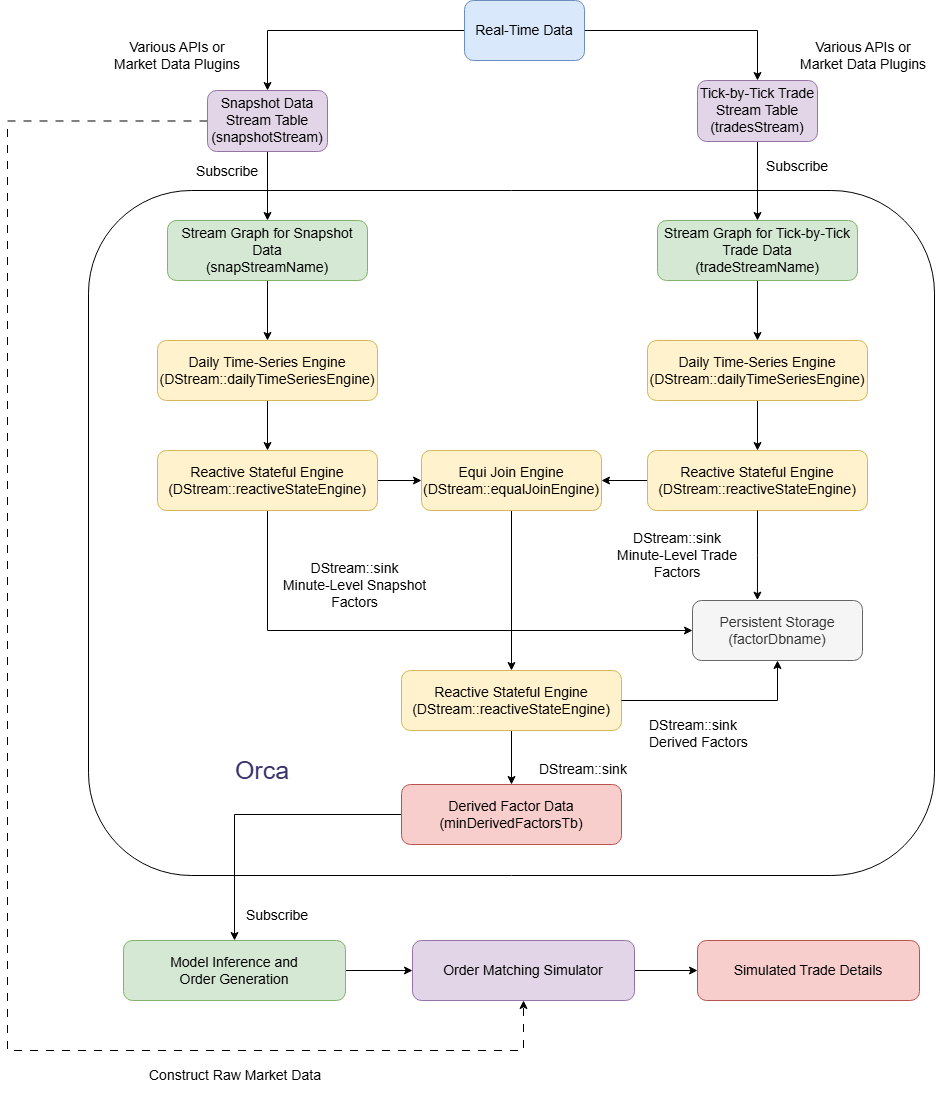
As shown in the figure, Orca uses cluster computing resources to generate minute-level derived factors in real time from raw trade and snapshot data. Execution nodes subscribe to factor data, perform real-time inference, and output trading signals. These signals are used to construct orders, which are sent to the order matching engine, which ultimately outputs execution details.
7.1 Best Practice on Orca
Traditional stream processing requires you to manually complete tasks such as data ingestion, engine configuration, factor function registration, and model loading, making the process cumbersome. Orca uses a unified stream graph to encapsulate factor calculation as a declarative workflow. Model inference and simulated trading are executed on one node, improving development efficiency. This chapter uses Orca to build the system described above.
7.1.1 Define Parameters
The following code initializes the Orca minute-level factor framework. It imports sample trade and snapshot data, creates stream tables with the same schemas, and configures the factor functions, parallelism, model path, and result storage location.
use SnapTradeStream::CreateTable
use SnapTradeStream::utils
use SnapTradeStream::OHLCFactors
use SnapTradeStream::OrcaFrame

// Import the data
colNames, colTypes = getTradeTickColDefs()
tradeData = select * from loadText("/data/trade.csv", ,table(colNames, colTypes)) order by tradeTime

colNames, colTypes = getSnapshotColDefs()
snapshotData = select * from loadText("/data/snapshot.csv", ,table(colNames, colTypes)) order by tradeTime


// Create stream tables
tradeStreamName = "tradeStreamOrca"
unsubAndDropAll(tradeStreamName)
sche = schema(tradeData).colDefs
colNames, colTypes = sche.name, sche.typeString
try{
    share(streamTable(100:0, colNames, colTypes), tradeStreamName)
}catch(ex){print(ex)}

snapStreamName = "snapshotStreamOrca"
unsubAndDropAll(snapStreamName)
sche = schema(snapshotData).colDefs
colNames, colTypes = sche.name, sche.typeString
try{
    share(streamTable(100:0, colNames, colTypes), snapStreamName)
}catch(ex){print(ex)}

// Define the factor function dictionary
factorFuncDict = {
    "tradeTSE": getTrade1MTSFactor, // Function for retrieving time-series engine metrics from trade data
    "tradeRSE": getTrade1MReactiveFactor, // Function for retrieving reactive stateful engine metrics from trade data
    "snapTSE": getSnap1MTSFactor, // Function for retrieving time-series engine metrics from snapshot data
    "snapRSE": getSnap1MReactiveFactor, // Function for retrieving reactive stateful engine metrics from snapshot data
    "mergedRSE": minDerivedKlineFactors // Function for retrieving reactive stateful engine metrics from derived data
}

// Define the parallelism parameter dictionary
parallelDict = {
    "tradeTSE": 5,
    "tradeRSE": 5,
    "snapTSE": 5,
    "snapRSE": 5,
    "mergedRSE": 5
}

// Define the model path
extraParams = {
    "torchModelPath": "/data/pytorch_model.pt",
    "lgbmModelPath": "/data/lightgbm_model.txt"
}

// Define the persistent database and table path
factorDbname = "dfs://factor"
factorTbname = "minDerivedFactorsTbOrca"| Parameter | Description | Note |
|---|---|---|
| factorDbname | Name of the database for storing factors | Example: dfs://factor |
| factorTbname | Name of table for storing factors | Example: minDerivedFactorsTbOrca |
| tradeStreamName | Name of tick-by-tick trade stream table | Example: tradeStreamOrca. The table must
have the same schema as the imported trade data. |
| snapStreamName | Name of snapshot data stream table | Example: snapshotStreamOrca. The table
must have the same schema as the imported snapshot
data. |
| factorFuncDict | Dictionary of factor-processing functions | Each key is a different name, and each value is the corresponding factor definition function. See the table below for details. |
| parallelDict | Dictionary of parallel task counts | The keys correspond to those in
factorFuncDict, and the values specify
the number of parallel tasks for each stage |
| extraParams | Additional parameters, including the model path and low-latency settings | Extended settings, such as the inference model path. See the table below for details. |
The keys in factorFuncDict are defined as follows:
| Parameter | Description | Note |
|---|---|---|
| tradeTSE | Time-series trade factor function | Corresponds to getTrade1MTSFactor and
calculates 1-minute time-series metrics from trade
data. |
| tradeRSE | Reactive stateful trade factor function | Corresponds to getTrade1MReactiveFactor
and calculates reactive stateful metrics from trade
data. |
| snapTSE | Time-series snapshot factor function | Corresponds to getSnap1MTSFactor and
calculates 1-minute time-series metrics from snapshot
data. |
| snapRSE | Reactive stateful snapshot factor function | Corresponds to getSnap1MReactiveFactor
and calculates reactive stateful metrics from snapshot
data. |
| mergedRSE | Derived factor function | Corresponds to minDerivedKlineFactors
and calculates derived OHLC bar factors from the merged
results. |
The keys in parallelDict are defined as follows:
| Parameter | Description | Note |
|---|---|---|
| tradeTSE | Time-series trade parallelism | Example: 5. Concurrently calculates 1-minute time-series trade factors, grouped by instrument. |
| tradeRSE | Reactive stateful trade parallelism | Example: 5. Concurrently calculates reactive stateful trade factors, grouped by instrument |
| snapTSE | Time-series snapshot parallelism | Example: 5. Concurrently calculates 1-minute time-series snapshot factors, grouped by instrument. |
| snapRSE | Reactive stateful snapshot parallelism | Example: 5. Concurrently calculates reactive stateful snapshot factors, grouped by instrument. |
| mergedRSE | Derived factor parallelism | Example: 5. Concurrently calculates derived OHLC bar factors, grouped by instrument. |
The keys in extraParams are described below:
| Parameter | Description | Note |
|---|---|---|
| torchModelPath | PyTorch model path | Example: /data/pytorch_model.pt, which
downstream inference loads. |
| lgbmModelPath | LightGBM model path | Example: /data/lightgbm_model.txt, which
downstream inference loads. |
7.1.2 Create the Framework
Call the buildOrcaFrame function in the module to set up the
Orca stream processing framework. For parameter details, see Section 6.3.4.
The function performs the following steps:
-
Clean up the existing environment, including stream graphs, stream tables, streaming engines, and related subscriptions, to prevent leftover data from interfering with processing.
-
Create a stream processing framework through the Orca API to generate minute-level derived factors from raw snapshot and trade data.
-
Subscribe to the minute-level derived factor data and use a model to perform real-time inference and generate trading signals. Then construct orders and insert them into the order matching simulator to produce real-time simulated trading results.
buildOrcaFrame(factorDbname, factorTbname, tradeStreamName, snapStreamName, factorFuncDict, parallelDict, extraParams)7.1.3 Replay the Data
Replay historical data to run the full Orca stream processing and simulated trading workflow and output simulated trading results in real time.
replay(
    [tradeData, snapshotData],
    [objByName(tradeStreamName, true), objByName(snapStreamName, true)],
    `tradeTime,
    `tradeTime,
    100,
    false
)
7.1.4 Clean Up the Environment
Run the following code to clean up the Orca environment.
clearOrcaEnv()
each(undef{, SHARED}, [tradeStreamName, snapStreamName])
7.2 Summary of Orca's Advantages
This example calculates minute-level indicators from raw trade data using Orca instead of a traditional stream processing workflow. The workflow starts with raw data input, passes through a reactive stateful engine and a time-series engine, and ends by writing the results to a persistent table. Unlike traditional stream processing, Orca lets you declare the required steps using chained functions. You do not need to define table schemas, shared tables, or other configurations unrelated to your business logic. This greatly simplifies development and improves efficiency and code readability:
tradePipeline = g.source(tradeStreamName, 1:0, colNames1, colTypes1)
                .dailyTimeSeriesEngine(
                    windowSize = 60000,
                    step = 60000,
                    metrics = tradetseMetrics,
                    timeColumn = `tradeTime,
                    useSystemTime=false,
                    keyColumn = `securityID,
                    useWindowStartTime=false,
                    parallelism=tradeparallelTSE,
                    sessionBegin=[09:30:00.000, 12:59:00.000],
                    sessionEnd=[11:30:00.000, 14:57:00.000]
                )
                .reactiveStateEngine(
                    metrics = traderseMetrics,
                    keyColumn = `securityId,
                    parallelism = tradeparallelRSE
                )
                .sink(factorDbname+"/"+tradeMinStreamTbname)
In summary, Orca replaces manually built distributed factor computation workflows with a declarative API and centralized, intelligent scheduling. Orca unifies and simplifies the entire data processing workflow, from ingesting raw market data and aggregating it at the minute level to computing complex factors. It significantly improves development efficiency and system reliability, reduces O&M complexity, and helps ensure efficient resource utilization and business continuity. These advantages make Orca a powerful platform-level foundation for efficient, stable real-time factor computation in quantitative applications.
8. Summary
This tutorial explains how to use Level 2 stock snapshot and trade data in DolphinDB to generate minute-level and derived factors in real time, and then perform inference based on those factors. It demonstrates end-to-end solutions for real-time minute-level and derived factor computation, inference, and simulated trading using both the traditional low-latency stream processing framework and the Orca framework. Comparing the workflows and characteristics of these two approaches helps you understand their respective use cases and advantages, so you can choose a real-time computing solution that meets your needs.
Note that the rules for generating minute-level and derived factors described in this tutorial may differ from those used in your actual applications. You can adapt the rules to your needs to accelerate project development.
Appendix
Version Requirements
-
The code in this tutorial was developed using DolphinDB 3.00.4. We recommend using version 3.00.4 or later.
-
This tutorial uses several plugins. Install and load them before you begin:
-
lgbm
-
LibTorch
-
MatchingEngineSimulator
-
OrderManagementEngine
-
Schema of Raw Snapshot Data Table
| Field | Data Type | Description |
|---|---|---|
| Market | SYMBOL | Market symbol |
| tradeTime | TIMESTAMP | Trade time |
| MDStreamID | INT | Market data type |
| securityID | SYMBOL | Security symbol |
| numImageStatus | INT | Snapshot image status |
| securityIDSource | INT | Source of security symbol |
| tradingPhaseCode | SYMBOL | Trading phase |
| preCloPrice | DOUBLE | Previous closing price |
| numTrades | INT | Number of trades |
| totalVolumeTrade | LONG | Total trading volume |
| totalValueTrade | DOUBLE | Total trading value |
| lastPrice | DOUBLE | Latest traded price |
| openPrice | DOUBLE | Opening price |
| highPrice | DOUBLE | High price |
| lowPrice | DOUBLE | Low price |
| closePrice | DOUBLE | Closing price |
| difPrice1 | DOUBLE | Price change 1 |
| difPrice2 | DOUBLE | Price change 2 |
| PE1 | DOUBLE | Price-to-earnings ratio 1 |
| PE2 | DOUBLE | Price-to-earnings ratio 2 |
| preCloseIOPV | DOUBLE | Previous close IOPV |
| IOPV | DOUBLE | IOPV |
| totalBuyQty | LONG | Total buy order volume |
| weightedAvgBuyPx | DOUBLE | Weighted best bid price |
| totalOfferQty | LONG | Total sell order volume |
| weightedAvgOfferPx | DOUBLE | Weighted best ask price |
| upLimitPx | DOUBLE | Limit up price |
| downLimitPx | DOUBLE | Limit down price |
| openInt | LONG | Open interest |
| optPremiumRatio | DOUBLE | Option premium ratio |
| offerPrice | DOUBLE[] | Ask prices, levels 1–10 |
| buyPrice | DOUBLE[] | Bid prices, levels 1–10 |
| offerOrderQty | LONG[] | Ask volumes, levels 1–10 |
| buyOrderQty | LONG[] | Bid volumes, levels 1–10 |
| buyNumOrders | LONG[] | Bid order counts, levels 1–10 |
| offerNumOrders | LONG[] | Ask order counts, levels 1–10 |
| ETFBuyNumber | INT | Number of ETF creation orders |
| ETFBuyAmount | LONG | ETF creation units |
| ETFBuyMoney | DOUBLE | ETF creation amount |
| ETFSellNumber | INT | Number of ETF redemption orders |
| ETFSellAmount | LONG | Number of ETF redemption shares |
| ETFSellMoney | DOUBLE | ETF redemption amount |
| yieldToMatu | DOUBLE | Yield to maturity |
| withdrawBuyNumber | INT | Number of canceled buy orders |
| withdrawBuyAmount | LONG | Canceled buy order volume |
| withdrawBuyMoney | DOUBLE | Canceled buy amount |
| withdrawSellNumber | INT | Number of canceled sell orders |
| withdrawSellAmount | LONG | Canceled sell order volume |
| withdrawSellMoney | DOUBLE | Canceled sell amount |
| totalBuyNumber | INT | Total number of buy orders |
| totalOfferNumber | INT | Total number of sell orders |
| maxBuyDur | INT | Longest resting duration for buy orders |
| maxSellDur | INT | Longest resting duration for sell orders |
| buyNum | INT | Number of bid levels |
| sellNum | INT | Number of ask levels |
| localTime | TIME | Local timestamp (data collector's machine time) |
| seqNo | INT | Local sequence number |
| offerOrders | LONG[] | Sell order queue |
| buyOrders | LONG[] | Buy order queue |
Schema of Raw Trade Data Table
| Field | Data Type | Description |
|---|---|---|
| channelNo | INT | Channel symbol |
| applSeqNum | LONG | Message sequence number |
| MDStreamID | INT | Market data type |
| buyApplSeqNum | INT | Buyer order sequence number |
| offerApplSeqNum | INT | Seller order sequence number |
| securityID | SYMBOL | Security symbol |
| securityIDSource | INT | Source of security symbol |
| tradePrice | DOUBLE | Trade price (yuan) |
| tradeQty | LONG | Trading volume (shares) |
| execType | INT | Trade type |
| tradeTime | TIMESTAMP | Execution time |
| localTime | TIME | Local collection time |
| seqNo | INT | Local sequence number |
| tradeBSFlag | SYMBOL | Trade direction (B: active buy, S: active sell) |
| market | SYMBOL | Market symbol |
| dataStatus | INT | Data status |
| tradeIndex | INT | Trade index |
| tradeMoney | DOUBLE | Trading value (yuan) |
| bizIndex | LONG | Business index |
Module, Scripts and Data
-
Stream processing module: SnapTradeStream.zip
-
Execution scripts:
-
Traditional stream processing: stream.dos
-
orca: orca.dos
-
-
Model training demo:
-
LightGBM model: lightgbm_model.txt
-
PyTorch model: pytorch_model.pt
-
-
Snapshot data: snapshot.csv
-
Trade data: trade.csv
-
OrderManagementEngine plugin: OrderManagementEngine.zip