
Usage Notes on DolphinDB
1. Introduction
The DolphinDB scripting language (DLang) supports commonly used SQL-92 syntax and keywords and provides a large number of built-in functions. However, it is fundamentally different in design from other scripting languages such as SQL and Python. Developers accustomed to SQL, Python, or other languages may have some misconceptions when first learning DolphinDB. This article summarizes the fundamentals of scripting and O&M in DolphinDB for quick reference.
This chapter compiles frequently asked questions about using DolphinDB, covering database and table management, SQL usage, DLang syntax, cluster O&M, and other practical features. You can locate questions by category and consult the corresponding answers to improve development and O&M efficiency.
This article serves as a quick reference guide for DolphinDB beginners, covering database and table management, SQL usage, DLang syntax, and O&M tasks.
2. FAQ
This chapter compiles frequently asked questions about using DolphinDB, covering database and table management, SQL usage, DLang syntax, cluster O&M, and other practical features. You can locate questions by category and consult the corresponding answers to improve development and O&M efficiency.
2.1 Database and Table Operations
This section covers questions about database and table operations, including renaming databases, considerations for creating databases and tables, retrieving the SQL statements used to create databases and tables, viewing or modifying table schemas, table design strategies (involving small-sized tables, primary keys, auto-increment columns, and unique indexes), and usage notes on the TSDB storage engine.
2.1.1 How Do I Rename a Database?
Once a database has been created successfully, its name cannot be changed . Therefore, when creating a database, choose an appropriate name to avoid the need for renaming.
2.1.2 What Should I Keep in Mind About Database Partitioning?
When creating a DFS database, you must choose an appropriate partitioning scheme. Once the partitioning scheme is determined, it cannot be changed, and all tables in the database will use the same partitioning scheme. Also note the following details:
-
Partition levels: The minimum is 1, and the maximum is 3.
-
Range partitioning: Range partitions can only be added forward and cannot expand automatically. You must call
addRangePartitionsto extend the partition range. As data volume grows, if allowMissingPartitions = true (default setting), data outside the partition range is discarded without any error. If you want an error to be thrown, set this parameter to false. -
Value partitioning: Value partitions expand automatically, but you should not initialize too many empty partitions.
2.1.3 How Do I Retrieve the SQL Statements for Creating Databases and Tables?
Starting with DolphinDB 3.00.6, you can use the built-in functions getDatabaseDDL and getDBTableDDL to retrieve the SQL statements for creating DFS databases and their tables, respectively.
The following example assumes that the database
dfs://stock_lv2_snapshot and its snapshot
table already exist.
getDatabaseDDL(dbHandle="dfs://stock_lv2_snapshot")
getDBTableDDL(dbHandle="dfs://stock_lv2_snapshot", tableName="snapshot")
2.1.4 How Do I Obtain a Database Handle?
You can use the database function to obtain a handle for the
specified database.
db = database("dfs://stock_lv2_snapshot")2.1.5 How Do I Check Which Databases or Tables Exist in the Cluster?
You can use the following functions to retrieve database and table information:
-
getClusterDFSDatabases: Retrieves all databases in the cluster. -
getClusterDFSTables: Retrieves all tables in the cluster. -
getTables: Retrieves all tables in the specified database.
getClusterDFSDatabases()
getClusterDFSTables()
getTables(database("dfs://stock_lv2_snapshot"))
2.1.6 How Do I View a Database or Table Schema?
You can use the schema function to view the schema
information of a specified database or table.
db = database("dfs://stock_lv2_snapshot")
db.schema()
tb = loadTable("dfs://stock_lv2_snapshot", "snapshot")
tb.schema()
tb.schema().colDefs
2.1.7 How Do I Modify a Table Schema?
-
Rename a Table
You can use the
renameTablefunction to rename a table in the specified database.db = database("dfs://stock_lv2_snapshot") tb = loadTable("dfs://stock_lv2_snapshot", "snapshot") select count(*) from tb renameTable(db, "snapshot", "newSnapshot") tbn = loadTable("dfs://stock_lv2_snapshot", "newSnapshot") select count(*) from tbn renameTable(db, "newSnapshot", "snapshot") -
Modify a Table Comment
You can use the
setTableCommentfunction to set a table comment.tb = loadTable("dfs://stock_lv2_snapshot", "snapshot") setTableComment(tb, "testsnapshot") tb.schema().tableComment -
Modify a Column Comment
You can use the
setColumnCommentfunction to set a column comment.tb = loadTable("dfs://stock_lv2_snapshot", "snapshot") setColumnComment(tb,{SecurityID:"stock symbol",OpenPrice:"open price",ClosePrice:"closing price"}) schema(tb).colDefs; -
Add Columns
You can use the
addColumnfunction oralter..addto add columns. New columns can only be appended after the existing columns; adding a column after a specified column is not supported.tb = loadTable("dfs://stock_lv2_snapshot", "snapshot") addColumn(tb, ["insertTime"], [TIMESTAMP]) alter table tb add updateTime TIMESTAMP tb = loadTable("dfs://stock_lv2_snapshot", "snapshot") tb.schema().colDefs -
Drop Columns
You can use the
dropColumns!function oralter..dropto drop columns. Supported only by the OLAP storage engine, and partition columns cannot be dropped.tb = loadTable("dfs://k_minute_level", "k_minute") tb.schema().engineType dropColumns!(tb, "val") alter table tb drop vwap -
Rename a Column
You can use the
rename!function oralter..renameto rename a column. Supported only by the OLAP storage engine, and partition columns cannot be renamed.tb = loadTable("dfs://k_minute_level", "k_minute") rename!(tb, "open", "openPrice") alter table tb rename close to closePrice tb = loadTable("dfs://k_minute_level", "k_minute") tb.schema().colDefs -
Change a Column Type
You can use the
replaceColumn!function to change a column type. Supported only by the OLAP storage engine, and partition column types cannot be changed.tb = loadTable("dfs://k_minute_level", "k_minute") replaceColumn!(tb, "vol", array(LONG, 0, 1)) tb.schema().colDefs -
Change Column Order
You cannot change the column order for DFS tables.
2.1.8 How Do I Create a Table to Store Very Small, Static Data or Configuration Information?
Create a dimension table in a DFS database. A dimension table is an unpartitioned table in a DFS database. During queries, all data in the table is loaded into memory, making it suitable for storing small datasets that are updated infrequently. For more information, see createDimensionTable.
db = database("dfs://stock_lv2_snapshot")
colNames = ["param_key", "param_value", "param_flag", "param_desc",
"insert_time","update_time"]
colTypes =  [STRING, STRING, STRING, STRING, TIMESTAMP, TIMESTAMP]
tb = table(1:0, colNames, colTypes);
params_cfg =db.createDimensionTable(tb,`params_cfg,
sortColumns = `param_key`insert_time)
params_cfg.tableInsert(table(["CONN_TIME_OUT"] as param_key,
["60"] as param_value, ["1"] as param_falg,
["timeout"] as param_desc ,
[now()] as insert_time, [now()] as update_time))
select * from params_cfg;
2.1.9 Can a Table Have a Primary Key? Can I define an auto-increment column?
In traditional databases, each table has a primary key, and even tables without a natural primary key often use a virtual auto-increment ID column as the primary key. However, DolphinDB does not support creating primary keys or defining auto-increment columns. For scenarios where data from OLTP tables with primary keys is captured via CDC and loaded into DolphinDB for analysis, see Primary Key Storage Engine.
2.1.10 Can a Table Have a Unique Index?
Traditional databases often allow you to create unique indexes on non-primary-key columns that must remain unique, as well as regular indexes on columns used to improve query performance. However, DolphinDB does not support creating unique indexes or regular indexes.
2.1.11 Can TSDB sortColumns Be Chosen from Columns with Uniqueness Constraints?
In the DolphinDB TSDB engine, sortColumns are used not only for sorting but also for deduplication: only one record is retained for data with the same sortKey. Therefore, upstream primary key columns or uniquely indexed columns are not recommended as sortColumns. Because such fields are unique, each row would form its own sortKey. This prevents deduplication from taking effect and also causes index bloat, which can degrade query performance. For considerations on creating databases and tables, see 10 Commonly Overlooked Details in Creating Databases and Tables.
2.2 SQL Usage
This section introduces common SQL operations in DolphinDB, such as querying
table data, selecting all columns except specific ones, limiting the number of
rows returned with SELECT TOP or SELECT LIMIT, viewing query plans, and handling
column names that contain special characters. In addition, this section explains
the difference between SELECT and EXEC, and considerations on using GROUP BY and
append!.
2.2.1 How Do I Query Table Data?
Before querying a DFS table, you must load the table metadata with
loadTable , and then use a SELECT statement to query
data. Note that loadTable does not return data
directly.
tb = loadTable("dfs://stock_lv2_snapshot", "snapshot")
t1 = select * from tb
t2 = select * from loadTable("dfs://stock_lv2_snapshot", "snapshot")
2.2.2 How Do I Query All Columns Except Specific Ones?
You can achieve this using SQL metaprogramming.
tb = table(rand(10.,100) as col1,rand(10.,100) as col2,rand(10.,100) as col3,
rand(10.,100) as col4,rand(10.,100) as col5)
exceptColNames = `col1`col5
filterColNames = tb.columnNames()[!(tb.columnNames() in exceptColNames)]
res = <select _$$filterColNames from tb>.eval()
2.2.3 How Do I Limit the Number of Rows Returned by a Query?
You can achieve this using the SELECT TOP or SELECT LIMIT clause. When used together with the CONTEXT BY clause, the scalar value in the LIMIT clause can be a negative integer to return the specified number of last records from each group.
tb = loadTable("dfs://stock_lv2_snapshot", "snapshot")
select top 1 * from tb
select * from tb limit 1
select top 1:5 * from tb
select * from tb limit 1, 4
select * from tb where TradeDate = 2022.01.04
context by SecurityID order by TradeTime limit -1;
2.2.4 How Do I View the SQL Execution Plan?
You can use [HINT_EXPLAIN] to view the execution plan of a SELECT statement.
select [HINT_EXPLAIN] * from loadTable("dfs://stock_lv2_snapshot", "snapshot")2.2.5 Why Do I Need to Assign the Result of a SELECT Query to a Variable?
When you run a SELECT query directly, the result is transmitted to the client over the network in one batch and rendered locally. With large datasets, this can lead to significant latency and resource consumption.
By contrast, when you assign the result of a SELECT query to a variable, the result is first stored in an in-memory table on the server. When you click the variable in the client to view the data, the system uses paged loading and returns only part of the data, significantly reducing data transfer and query time.
2.2.6 What If a Column Name in a SELECT Statement Contains Special Characters or Starts with a Digit?
In SQL, when referencing a column name that contains special characters, starts with a digit, or is identical to a DolphinDB keyword (such as data type names), enclose it in double quotes and prefix it with an underscore.
tb = loadTable("dfs://stock_lv2_snapshot", "snapshot")
// Add special columns.
addColumn(tb, ["exec"], [INT])
addColumn(tb, ["1_col"], [STRING])
tb = loadTable("dfs://stock_lv2_snapshot", "snapshot")
select _"1_col" from tb
select _"exec" from tb

t1 = table(`202601`202602`202603 as MONTH, 1.0 2.0 3.0 as price)
select * from t1 where MONTH=`202601 // Empty query result
select * from t1 where _"MONTH"=`202601 // Result returned
2.2.7 What Is the Difference Between SELECT and EXEC?
A SELECT clause always returns a table, even when only a single column is selected. If you need a scalar or a vector, use an EXEC clause.
2.2.8 What Should I Keep in Mind When Using the GROUP BY Clause?
By default, the GROUP BY clause returns the grouping columns. Therefore, if you write "SELECT aggregate function(grouping column) as grouping column", an error is returned: Duplicated column name (see sample code 4 below). The GROUP BY clause must be used with an aggregate function. Otherwise, the system returns "All columns must be of the same length" (see Sample Code 5 below).
tb = loadTable("dfs://stock_lv2_snapshot", "snapshot")
// Sample Code 1: Correct
select sum(TotalVolumeTrade) as tot from tb
where tradeDate = 2022.01.05 group by SecurityID
// Sample Code 2: Correct
select SecurityID  , sum(TotalVolumeTrade) as tot from tb
where tradeDate = 2022.01.05 group by SecurityID
// Sample Code 3: Correct
select min(SecurityID) as sid , sum(TotalVolumeTrade) as tot from tb
where tradeDate = 2022.01.05 group by SecurityID
// Sample Code 4: Incorrect
select min(SecurityID) as SecurityID , sum(TotalVolumeTrade) as tot from tb
where tradeDate = 2022.01.05 group by SecurityID
// Sample Code 5: Incorrect
select SecurityID as sid , sum(TotalVolumeTrade) as tot from tb
where tradeDate = 2022.01.05 group by SecurityID
2.2.9 How Do I Filter Array Vectors in a WHERE Condition?
You can filter array vectors in a WHERE condition by using the
byRow function.
t = table(fixedLengthArrayVector([1, 2, 3, 4], [3, 4, 5, 6], [5, 6, 7, 8]) as ids,
[1.0, 2.0, 3.0, 4.0] as value);
select * from t where rowAnd(byRow(eq{[4, 6, 8]}, ids))
2.2.10 What Should I Keep in Mind When Inserting Data via append!?
This function does not check column names or column order between the two
tables. It can execute as long as the data types of columns in corresponding
positions are consistent. Therefore, when performing an
append! operation on a table, verify the column names
and column order in both tables to avoid errors.
2.3 DLang Syntax
This chapter covers common DLang syntax and language features, including the differences among single quotes, double quotes, and backticks; conversion between CHAR and SYMBOL; the differences between slashes (/) and backslashes (\) in division; the differences among NULL, empty strings, and NaN; method of viewing variable types; method of undefining variables; conversion between temporal data types; floating-point precision and comparison; and string formatting.
2.3.1 What Are the Differences Among Single Quotes, Double Quotes, and Backticks?
| Character | Primary Use | Key Differences or Notes |
|---|---|---|
|
Single quotes |
Define a string or character. |
If single quotes contain a single character, the value is of type CHAR. For example, 'A' is a CHAR, not a STRING. If single quotes contain multiple characters, the value is of type STRING, with no difference from double quotes. |
|
Double quotes |
Define a string. |
Double quotes can contain special characters. |
|
Backticks |
Define a string. |
Backticks cannot contain special characters. |
2.3.2 Can Data of Type CHAR Be Automatically Converted to Data of Type SYMBOL?
No. Example of incorrect code:
symVec = [`a, `b, `c, `d]$SYMBOL
c = 'a'
symVec.append!(c) // append!(symVec, c) => Failed to append data
However, data of type STRING can be automatically converted to data of type SYMBOL. The corrected code example is shown below:
symVec.append!(c.string())2.3.3 What Are the Differences Between Slashes (/) and Backslashes (\) in Division?
If either the dividend or the divisor is a FLOATING type, there is no difference between the two operators.
If both the dividend and the divisor are integers, division with the backslash (\) operator returns a FLOATING result and preserves the fractional part. By contrast, the slash (/) operator truncates the division result and returns an integer.
100 / 2.1 // 47.61904761904762
100 \ 2.1 // 47.61904761904762
100.0 / 3 // 33.333333333333336
100.0 \ 3 // 33.333333333333336
100 \ 3   // 33.333333333333336
100 / 3   // 33
2.3.4 What Are the Differences Among NULL, Empty Strings, and NaN?
| Concept | Type | Representation |
|---|---|---|
|
NULL |
VOID or a typed null value |
NULL, int(), 00i, etc. |
|
Empty string |
STRING |
"" |
|
NaN |
FLOAT or DOUBLE |
Caused by arithmetic overflow, indicating an invalid numeric result. |
2.3.5 How Do I View the Data Type of a Variable?
Use the typestr function to view the type of any data
object.
symVec = [`a, `b, `c, `d]$SYMBOL
t = table(1 2 3 as id, symVec as symbol, 1 2 3 as value)
d = dict(`a`b`c, 1 2 3)
typestr symVec // FAST SYMBOL VECTOR
typestr t // IN-MEMORY TABLE
typestr d // STRING->INT DICTIONARY
2.3.6 How Do I Undefine a Variable?
| Variable type | Function used to undefine it |
|---|---|
|
Local variable |
undef(`var) |
|
Shared variable |
undef(`var, SHARED) |
|
Function definition |
undef(`def, DEF) |
|
Stream table |
dropStreamTable(`streamTableDemo) |
|
Streaming engine |
dropStreamEngine(`streamEngineDemo) |
2.3.7 Questions Related to TEMPORAL Types and Conversions
Why does the year of type DATETIME become 1970?
This is usually caused by integer overflow in the time value. In DolphinDB, DATETIME values are stored internally as 32-bit INTs, with a representable range of [1901.12.13T20:45:53, 2038.01.19T03:14:07]. When the time exceeds the upper bound, integer overflow occurs, and the value is ultimately displayed as an anomalous year in 1970.
For time values outside this range, use the TIMESTAMP type to avoid overflow issues.
How do I convert a DATE value to DATETIME or TIMESTAMP?
Use the datetime or timestamp function for
the conversion.
datetime(2025.07.09)
timestamp(2025.07.09)
How do I combine DATE and TIME values into a DATETIME or TIMESTAMP?
Use the concatDateTime function.
concatDateTime(2025.07.09, 09:30:00)
concatDateTime(2025.07.09, 09:30:00).timestamp()
How do I convert a LONG value to DATETIME or TIMESTAMP?
Use the datetime or timestamp function.
datetime(1752053400)
timestamp(1752062327626)
How do I convert a STRING value to DATETIME or TIMESTAMP?
Use the temporalParse function.
dateStr = "2025.07.09"
temporalParse(dateStr, "yyyy.MM.dd").date() // Parse as a date
dateStr = "2025.07.09 11:58:47.626"
temporalParse(dateStr, "yyyy.MM.dd HH:mm:ss.SSS").timestamp() // Parse as a timestamp
2.3.8 Questions Related to FLOATING Numbers
Why are there so many digits after the decimal point in a FLOATING number? A value of 1115.52 in the source database may become 1115.520000000000200000 after being synchronized to DolphinDB.
Since binary storage and decimal representation are inherently incompatible, FLOATING values always involve precision errors when stored by computers. Solution:
How do I control the number of digits after the decimal point when exporting FLOATING numbers to CSV?
Use the round function to round to a specified number of
decimal places.
How do I compare FLOATING numbers?
Use the eqFloat function.
How do I round FLOATING numbers down, up, or to the nearest integer?
The floor function rounds down, ceil rounds
up, and round rounds to the nearest integer.
2.3.9 How do I format, align, or pad strings?
Use the stringFormat function.
// Right-aligned (a length of 10, padded with spaces)
stringFormat("%10W", "DolphinDB") // Output: " DolphinDB"
// Left-aligned (a length of 10, padded with zeros)
stringFormat("%010l", 123l) // Output: "0000000123"
2.3.10 How Do I Determine Whether a String Contains a Character or Substring?
Use the strpos or strFind function.
strpos("Hello, DolphinDB!", "Dolphin") // Output: 72.3.11 How Do I Extract a Specified Character or Substring from a String?
Use functions such as regexFindStr and
substr. For example, extract 20220701 from
AP210_ZCE_20220701.txt.
fileName = "AP210_ZCE_20220701.txt"
regexFindStr(fileName, "[0-9]{8}") // Output: '20220701'
substr(fileName, 10, 8) // Output: '20220701'
split(fileName, "_").last().split(".").first() // Output: '20220701'
2.3.12 In a Vector, How Do I Get the Indexes of Elements Greater Than a Specified Value?
v = 1 2 3 4 5 6 7 8 9 10
at(v>3)
2.3.13 Dictionary-Related Questions
How do I convert a dictionary to a table?
Use the transpose function.
d = dict(`sym`val, [`a`b`c, 1 2 3])
transpose(d)
How do I delete a key from a dictionary?
Use the erase! function.
d = dict(`sym`val, [`a`b`c, 1 2 3])
erase!(d, `sym)
2.3.14 Module-Related Questions
How do I upload a module through VSCode?
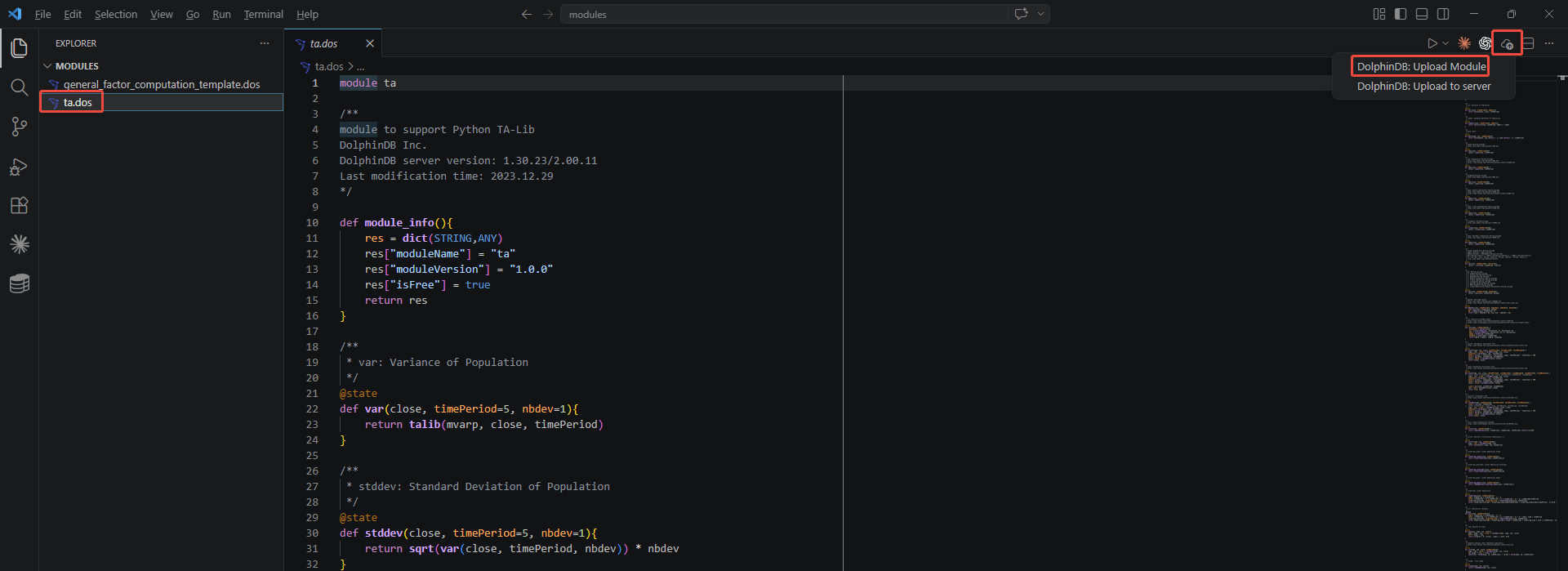
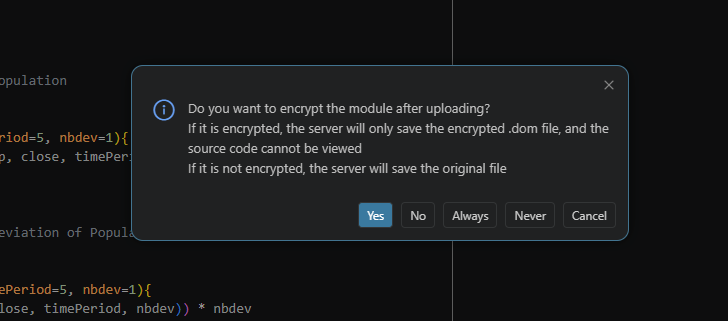
After you install the DolphinDB VSCode Extension, an upload icon appears in the upper-right corner of VSCode. First, select the module file to upload. Then, click Upload and select DolphinDB: Upload Module . In the dialog box, choose whether to encrypt the module. The detailed steps are shown in the figures below.
Why can't the uploaded module be found when I use it?
Troubleshooting:
After re-uploading a module to overwrite the existing one, why is the old module still being used?
Troubleshooting:
2.4 O&M
This section describes common O&M tasks when using DolphinDB, including graceful shutdown, disk space management, data migration, configuration of commonly used file directories, system troubleshooting, and important operations that must be performed only after consulting DolphinDB technical staff.
2.4.1 Graceful Shutdown
Since a graceful shutdown flushes transactions to disk before the service stops, the shutdown may take an extended period. Therefore, after performing a graceful shutdown by running the stopSingle.sh or stopAllNode.sh script, make sure that the shutdown completes successfully before restarting the service. Otherwise, node ports may remain occupied, causing the restart to fail. See Graceful Shutdown.
2.4.2 Disk Space
We recommend monitoring disk space usage based on O&M requirements and triggering alerts promptly when disk usage reaches the configured threshold. Otherwise, if the disk becomes full, it may cause data writes to fail, result in incomplete writes, freeze the system, or lead to other unpredictable issues, making timely service recovery difficult.
2.4.3 Data Migration
For data migration, we recommend using the backup-related functions to back up data, and the restore-related functions to restore and import data. We do not recommend migrating data by directly copying data files to avoid issues such as data inconsistency or missing metadata.
2.4.4 System Files
Files in the DolphinDB deployment directory and data storage directories (including dfsMetaDir, chunkMetaDir, volumes, TSDBRedoLogDir, persistenceDir, and computeNodeCacheDir) contain important data required for system operation. You must not modify or delete them arbitrarily.
We recommend using a unified directory convention that includes a DolphinDB subdirectory when configuring data storage paths (for example, chunkMetaDir=/ssd/ssd1/DolphinDB/chunkMeta/). This clearly identifies the directory as DolphinDB-related data storage and reduces the risk of accidental operations.
2.4.5 System Troubleshooting
See Troubleshooting.
2.4.6 Risky Operations
Some operations may cause serious issues, such as startup failure and data loss. For the scenarios listed below, we recommend consulting DolphinDB technical staff before proceeding and performing the operations under their guidance.
-
Disk operations: Mounting, unmounting, scaling up, scaling in, and replacement.
-
Changing the hostname.
-
Changing the IP address.
-
Changing data storage directories: volumes, dfsMetaDir, chunkMetaDir, redoLogDir, TSDBRedoLogDir.
2.5 Others
This section covers other FAQs when using DolphinDB, such as whether upgrading the server or updating the license requires a cluster restart, how regular users can change their own passwords, how to calculate the disk space used by databases and tables, and how to view the memory usage of different users.
2.5.1 Do I Need to Restart the DolphinDB Cluster After Upgrading the Server or Updating the License?
After upgrading the server, you must restart the DolphinDB cluster. However, license updates can be performed either online or offline.
For online license updates, you can use the updateLicense
function or the updateAllLicenses function provided in the
ops module. Online license updates are subject to certain restrictions. For
more information, see Update License File in High-availability
Cluster Deployment.
For offline license updates, replace the existing license file and restart the cluster.
2.5.2 How Do Regular Users Change Their Own Passwords?
Use the changePwd function.
2.5.3 How Do I Check the Disk Space Used by a Database or Table?
Use the getTableDiskUsage function in the ops module.
2.5.4 How Do I View the Memory Usage of Different Users?
Use the getSessionMemoryStat function.
3. Summary
This article serves as a quick reference guide for DolphinDB beginners, covering database and table management, SQL usage, DLang syntax, and O&M tasks.