
DolphinDB Backtesting Engine: Usage Guide and Performance Optimization
Strategy backtesting is an important part of quantitative trading and research. Before a quantitative strategy is applied to live trading, its performance on historical data must be evaluated through backtesting. Compared with low-frequency strategy backtesting, medium- and high-frequency strategy backtesting involves data volumes that are several orders of magnitude larger, imposing more stringent performance requirements on both data querying and calculation. DolphinDB implements a medium- and high-frequency backtesting engine. In addition to using C++ code to improve performance, the backtesting engine also supports just-in-time (JIT) compilation to improve the execution efficiency of strategy event callback functions. This article addresses issues that may arise during strategy development and explains how to use DolphinScript to write high-performance backtesting strategies.
1. Introduction to the Backtesting Engine
The DolphinDB backtesting engine supports strategy backtesting for multiple asset classes and market data types to meet different backtesting needs. Supported scenarios include stock strategies based on tick-by-tick data + snapshots, snapshots, tick-by-tick data (wide tables), tick-by-tick data + snapshots (wide tables), snapshots + tick-by-tick trade details, and minute- and daily-frequency market data; futures and options strategies based on snapshots and minute- and daily-frequency market data; cryptocurrency strategies based on snapshots, snapshots + tick-by-tick trade details, and minute- and daily-frequency market data; interbank bond strategies based on snapshots and snapshots + tick-by-tick trade details; and strategies for margin trading and securities lending.
1.1 Backtesting Workflow
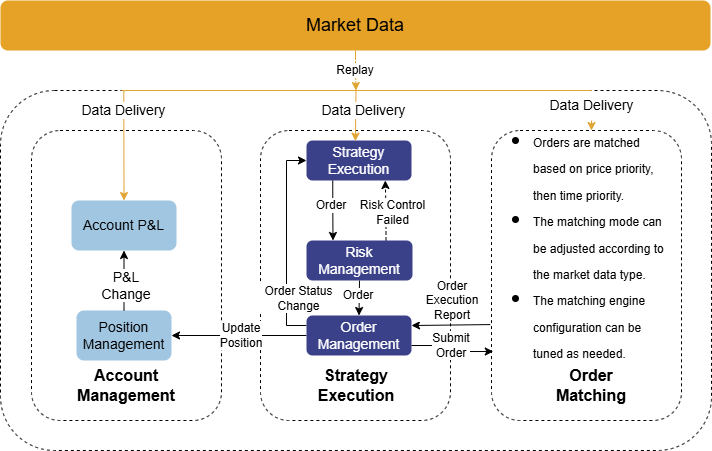
The backtesting engine is provided as a plugin. Figure 1-1 shows its logical architecture. The main backtesting workflow is as follows:
-
The backtesting engine receives a data stream replayed in chronological order and internally delivers it to the order matching simulator and the corresponding market data callback function;
-
The market data callback function processes the strategy logic and submits orders;
-
The backtesting engine performs risk checks on orders;
-
The backtesting engine sends orders that pass risk checks to the order matching simulator for order matching;
-
The backtesting engine tracks positions and funds in real time based on order executions. When strategy backtesting is complete, it returns information such as the strategy's returns and trade details.
Using the backtesting engine typically involves the five steps shown in Figure 1-2. First, the backtesting engine provides a range of event functions, including callbacks for strategy initialization and daily pre-market and post-market processing; handlers for tick, snapshot, and OHLC bar subscriptions; and functions that notify you of order change and execution. You can define indicators during strategy initialization and implement user-defined strategy logic in the appropriate callbacks. Next, configure the strategy's market data source, capital, order latency, fill ratio, and other settings. Then, create a backtesting engine based on the strategy and configuration. Next, replay the source data to run the backtesting engine. Finally, call the engine functions to retrieve the backtest results.

The following example demonstrates how to use the backtesting engine.
Implement the user-defined strategy logic:
@state
def pctChg(lastPrice, prevClosePrice){
 return lastPrice\prevClosePrice - 1
}
def initialize(mutable context){
 // Initialization callback
 print("initialize")
 // Subscribe to indicators calculated based on snapshot data
 d = dict(STRING,ANY)
 d["pctChg"] = <pctChg(lastPrice, prevClosePrice)>
 Backtest::subscribeIndicator(context["engine"], "snapshot", d)
 context["maxPos"] = 500
}
def beforeTrading(mutable context){
 // Daily pre-market callback
 // Get the current trading date from context["tradeDate"];
 print("beforeTrading: " + context["tradeDate"])
 // Use Backtest::setUniverse to change the stock universe for the current trading day
 Backtest::setUniverse(context["engine"], ["000001.XSHE"])
 context["open"] = dict(STRING,BOOL)
}
def onSnapshot(mutable context, msg, indicator){
 // Query the current positions
 pos = Backtest::getPosition(context["engine"], msg.symbol)
 longPos = pos.longPosition
 if (indicator.pctChg > 0.01 and longPos <= context.maxPos and
 context["open"][istock] != true){
 Backtest::submitOrder(context["engine"],
 (msg.symbol, context["tradeTime"], 5, msg.offerPrice[0], 100, 1), "buy")
 context["open"][istock] = true
 }
}
def onOrder(mutable context, msg){}
def onTrade(mutable context, msg){}
def afterTrading(mutable context){}
def finalize(mutable context){}
Configure the strategy's market data source, capital, and fill ratio.
// Configuration parameters
config = {
   startDate: 2022.04.11, // Start date of backtesting
   endDate: 2022.04.11,   // End date of backtesting
   strategyGroup: `stock,
   frequency: 0,
   cash: 100000000,       // Initial capital for the strategy
   commission: 0.00015,
   tax: 0.001,
   dataType: 1,          // Market data type; dataType = 1 indicates snapshot data
   msgAsTable: false,
   "context": {
          maxPos:0,
          open: {
                  A: true
                }
             }
}
Once you have specified the strategy callback function, you can create a backtesting engine using createBacktester:
// Create a backtesting engine
callbacks = {
        initialize: initialize,
        beforeTrading: beforeTrading,
        onSnapshot: onSnapshot,
        onOrder: onOrder,
        onTrade: onTrade,
        afterTrading: afterTrading,
        finalize: finalize
}
name = "BackTester1"
engine = Backtest::createBacktester(name, config, callbacks, false)
After obtaining the required market data, you can start strategy backtesting via appendQuotationMsg:
// Write data and start strategy backtesting. messageTable must contain data that meets the engine's requirements.
Backtest::appendQuotationMsg(engine, messageTable)
After the backtest is complete, you can get the results using different engine functions:
// Get backtest results
Backtest::getDailyPosition(engine)// Get daily position data
Backtest::getDailyTotalPortfolios(engine)// Get daily portfolio metrics
Backtest::getReturnSummary(engine)// Get summary for the returns
Backtest::getContextDict(engine)// Get the strategy's logical context
Backtest::getTradeDetails(engine)// Get the trade details table
1.2 Write Cross-Platform Strategies
The DolphinDB backtesting engine is built on DolphinDB's high-performance distributed storage and computing architecture. It supports developing and testing medium- and high-frequency strategies in DolphinScript, Python, or C++. Because the backtesting engine's JIT optimization depends on DolphinDB's native JIT support, currently only DolphinScript supports JIT optimization. When JIT optimization is enabled, strategy callback functions must not use default jit value or partial application. Global variables in the strategy must be declared in the context key of the config dictionary.
Starting from the 3.00.2.1 JIT version, the backtesting engine supports JIT optimization. When creating a backtesting engine, set the jit parameter of createBacktester to true.
Backtest::createBacktester(name, config, eventCallbacks, [jit=false], [securityReference])| Parameter | Type | Description |
|---|---|---|
| name | STRING | The engine name. |
| config | DICT | The dictionary of strategy configurations, storing the basic configuration information used by the strategy. |
| eventCallbacks | DICT | The dictionary of strategy callback functions. |
| jit | BOOL | JIT mode is disabled by default; set to true to enable JIT optimization. |
| securityReference | TABLE | The basic information table, required for futures backtesting. |
On a non-JIT server, the backtesting engine does not support JIT optimization. Setting jit to true results in an error:
[PLUGIN::BACKTEST] This version of server doesn't support JIT function..1.3 Considerations for Using Strategy Event Functions
The backtesting engine's strategy event functions accept the following parameters: context for specifying global strategy variables, msg for market data, and indicator for market data indicators.
-
context is a dictionary. To use JIT optimization, user-defined global variables in context cannot be tables; all other DolphinDB data types are supported.
-
msg is a dictionary. In the
onSnapShotandonTickfunctions for high-frequency strategy backtesting, usemsg.lastPriceandmsg.priceto obtain the latest price. In theonBarfunction, the msg dictionary keys are instrument symbols, and the values are the corresponding market data. For example, usemsg[istock].closeandmsg[istock].lowto obtain the latest closing price and latest low price. -
The market data indicator's data type must match that of msg for the corresponding market data.
If your strategy needs to save certain market data in real time, you can use the following approach. In this example, the highest and lowest price indicators are saved in real time in the onSnapShot function.
def onSnapshot(mutable context, msg, indicator){
        context["highPrice"] = max(msg.highPrice, context["highPrice"])
        context["lowPrice"] = min(msg.lowPrice, context["lowPrice"])
}
// The lifetime of context does not end after each callback completes;
// Variables stored in context remain available throughout the entire callback process unless they are modified by another callback function.
For better performance, the same object instance is used for msg in every event function call. Therefore, when using it in a strategy function, do not retain it for later use. Therefore, we do not recommend storing msg in an event function, as shown below.
def onBar(mutable context, msg, indicator){
        context["msg"] = msg
}
1.4 Execution at the Order Price
By default, the backtesting engine relies on DolphinDB’s order matching simulator, a high-precision system modeled on exchange matching practices that prioritizes orders by price and then by time. If your strategy logic does not require a high-precision order matching system—for example, some medium- and low-frequency strategies—and you want orders to be filled at the prices submitted by the strategy, set matchingMode to 3 when creating the engine.
config["matchingMode"] = 3This setting executes orders at their submitted prices while still enforcing limit-up and limit-down restrictions. In other words, a buy order submitted at the limit-up price fails, and a sell order submitted at the limit-down price fails.
2. Performance Optimization Guide
The backtesting engine is available as a plugin, provides multi-asset backtesting solutions, and uses optimized C++ code internally. It embeds stateful streaming engines and optimizes a series of window functions. This allows strategies to implement complex factor-based logic while delivering better overall performance. JIT technology further accelerates backtesting, bringing scripting-language execution close to the performance of compiled languages.
2.1 Calculate Indicators
The backtesting engine supports not only complex real-time indicator calculation but also replaying pre-calculated indicators together with market data to implement strategy logic.
2.1.1 Real-Time Indicator Calculation
The backtesting engine supports real-time indicator subscriptions. Use the
engine’s subscribeIndicator function to specify the factor
names and expressions for the strategy indicators you want to subscribe to.
The backtesting engine internally creates a reactive stateful engine. For
details about defining factor indicators, see createReactiveStateEngine. An example of using this function is
shown below:
Backtest::subscribeIndicator(engine, marketDataType, metrics)engine: the handle for the backtesting engine.
marketDataType: a STRING scalar that specifies the market data type of the indicators to subscribe to. Valid values are:
-
"snapshot": snapshot data.
-
"entrust": tick-by-tick orders.
-
"ohlc": OHLC bar.
-
"trade": tick-by-tick trade details.
-
"snapshot_ohlc": OHLC bar synthesized from snapshots.
metrics: a dictionary whose keys are of type STRING and represent indicator names, while its values are calculation formulas expressed as metacode that define how the indicators are calculated. Example:
indicatorDict = dict(STRING, ANY)
indicatorDict["mavg"] = <mavg(lastPrice, 20)>
You can improve the efficiency of indicator calculation by setting enableIndicatorOptimize=true in the engine configuration. You can also use dataRetentionWindow to specify the data retention window. Valid values:
-
"None" (default): does not retain data.
-
"ALL": retains all data.
-
Retains data by day: for example, "20d" indicates 20 trading days.
-
Positive integer: retains data by record count; for example, "20" means retain the latest 20 records for each symbol.
config["enableIndicatorOptimize"] = true // Enable optimization for indicator calculation
config["dataRetentionwindow"] = "ALL" // Retain all market data
The following example shows how to subscribe to three indicators in real time. First, define the myAtr and rsi functions to calculate the ATR, mATR, and RSI indicators, then use subscribeIndicator to subscribe to the indicators in real time.
@state
def myAtr(high, low, close, m = 14, n = 10) {
 prevClosePrice = prev(close)
 tr = rowMax([high - low,abs(high - prevClosePrice),abs(low - prevClosePrice)])
 atr = ema(tr, m)
 mAtr = mavg(atr,n)
 return atr,mAtr
}
def initialize(mutable contextDict){
 d = dict(STRING, ANY)
 d["ATR"] = <myAtr(signal[0], signal[1], signal[2], 14, 10)[0]>
 d["mATR"] = <myAtr(signal[0], signal[1], signal[2], 14, 10)[1]>
 d["RSI"] = <ta::rsi(signal[2], 14)>
 // Signal comes from the market data and is an array vector consisting of three columns of market data
 // fixedLengthArrayVector([backwardFactorHighPrice,backwardFactorLowPrice,backwardFactorClosePrice])
 Backtest::subscribeIndicator(contextDict["engine"], "kline", d)
}
2.1.2 Load Pre-Calculated Indicators
If you have calculated the relevant historical indicators, you can use the reserved signal field in market-data messages provided by the backtesting engine to replay the indicators required by the strategy along with the market data. The reserved signal field is an array vector. You can load multiple pre-calculated indicators into this field and then retrieve them from msg.signal in the market data. As shown in the following example, assume that you have ATR and RSI data. You can update the quoteTB market-data table as follows.
update quoteTB set signal = fixedLengthArrayVector([ATR, prev(ATR), RSI]) context by symbolOnce these indicators have been stored in the reserved signal field, you only need to use msg.signal[0], msg.signal[1], and so on in the strategy implementation to retrieve the corresponding indicators.
def onBar(mutable contextDict, msg, indicator){
        keys = msg.keys()
        for(i in keys){
                price = msg[i].close
                signal = msg[i].signal
                atr = signal[0]
                matr = signal[1]
                rsi = signal[2]
        }
}
2.1.3 Avoid Manual Calculation of Stateful Indicators
During strategy implementation, indicators are often used to support buy and sell decisions. We recommend calculating them in real time or loading them through the reserved signal field. Avoid recording historical market data in real time within a strategy and then calculating indicators from it. This approach requires historical state, and recalculating each indicator over the full data set can result in poor performance. The following example implements RSI and ATR calculation by recording a period of historical market data in real time in the market-data callback, then calculating the indicators each time the callback is invoked.
def onBar(mutable context, msg, indicator){
        closeList = context["closeList"]         // Record historical closing prices in real time
        lowPriceList = context["lowPriceList"]   // Record historical low prices in real time
        highPriceList = context["highPriceList"] // Record historical high prices in real time
        keys = msg.keys()
        for(i in keys){
                istock = msg[i].symbol
                price = msg[i].close
                if( type(closeList[istock]) == VOID){
                        closeList[istock] = array(DOUBLE, 0, 14)
                        lowPriceList[istock] = array(DOUBLE, 0, 14)
                        highPriceList[istock] = array(DOUBLE, 0, 14)
                }
                closeList[istock] = closeList[istock].append!(price)
                lowPriceList[istock] = lowPriceList[istock].append!(msg[i].low)
                highPriceList[istock] = highPriceList[istock].append!(msg[i].high)
                if(closeList[istock].size() >= 14){
                        n = size(closeList[istock])
                        closeList[istock] = closeList[istock][n - 14:]
                        lowPriceList[istock] = lowPriceList[istock][n - 14:]
                        highPriceList[istock] = highPriceList[istock][n - 14:]
                }
                atr_ = myatr(highPriceList[istock], lowPriceList[istock],
            closeList[istock], 14, 10)
                atr = atr_[0]
                matr = atr_[1]
                rsi = RSI(closeList[istock], 14)
        }
        context["closeList"] = closeList
        context["lowPriceList"] = lowPriceList
        context["highPriceList"] = highPriceList
}
2.1.4 Performance Testing
Using the strategy code described above, this test calculates strategy indicators for one month of 1-minute market data for the main contracts of 77 commodity futures, totaling 350,000 rows. It compares the total elapsed time for real-time indicator calculation, loading pre-calculated indicators, and manually calculating external indicators. The test results show that loading pre-calculated indicators delivers the best performance, while manually calculating external indicators delivers the worst. Therefore, if the corresponding indicators are available, we recommend loading them.
Table 2-1 Performance Test Results
| Scenario | Total Elapsed Time (seconds) |
|---|---|
| Real-time indicator calculation (without indicator optimization) | 4 |
| Real-time indicator calculation (with indicator optimization) | 3 |
| Load existing indicators | 2.6 |
| Manually calculate external indicators | 12 |
2.2 Batch Replay of Market Data
When backtesting a strategy, the backtesting engine supports replaying market data in streaming mode. Batch replay can significantly improve performance. In this example, snapshot data is used as the market data. The strategy buys 100 shares when the latest price for the current day is 1% higher than the previous day's closing price. The maximum position is limited to 500 shares, and the strategy opens a position no more than once per day.
def onSnapshot(mutable context, msg, indicator){
        // Query the current position
        pos = Backtest::getPosition(context["engine"], istock)
        if (indicator.pctChg > 0.01 and pos.longPosition <= context["maxPos"] and
        context["open"][istock] != true){
        // Backtest::submitOrder is the order placement function provided by the backtesting engine
                    Backtest::submitOrder(context["engine"],
                    (msg.symbol, context["tradeTime"], 5, msg.offerPrice[0], 100, 1), "buy")
                    context["open"][istock] = true
        }
}
Based on the strategy above, we simulate the insertion of backtest data and compare the performance of writing 100,000 snapshot records one at a time with that of batch writing. Compared with writing records one at a time, batch writing improves performance by approximately fivefold or more. Therefore, batch writing is recommended during backtesting. When writing market data in batches, you can read cached data in batches to accelerate market data parsing.
n = 100000
t = table(take("000001.XSHE",n) as symbol, take("XSHE",n) as symbolSource,
take(concatDateTime(2022.04.11, transFreq(10:00:00..11:00:00, "3S").distinct()), n) as timestamp,
randUniform(7.0, 10.0, n) as lastPrice, randUniform(9.0, 10.0, n) as upLimitPrice,
randUniform(7.0, 8.0, n) as downLimitPrice, take(10000, n) as totalBidQty, take(10000, n) as totalOfferQty,
take(arrayVector([10], [6.9, 6.8, 6.7, 6.6, 6.5, 6.4, 6.3, 6.2, 6.1,6.0]), n) as bidPrice,
take(arrayVector([10], [800, 900, 1000, 1100, 1200, 1000, 1000, 1000, 1000, 1000]), n) as bidQty, take(arrayVector([10],
[7.1, 7.2, 7.3, 7.4, 7.5, 7.6, 7.7, 7.8, 7.9, 8.0]), n) as offerPrice,
take(arrayVector([10], [1000, 1000, 1000, 1000, 1000, 1000, 1000, 1000, 1000, 1000]), n) as offerQty,
take(arrayVector([1], [double()]), n) as signal, randUniform(6.0, 7.0, n) as prevClosePrice)

messageTable.append!(t)
timer{Backtest::appendQuotationMsg(engine, messageTable)}
for (i in 0:messageTable.size()){
        tmp = select * from messageTable where rowNo(symbol) = i
        t = evalTimer(Backtest::appendQuotationMsg{engine2, tmp})
        tsRun = tsRun.append!(t)
}
try{Backtest::dropBacktestEngine(strategyName)}catch(ex){print ex}
tsRun = array(DOUBLE, 0, 10)
engine2 = Backtest::createBacktester(strategyName, userConfig, callbacks,, basicInfo)
// Write every 10 records
a = 0
for (i in 1..messageTable.size()){
        if(a >= size(messageTable)){continue}
        tmp = select * from messageTable where rowNo(symbol) >= a and rowNo(symbol) < (a + 10*i)
        t = evalTimer( Backtest::appendQuotationMsg{engine2,tmp})
        tsRun = tsRun.append!(t)
        a = a + 10*i
}
print(sum(tsRun))
2.3 Avoid Unnecessary Data Copying
DolphinDB and Python differ in how assignment with the equals sign works. In Python, '=' creates a reference: it simply makes one variable point to an existing variable, requiring neither additional memory allocation nor data copying. In DolphinDB, the assignment behavior of '=' depends on the object and its flags. When creating a dictionary, shallow copying is used by default. Therefore, assigning with '=' copies the object. If the transient flag is set, this becomes a deep copy that recursively copies all child objects under the object. In backtest callback functions, the market data msg uses deep copying by default. Assignment with '=' can therefore significantly reduce backtest speed, so avoid using '=' to directly reference the entire msg or its fields whenever possible (except indicator).
2.4 Enable High-Frequency Real-Time Risk Control in Medium- and Low-Frequency Strategies
For most CTA strategies, high-precision order matching and real-time risk control are key to ensuring the strategy's success and effective execution. The strategy's primary logic may be based on minute-level OHLC bars, while order fills depend on a high-precision order matching engine or the strategy's take-profit and stop-loss logic depends on real-time, tick data. DolphinDB can implement a backtesting engine that uses real-time tick data as its input while triggering the onBar callback at the configured frequency. Strategies can use the high-frequency callback function onSnapshot to perform real-time take-profit and stop-loss operations. The relevant configuration items are callbackForSnapshot and frequency.
| Configuration | Description |
|---|---|
| callbackForSnapshot=0 | Indicates tick data: tick data triggers the onSnapshot callback. |
| callbackForSnapshot=1, frequency>0 | Indicates tick data: tick data triggers the onSnapshot callback; OHLC bars aggregated from tick data at the specified frequency triggers the onBar callback. |
| callbackForSnapshot=2, frequency>0 | Indicates tick data: OHLC bars aggregated from tick data at the specified frequency triggers the onBar callback. |
In addition, the backtesting engine includes built-in algorithmic orders for real-time take-profit and stop-loss execution. Set enableAlgoOrder to true to enable algorithmic orders:
Backtest::submitOrder(engine, msg, [label=""], [orderType = 0])The msg tuple contains the instrument symbol, exchange symbol, time, order type, order price, stop-loss price, take-profit price, order quantity, buy/sell direction, slippage, order validity, and order expiration time. The valid values for orderType are:
-
0: Default value, indicating a standard order
-
5: Limit take-profit/stop-loss order
-
6: Market take-profit/stop-loss order
-
8: Two-sided quote order (supported for futures and options only)
-
9: Automatic order placement; the buy/sell direction can only be set to 1 or 2
-
10: Time-Weighted Average Price (TWAP) algorithmic order, which splits a large order evenly into multiple smaller orders for execution at regular time intervals
-
11: Volume-Weighted Average Price (VWAP) algorithmic order, which splits a large order into multiple smaller orders according to the distribution of trading volume
-
12: Trailing take-profit/stop-loss order
Detailed Implementation Example:
The following example uses an FX CTA trend-following strategy that uses Bollinger Band breakouts and RSI as entry signals to illustrate how to synthesize real-time market data from high-frequency quotes. This strategy calculates the Bollinger Bands and RSI indicators every hour and uses real-time tick data for risk monitoring and take-profit/stop-loss execution. Its logic is as follows:
-
Open a long position: RSI is currently above 70, and the Bollinger Bands are moving upward and breaking through the upper band.
-
Open a short position: The current RSI is below 30, and the Bollinger Bands are moving downward and breaking through the lower band.
If any pending long or short orders exist, use tick data to determine whether to cancel them or trigger take-profit and stop-loss operations.
Code Implementation:
First, subscribe to the indicators:
use ta
def initialize(mutable context){
        print("initialize")
        d = dict(STRING,ANY)
        d["rsi"] = <ta::rsi(lastPrice, 11)>
        d["bhigh"] = <ta::bBands(lastPrice, 20, 2, 2, 0)[0]>
        d["bmid"] = <ta::bBands(lastPrice, 20, 2, 2, 0)[1]>
        d["blow"] = <ta::bBands(lastPrice, 20, 2, 2, 0)[2]>
        Backtest::subscribeIndicator(context["engine"], "snapshot_kline", d)

}
Strategy logic: Buy when the RSI is above 70 and the Bollinger Bands are moving upward and breaking through the upper band. Sell when the RSI is below 30 and the Bollinger Bands are moving downward and breaking through the lower band. Submit algorithmic orders to perform real-time take-profit and stop-loss operations.
def onBar(mutable context, msg,indicator){
        istock=msg.keys()[0]
        if(indicator[istock].rsi <= 0){ return }
        position=Backtest::getPosition(context["engine"],istock)
        longpos = position.longPosition
        shortpos = position.shortPosition
        if(indicator[istock].rsi >70. and msg[istock].offerPrice[0]>indicator.bhigh and msg[istock].close>msg[istock].open){
                if(longpos <1){
                        orderId=Backtest::submitOrder(context.engine, (istock,msg[istock].symbolSource ,
                        context.barTime,5, round(msg[istock].offerPrice[0],5),
                        msg[istock].offerPrice[0] -context.sl+context.Slippage , msg[istock].offerPrice[0]+ context.tp+context.Slippage,
                        2, 1,context.Slippage, 0, context.barTime+36000000),"openBuy", 5)
                        return
                }
        }
        if(indicator[istock].rsi<30. and msg[istock].bidPrice[0]<indicator.blow and msg[istock].close<msg[istock].open){
                if(shortpos <1){
                        orderId=Backtest::submitOrder(context.engine, (istock,msg[istock].symbolSource,
                        context.barTime,5, round(msg[istock].bidPrice[0],5),
                        msg[istock].bidPrice[0]+context.sl-context.Slippage,
                        msg[istock].bidPrice[0] - context.tp-context.Slippage, 2, 2, context.Slippage , 0,
                        context.barTime+36000000),"openSell", 5)
                        return
                }
        }
}
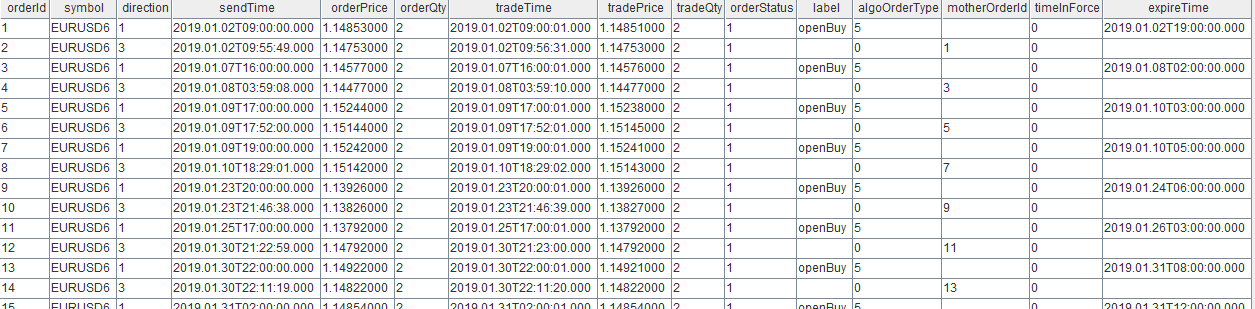
Performance test: In the example above, processing 29,317,091 market data records and 168 orders took 11 seconds.
2.5 Notes on Enabling JIT Optimization
When JIT optimization is enabled, strategy callback functions must not use default jit value or partial application. Global variables defined in the strategy must be declared in the context configuration item in config. JIT optimization does not support direct assignment to nested dictionary entries.
2.5.1 Strategy Callback Functions Do Not Support Default jit Value or Partial Application
The following callback function reports an error when JIT optimization is enabled:
def onSnapshot(mutable context, msg, indicator = NULL){}// JIT compilation fails for this functionJIT optimization also cannot be enabled when a strategy callback function uses partial application:
def onSnapshot(mutable context, msg, indicator, myParam){}// Add parameters to the strategy callback function
eventCallbacks["onSnapshot"] = onSnapshot{,,,myParam}
As shown above, adding parameters to a strategy callback function in the strategy implementation and configuring the callback as a partial application prevents optimization from being enabled. The additional parameter myParam for the strategy callback function can be added to the configuration and accessed in the strategy through context.myParam:
context = dict(STRING, ANY)
context["myParam"] = myParam
config["context"] = context
2.5.2 Predefine Global Variables in a Strategy
When creating a backtesting engine, declare all global variables defined in the strategy callback function in config's context configuration item:
config = dict(STRING, ANY)
config["startDate"] = 2023.01.01 // Start date of backtesting
config["endDate"] = 2024.10.30 // End date of backtesting
config["strategyGroup"] = "stock" // Strategy type
// Configure global variables for the strategy
context = dict(STRING, ANY)
context["initPrice"] = 0.
context["feeRatio"] = 0.00002
context["alpha"] = 0.01
context["M"] = 0.01
context["highPrice"] = dict(STRING, ANY)
config["context"] = context
As shown above, the strategy defines four global variables: initPrice, feeRatio, alpha, and M. When JIT optimization is enabled, the data types used to initialize the strategy's global variables in context must match the data types used in the strategy; otherwise, backtesting will fail or produce an error:
JIT: Data type does not match when assign value to attribute of ...2.5.3 JIT Optimization Does Not Support Nested Dictionary Assignment
Nested assignment in dictionaries is not supported in strategy callback functions with JIT optimization enabled.
def onBar(context, msg, indicator){
 context["test"][istock] = msg.close
}
The error is as follows:
Attribute [("test","000001.XSHE")] doesn't existYou can implement it as follows instead:
def onBar(context, msg, indicator){
 temp = context["test"]
 temp[istock] = msg.close
 temp["test"]=temp
}
2.5.4 Data Types and Data Structures Supported in Strategy Callback Functions
The strategy callback functions of the backtesting engine support basic data types and the following data structures: matrices, sets, dictionaries, tuples, and array vectors.
Strategy callback functions for the backtesting engine can call user-defined functions. The data types supported within user-defined functions are the same as those supported by callback functions.
The backtesting engine highly optimizes the following basic data types and arrays of these types. We recommend using basic data types whenever possible. Sets, dictionaries, tuples, and other unstructured data forms are optimized to a lesser extent. Therefore, use basic data types whenever possible when writing scripts, and minimize the use of unstructured data.
The optimized data types include: BOOL, CHAR, SHORT, INT, LONG, TIME, TIMESTAMP, SECOND, DATE, FLOAT, DOUBLE
2.5.5 Custom Functions Do Not Support Multiple Return Values
In a regular DolphinDB script, a function can return multiple variables, as shown below. Other user-defined functions called by strategy callback functions currently do not support this syntax. If a function needs to return multiple variables, use a tuple as the return value.
def fun() {
    return 1., 2.
}
def onSnapshot(context,msg,indicator){
    // Unsupported method:
    a,b = fun()
    // Error: codegen for statement type MULTIASSIGN not supported: a, b fun()

    // Supported method:
    tmp = fun()
    a = tmp[0]
    a = tmp[1]
}
2.5.6 Built-in Backtesting Engine Functions Supported in Strategy Event Functions
In addition to submitting orders based on market data, real-time position and profit and loss (P&L) statistics are not only important tools for implementing a trading strategy but also the foundation for risk management and decision optimization. By making effective use of these statistics, a strategy can improve profitability and reduce potential losses in complex market conditions. The backtesting engine provides functions for real-time position and P&L statistics, helping a strategy evaluate its current performance and adjust trading decisions promptly. For example, if a strategy's positions are performing poorly, it can close them or adjust its position size. You can use these functions with JIT optimization enabled.
-
Retrieve a strategy's current positions in real time
Backtest::getPosition(engine, symbol = "")You can call
Backtest::getPositionto retrieve position information in real time, including buy/sell position quantities, average buy/sell execution prices, and buy/sell execution quantities for the current day. -
Functions for submitting, canceling, and retrieving unfilled orders
You can use these functions with JIT optimization enabled.
Backtest::submitOrder(engine, msg, label="", orderType = 0) Backtest::cancelOrder(engine, symbol = NULL, orders = NULL, label = "") Backtest::getOpenOrders(engine, symbol = NULL, orders = NULL, label = "", outputQueuePosition = 0) -
Retrieve the strategy's current equity in real time
For strategy backtesting across different asset classes, each asset class has its own equity and risk-control metrics. Accordingly, three functions are provided for stocks, futures, and options. For stock strategies, the system provides real-time available funds, the strategy's real-time net asset value, and other information. For futures and options, it also provides statistical tables for real-time margin usage, unrealized P&L, cumulative realized P&L, and other metrics.
Backtest::getStockTotalPortfolios(engine)
Backtest::getFuturesTotalPortfolios(engine)
Backtest::getOptionTotalPortfolios(engine)
Backtest::getTodayPnl(engine, symbol)  // Get the P&L for a single instrument
3. Optimize a Medium- and High-Frequency CTA Strategy for Stocks
This section uses a specific example to explain how to improve performance when developing a backtesting strategy.
In medium- and high-frequency trading, a CTA strategy predicts price movements and can capture the activity of large orders. The strategy analyzes order-flow information or specific events to estimate the general direction of short-term price movements. It then uses its speed advantage to enter positions ahead of the market and exit once prices reach the expected level.
Implement the following CTA strategy logic based on level 2 snapshot data and tick-by-tick trade data:
-
Calculate the MACD indicator from snapshot data. When the MACD forms a golden cross and either of the following two conditions is met, execute a buy order:
-
Based on tick-by-tick trades, buy 500 shares when the CCI calculated from the trade price over the past 30 seconds crosses upward through the +100 line into the overbought zone and trading volume over the past 30 seconds exceeds 10,000 shares.
-
Buy 500 shares when the CCI calculated from the trade price over the past 30 seconds crosses upward through the -100 line.
-
-
Sell when the MACD shows a death cross.
Code implementation
First, identify the global variables required by the strategy and their corresponding types. According to the strategy logic, this example requires the number of shares to buy in each transaction and the pools of instruments to buy and sell. Here, the number of shares to buy is an integer, while the stocks to be bought and closed out are represented as character arrays.
context["buyVol"] = 500
context["buyList"] = array(SYMBOL,0)
context["sellList"] = array(SYMBOL,0)
Next, define the MACD indicator based on level 2 snapshot data, and the 30-second CCI and trading volume indicators based on level 2 tick-by-tick trade data. The backtesting engine internally creates a reactive stateful engine. For details on defining factor indicators, refer to createReactiveStateEngine. In the strategy initialization function, first subscribe to the MACD indicator based on level 2 snapshot data and the 30-second CCI and trading volume indicators based on trade data.
def initialize(mutable context){
        // Use Backtest::setUniverse to change the stock universe for the day,
        // For example, Backtest::setUniverse(context["engine"],["688088.XSHG","688157.XSHG","688208.XSHG"])
        print("initialize")
        // Subscribe to indicators calculated based on snapshot data
        d = dict(STRING, ANY)
        d["macd"] = <macd(lastPrice, 240, 520, 180)[0]>
        d["prevMacd"] = <macd(lastPrice, 240, 520, 180)[1]>
        Backtest::subscribeIndicator(context["engine"], "snapshot", d)
        d = dict(STRING, ANY)
        d["cci"] = <myCCI(price, timestamp, orderType)[0]>
        d["prevcci"] = <myCCI(price, timestamp, orderType)[1]>
        d["tradeVol30s"]=<tradeVol30s(qty, timestamp, orderType)>
        Backtest::subscribeIndicator(context["engine"], "trade", d)
        // Record daily statistics
        context["buyVol"] = 500
}
In the snapshot market data callback function onSnapshot, use the subscribed MACD indicator to record buy and sell signals.
def getOpenQty(openOrders){
 qty = 0
 for( i in openOrders){
 qty = i.openQty + qty
 }
 return qty
}
def onSnapshot(mutable context, msg, indicator){
 // msg is a dictionary containing the most recent tick data.
 // Record buy and sell signals.
    if(indicator.prevMacd < 0 and indicator.macd > 0){//MACD shows a gloden cross
    pos=Backtest::getPosition(context.engine,msg.symbol).longPosition
    if((pos <= 0) and (not msg.symbol in context["buyList"])){
       context["buyList"] = context["buyList"].append!(msg.symbol)
    }
 }
    else if((indicator.prevMacd > 0 and indicator.macd < 0) or (msg.symbol in context["sellList"])){//MACD shows a death cross; close position
 // Cancel unfilled orders.
 Backtest::cancelOrder(context.engine, msg.symbol, , "buy")
 pos = Backtest::getPosition(context.engine, msg.symbol).longPosition
 openQty = getOpenQty(Backtest::getOpenOrders(context.engine, msg.symbol,, "close"))
 if(pos-openQty>0){ //Sell the position.
 Backtest::submitOrder(context.engine,(
 msg.symbol, context["tradeTime"], 5, round(msg.lastPrice-0.02,3), pos-openQty, 3), "close")
 }
 if(not msg.symbol in context["sellList"]){
 context["sellList"]=context["sellList"].append!(msg.symbol)
 }
 }
}
When closing a position by selling, cancel any unfilled orders and close the current position. When closing a position, if the previous closing order was not fully filled, continue closing the position. You can retrieve unfilled orders through the getOpenOrders interface, which returns an array of dictionaries containing all currently unfilled orders.
Execute the buy operation in the tick-by-tick trades callback onTick. Specifically, after the snapshot-based MACD indicator forms a golden cross, buy 500 shares when the CCI calculated from tick-by-tick trade prices over the past 30 seconds crosses above +100 into the overbought zone and trading volume over the past 30 seconds exceeds 10,000 shares. Alternatively, buy 500 shares when the CCI calculated from the trade price over the past 30 seconds crosses above -100. After placing a buy order, if it is not filled, wait for it to execute to avoid placing multiple buy orders.
def onTick(mutable context, msg, indicator){
        //...
        if(msg.symbol in context["buyList"]){
                buyFlag = false
 // Buy when the indicator breaks above the +100 line from below and enters the overbought zone, provided that trading volume over the past 30 seconds exceeds 10,000 shares.
                if(indicator.prevcci < 100. and indicator.cci >= 100. and indicator.tradeVol30s > 10000){
                        buyFlag =true
                }
 // Buy when the indicator breaks above the -100 line from below.
                if( indicator.prevcci < -100. and indicator.cci >= -100. ){
                        buyFlag = true
                }
                if(buyFlag == false){
                        return
                }
                // Has a position.
                pos=Backtest::getPosition(context["engine"], msg.symbol).longPosition
                if(pos > 0){
                        return
                }
                //Has an open order.
                opens=Backtest::getOpenOrders(context["engine"], msg.symbol, , "buy")
                if(opens.size() > 0){
                        return
                }
                Backtest::submitOrder(context["engine"], (
                msg.symbol, msg.timestamp, 5, round(msg.price,2), context["buyVol"], 1), "buy")
                context["buyList"] = context["buyList"][context["buyList"] != msg.symbol]
                context["sellList"] = context["sellList"][context["sellList"] != msg.symbol]
        }
}
See the Appendix for the complete script for backtesting a stock tick-by-tick CTA strategy.
Performance Testing
The code implementing the strategy above can run on versions 2.00.14.1/3.00.2.1 and later. JIT can be enabled on JIT versions 3.00.2.1 and later.
try{Backtest::dropBacktestEngine(strategyName)}catch(ex){print ex}
// Version 2.00.14.1 / 3.00.2.1 and later
engine = Backtest::createBacktester(strategyName, userConfig, callbacks,false)
// JIT versions 3.00.2.1 and later
engine = Backtest::createBacktester(strategyName, userConfig, callbacks,true)
A backtest using 241,000 market data records for a single instrument over 20 trading days took 3.9 seconds without JIT and 1.8 seconds with JIT.
Counterexample
During strategy implementation, if, in either of the two market-data callback functions above, the two global variables for the indicators and the stock pools to buy and sell are copied to local variables, or if the local variables are copied back to the global variables, the elapsed time increases. The implementation is shown below. In a test using 241,000 market data records for a single instrument over 20 trading days, the non-JIT version took 4.4 seconds—10% longer than the original approach that reduced copying.
def onSnapshot(mutable context, msg, indicator){
 buyList = context["buyList"]
 sellList = context["sellList"]
 istock = msg.symbol
 macd = indicator.macd
 prevMacd = indicator.prevMacd
 if( prevMacd < 0 and macd >0 ){// MACD indicator shows a golden cross
 //...
 }
 else if((prevMacd > 0 and macd < 0) or (istock in sellList)){// Close the position when the MACD indicator shows a death cross
 //...
 }
 context["buyList"] = buyList
 context["sellList"] = sellList
}
def onTick(mutable context, msg, indicator){
 buyList = context["buyList"]
 sellList = context["sellList"]
 istock = msg.symbol
 if(istock in buyList){
 cci = indicator.cci
 prevcci = indicator.prevcci
 tradeVol30s = indicator.tradeVol30s
 // Buy when the indicator breaks above the +100 line from below and enters the overbought zone, provided that trading volume over the past 30 seconds exceeds 10,000 shares.
 if(prevcci < 100. and cci >= 100. and tradeVol30s > 10000){
 buyFlag = true
 }
 // Buy when the indicator breaks above the -100 line from below.
 if( prevcci < -100. and cci >= -100. ){
 buyFlag = true
 }
 }
 context["buyList"] = buyList
 context["sellList"] = sellList
}
4. Summary
This article explains how to use the DolphinDB backtesting engine and the considerations for writing related strategies. In addition to using C++ code to improve performance, the DolphinDB backtesting engine in the 3.00.2.1 JIT version also supports JIT compilation to improve the execution efficiency of strategy event callback functions. From the perspective of strategy coding, it introduces the use of the global variable (context), the market-data message (msg), and the indicator. It also focuses on enabling JIT optimization for strategies. In addition to basic data types, DolphinDB's JIT also supports unstructured data such as collections, dictionaries, and tuples. Using the same strategy code, you can directly enable JIT-optimized execution for backtesting on the 3.00.2.1 JIT server version. The performance comparison in the final case shows that reducing copies of market data and global variables during strategy backtesting can improve performance by about 10%. Enabling JIT delivers at least a twofold performance improvement, and the more complex the strategy logic, the greater the improvement.