
Generate Stock and Fund OHLC Bars from Snapshot Data
1. Overview
Trading rules vary across exchanges and asset classes. Therefore, the methods for generating 1-minute OHLC bars from snapshot data or tick-by-tick data also differ by exchange and asset class.
This tutorial is designed to help you use DolphinDB more efficiently and reduce development complexity in specific business scenarios.
In this tutorial, you will learn:
- Generate 1-minute OHLC bars from historical snapshot data
- Generate 1-minute OHLC bars from real-time snapshot data
This tutorial applies to the following assets:
| Exchange-Asset | Supported |
|---|---|
| SZSE - Stock | Yes |
| SZSE - Fund | Yes |
| SSE - Stock | Yes |
| SSE - Fund | Yes |
| BSE - Stock | Yes |
The trading hours for stocks and funds on the Shanghai Stock Exchange (SSE), the Shenzhen Stock Exchange (SZSE) and the Beijing Stock Exchange (BSE) are as follows:
- Opening call auction: 09:15:00 - 09:25:00
- Continuous auction: 09:30:00 - 11:30:00
- Continuous auction: 13:00:00 - 14:57:00
- Closing call auction: 14:57:00 - 15:00:00
2. Generate OHLC Bars from Historical Snapshot Data
2.1 Snapshot Data Characteristics
Level-1 or Level-2 snapshot data is pushed at an approximate frequency of 3 seconds (i.e., one snapshot per 3 seconds). However, the intervals are not strictly equally spaced. In the live market, each stock or fund generates approximately 4,000 snapshot records per day on average.

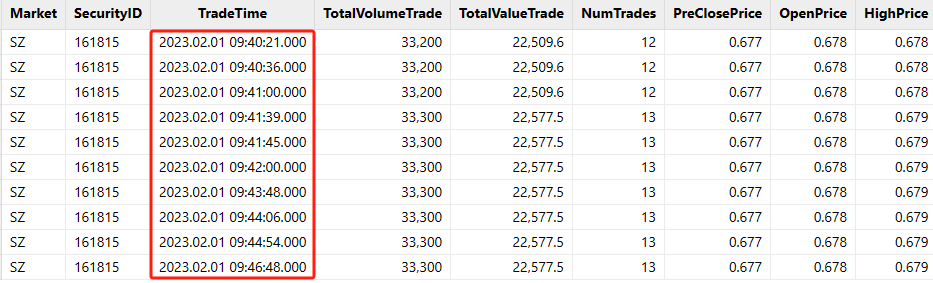
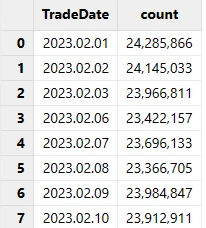
The fields of snapshot data vary across data vendors and exchanges.
This tutorial applies a unified schema to snapshot data for stocks and funds from the SSE, SZSE and BSE. The key fields are listed below:
| Field Name | Data Type | Description |
|---|---|---|
| TradeTime | TIMESTAMP | Date and time |
| SecurityID | SYMBOL | Security ID |
| OpenPrice | DOUBLE | Opening price |
| PreCloPrice | DOUBLE | Previous closing price |
| HighPrice | DOUBLE | High price of the day |
| LowPrice | DOUBLE | Low price of the day |
| LastPrice | DOUBLE | Latest price of the day |
| PreCloseIOPV | DOUBLE | Previous IOPV (fund) |
| IOPV | DOUBLE | IOPV (fund) |
| TotalVolumeTrade | LONG | Daily trading volume |
| TotalValueTrade | DOUBLE | Daily trading value |
| NumTrades | LONG | Daily trade count |
| UpLimitPx | DOUBLE | Limit up price of the day |
| DownLimitPx | DOUBLE | Limit down price of the day |
| ...... | ...... | The full snapshot data includes additional fields (excluded here due to space constraints). |
The table schema for the 1-minute OHLC bars generated from snapshot data for stocks and funds on the SSE, SZSE and BSE is as follows:
| Field Name | Data Type | Description | Calculation Rules |
|---|---|---|---|
| SecurityID | SYMBOL | Security ID | Security ID |
| TradeTime | TIMESTAMP | Date and time | The opening call auction data is included in the first OHLC bar. The output time of the first bar is 09:30:00, with its calculation window set to [09:25:00, 09:31:00). The output time of the OHLC bar timestamp corresponds to the left boundary of its calculation window, which is left-closed and right-open. A total of 240 OHLC bars are generated, including the bars of 11:30:00, 14:57:00, and 15:00:00, but excluding those of 14:58:00 and 14:59:00. |
| OpenPrice | DOUBLE | Opening price | The latest price of the first snapshot within the calculation window. If no trades occur after the market opens, the value is filled with 0. If the snapshot data is missing during intraday calculation windows, the value is filled with the previous OHLC bar's closing price. |
| HighPrice | DOUBLE | High price | The high price in the calculation window. If no trade occurs after the market opens, the value is filled with 0. If the snapshot data is missing for an intraday calculation window, the value is filled with the previous OHLC bar's closing price. |
| LowPrice | DOUBLE | Lowe price | The low price in the calculation window. If no trade occurs after the market opens, the value is filled with 0. If the snapshot data is missing for an intraday calculation window, the value is filled with the previous OHLC bar's closing price. |
| ClosePrice | DOUBLE | Closing price | The latest price from the last snapshot in the calculation window. If no trade occurs after the market opens, the value is filled with 0. If the snapshot data is missing for an intraday calculation window, the value is filled with the previous OHLC bar's closing price. |
| Volume | LONG | Trading volume | The sum of trading volume across all snapshots in the calculation window. If the snapshot data is missing, the value is filled with 0. |
| Turnover | DOUBLE | Trading value | The sum of trading value across all snapshots in the calculation window. If the snapshot data is missing, the value is filled with 0. |
| TradesCount | INT | Number of trades | The sum of the number of trades across all snapshots in the calculation window. If the snapshot data is missing, the value is filled with 0. |
| PreClosePrice | DOUBLE | Previous closing price | The previous closing price in the day's snapshot data. If the snapshot data is missing for an intraday calculation window, the value is filled with the previous OHLC bar's closing price. |
| PreCloseIOPV | DOUBLE | Previous IOPV (fund) | The previous IOPV in the fund's snapshot data for the day. This field is available for SZSE funds but not for SSE funds. If the snapshot data is missing for an intraday calculation window, the value is filled with the previous OHLC bar's previous IOPV. |
| IOPV | DOUBLE | IOPV (fund) | The IOPV in the fund's snapshot data for the day. This field is not available for SZSE funds but is available for SSE funds. If the snapshot data is missing for an intraday calculation window, the value is filled with the previous OHLC bar's previous IOPV. |
| UpLimitPx | DOUBLE | Limit up price | The limit up price in the day's snapshot data. This field is available for SZSE but not for SSE. If the snapshot data is missing for an intraday calculation window, use the previous OHLC bar's limit up price. |
| DownLimitPx | DOUBLE | Limit down price | The limit down price in the day's snapshot data. This field is available for SZSE but not for SSE. If the snapshot data is missing for an intraday calculation window, the value is filled with the previous OHLC bar's limit down price. |
| ChangeRate | DOUBLE | Price change ratio | The percentage change of the current OHLC bar's closing price to the previous OHLC bar's closing price. For the first bar after the market opens, it equals the percentage change between the latest price in the last snapshot and the latest price in the first snapshot within the [09:25:00, 09:31:00) window. If snapshot data is missing within the calculation window, the value is filled with 0. |
2.2 Rules for Generating OHLC Bars from Snapshot Data
(1) Handle High and Low Prices
Snapshot data consists of slices captured at non-uniform 3-second intervals. Therefore, the following situations may occur:
-
The high price of the day (HighPrice) changes within the current calculation window, but none of the latest prices (LastPrice) in that window contains the high price of the day that occurred within the window.
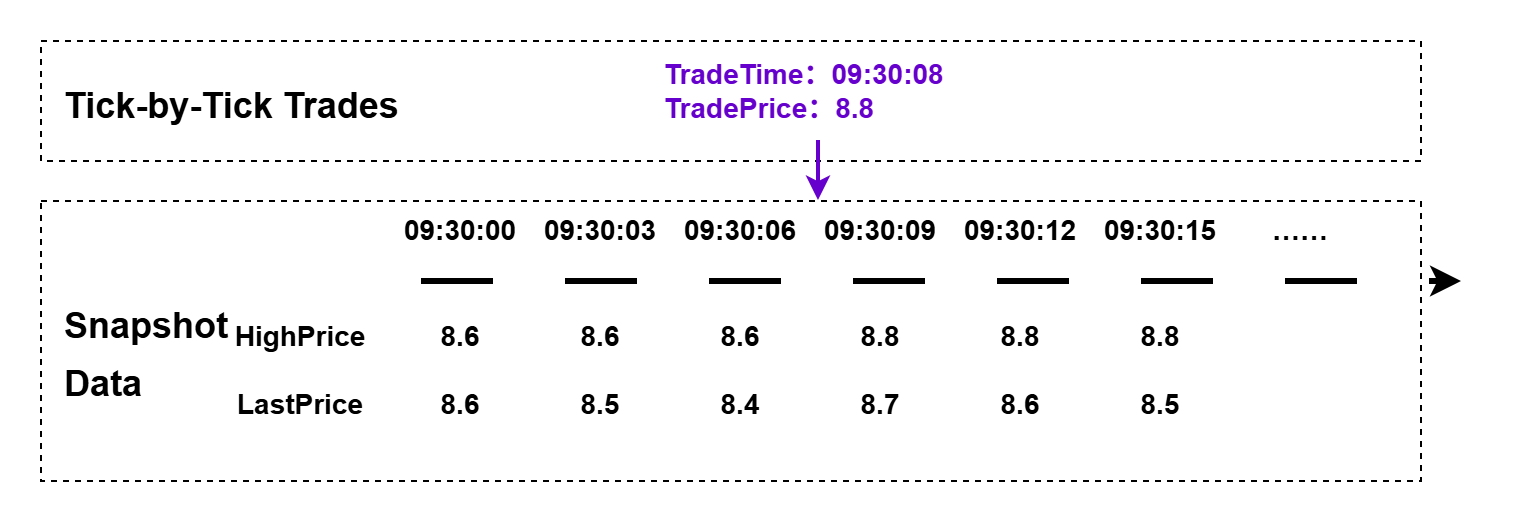
Figure 7. Figure 2-4 High Price Calculation Rules
-
Low price of the day (LowPrice) changes within the current calculation window, but none of the latest prices (LastPrice) in that window contains the low price of the day that occurred within the window.
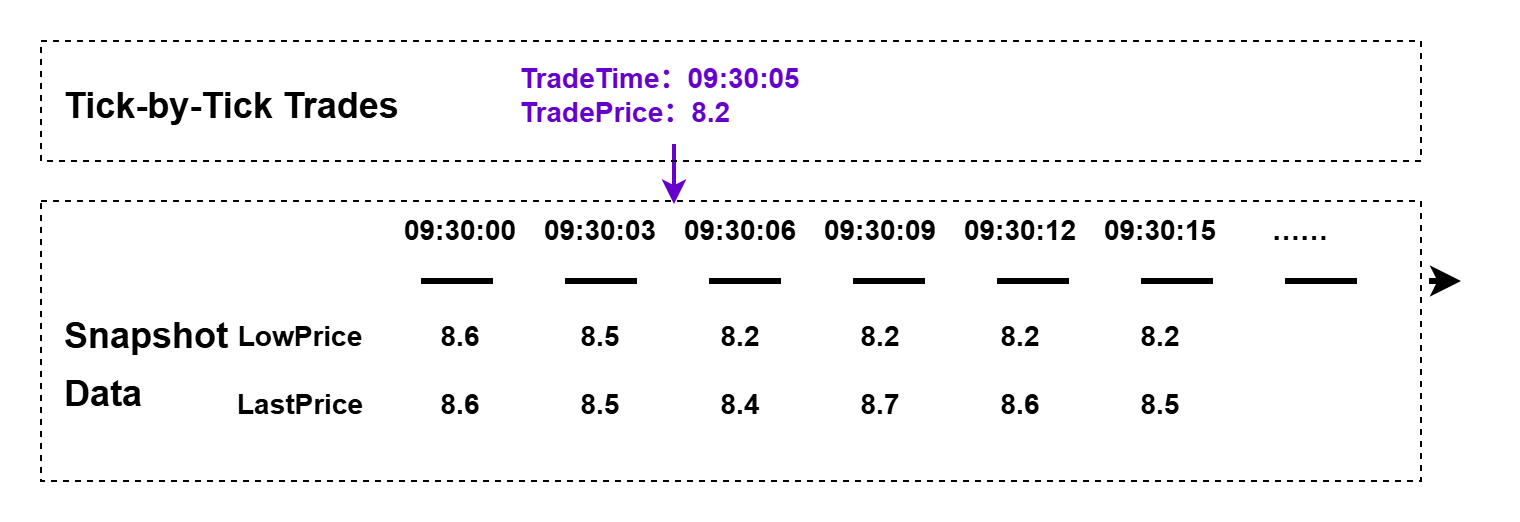
Figure 8. Figure 2-5 Low Price Calculation Rules
The user-defined function to calculate the high price of a 1-minute OHLC bar is as follows:
defg high(DeltasHighPrice, HighPrice, LastPrice){
	if(sum(DeltasHighPrice)>0.000001){
		return max(HighPrice)
	}
	else{
		return max(LastPrice)
	}
}
Parameters:
- DeltasHighPrice: The difference in the high prices of the day (HighPrice) between two adjacent snapshots for the same stock or fund.
- HighPrice: The high price of the day in the snapshot data.
- LastPrice: The latest price of the day in the snapshot data.
Calculation logic:
- Within the calculation window for a 1-minute OHLC bar, if the high price of the day changes between two adjacent snapshots for the same stock or fund, the OHLC bar's high price is the maximum high price of the day in the calculation window.
- Within the calculation window for a 1-minute OHLC bar, if the high price of the day does not change between two adjacent snapshots for the same stock or fund, the OHLC bar's high price is the maximum latest price of the day in the calculation window.
The user-defined function to calculate the low price of a 1-minute OHLC bar is as follows:
defg low(DeltasLowPrice, LowPrice, LastPrice){
	sumDeltas = sum(DeltasLowPrice)
	if(sumDeltas<-0.000001 and sumDeltas!=NULL){
		return min(iif(LowPrice==0.0, NULL, LowPrice))
	}
	else{
		return min(LastPrice)
	}
}
Parameters:
- DeltasLowPrice: The difference in the low prices of the day (LowPrice) between two adjacent snapshots for the same stock or fund.
- LowPrice: The low price of the day in the snapshot data.
- LastPrice: The latest price of the day in the snapshot data.
Calculation logic:
- Within the calculation window for a 1-minute OHLC bar, if the low price of the day changes between two adjacent snapshots for the same stock or fund, the OHLC bar's low price is the minimum low price of the day in the calculation window.
- For stocks or funds with no trades at the open, the latest price and low
price in the published snapshot data are both 0. In the first window that
contains a trade, the low price changes. In this case, the OHLC bar's low
price for the calculation window is the minimum non-zero day's low price in
the snapshot data. This special case is handled by
min(iif(LowPrice==0.0, NULL, LowPrice)). - Within the calculation window for a 1-minute OHLC bar, if the low price of the day does not change between two adjacent snapshots for the same stock or fund, the OHLC bar's low price is the minimum latest price of the day in the calculation window.
- Optimization tip: The
ifcondition in the third line referencessum(DeltasLowPrice)twice. To improve performance, first assignsumDeltas = sum(DeltasLowPrice)to aggregate once. If you write theifcondition asif(sum(DeltasLowPrice)<-0.000001 and sum(DeltasLowPrice)!=NULL), the system performs the aggregation twice here.
(2) Handle Trading Volume, Trading Value, and Number of Trades
The trading volume, trading value, and number of trades in snapshot data are all cumulative daily totals. Therefore, before you calculate them with a rolling window of 1 minute and a step of 1 minute, first calculate the increments between adjacent snapshots.
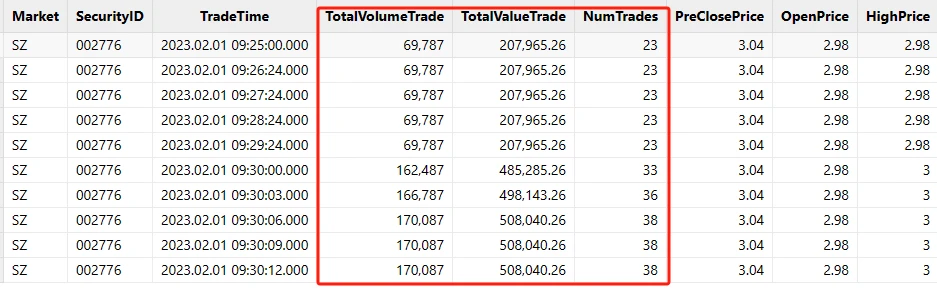
You can preprocess the data by using DolphinDB's built-in deltas and the context by. The specific code is described in detail below.
(3) No Trades After the Open
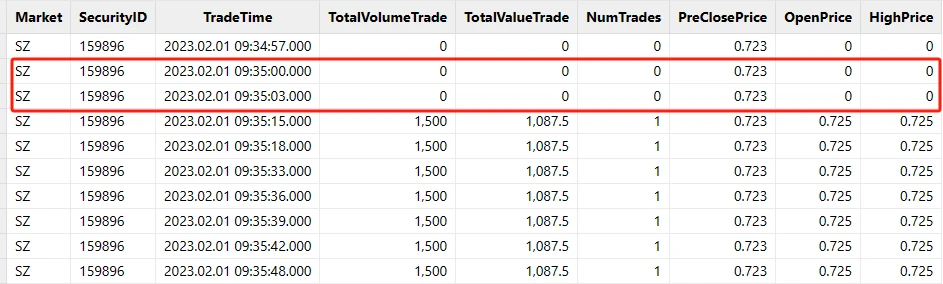
For some infrequently traded stocks and funds, no trades occur after the market opens at 09:15:00. However, the snapshot data continues to be pushed normally.
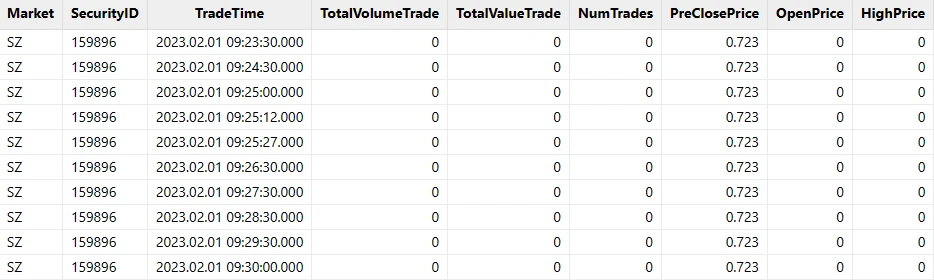
For calculation windows in which no trades occur after the open, this tutorial applies the following rules:
- The values of OpenPrice, HighPrice, LowPrice, ClosePrice, Volume, Turnover, TradesCount, and ChangeRate are filled with 0.
- The values of PreClosePrice, PreCloseIOPV, IOPV, UpLimitPx, and DownLimitPx are filled with the corresponding values in the snapshot data.
(4) No Trades Within an Intraday Calculation Window
For some infrequently traded stocks and funds, no trades may occur during certain intraday calculation windows. However, the snapshot data continues to be pushed normally.
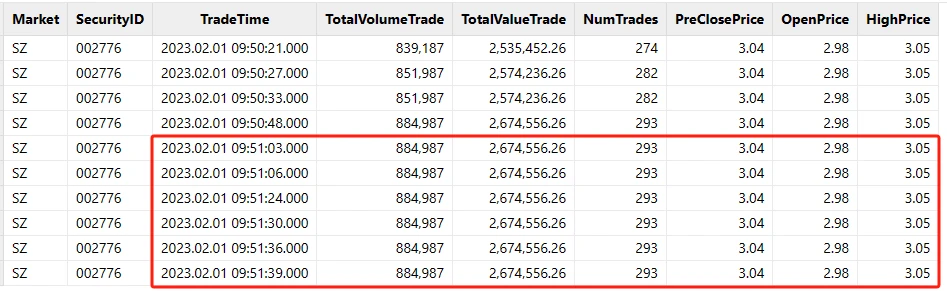
For intraday calculation windows with no trades, this tutorial applies the following rules:
- The values of OpenPrice, HighPrice, LowPrice, and ClosePrice are filled with the ClosePrice of the previous OHLC bar.
- The values of Volume, Turnover, TradesCount, and ChangeRate are filled with 0.
- The values of PreClosePrice, PreCloseIOPV, IOPV, UpLimitPx, and DownLimitPx are filled with the corresponding values in the previous OHLC bar.
2.3 Generate OHLC Bars from Historical Snapshot Data
Step 1: Deploy the Test Environment
- Deploy the DolphinDB server in standalone mode: Standalone Deployment and Upgrade.
- Download the test data and upload it to the server directory of your DolphinDB server.
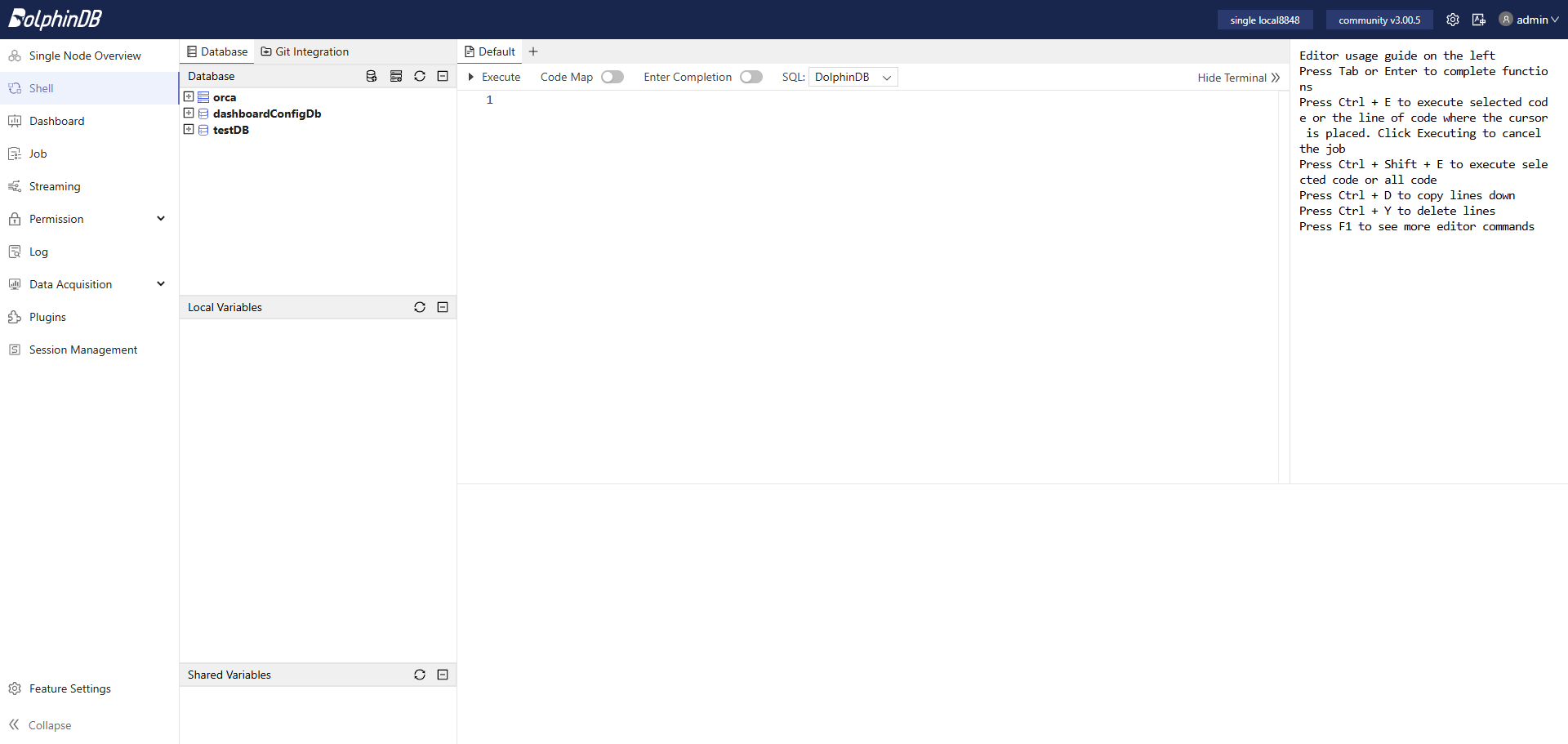
- Open the web interface as instructed in the deployment tutorial. After logging in, run the test code as follows. The default admin account is admin with the password 123456.
Step 2: Create the Database and Partitioned Table
The database and partitioned table creation code below applies when Level-2 snapshot data for stocks and funds from both the SSE and SZSE is stored in the same table. For more information about creating databases and partitioned tables, see Best Practices for Financial Data Storage.
Paste the following code into the web interface, select the code you want to run, and click Execute (shortcut: Ctrl+E).
//Create the database
create database "dfs://snapshotDB"
partitioned by VALUE(2020.01.01..2021.01.01), HASH([SYMBOL, 50])
engine='TSDB'
//Create the partitioned table
create table "dfs://snapshotDB"."snapshotTB"(
    Market SYMBOL
    TradeTime TIMESTAMP
    MDStreamID SYMBOL
    SecurityID SYMBOL
    SecurityIDSource SYMBOL
    TradingPhaseCode SYMBOL
    ImageStatus INT
    PreCloPrice DOUBLE
    NumTrades LONG
    TotalVolumeTrade LONG
    TotalValueTrade DOUBLE
    LastPrice DOUBLE
    OpenPrice DOUBLE
    HighPrice DOUBLE
    LowPrice DOUBLE
    ClosePrice DOUBLE
    DifPrice1 DOUBLE
    DifPrice2 DOUBLE
    PE1 DOUBLE
    PE2 DOUBLE
    PreCloseIOPV DOUBLE
    IOPV DOUBLE
    TotalBidQty LONG
    WeightedAvgBidPx DOUBLE
    AltWAvgBidPri DOUBLE
    TotalOfferQty LONG
    WeightedAvgOfferPx DOUBLE
    AltWAvgAskPri DOUBLE
    UpLimitPx DOUBLE
    DownLimitPx DOUBLE
    OpenInt INT
    OptPremiumRatio DOUBLE
    OfferPrice DOUBLE[]
    BidPrice DOUBLE[]
    OfferOrderQty LONG[]
    BidOrderQty LONG[]
    BidNumOrders INT[]
    OfferNumOrders INT[]
    ETFBuyNumber INT
    ETFBuyAmount LONG
    ETFBuyMoney DOUBLE
    ETFSellNumber INT
    ETFSellAmount LONG
    ETFSellMoney DOUBLE
    YieldToMatu DOUBLE
    TotWarExNum DOUBLE
    WithdrawBuyNumber INT
    WithdrawBuyAmount LONG
    WithdrawBuyMoney DOUBLE
    WithdrawSellNumber INT
    WithdrawSellAmount LONG
    WithdrawSellMoney DOUBLE
    TotalBidNumber INT
    TotalOfferNumber INT
    MaxBidDur INT
    MaxSellDur INT
    BidNum INT
    SellNum INT
    LocalTime TIME
    SeqNo INT
    OfferOrders LONG[]
    BidOrders LONG[]
)
partitioned by TradeTime, SecurityID,
sortColumns=[`Market,`SecurityID,`TradeTime],
keepDuplicates=ALL
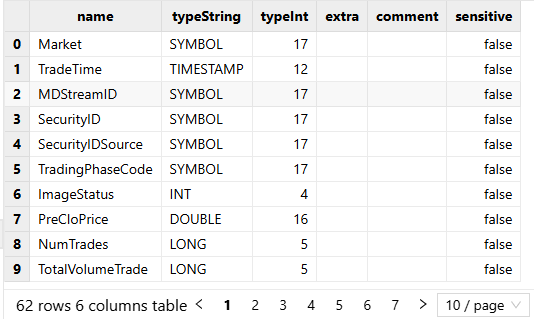
If the code runs without errors, it has executed successfully. You can then run the following code to view the partitioned table schema:
loadTable("dfs://snapshotDB", "snapshotTB").schema().colDefsThe output:
Step 3: Import the Test CSV Data
Run the following code to import the test CSV data. Note that before running the following code, upload the test data file testData.csv to the server directory of your DolphinDB server. You can also upload the CSV file to a user-defined path, such as /data/testData.csv. In that case, set filename="/data/testData.csv" in the loadTextEx function in the following code.
tmp = loadTable("dfs://snapshotDB", "snapshotTB").schema().colDefs
schemaTB = table(tmp.name as name, tmp.typeString as type)
loadTextEx(dbHandle=database("dfs://snapshotDB"), tableName="snapshotTB", partitionColumns=`TradeDate`SecurityID, filename="./testData.csv", schema=schemaTB)
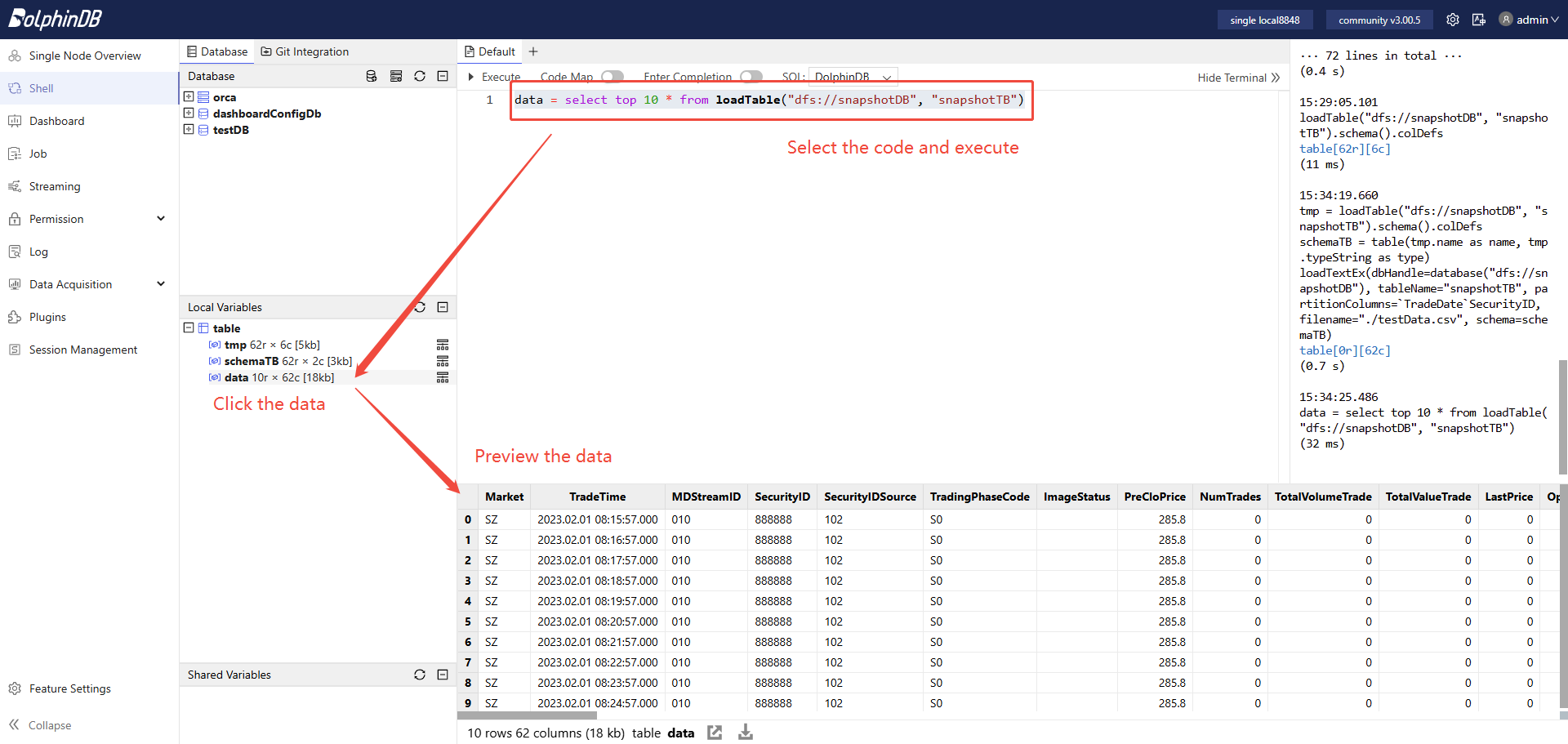
After successful import, run the following code to load the first 10 rows into memory to preview the data:
data = select top 10 * from loadTable("dfs://snapshotDB", "snapshotTB")The output:
Step 4: Define User-Defined Functions to Calculate High and Low Prices
Run the following code to define user-defined functions in the current session. You can then call the high and low functions in subsequent operations within the same session:
defg high(DeltasHighPrice, HighPrice, LastPrice){
	if(sum(DeltasHighPrice)>0.000001){
		return max(HighPrice)
	}
	else{
		return max(LastPrice)
	}
}

defg low(DeltasLowPrice, LowPrice, LastPrice){
	sumDeltas = sum(DeltasLowPrice)
	if(sumDeltas<-0.000001 and sumDeltas!=NULL){
		return min(iif(LowPrice==0.0, NULL, LowPrice))
	}
	else{
		return min(LastPrice)
	}
}
Step 5: Load a Small Sample into Memory for Debugging
To make it easier to verify that the code works well during debugging, you can first load a small amount of data into memory, which also makes it easier to debug more complex business logic later.
Run the following code to load one day's data for two symbols into memory and assign it to the table snapshotTB. In the subsequent code, you can reference the snapshotTB for debugging:
snapshotTB =	select	TradeTime, SecurityID, OpenPrice,
			PreCloPrice, HighPrice, LowPrice,
			LastPrice, PreCloseIOPV, IOPV,
			TotalVolumeTrade, TotalValueTrade, NumTrades,
			UpLimitPx, DownLimitPx
		from loadTable("dfs://snapshotDB", "snapshotTB")
		where TradeTime.date()=2023.02.01, SecurityID in `888888`999999
Step 6: Process the Raw Snapshot Data
Run the following code to process the raw snapshot data. The main transformations are as follows:
- Include the data from 09:25:00 to 09:30:00 in the first OHLC bar: [09:30:00, 09:31:00].
- Calculate the changes in the high and low prices between two adjacent snapshots of the same stock or fund.
- Calculate the increments in trading volume, trading value, and trade count between two adjacent snapshots of the same stock or fund.
tempTB1 =	select	TradeTime.date() as TradeDate,
			iif(TradeTime.time()<=09:30:00.000, 09:30:00.000, TradeTime.time()) as TradeTime,
			SecurityID,
			OpenPrice,
			PreCloPrice,
			HighPrice,
			LowPrice,
			LastPrice,
			PreCloseIOPV,
			IOPV,
			UpLimitPx,
			DownLimitPx,
			iif(deltas(HighPrice)>0.000001, 1, 0) as DeltasHighPrice,
			iif(abs(deltas(LowPrice))>0.000001, -1, 0) as DeltasLowPrice,
			iif(deltas(TotalVolumeTrade)==NULL, TotalVolumeTrade, deltas(TotalVolumeTrade)) as DeltasVolume,
			iif(deltas(TotalValueTrade)==NULL, TotalValueTrade, deltas(TotalValueTrade)) as DeltasTurnover,
			iif(deltas(NumTrades)==NULL, NumTrades, deltas(NumTrades)) as DeltasTradesCount
		from snapshotTB
		where TradeTime.time()>=09:25:00.000
		context by SecurityID
Step 7: Perform Aggregation with a 1-Minute Window and 1-Minute Step
Run the following code to perform rolling-window aggregation on the processed snapshot data using a 1-minute window and a 1-minute step. The key steps are as follows:
- Call the user-defined functions
highandlowto calculate the high and low prices of the OHLC bar. - FirstBarChangeRate indicates the change between the first snapshot with a nonzero latest price and the latest snapshot with a nonzero latest price within the current 1-minute calculation window. It is used to calculate the price change for the opening OHLC bar.
- This downsampling step calls the DolphinDB built-in function
interval. At this stage, if snapshot data is missing from an intraday calculation window, the code fills the values with 0. In a later step, it further processes OHLC bars with all values 0.
tempTB2 =	select	firstNot(LastPrice, 0) as OpenPrice,
			high(DeltasHighPrice, HighPrice, LastPrice) as HighPrice,
			low(DeltasLowPrice, LowPrice, LastPrice) as LowPrice,
			last(LastPrice) as ClosePrice,
			sum(DeltasVolume) as Volume,
			sum(DeltasTurnover) as Turnover,
			sum(DeltasTradesCount) as TradesCount,
			last(PreCloPrice) as PreClosePrice,
			last(PreCloseIOPV) as PreCloseIOPV,
			last(IOPV) as IOPV,
			last(UpLimitPx) as UpLimitPx,
			last(DownLimitPx) as DownLimitPx,
			lastNot(LastPrice, 0)\firstNot(LastPrice, 0)-1 as FirstBarChangeRate
		from tempTB1
		group by SecurityID, TradeDate, interval(X=TradeTime, duration=60s, label='left', fill=0) as TradeTime
Step 8: Align 240 Daily OHLC Bars
In this example, a total of 240 OHLC bars are generated:
- The output time of the first OHLC bar is 09:30:00, and its calculation window is [09:25:00, 09:31:00).
- The full output includes the bars at 11:30:00, 14:57:00, and 15:00:00, but excludes those at 14:58:00 and 14:59:00.
If you need to customize the output rules—for example, to output OHLC bars for the two special periods 14:58:00 and 14:59:00—you can modify the following code.
codes = select distinct(SecurityID) as SecurityID from tempTB2 order by SecurityID
allTime = table((take(0..120, 121)*60*1000+09:30:00.000).join(take(0..117, 118)*60*1000+13:00:00.000).join(15:00:00.000) as TradeTime)
tempTB3 = cj(codes, allTime)
Step 9: Fill Calculation Windows with Missing Snapshot Data
Run the following code to process the aligned 240 daily OHLC bars data as follows and retrieve the final result:
- For calculation windows with no intraday trades, fill the values of OpenPrice, HighPrice, LowPrice, and ClosePrice with the ClosePrice of the previous OHLC bar.
- For calculation windows with no intraday trades, fill the values of PreClosePrice, PreCloseIOPV, IOPV, UpLimitPx, and DownLimitPx with the corresponding values from the previous OHLC bar.
- For the OHLC bar after the open, the price change equals the change between the latest price in the last snapshot and the latest price in the first snapshot within the [09:25:00, 09:31:00) calculation window
result = select	SecurityID,
		concatDateTime(TradeDate, TradeTime) as TradeTime,
		iif(OpenPrice==0.0 and PreClosePrice==0.0, cumlastNot(ClosePrice, 0.0), OpenPrice) as OpenPrice,
		iif(HighPrice==0.0 and PreClosePrice==0.0, cumlastNot(ClosePrice, 0.0), HighPrice) as HighPrice,
		iif(LowPrice==0.0 and PreClosePrice==0.0, cumlastNot(ClosePrice, 0.0), LowPrice) as LowPrice,
		iif(ClosePrice==0.0 and PreClosePrice==0.0, cumlastNot(ClosePrice, 0.0), ClosePrice) as ClosePrice,
		Volume,
		Turnover,
		TradesCount,
		iif(PreClosePrice==0.0, cumlastNot(PreClosePrice, 0.0), PreClosePrice) as PreClosePrice,
		iif(PreCloseIOPV==0.0 and PreClosePrice==0.0, cumlastNot(PreCloseIOPV, 0.0), PreCloseIOPV).nullFill(0.0) as PreCloseIOPV,
		iif(IOPV==0.0 and PreCloseIOPV==0.0, cumlastNot(IOPV, 0.0), IOPV).nullFill(0.0) as IOPV,
		iif(UpLimitPx==0.0, cumlastNot(UpLimitPx, 0.0), UpLimitPx).nullFill(0.0) as UpLimitPx,
		iif(DownLimitPx==0.0, cumlastNot(DownLimitPx, 0.0), DownLimitPx).nullFill(0.0) as DownLimitPx,
		iif(	time(TradeTime)==09:30:00.000,
			iif(FirstBarChangeRate!=NULL, FirstBarChangeRate, 0.0),
			iif(ratios(ClosePrice)!=NULL and ClosePrice!=0.0, ratios(ClosePrice)-1, 0.0)) as ChangeRate
	from lj(tempTB3, tempTB2, `TradeTime`SecurityID)
	context by SecurityID
The output:

Step 10: Encapsulate the Parallel Computing Code
After completing the first nine steps, you can already generate OHLC bars from a small volume of snapshot data. To process massive volumes of historical market data, you still need to encapsulate the code further so it can run in parallel.
First, run the following code to clear all temporary in-memory variables in the current session:
undef allThen run the following code to define the functions for parallel computing:
defg high(DeltasHighPrice, HighPrice, LastPrice){
	if(sum(DeltasHighPrice)>0.000001){
		return max(HighPrice)
	}
	else{
		return max(LastPrice)
	}
}

defg low(DeltasLowPrice, LowPrice, LastPrice){
	sumDeltas = sum(DeltasLowPrice)
	if(sumDeltas<-0.000001 and sumDeltas!=NULL){
		return min(iif(LowPrice==0.0, NULL, LowPrice))
	}
	else{
		return min(LastPrice)
	}
}

def calOHLCBaseOnSnapshotMapFuc(snapshotTB){
	//Processing the original snapshot market table for calculating OHLC
	tempTB1 =	select	TradeTime.date() as TradeDate,
				iif(TradeTime.time()<=09:30:00.000, 09:30:00.000, TradeTime.time()) as TradeTime,
				SecurityID,
				OpenPrice,
				PreCloPrice,
				HighPrice,
				LowPrice,
				LastPrice,
				PreCloseIOPV,
				IOPV,
				UpLimitPx,
				DownLimitPx,
				iif(deltas(HighPrice)>0.000001, 1, 0) as DeltasHighPrice,
				iif(abs(deltas(LowPrice))>0.000001, -1, 0) as DeltasLowPrice,
				iif(deltas(TotalVolumeTrade)==NULL, TotalVolumeTrade, deltas(TotalVolumeTrade)) as DeltasVolume,
				iif(deltas(TotalValueTrade)==NULL, TotalValueTrade, deltas(TotalValueTrade)) as DeltasTurnover,
				iif(deltas(NumTrades)==NULL, NumTrades, deltas(NumTrades)) as DeltasTradesCount
			from snapshotTB
			where TradeTime.time()>=09:25:00.000
			context by SecurityID
	//Aggregate Calculating: temporary 1-minute OHLC table
	tempTB2 =	select	firstNot(LastPrice, 0.0) as OpenPrice,
				high(DeltasHighPrice, HighPrice, LastPrice) as HighPrice,
				low(DeltasLowPrice, LowPrice, LastPrice) as LowPrice,
				last(LastPrice) as ClosePrice,
				sum(DeltasVolume) as Volume,
				sum(DeltasTurnover) as Turnover,
				sum(DeltasTradesCount) as TradesCount,
				last(PreCloPrice) as PreClosePrice,
				last(PreCloseIOPV) as PreCloseIOPV,
				last(IOPV) as IOPV,
				last(UpLimitPx) as UpLimitPx,
				last(DownLimitPx) as DownLimitPx,
				lastNot(LastPrice, 0.0)\firstNot(LastPrice, 0.0)-1 as FirstBarChangeRate
		from tempTB1
		group by SecurityID, TradeDate, interval(X=TradeTime, duration=60s, label='left', fill=0) as TradeTime
	//240 bars per day
	codes = select distinct(SecurityID) as SecurityID from tempTB2 order by SecurityID
	allTime = table((take(0..120, 121)*60*1000+09:30:00.000).join(take(0..117, 118)*60*1000+13:00:00.000).join(15:00:00.000) as TradeTime)
	tempTB3 = cj(codes, allTime)
	//Processing missing data calculation window, excluding opening
	result = select	SecurityID,
			concatDateTime(TradeDate, TradeTime) as TradeTime,
			iif(OpenPrice==0.0 and PreClosePrice==0.0, cumlastNot(ClosePrice, 0.0), OpenPrice) as OpenPrice,
			iif(HighPrice==0.0 and PreClosePrice==0.0, cumlastNot(ClosePrice, 0.0), HighPrice) as HighPrice,
			iif(LowPrice==0.0 and PreClosePrice==0.0, cumlastNot(ClosePrice, 0.0), LowPrice) as LowPrice,
			iif(ClosePrice==0.0 and PreClosePrice==0.0, cumlastNot(ClosePrice, 0.0), ClosePrice) as ClosePrice,
			Volume,
			Turnover,
			TradesCount,
			iif(PreClosePrice==0.0, cumlastNot(PreClosePrice, 0.0), PreClosePrice) as PreClosePrice,
			iif(PreCloseIOPV==0.0 and PreClosePrice==0.0, cumlastNot(PreCloseIOPV, 0.0), PreCloseIOPV).nullFill(0.0) as PreCloseIOPV,
			iif(IOPV==0.0 and PreCloseIOPV==0.0, cumlastNot(IOPV, 0.0), IOPV).nullFill(0.0) as IOPV,
			iif(UpLimitPx==0.0, cumlastNot(UpLimitPx, 0.0), UpLimitPx).nullFill(0.0) as UpLimitPx,
			iif(DownLimitPx==0.0, cumlastNot(DownLimitPx, 0.0), DownLimitPx).nullFill(0.0) as DownLimitPx,
			iif(	time(TradeTime)==09:30:00.000,
				iif(FirstBarChangeRate!=NULL, FirstBarChangeRate, 0.0),
				iif(ratios(ClosePrice)!=NULL and ClosePrice!=0.0, ratios(ClosePrice)-1, 0.0)) as ChangeRate
		from lj(tempTB3, tempTB2, `TradeTime`SecurityID)
		context by SecurityID
	return result
}

def calOHLCBaseOnSnapshot(calStartDate, calEndDate, dbName, tbName){
	//Generate data source: If SQL only contains the required columns for calculation, it can improve calculation efficiency
	dataSource = sqlDS(<	select	TradeTime, SecurityID, OpenPrice,
					PreCloPrice, HighPrice, LowPrice,
					LastPrice, PreCloseIOPV, IOPV,
					TotalVolumeTrade, TotalValueTrade, NumTrades,
					UpLimitPx, DownLimitPx
				from loadTable(dbName, tbName)
				where TradeTime.date()>=calStartDate, TradeTime.date()<=calEndDate>)
	result = mr(ds=dataSource, mapFunc=calOHLCBaseOnSnapshotMapFuc, finalFunc=unionAll{,false}, parallel=true)
	return result
}
Finally, run the following code to generate 1-minute OHLC bars in parallel from one day's full snapshot data for the SSE and SZSE.
calStartDate = 2023.02.01
calEndDate = 2023.02.01
dbName = "dfs://snapshotDB"
tbName = "snapshotTB"
oneDayResult = calOHLCBaseOnSnapshot(calStartDate, calEndDate, dbName, tbName)
Step 11: Store 1-Minute OHLC Bars Data
Run the following code to create the database and partitioned table to store 1-minute OHLC bars before storing data for the first time:
def createStockFundOHLCDfsTB(dbName="dfs://stockFundOHLC", tbName="stockFundOHLC"){
	if(existsDatabase(dbUrl=dbName)){
		print(dbName + " has been created !")
		print(tbName + " has been created !")
	}
	else{
		db = database(dbName, VALUE, 2021.01.01..2021.12.31)
		print(dbName + " created successfully.")
		colNames = `SecurityID`TradeTime`OpenPrice`HighPrice`LowPrice`ClosePrice`Volume`Turnover`TradesCount`PreClosePrice`PreCloseIOPV`IOPV`UpLimitPx`DownLimitPx`ChangeRate
		colTypes = [SYMBOL, TIMESTAMP, DOUBLE, DOUBLE, DOUBLE, DOUBLE, LONG, DOUBLE, INT, DOUBLE, DOUBLE, DOUBLE, DOUBLE, DOUBLE, DOUBLE]
		schemaTable = table(1:0, colNames, colTypes)
		db.createPartitionedTable(table=schemaTable, tableName=tbName, partitionColumns=`TradeTime)
		print(tbName + " created successfully.")
	}
	return loadTable(dbName, tbName).schema().colDefs
}
dbName = "dfs://stockFundOHLC"
tbName = "stockFundOHLC"
createStockFundOHLCDfsTB(dbName, tbName)
Run the following code to persist the results from memory into the partitioned table:
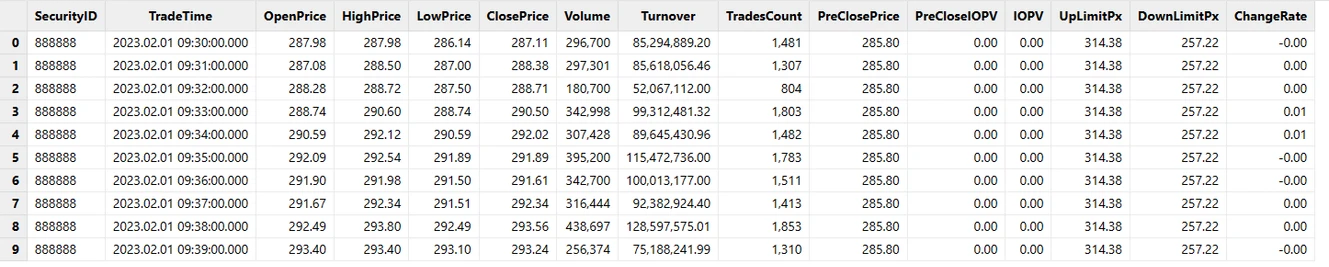
loadTable("dfs://stockFundOHLC", "stockFundOHLC").append!(oneDayResult)Load the first 10 rows into memory to preview:
data = select top 10 * from loadTable("dfs://stockFundOHLC", "stockFundOHLC")The output:
2.4 Performance Test of Parallel Computing
| Configurations | Details |
|---|---|
| OS (Operating System) | CentOS Linux 7 (Core) |
| Kernel | 3.10.0-1160.el7.x86_64 |
| CPU | Intel(R) Xeon(R) Gold 5220R CPU @ 2.20GHz 16 Logical Cores |
| Memory | 256 GB |
| Test Scenario | Raw Snapshot Data | Number of Output Rows | Output Size | Calculation Time |
|---|---|---|---|---|
| 1 day | 24,285,866 rows | 1,555,440 rows | 172 MB | 4.3 s |
| 10 days | 238,691,947 rows | 15,563,760 rows | 1.7 GB | 37.3 s |
| 1 month (20 trading days) | 474,919,708 rows | 31,158,240 rows | 3.4 GB | 76.5 s |
If you use the Community Edition, large-scale parallel computing on the data above may fail due to insufficient memory (the Community Edition is limited to 8 GB). Contact technical support to apply for a trial license.
3. Generate OHLC Bars from Real-Time Snapshot Data
The characteristics of real-time snapshot data and the rules for generating 1-minute OHLC bars are the same as those described in sections 2.1 and 2.2.
The workflow for generating OHLC bars from real-time snapshot data is shown below:
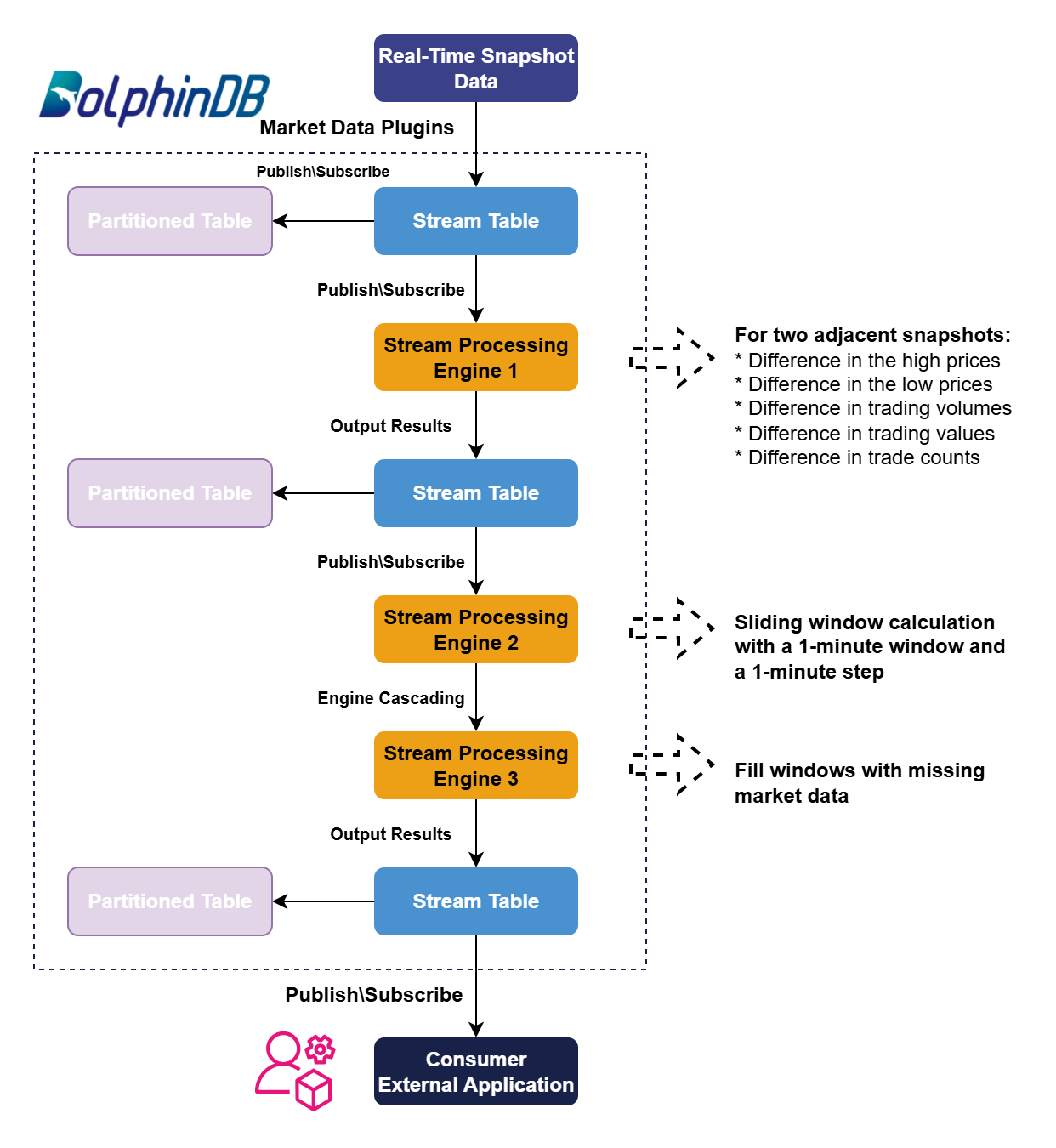
Next, we will explain in detail how to write the code in DolphinDB to generate OHLC bars from real-time snapshot data. This tutorial does not cover the basic concepts of DolphinDB’s streaming feature. For more information, see the official tutorial: Stream for DolphinDB.
3.1 Define Functions to Create Stream Tables
Run the following code to define the functions to create the stream tables:
def getMDLSnapshotTB(tableCapacity=1000000){
	colNames = `Market`TradeTime`MDStreamID`SecurityID`SecurityIDSource`TradingPhaseCode`ImageStatus`PreCloPrice`NumTrades`TotalVolumeTrade`TotalValueTrade`LastPrice`OpenPrice`HighPrice`LowPrice`ClosePrice`DifPrice1`DifPrice2`PE1`PE2`PreCloseIOPV`IOPV`TotalBidQty`WeightedAvgBidPx`AltWAvgBidPri`TotalOfferQty`WeightedAvgOfferPx`AltWAvgAskPri`UpLimitPx`DownLimitPx`OpenInt`OptPremiumRatio`OfferPrice`BidPrice`OfferOrderQty`BidOrderQty`BidNumOrders`OfferNumOrders`ETFBuyNumber`ETFBuyAmount`ETFBuyMoney`ETFSellNumber`ETFSellAmount`ETFSellMoney`YieldToMatu`TotWarExNum`WithdrawBuyNumber`WithdrawBuyAmount`WithdrawBuyMoney`WithdrawSellNumber`WithdrawSellAmount`WithdrawSellMoney`TotalBidNumber`TotalOfferNumber`MaxBidDur`MaxSellDur`BidNum`SellNum`LocalTime`SeqNo`OfferOrders`BidOrders
	colTypes = [SYMBOL,TIMESTAMP,SYMBOL,SYMBOL,SYMBOL,SYMBOL,INT,DOUBLE,LONG,LONG,DOUBLE,DOUBLE,DOUBLE,DOUBLE,DOUBLE,DOUBLE,DOUBLE,DOUBLE,DOUBLE,DOUBLE,DOUBLE,DOUBLE,LONG,DOUBLE,DOUBLE,LONG,DOUBLE,DOUBLE,DOUBLE,DOUBLE,INT,DOUBLE,DOUBLE[],DOUBLE[],LONG[],LONG[],INT[],INT[],INT,LONG,DOUBLE,INT,LONG,DOUBLE,DOUBLE,DOUBLE,INT,LONG,DOUBLE,INT,LONG,DOUBLE,INT,INT,INT,INT,INT,INT,TIME,INT,LONG[],LONG[]]
	return streamTable(tableCapacity:0, colNames, colTypes)
}

def getMDLSnapshotProcessTB(tableCapacity=1000000){
	colNames = `SecurityID`TradeTime`UpLimitPx`DownLimitPx`PreCloPrice`HighPrice`LowPrice`LastPrice`PreCloseIOPV`IOPV`DeltasHighPrice`DeltasLowPrice`DeltasVolume`DeltasTurnover`DeltasTradesCount
	colTypes = [SYMBOL, TIMESTAMP, DOUBLE, DOUBLE, DOUBLE, DOUBLE, DOUBLE, DOUBLE, DOUBLE, DOUBLE, DOUBLE, DOUBLE, LONG, DOUBLE, INT]
	return streamTable(tableCapacity:0, colNames, colTypes)
}

def getMDLStockFundOHLCTempTB(tableCapacity=1000000){
	colNames = `TradeTime`SecurityID`OpenPrice`HighPrice`LowPrice`ClosePrice`Volume`Turnover`TradesCount`PreClosePrice`PreCloseIOPV`IOPV`UpLimitPx`DownLimitPx`FirstBarChangeRate
	colTypes = [TIMESTAMP, SYMBOL, DOUBLE, DOUBLE, DOUBLE, DOUBLE, LONG, DOUBLE, INT, DOUBLE, DOUBLE, DOUBLE, DOUBLE, DOUBLE, DOUBLE]
	return streamTable(tableCapacity:0, colNames, colTypes)
}

def getMDLStockFundOHLCTB(tableCapacity=1000000){
	colNames = `SecurityID`TradeTime`OpenPrice`HighPrice`LowPrice`ClosePrice`Volume`Turnover`TradesCount`PreClosePrice`PreCloseIOPV`IOPV`UpLimitPx`DownLimitPx`ChangeRate
	colTypes = [SYMBOL, TIMESTAMP, DOUBLE, DOUBLE, DOUBLE, DOUBLE, LONG, DOUBLE, INT, DOUBLE, DOUBLE, DOUBLE, DOUBLE, DOUBLE, DOUBLE]
	return streamTable(tableCapacity:0, colNames, colTypes)
}
3.2 Define Functions to Calculate the High and Low Prices
Run the following code to define the functions to calculate the high and low prices:
defg high(DeltasHighPrice, HighPrice, LastPrice){
	if(sum(DeltasHighPrice)>0.000001){
		return max(HighPrice)
	}
	else{
		return max(LastPrice)
	}
}

defg low(DeltasLowPrice, LowPrice, LastPrice){
	sumDeltas = sum(DeltasLowPrice)
	if(sumDeltas<-0.000001 and sumDeltas!=NULL){
		return min(iif(LowPrice==0.0, NULL, LowPrice))
	}
	else{
		return min(LastPrice)
	}
}
3.3 Define the Raw Snapshot Data Processing Engine
Step 1: Create the Stream Tables
Run the following code:
//Declare parameters
tableCapacity = 1000000
mdlSnapshotTBName = "mdlSnapshot"
mdlSnapshotProcessTBName = "mdlSnapshotProcess"
//Create MDL snapshot table
share(getMDLSnapshotTB(tableCapacity), mdlSnapshotTBName)
//Create MDL processed snapshot table
share(getMDLSnapshotProcessTB(tableCapacity), mdlSnapshotProcessTBName)Notes:
- The tableCapacity specifies the amount of memory preallocated when creating a stream table. If this value is smaller than the actual amount of market data received, the table expands automatically. However, the expansion may introduce latency fluctuations at the time it occurs. You should not set this value too high either, as that would waste memory. A reasonable value should be slightly larger than the total volume of market data for the day. You can determine this value based on market data collected over a recent period.
- The mdlSnapshotTBName stream table receives real-time snapshot data and pushes incremental data in real time to the raw snapshot data processing engine.
- The mdlSnapshotProcessTBName is a stream table that receives the result data processed by the engine.
Step 2: Define the Rules for the Raw Snapshot Data Processing Engine
Run the following code:
//Original columns in the snapshot table
colNames = `TradeTime`UpLimitPx`DownLimitPx`PreCloPrice`HighPrice`LowPrice`LastPrice`PreCloseIOPV`IOPV
//Derived columns processed based on the original snapshot table
convert = sqlCol(colNames).append!(sqlColAlias(<iif(deltas(HighPrice)>0.000001, 1, 0)>, `DeltasHighPrice)).append!(sqlColAlias(<iif(abs(deltas(LowPrice))>0.000001, -1, 0)>, `DeltasLowPrice)).append!(sqlColAlias(<iif(deltas(TotalVolumeTrade)==NULL, TotalVolumeTrade, deltas(TotalVolumeTrade))>, `DeltasVolume)).append!(sqlColAlias(<iif(deltas(TotalValueTrade)==NULL, TotalValueTrade, deltas(TotalValueTrade))>, `DeltasTurnover)).append!(sqlColAlias(<iif(deltas(NumTrades)==NULL, NumTrades, deltas(NumTrades))>, `DeltasTradesCount))
You can click the “convert” in Local Variables to view the defined calculation rules.
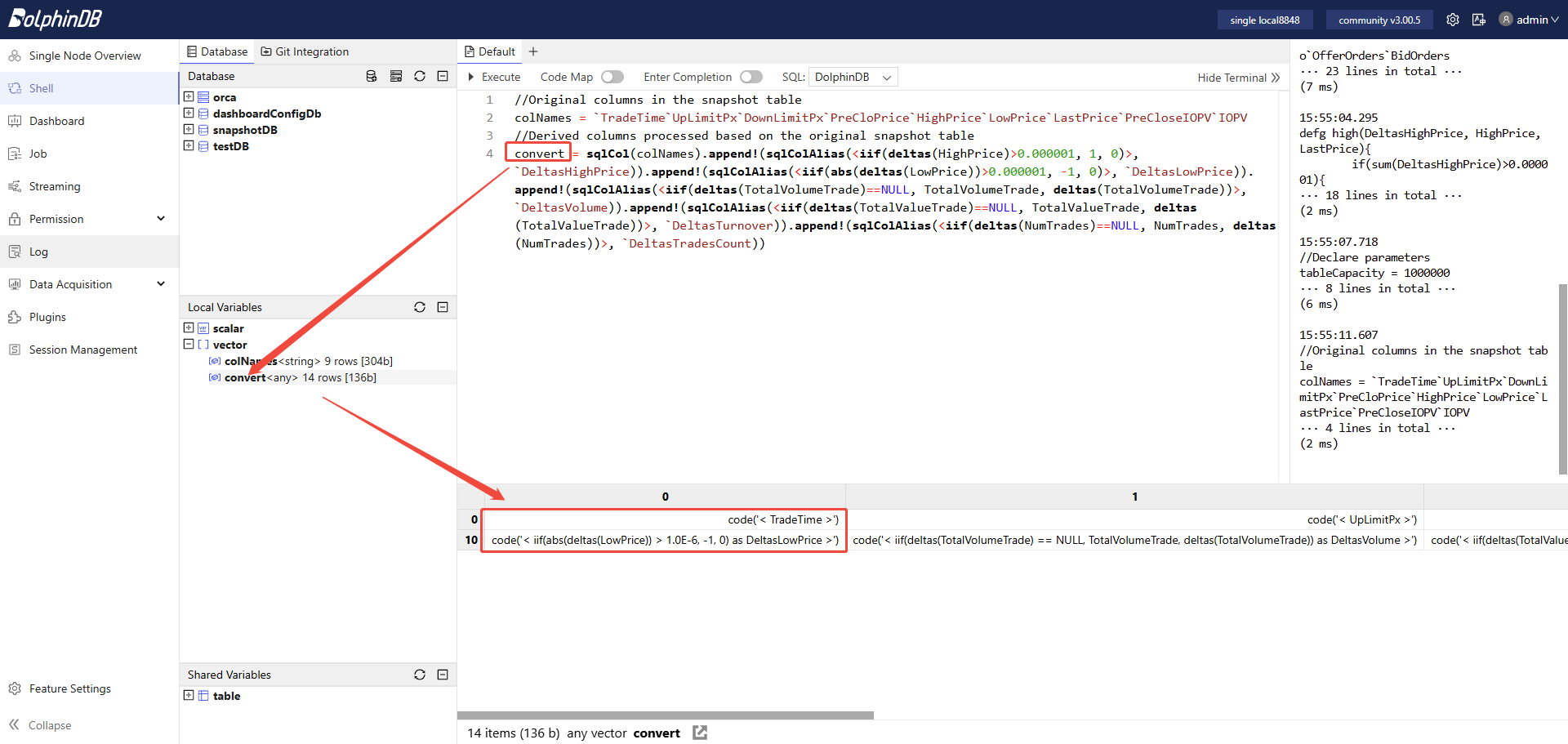
The processing of the raw market data consists of two parts:
- Retain the values of some raw fields, such as market time, limit up price, and limit down price, as specified in the colNames variable.
- Process the raw fields as needed. For example, you can calculate the
increment of trading volume between two adjacent snapshots from the daily
trading volume. In DolphinDB, use the following expression: . The deltas computes the difference
between two adjacent records. For the first snapshot,
deltas(TotalVolumeTrade)returns NULL, so this example uses the iif to handle that if-else logic. For the first snapshot, the trading volume increment equals that snapshot's TotalVolumeTrade.
Step 3: Define the Raw Snapshot Data Processing Engine (Stream Processing Engine 1)
Run the following code:
mdlSnapshotProcessEngineName = "mdlSnapshotProcessEngine"
createReactiveStateEngine(
	name=mdlSnapshotProcessEngineName,
	metrics =convert,
	dummyTable=objByName(mdlSnapshotTBName),
	outputTable=objByName(mdlSnapshotProcessTBName),
	keyColumn="SecurityID",
	filter=<TradeTime.time() between 09:25:00.000:11:31:00.000 or TradeTime.time() between 13:00:00.000:14:57:00.000 or TradeTime.time()>=15:00:00.000>,
	keepOrder = true)
Notes:
- This example uses DolphinDB's reactive state engine
ReactiveStateEngine. Its primary function is to perform sliding-window processing on the input data. It processes each record fed into the engine according to the specified computation logic. The engine supports both stateless and stateful computation. Its stateful functions have been algorithmically optimized, including incremental computation and the avoidance of redundant calculations. - This engine supports filtered output. Here, it is configured to output
results only for the following time range:
- 09:25:00.000-11:31:00.000
- 13:00:00.000-14:57:00.000
- Later than or equal to 15:00:00.000
Run the following code to check the engine status. Under normal conditions, it returns output similar to the following:
getStreamEngineStat()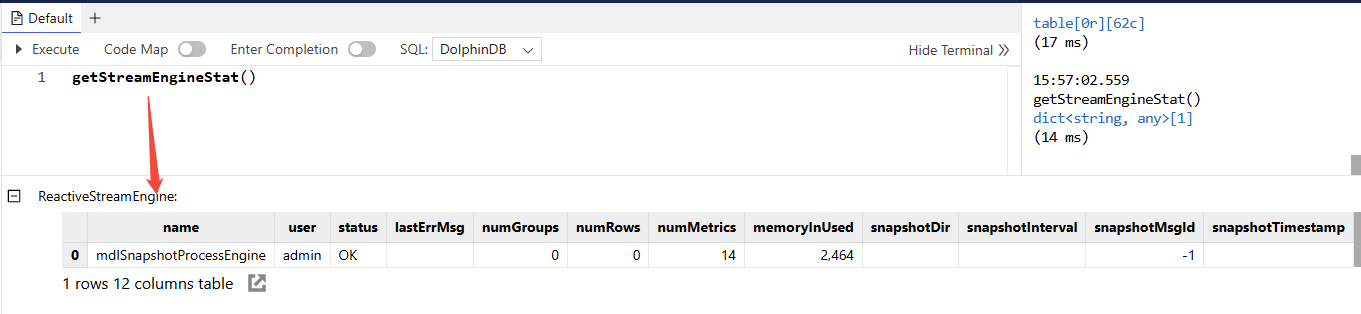
Step 4: Subscribe to the Raw Market Data Stream Table
Run the following code:
subscribeTable(
	tableName=mdlSnapshotTBName,
	actionName=mdlSnapshotProcessEngineName,
	handler=getStreamEngine(mdlSnapshotProcessEngineName),
	msgAsTable=true,
	batchSize=100,
	throttle=0.002,
	hash=0,
	reconnect=true)
Notes:
- The subscribed stream table is the raw snapshot data table.
- The consumer is the raw snapshot data processing engine. Data that streams into the raw market data table is promptly published to the engine, which processes it in real time.
Run the following code to check the subscription status. Under normal conditions, it returns output similar to the following:
getStreamingStat().pubTables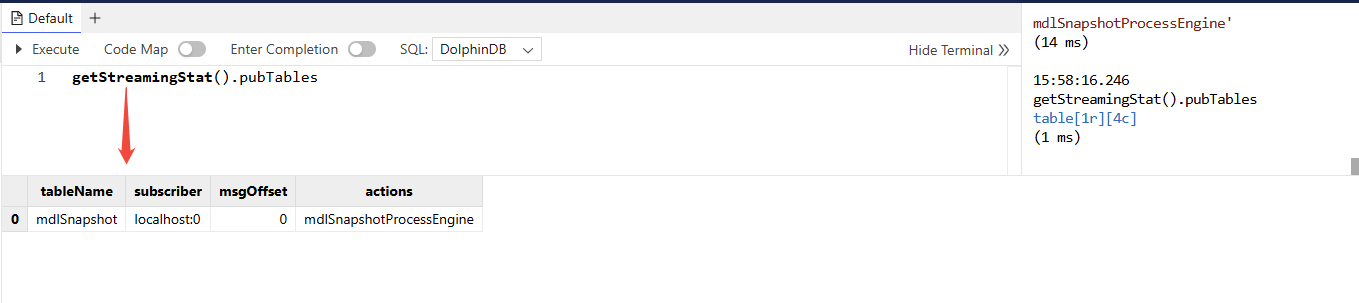
3.4 Define the Missing Market Data Fill Engine
According to the OHLC bar generation workflow, we normally define Stream Processing Engine 2 first, then Stream Processing Engine 3. However, in this tutorial, Stream Processing Engine 2 and Stream Processing Engine 3 use engine cascading. Therefore, you must define Stream Processing Engine 3 first so that, when you define Stream Processing Engine 2, you can specify its output as the input to Stream Processing Engine 3.
Step 1: Create the Stream Tables
Run the following code:
//Declare parameters
mdlStockFundOHLCTBName = "mdlStockFundOHLC"
//Create MDL 1-minute OHLC table
share(getMDLStockFundOHLCTB(100000), mdlStockFundOHLCTBName)
Note:
- The
mdlStockFundOHLCTBNameis a stream table that receives the final output from Stream Processing Engine 3, namely 1-minute OHLC bar data. External applications can subscribe to it, such as Python, C++, Java, or C#, etc.
Step 2: Define the Missing Market Data Fill Engine (Stream Processing Engine 3)
Run the following code:
//Declare parameters
mdlStockFundOHLCEngineName = "mdlStockFundOHLCEngine"
//Define engine calculation methods
convert = <[
	TradeTime,
	iif(OpenPrice==0, ClosePrice, OpenPrice).nullFill(0.0),
	iif(HighPrice==0, ClosePrice, HighPrice).nullFill(0.0),
	iif(LowPrice==0, ClosePrice, LowPrice).nullFill(0.0),
	ClosePrice.nullFill(0.0),
	Volume,
	Turnover,
	TradesCount,
	PreClosePrice,
	PreCloseIOPV.nullFill(0.0),
	IOPV.nullFill(0.0),
	UpLimitPx,
	DownLimitPx,
	iif(time(TradeTime)==09:30:00.000, FirstBarChangeRate, iif(ratios(ClosePrice)!=NULL, ratios(ClosePrice)-1, 0)).nullFill(0.0)
]>
//Create ReactiveStateEngine: mdlStockFundOHLCEngineName
createReactiveStateEngine(
	name=mdlStockFundOHLCEngineName,
	metrics =convert,
	dummyTable=getMDLStockFundOHLCTempTB(1),
	outputTable=objByName(mdlStockFundOHLCTBName),
	keyColumn="SecurityID",
	keepOrder = true)
Notes:
- Stream Processing Engine 2 performs rolling-window calculations on the processed snapshot data, using a window size and step of 1 minute. Under normal conditions, it outputs one record per minute for each stock or fund. However, in special cases, a very inactive stock or fund may have no snapshot data at all during a minute. In that case, Stream Processing Engine 2 fills the values with 0. To comply with OHLC bar calculation rules, when the calculation window contains no snapshot data, the values of OpenPrice, HighPrice, LowPrice, and ClosePrice are filled with the previous bar's ClosePrice. The engine described above handles these special cases.
- Stream Processing Engine 3 takes the output of Stream Processing Engine 2 as its input. Therefore, Stream Processing Engine 3 does not need to subscribe to an upstream stream table.
3.5 Define the Rolling Calculation Engine with a 1-Minute Window and 1-Minute Step
Run the following code:
mdlStockFundOHLCTempEngineName = "mdlStockFundOHLCTempEngine"
//Define engine calculation methods
barConvert = <[
	firstNot(LastPrice, 0),
	high(DeltasHighPrice, HighPrice, LastPrice),
	low(DeltasLowPrice, LowPrice, LastPrice),
	lastNot(LastPrice, 0),
	sum(DeltasVolume),
	sum(DeltasTurnover),
	sum(DeltasTradesCount),
	first(PreCloPrice),
	first(PreCloseIOPV),
	lastNot(IOPV, 0),
	last(UpLimitPx),
	last(DownLimitPx),
	lastNot(LastPrice, 0)\firstNot(LastPrice, 0)-1
]>
//Define engine fill methods
fillList = [0, 0, 0, 'ffill', 0, 0, 0, 'ffill', 'ffill', 'ffill', 'ffill', 'ffill', 0]
createDailyTimeSeriesEngine(
	name=mdlStockFundOHLCTempEngineName,
	windowSize=60000,
	step=60000,
	metrics=barConvert,
	dummyTable=objByName(mdlSnapshotProcessTBName),
	outputTable=getStreamEngine(mdlStockFundOHLCEngineName),
	timeColumn=`TradeTime,
	keyColumn=`SecurityID,
	useWindowStartTime=true,
	forceTriggerTime=1000,
	fill=fillList,
	sessionBegin=09:30:00.000 13:00:00.000 15:00:00.000,
	sessionEnd=11:31:00.000 14:58:00.000 15:01:00.000,
	mergeSessionEnd=true,
	forceTriggerSessionEndTime=30000)
//Subscribe to the processed snapshot table, input incremental data into the DailyTimeSeriesEngine of mdlStockFundOHLCTempEngineName
subscribeTable(
	tableName=mdlSnapshotProcessTBName,
	actionName=mdlStockFundOHLCTempEngineName,
	handler=getStreamEngine(mdlStockFundOHLCTempEngineName),
	msgAsTable=true,
	batchSize=100,
	throttle=0.01,
	hash=0,
	reconnect=true)
Notes:
- This example uses DolphinDB's daily time-series aggregation engine
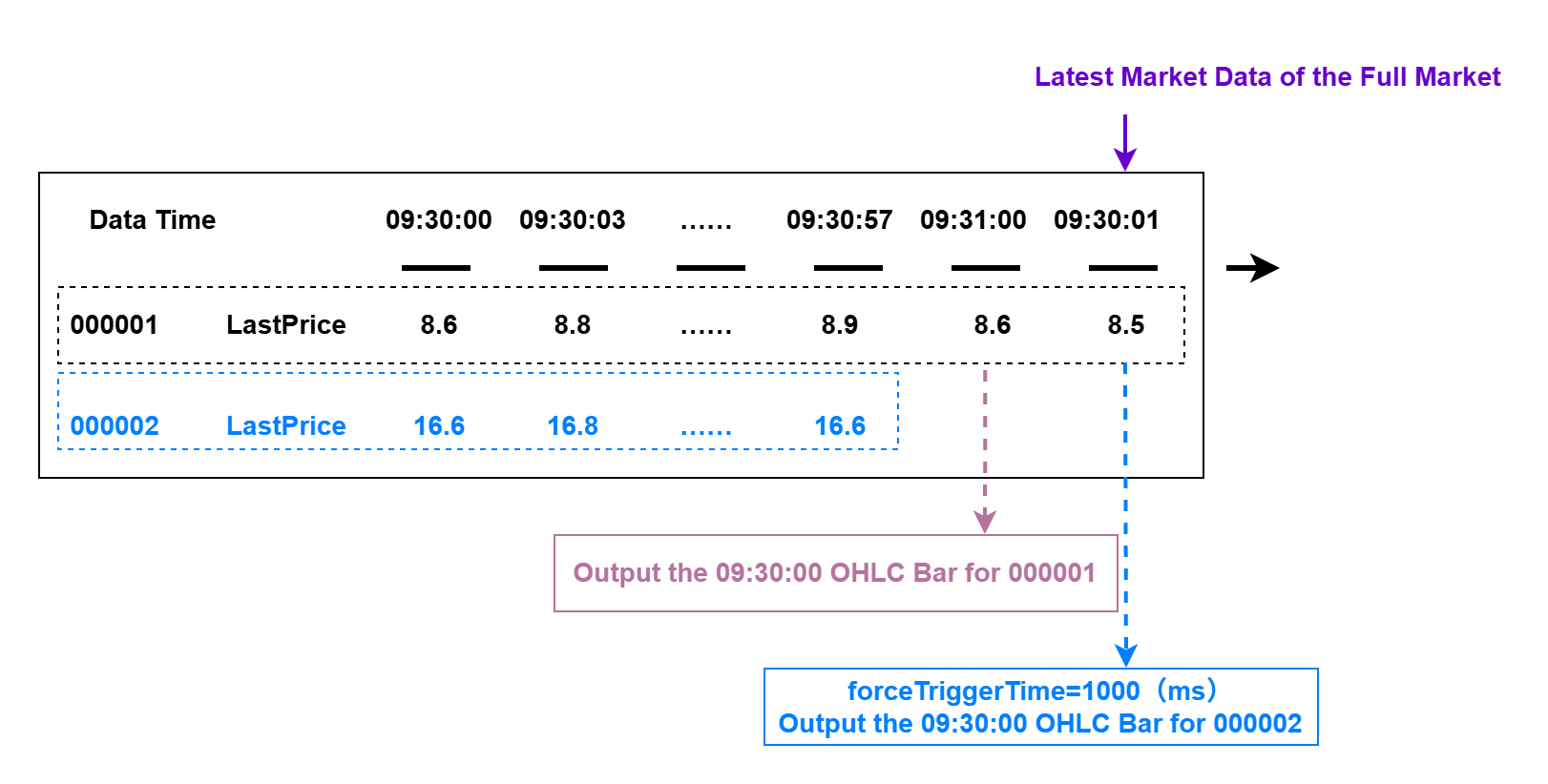
DailyTimeSeriesEngine, which is primarily designed for rolling-window and sliding-window calculations in real-time computing scenarios. - Setting forceTriggerTime=1000 means that if the latest snapshot time TradeTime for any stock or fund in the entire market is greater than or equal to the window close time (an exact minute boundary in this tutorial) plus 1000 milliseconds (1 second), the system forcibly closes the latest OHLC bar calculation window for inactive stocks and funds and outputs the OHLC bar result. You can set the parameter based on your actual business needs.
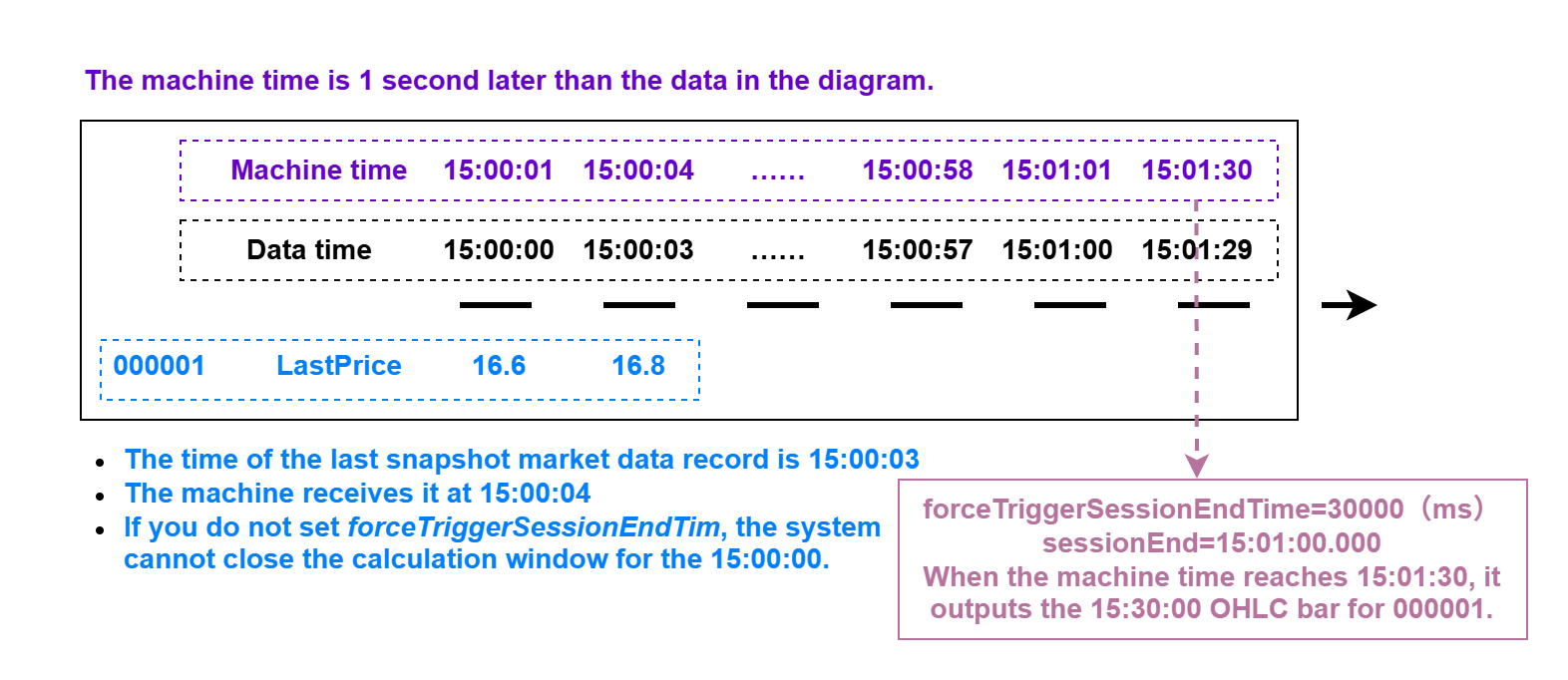
- Setting forceTriggerSessionEndTime=30000 means that once system time reaches each sessionEnd time point, the system waits another 30000 milliseconds (30 seconds) and then forcibly closes the final OHLC bar for any stock or fund that has not yet output its last bar at sessionEnd.
3.6 Persist Real-Time OHLC Bars to a Partitioned Table
In the workflow of generating a real-time OHLC bar in this tutorial, there are three stream tables, which contain the following data:
- mdlSnapshotTBName: Raw snapshot data
- mdlSnapshotProcessTBName: Processed raw snapshot data
- mdlStockFundOHLCTBName: 1-minute OHLC bar data
To retain stream table data permanently, we need to persist it in a partitioned table. Using the 1-minute OHLC bar results as an example, the following section explains in detail how to persist newly appended real-time data from a stream table to a partitioned table.
Step 1: Create the Database and Partitioned Table
You only need to run the code that creates the database and partitioned table once. Once the partitioned table is successfully created, it remains available. Therefore, you do not need to run it repeatedly.
def createStockFundOHLCDfsTB(dbName, tbName){
	if(existsDatabase(dbUrl=dbName)){
		print(dbName + " has been created !")
		print(tbName + " has been created !")
	}
	else{
		db = database(dbName, VALUE, 2021.01.01..2021.12.31)
		print(dbName + " created successfully.")
		colNames = `SecurityID`TradeTime`OpenPrice`HighPrice`LowPrice`ClosePrice`Volume`Turnover`TradesCount`PreClosePrice`PreCloseIOPV`IOPV`UpLimitPx`DownLimitPx`ChangeRate
		colTypes = [SYMBOL, TIMESTAMP, DOUBLE, DOUBLE, DOUBLE, DOUBLE, LONG, DOUBLE, INT, DOUBLE, DOUBLE, DOUBLE, DOUBLE, DOUBLE, DOUBLE]
		schemaTable = table(1:0, colNames, colTypes)
		db.createPartitionedTable(table=schemaTable, tableName=tbName, partitionColumns=`TradeTime)
		print(tbName + " created successfully.")
	}
	return loadTable(dbName, tbName).schema().colDefs
}
dbName = "dfs://stockFundStreamOHLC"
tbName = "stockFundStreamOHLC"
createStockFundOHLCDfsTB(dbName, tbName)
Step 2: Subscribe to the 1-Minute OHLC Bar Results Table for Real-Time Persistence
Run the following code:
subscribeTable(
	tableName=mdlStockFundOHLCTBName,
	actionName=mdlStockFundOHLCTBName,
	handler=loadTable("dfs://stockFundStreamOHLC", "stockFundStreamOHLC"),
	msgAsTable=true,
	batchSize=5000,
	throttle=1,
	hash=0,
	reconnect=true)
Note:
To improve throughput when writing real-time data to the partitioned table, we recommend setting batchSize to 5000 and throttle to 1 (s) to write data in batches.
3.7 Ingest Real-Time Market Data
After you complete the preceding steps, ingest real-time snapshot data into the raw market data table mdlSnapshotTBName to trigger the predefined OHLC bar calculation tasks.
You can ingest real-time market data through DolphinDB market data plugins, message queue plugins, or APIs for various programming languages. For details, refer to the corresponding tutorials.
In this tutorial, historical market data stored in the database is replayed as streaming data by using DolphinDB's replay feature for debugging and development.
Run the following code to start the replay task:
replayData =	select *
		from loadTable("dfs://snapshotDB", "snapshotTB")
		where TradeTime.date()=2023.02.01
		order by TradeTime
replay(
	inputTables=replayData,
	outputTables=mdlSnapshot,
	dateColumn=`TradeTime,
	timeColumn=`TradeTime,
	replayRate=-1)
After the replay finishes, you can run the following code to view the result in the stream table:
result = select * from mdlStockFundOHLC order by SecurityID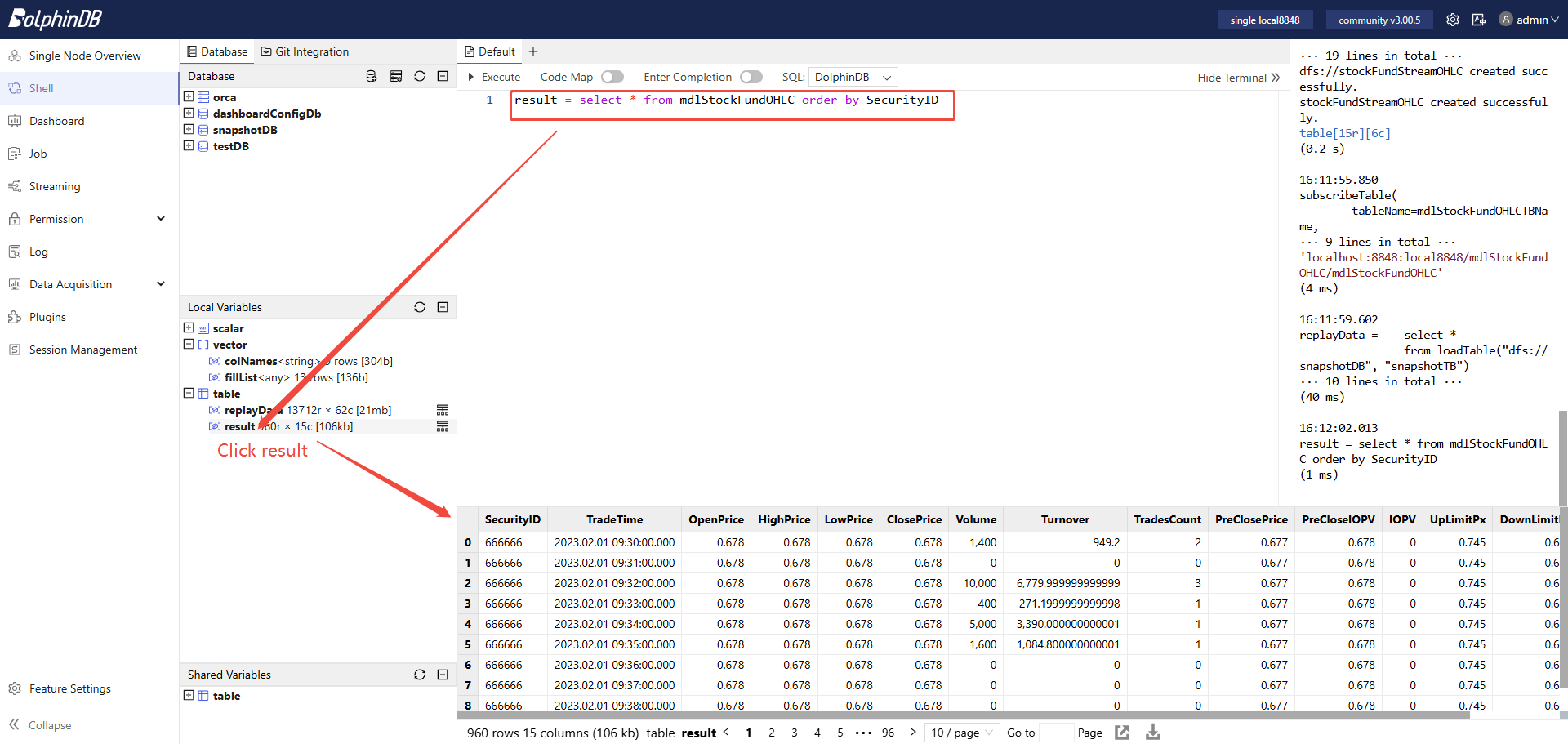
You can run the following code to view the result in the partitioned table:
result = select *
	from loadTable("dfs://stockFundStreamOHLC", "stockFundStreamOHLC")
	where SecurityID=`666666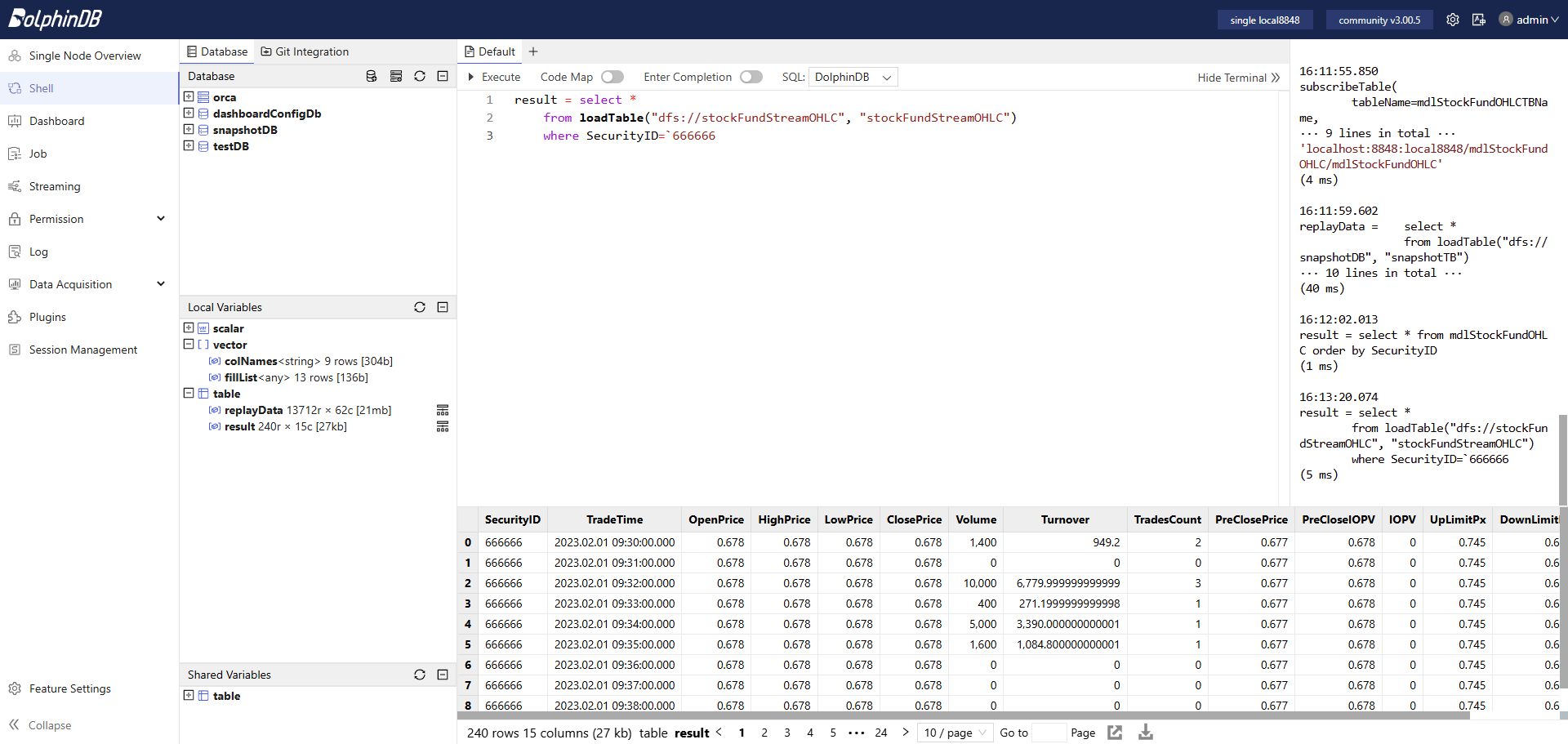
3.8 Subscribe from a Python Client
DolphinDB provides subscription APIs for multiple programming languages, including Python, C++, Java, and C#. For details, refer to the corresponding API tutorials.
This tutorial uses Python API as an example to demonstrate a simple third-party client that consumes DolphinDB streaming data. Run the following code in your Python environment:
import dolphindb as ddb

# Establish a session and connection with DolphinDB
s = ddb.session()
s.connect(host="127.0.0.1", port=8848, userid="admin", password="123456")

# Define the callback function in the Python client
def handlerTestPython(msg):
    print(msg)

# Enable subscription in the Python client to DolphinDB
s.enableStreaming(0)

# Subscribe
s.subscribe(host="127.0.0.1",
            port=8848,
            handler=handlerTestPython,
            tableName="mdlStockFundOHLC",
            actionName="testStream",
            offset=0,
            batchSize=2,
            throttle=0.1,
            msgAsTable=True)
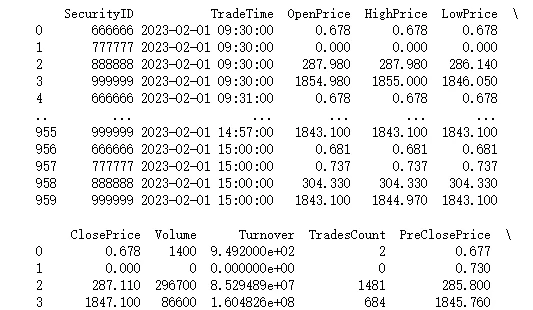
The output:
Notes:
- In this example, offset is set to 0, which means the subscriber starts consuming from the first historical record stored in memory in the stream table. Therefore, when you start the subscription in Python, the Python client can consume all records in the subscribed stream table.
- In a live market, offset is typically set to -1, which means consumption starts when the subscription starts and processes only the incremental data, namely the latest data appended to the subscribed stream table from that point forward.
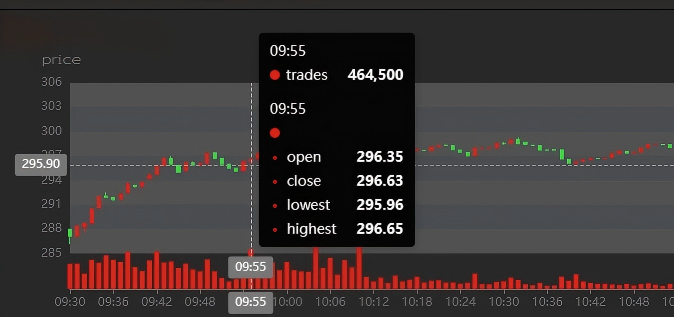
3.9 Configure the DolphinDB Dashboard
DolphinDB provides a convenient visual dashboard configuration. For detailed instructions, see the official tutorial: Dashboard.
The dashboard configured for the OHLC bar data generated from this tutorial is shown below:
3.10 Clean Up the Environment
Real-time computation in this tutorial mainly relies on DolphinDB streaming, including publish-subscribe, stream tables, and the streaming engine. When you clean up the environment, you must clean all of these definitions.
Environment cleanup:
- Before you delete a stream table, you must first remove all related publish-subscribe using the unsubscribeTable.
- Use the dropStreamTable to delete a stream table.
- Use the dropStreamEngine to delete a streaming engine.
You can run the following code to clean up the streaming environment used in this tutorial:
//Declare parameters
mdlSnapshotTBName = "mdlSnapshot"
mdlSnapshotProcessTBName = "mdlSnapshotProcess"
mdlSnapshotProcessEngineName = "mdlSnapshotProcessEngine"
mdlStockFundOHLCTempEngineName = "mdlStockFundOHLCTempEngine"
mdlStockFundOHLCTBName = "mdlStockFundOHLC"
mdlStockFundOHLCEngineName = "mdlStockFundOHLCEngine"
//Cancel related subscriptions
try{unsubscribeTable(tableName=mdlSnapshotTBName, actionName=mdlSnapshotProcessEngineName)} catch(ex){print(ex)}
try{unsubscribeTable(tableName=mdlSnapshotProcessTBName, actionName=mdlStockFundOHLCTempEngineName)} catch(ex){print(ex)}
try{unsubscribeTable(tableName=mdlStockFundOHLCTBName, actionName=mdlStockFundOHLCTBName)} catch(ex){print(ex)}
//Cancel the definition of related stream tables
try{dropStreamTable(mdlSnapshotTBName)} catch(ex){print(ex)}
try{dropStreamTable(mdlSnapshotProcessTBName)} catch(ex){print(ex)}
try{dropStreamTable(mdlStockFundOHLCTBName)} catch(ex){print(ex)}
//Cancel the definition of related stream calculation engines
try{dropStreamEngine(mdlSnapshotProcessEngineName)} catch(ex){print(ex)}
try{dropStreamEngine(mdlStockFundOHLCEngineName)} catch(ex){print(ex)}
try{dropStreamEngine(mdlStockFundOHLCTempEngineName)} catch(ex){print(ex)}
3.11 Performance Test of Real-Time Computing
| Configurations | Details |
|---|---|
| OS (Operating System) | CentOS Linux 7 (Core) |
| Kernel | 3.10.0-1160.el7.x86_64 |
| CPU | Intel(R) Xeon(R) Gold 5220R CPU @ 2.20GHz 16 Logical Cores |
| Memory | 256 GB |
| Test Scenario | Average Latency |
|---|---|
| Live all market stocks and funds (6,481 symbols) | <0.50 ms (a single computation response for one stock or fund) |
3.12 Unified Stream and Batch Processing for Generating OHLC Bars
To support a unified production and research workflow, we need a single codebase to generate OHLC bars from both historical and real-time snapshot data.
To meet this, you only need to follow the tutorial for generating OHLC bars from real-time snapshot data, replay the complete historical dataset at full speed, and then store the resulting OHLC bar output in a partitioned table.
For live real-time computation, simply connect to the real-time market data as described in Section 3.7 of this chapter. If you have any questions, please contact technical support.
4. Summary
This tutorial explains in detail how to generate 1-minute OHLC bars for stocks and funds on the SSE, SZSE and BSE in DolphinDB from historical and real-time snapshot data.
DolphinDB delivers excellent batch computing performance on massive datasets. Using 16 CPU cores, it takes only 4.7 seconds to compute downsampled OHLC bars for one trading day of raw snapshot data from the SSE and SSZE, covering 24,285,866 rows, and produces 1,555,440 rows of 1-minute OHLC bar data.
DolphinDB also delivers excellent real-time streaming processing performance under high throughput, reaching microsecond-level latency. On a CPU of 2.20 GHz, the average latency of a single real-time computation response for one stock or fund when generating 1-minute OHLC bars across the full SSE and SZSE is 500 microseconds.
Rules for generating the OHLC bar used in this tutorial may differ from those in the actual scenario. You can modify the source code in this tutorial to complete your own project quickly.
5. FAQ
5.1 Task Failure Caused by Out of Memory Error
When you use the samples in this tutorial for parallel computation on large datasets, the task may fail due to insufficient memory. Please contact technical support to apply for a trial license.
5.2 Calculation Results Do Not Match the Rules
This tutorial was developed using snapshot data for the full market of stocks and funds from a single trading day in 2023. Some special cases may not have been fully covered. If you find that the results produced by the tutorial code do not match the calculation rules, please contact technical support to report the issue.
6. Appendix
-
Test data: testData.csv
-
Code for generating OHLC bars from historical snapshot data: calHistoryOHLC.dos
-
Code for generating OHLC bars from real-time snapshot data: calStreamOHLC.dos