
Implement High-Performance Backtesting in C++ with the Order Matching Simulator Plugin
DolphinDB’s high-performance market data replay and order matching simulator plugin provides quantitative traders with a low-latency, high-throughput solution for strategy validation. For institutions that have already built a C++ backtesting framework, integrating the order matching simulator directly into the existing system lets them reuse their current infrastructure while taking advantage of DolphinDB’s ultra-fast computing capabilities, making it an ideal choice for high-frequency strategy simulation.
This tutorial is intended for quantitative engineers who are familiar with C++ development and have a basic understanding of DolphinDB. It focuses on how to seamlessly integrate the DolphinDB order matching simulator plugin into a standalone C++ trading system by using either the Swordfish library or the C++ API. Compared with backtesting in the DolphinDB scripting language, this approach delivers a low-latency, highly concurrent backtesting workflow and is particularly well suited to time-sensitive simulation scenarios such as algorithmic trading and market-making strategies.
1. Background
Backtesting is a critical part of quantitative trading research and development. Before a quantitative strategy is applied to live trading, its performance on historical data must be evaluated through backtesting. In medium- and high-frequency strategy backtesting, you cannot simply assume that every order is filled in full at the current price or the end-of-day price. Instead, you need an order matching simulator to model the actual trading process, including whether an order can be filled, the execution price, trading volume, and market impact. DolphinDB provides an order matching simulator plugin that supports Level-2 tick-by-tick and snapshot market data from the Shanghai and Shenzhen stock exchanges. It delivers high-precision order matching consistent with exchange rules under the “price priority, time priority” principle, supports matching modes based on multiple types of market data, and offers extensive order matching configuration options to simulate real-world trading conditions. It also supports medium- and high-frequency quantitative trading strategy development and testing in the DolphinDB scripting language, Python, and C++, providing a high-performance and highly extensible backtesting solution.
Swordfish is a high-performance analytical computing library designed specifically for the financial industry, with excellent in-memory processing capabilities and optimized computational performance. In addition to a wide range of general-purpose computing functions, it supports real-time streaming data processing and user-defined functions to meet the needs of complex analytics and low-latency stream processing. Swordfish runs on any platform that supports C++, and users can invoke its APIs directly in C++ code for efficient computation.
The DolphinDB C++API can connect to the DolphinDB server and a C++ client, enabling bidirectional data transfer and remote script execution. It lets you conveniently use DolphinDB in C++ programs for data processing, analysis, modeling, and more, helping you accelerate these workloads with DolphinDB’s excellent computing performance and powerful storage capabilities.
This tutorial explains how to encapsulate the order matching simulator plugin in C++ to build a simple, extensible backtesting framework with high-precision order matching, which can be easily integrated into an existing C++ backtesting or simulation system. This tutorial defines a unified event-driven interface and provides two implementations: Swordfish and C++API. The applicable scenarios for the two approaches are as follows:
Table 1-1 Scenario comparison between the Swordfish and C++API backtesting framework implementations
| Library | Applicable Scenarios |
|---|---|
| Swordfish |
|
| C++API |
|
2. System Design
Implementing a medium- and high-frequency quantitative trading strategy backtesting platform mainly involvesthe following three key parts:
-
Market data replay
-
Order matching simulation
-
Strategy development and backtest performance evaluation
Based on this design, you can define the overall workflow for backtesting in C++ with DolphinDB as the data source:
-
Create and subscribe to a remote market data stream table.
-
Replay market data into the stream table.
-
Traverse and parse the data in the subscription callback, then write the parsed market data to the order matching simulator.
-
Trigger the market data callback, implement strategy logic in the callback, and place orders or perform other actions.
-
The order matching simulator outputs execution details and other information, triggers the relevant business callbacks, and lets you implement strategy logic in those callbacks.
-
Output performance metrics after the backtest ends.
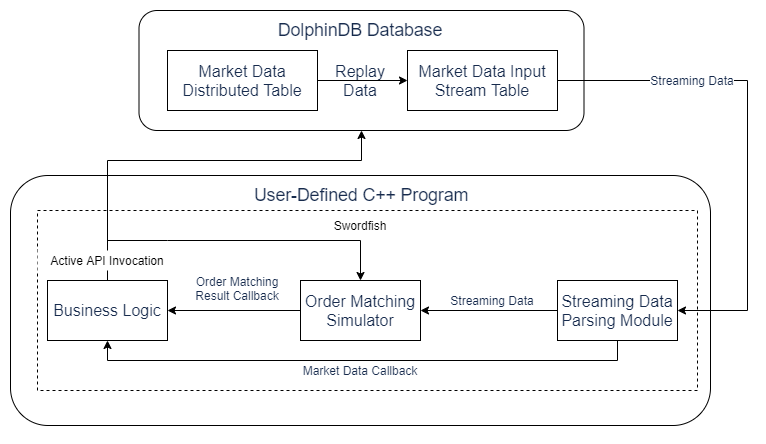
The following diagram shows the system architecture for implementing user-defined backtesting with Swordfish:
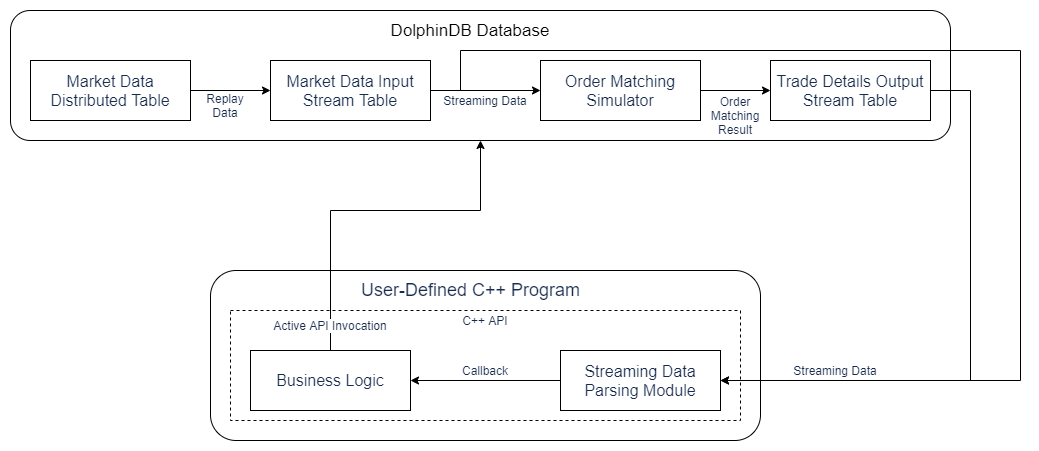
The following diagram shows the system architecture for implementing user-defined backtesting with C++ API:
3. Interface Design
Based on the capabilities provided by DolphinDB’s order matching simulator interfaces, this tutorial defines market data and trading interfaces. The design mainly includes the following functional modules:
-
Configuration module:Handles settings for backtesting framework instances, including remote connection settings, market data type settings, and concurrency-related settings.
-
Active call interface module: Provides interfaces that you can call directly in code, including interfaces to create order matching simulator instances, replay data, place orders, and cancel orders.
-
Callback interface module: Provides callback-based interfaces, including market data callbacks, order acknowledgments, and execution notifications.
Note:
Unless otherwise specified, the configuration items and interfaces introduced in this section can be used in both Swordfish and the C++ API.
3.1 Configuration Items
The configuration items for a backtesting framework instance are shown in the following table. Each instance can be configured independently, which allows users to run concurrent backtests with multiple instances.
| Configuration name | Description | Notes |
|---|---|---|
| hostName | DolphinDB node IP | |
| port | DolphinDB node port | |
| userId | DolphinDB username | |
| password | DolphinDB password | |
| dataType | Market data type. Same as the dataType parameter of the order matching simulator. | |
| inputStreamTableName | Input stream table name. Defaults to “inputStream”. | Concurrency can be achieved by configuring different stream table names. |
| engineName | Order matching simulator name. Defaults to “matchEngine”. | Concurrency can be achieved by configuring different engine names. |
| orderDetailsOutputStreamTableName | Output stream table name for trade details. Defaults to “orderDetailsOutputStream”. | A configuration item specific to the C++ API implementation. Concurrency can be enabled by configuring different stream table names. |
| snapshotOutputStreamTableName | Output stream table name for snapshot data. Defaults to “snapshotOutputStream”. | A configuration item specific to the C++ API implementation. Concurrency can be enabled by configuring different stream table names. |
3.2 Interfaces
The backtesting framework presented in this tutorial provides direct-call interfaces for creating order matching simulator instances, replaying data, submitting orders, and canceling orders, as well as callback interfaces for market data, order submission responses, and trade notifications. The following sections describe the design and usage of the core interfaces. For more detailed information about other interfaces, see the comments in the attached source code.
3.2.1 Create an Order Matching Simulator
First, use the createMatchEngine interface to create an order matching simulator instance. It provides two implementations:
dolphindb::SmartPointer<MatchingEngineSimulatorWrapper> createMatchEngine(
        dolphindb::ConstantSP name, dolphindb::ConstantSP exchange, dolphindb::DictionarySP config,
        dolphindb::TableSP dummyQuoteTable, dolphindb::DictionarySP quoteColMap, dolphindb::TableSP dummyUserOrderTable,
        dolphindb::DictionarySP userOrderColMap, dolphindb::TableSP dummyOrderDetailsOutput,
        dolphindb::ConstantSP orderDetailsOutputStreamTableName=nullptr)

dolphindb::SmartPointer<MatchingEngineSimulatorWrapper> createMatchEngine(
        std::vector<dolphindb::ConstantSP> args)
The first uses an expanded parameter list, and the second packages all parameters from the first list into a single array. The parameter requirements for this interface are largely the same as those of the original createMatchEngine interface. Only the parameters that differ are described here:
-
dummyOrderDetailsOutput: A pointer to a Table object that defines the actual schema of the trade details output table used as the reference schema for Swordfish/DolphinDB when creating the output stream table.
-
orderDetailsOutputStreamTableName: A pointer to a String object that specifies the stream table name of the trade details output table. The default is “orderDetailsOutputStream”. A parameter specific to the C++ API.
The return value is a pointer to a MatchingEngineSimulatorWrapper object. This engine instance supports feeding market data, submitting orders, retrieving trade details, and performing related operations.
Note:In the C++ API implementation, the order matching simulator instance resides in DolphinDB. Each call to createMatchEngine creates and binds a new remote DolphinDB connection. Therefore, frequent calls to this interface should be avoided; instead, the returned instance should be retained and reused.
3.2.2 Replay Market Data
After the order matching simulator is created, the replayQuoteToMatchEngine interface can be used to replay market data for a specified stock symbol and number of days to a specified engine. The replay speed can also be configured.
void Interface::replayQuoteToMatchEngine(VectorSP codes, ConstantSP startDate, ConstantSP endDate,
                                         SmartPointer<MatchingEngineSimulatorWrapper> engine, int replayRate)
Note:This tutorial provides an example of replaying Level-2 stock snapshot data. The code can be used as a reference for implementing replay for other types of market data.
3.2.3 Market Data Callbacks
After market data starts flowing into the engine, it triggers the onQuote callback. The callback parameter is a dictionary representing one market data record. You can read fields by calling getMember(“key”), for example, to read the stock symbol:
virtual void onQuote(const ConstantSP "e){
string symbol = quote->getMember("symbol")->getString();
}3.2.4 Implement a Strategy
When implementing a strategy, the getMatchEngine interface can be used to obtain the order matching simulator with the specified name, which can then be used to submit or cancel orders.
SmartPointer<MatchingEngineSimulatorWrapper> Interface::getMatchEngine(ConstantSP name)The order submission interface is submitOrder, and the order cancellation interface is cancelOrder. Both take the engine instance and order data as parameters. The order data type is OrderField, a struct whose field format is the same as that of the order table in the order matching simulator plugin. The fields are described below:
-
symbol: string. Symbol code.
-
timestamp: long long. Order timestamp. Optional; if omitted, the engine performs order matching immediately.
-
orderType: int. Order type.
-
price: double. Order price.
-
orderQty: long long. Order quantity.
-
direction: int. Buy/sell direction: 1 (buy), 2 (sell).
-
orderId: int. User order ID. Optional; required only when canceling an order.
-
userOrderId: int. User-defined order ID. Optional; if omitted, the system automatically assigns an incrementing ID. Make sure that userOrderId is unique for each order submitted to the same engine.
The return value is of type long long. If the order submission or cancellation succeeds, the function returns the user order ID; otherwise, it returns -1.
long long Interface::submitOrder(SmartPointer<MatchingEngineSimulatorWrapper> engine, const OrderField &order)
long long Interface::cancelOrder(SmartPointer<MatchingEngineSimulatorWrapper> engine, const OrderField &order
3.2.5 Order Submission/Cancellation Responses and Notifications
After an order is submitted or canceled, the system triggers responses and notifications. The callback interface for order submission responses is onOrderSubmit, and the callback interface for order cancellation responses is onOrderCancel. Both callbacks include the order data and an error code. The callback interface for order notifications is onOrder, and the callback interface for trade notifications is onMatch. The parameter is a dictionary for a single order or trade detail record, with the same field format as the trade detail table in the order matching simulator.
virtual void onOrder(dolphindb::DictionarySP orderDetail);
virtual void onMatch(dolphindb::DictionarySP tradeDetail);
4. Backtesting Platform Implementation
Based on the system design and interface design, the following functional modules are designed to implement the backtesting and simulated trading system:
-
Remote connection: Connect remotely to DolphinDB and execute scripts to implement interfaces for data replay, remote environment cleanup, and related operations.
-
Plugin loading and usage: Load the order matching simulator plugin, encapsulate its script methods as C++ interfaces, and implement active interfaces such as order submission and cancellation, as well as callbacks for order notifications and trade notifications.
-
Streaming data subscription, parsing, and callbacks: Subscribe to DolphinDB stream tables as data sources, parse streaming data, and write it to the order matching simulator to implement market data callbacks.
The following sections describe the implementation logic for Swordfish and the C++ API separately.
4.1 Implementation Using Swordfish
Swordfish supports plugin loading, with plugin methods invoked through C++ function pointers. Both input parameters and return values are DolphinDB data types derived from the Constant class. User-defined backtesting logic can be implemented through local calls to order matching simulator methods in Swordfish. The following sections describe the design of the main implementation logic.
4.1.1 Remote Connection
In Swordfish, remote connection to a DolphinDB node can be established through the xdb method, and scripts can then be executed using remoteRun. To make remote connection operations easier, we encapsulated xdb and remoteRun and and defined a class named DDBConnection for remote connections. This class is specifically designed to connect remotely to a designated DolphinDB node, execute scripts, and subscribe to stream tables. Its parameters and return values follow the design of the remote connection class in the C++ API. For details, see the source code comments.
4.1.2 Plugin Loading and Usage
In Swordfish, the order matching simulator plugin can be loaded and used locally. The loadPlugin method is used to load the plugin and obtain function pointers to its interfaces. To simplify plugin loading and interface invocation, we encapsulated the loadPlugin method and defined the plugin class DDBPlugin to load a specified plugin and invoke its interfaces. By inheriting from the plugin class, we implemented the order matching simulator plugin class MatchingEngineSimulatorWrapper to call the order matching simulator interfaces for active operations such as order placement and cancellation. For detailed usage instructions, see the source code comments.
4.1.3 Streaming Data Subscription, Parsing, and Callback Handling
In Swordfish, the subscribeTable method can be used to subscribe to a remote DolphinDB stream table. A key parameter of this method is handler, a function pointer that processes the subscribed data. We encapsulated the Swordfish function definition classSwordfishFunctionDef to make it easy to convert C++ function pointers into Swordfish function pointers, so that you can parse streaming data and invoke the relevant business callbacks within user-defined C++ methods. For detailed usage instructions, see the source code comments.
4.2 Implementation Using the C++ API
After loading the order matching simulator plugin in DolphinDB, user-defined backtesting logic can be implemented through the C++ API by remotely connecting to DolphinDB, uploading parameters, and calling the relevant script methods. The following sections describe the implementation design of the main logic.
4.2.1 Remote Connection
In the C++ API, remote connection to DolphinDB and script execution can be performed through the DBConnection class. For details on how to use the interfaces, see the official C++ API documentation.
4.2.2 Plugin Loading and Usage
In the C++ API, subscription to remote DolphinDB stream tables can be implemented through the ThreadedClient class. Its subscribe method accepts a C++ function pointer directly as the subscription callback, allowing streaming data to be parsed and relevant business callbacks to be invoked within user-defined C++ methods. For details on how to use the interfaces, see the official C++ API documentation.
4.2.3 Streaming Data Subscription, Parsing, and Callback Handling
In the C++ API, subscription to remote DolphinDB stream tables can be implemented through the ThreadedClient class. Its subscribe method accepts a C++ function pointer directly as the subscription callback, allowing streaming data to be parsed and relevant business callbacks to be invoked within user-defined C++ methods. For details on how to use the interfaces, see the official C++ API documentation.
5. Backtesting Example
Based on the design and implementation described above, this section explains the implementation logic of a simple backtesting strategy through core code examples. Specifically, the strategy automatically generates a limit order after processing each item of snapshot data in real time. For the complete code, see the attached source files.
-
Define the interface class and implement the strategy
Derive the
CustomInterfaceclass from theInterfaceclass and override theonQuotemethod. When a piece of market data arrives, callgetMatchEngineto get the engine instance, and then callsubmitOrderto place an order:class CustomInterface: public Interface { public: CustomInterface(unordered_map<string, string> config): Interface(config) {} void onQuote(const ConstantSP "e) override { ... engine = getMatchEngine(new String(matchEngineName_)); string symbol = quote->getMember("symbol")->getString(); OrderField order; order.symbol = symbol; order.orderType = 5; order.price = bidPrice->getLong(); order.orderQty = 200; order.direction = 1; submitOrder(engine, order); } }; -
Create the order matching simulator: In the main function, create an instance of the
CustomInterfaceclass, use thegetExampleMatchEngineArgsmethod to get sample arguments for the order matching simulator, and then callcreateMatchEngineto create the order matching simulator.interface = new CustomInterface(config); auto args = interface->getExampleMatchEngineArgs(); engine = interface->createMatchEngine(args); -
Subscribe to market data: Use the
subQuoteTablemethod to subscribe to market data thereby enabling the market data callback.interface->subQuoteTable(); -
Replay market data
Use the
replayQuoteToMatchEnginemethod to replay data for a specified stock symbol and date-time range into the engineinterface->replayQuoteToMatchEngine(codes, startDate, endDate, engine, -1); -
Wait for the backtest to finish
Use the
isBacktestEndmethod to wait for the backtest to finish.interface->isBacktestEnd(true); -
Display performance metrics
For example, the
getPositionmethod can be used to display positions. TheCustomInterfaceclass can also be used to implement and output user-defined metrics.cout << interface->getPosition() << endl;
6. Performance Testing
The test environment used in this article is configured as follows:
-
DolphinDB v3.00.2.2, single node
-
Swordfish v3.00.2 ABI0
-
CPU: Intel(R) Xeon(R) Silver 4216 CPU @ 2.10GHz, 64 cores
-
Memory: 400 GB
-
Disk: SSD, 12 Gbps
We measured the total time taken by the Swordfish-based backtesting framework to perform full-speed replay with multiple concurrent tasks. The order placement strategy submits one limit order for each snapshot quote. The performance statistics are as follows:
Table 6-1 Performance statistics for the backtesting framework implemented with Swordfish
| Data volume | Number of concurrent tasks | Elapsed time (s) |
|---|---|---|
| Snapshots for 2,000 stocks (7,039,909 rows, 2.6 GB) | 1 | 175 |
| Snapshots for 2,000 stocks (7,039,909 rows, 2.6 GB) | 2 | 95 |
| Snapshots for 2,000 stocks (7,039,909 rows, 2.6 GB) | 4 | 50 |
| Snapshots for 2,000 stocks (7,039,909 rows, 2.6 GB) | 8 | 29 |
As shown, multithreaded parallelism can effectively improve performance, but the improvement is not linear because the server still needs time to replay data into the stream table and send it to the client.
In the C++ API implementation, the order matching simulator runs on the remote DolphinDB server, so operations such as order placement and cancellation incur network latency. During accelerated replay, the server may already have replayed to a later point in time by the time the client operation is executed. Therefore, only real-time replay is supported, and no accelerated replay performance test can be performed.
7. Summary
This article demonstrates how to implement high-performance backtesting in C++ by using Swordfish or the C++ API to invoke the order matching simulator plugin, and how to encapsulate a unified interface for easy integration of DolphinDB backtesting logic into existing C++ backtesting systems. Among the two approaches, Swordfish can run the order matching simulator locally, offering greater flexibility, support for accelerated replay, and better overall performance.
8. Appendix
Note:To compile and run the Swordfish implementation, you must place the Swordfish-enabled license file dolphindb.lic in the asset folder.