
Getting Started with Backtest Plugin
Using DolphinDB scripts to write backtesting strategies typically involves the following steps:
-
Define required indicators in the initialization function.
-
Implement customized trading logic in the corresponding callback functions (e.g.,
onBar,onSnapshot). -
Configure strategy parameters, e.g., market data source, initial capital, order delay, and trade matching ratio.
-
Create the Backtest engine based on your strategy and configuration.
-
Replay the data source and run the Backtest.
-
Retrieve and analyze backtesting results.
This tutorial demonstrates how to use DolphinDB Backtest plugin to write strategies and perform backtesting. The examples are compatible with DolphinDB Server versions 2.00.14.1, 3.00.2.1, and later.
1. Quick Start: Build a Basic Strategy Backtesting
The backtesting framework is built on DolphinDB Server and offers the Backtest engine as a plugin that supports various asset types. This chapter demonstrates how to use the engine to backtest a simple mid-to-high frequency trading strategy.
1.1 Implement a Simple Strategy
In this example, the strategy uses minute-level OHLC data. For each symbol, it places a buy order when no position is held. The data used in this example is provided in Appendix.
//step 1: Implement the strategy logic
def onBar(mutable context, msg, indicator){
	for(istock in msg.keys()){
		&pos=Backtest::getPosition(context.engine,istock)
		price=msg[istock].close
		//When there is no position, buy
		if(pos.longPosition<1){
			Backtest::submitOrder(context.engine, (istock,
			context.tradeTime,5, price+0.02,100, 1),"buyOpen")
		}
	}
}
//step 2: Configure parameters
config = {
	startDate: 2023.07.11 ,//Backtest start date
	endDate: 2023.07.11 , //Backtest end date
	strategyGroup: `stock,//Stock strategy
	cash: 1000000.,  //Initial capital for the strategy
	commission: 0.00015,//Commission fee
	tax: 0.001, //Tax rate
	dataType: 3//Data type for backtesting, 3 means minute-level data
}
callbacks = { onBar:onBar}
try{Backtest::dropBacktestEngine("test01")}catch(ex){print ex}//Delete exsting engine
 //step 3: Create the Backtest engine (without JIT)
 engine = Backtest::createBacktester("test01", config, callbacks, false)
 // step 4: Execute the Backtest and retrieve results
colName=`symbol`tradeTime`open`low`high`close`volume`amount`upLimitPrice`downLimitPrice
colType=["SYMBOL","TIMESTAMP","DOUBLE","DOUBLE","DOUBLE","DOUBLE","LONG","DOUBLE","DOUBLE","DOUBLE"]
dayData = loadText(filename="./barData.csv",schema=table(colName as name ,colType as type ))
Backtest::appendQuotationMsg(engine, dayData) //Execute backtesting
tradeDetails = Backtest::getTradeDetails(engine)
ret = Backtest::getReturnSummary(engine)
1.2 View Backtesting Results
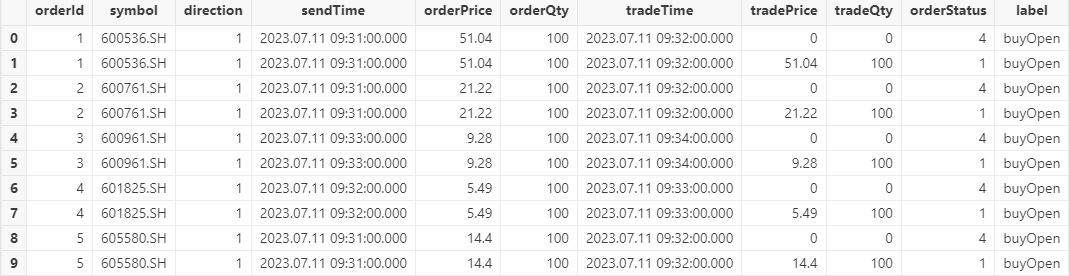
After completing the backtest, you can retrieve the results through the provided
functions. The following table shows part of the trade details table returned by
the getTradeDetails function. Several fields are described
below:
-
direction: The buy/sell direction of the order. “1” represents buy and “2” represents sell.
-
orderPrice: The order price.
-
orderQty: The order quantity.
-
label: A user-defined string used to identify the order. It can be specified when placing the order.
1.3 Code Explanation
Below is a detailed explanation of the example code from Section 1.1 to help you understand how to use the Backtest plugin.
Lines 1-12 define
onBar , i.e., the callback function for OHLC data, where you
can implement your strategy logic (such as opening or closing positions). The
function contains the following three parameters:
-
context : The logical context, which should be defined in the engine configuration parameter userConfig .
-
msg : The OHLC data. During backtesting, the engine inserts it into
onBarrecord by record (see line 31) to implement the strategy. -
indicator : The indicator, which can either be an existing indicator or a custom indicator computed and subscribed to within the engine. Detailed definition will be covered in the next chapter.
Within onBar , the getPosition function is
used to retrieve the current position, which is then used for strategy
decisions. Finally, the submitOrder function is used to submit
orders.
Lines 14-22 configure the basic parameters of the Backtest engine, such as the start date, end date, strategy type, initial capital, transaction fees, etc. These parameters must be set correctly to ensure Backtest runs smoothly. Additionally, context contains parameters required by your strategy and can be specified as needed.
Line 26 uses the
createBacktester
function to create the Backtest engine named “test01”. If an engine with
the same name already exists, creation will fail; so delete the existing engine
first (line 24). Ensure all parameters are defined before creating the engine:
-
config : The engine configuration parameters.
-
callbacks : The event callback functions (line 23).
-
false : Indicates that JIT (Just-In-Time) optimization is disabled.
Lines 28-30 load market data and insert it into the engine for execution . Since the Backtest engine requires a specific data schema, the schema parameter is used to ensure that the schema is consistent before inserting the data into the engine.
Lines 32-33 retrieve different backtesting results through the corresponding functions.
2. Advanced Backtesting: Strategy Extension and Performance Optimization
This chapter builds on the previous simple strategy and demonstrates how to use Backtest’s event-driven mechanism to flexibly apply various event functions, progressively extending and optimizing the strategy logic.
2.1 Overview of Event Functions
The Backtest engine provides a series of event functions to meet different strategy requirements, including:
-
Initialization function (
initialize) for strategy parameters and environment setup. -
Pre-trading callback function (
beforeTrading) for daily preparations before the market opens. -
Post-trading callback function (
afterTrading) for daily strategy summaries and analysis.
For different market data, the engine provides:
-
Callback function (
onSnapshot) for real-time snapshots. -
OHLC callback function (
onBar) for minute-level and daily data, effectively supporting strategies with various trading frequencies.
Additionally, the engine offers callback functions for monitoring order status (
onOrder ) and trade execution ( onTrade ).
With these rich event callback functions, you can easily implement detailed and customized strategy logic. Next, we will explain how to use them in practice.
2.2 Define Indicators in the Initialization Function
The strategy initialization function is triggered only once during backtesting. In this function, you can initialize the global variable context , set global parameters or states required by the strategy, and subscribe to or configure the indicators needed during the strategy's execution to ensure the necessary data is available throughout.
To demonstrate the role of the initialization function, we implement a
simplified sample strategy. The complete code will be provided in the next
section when introducing the onSnapshot function. This strategy
uses stock snapshot data as the market data source. If the latest price exceeds
the previous day's closing price by more than 1%, it buys 100 shares. The
strategy allows at most one open position per day, and with a maximum position
of 500 shares.
In the initialization function, we define an indicator called pctChg, which calculates the percentage change in the current tick compared to the previous day's closing price, serving as the trigger for the trading signal.
@state
def pctChg(lastPrice, prevClosePrice){
	return lastPrice\prevClosePrice - 1
}
def initialize(mutable context){
	//Initialize callback function
	print("initialize")
	//Subscribing to indicators for snapshots
	d = dict(STRING,ANY)
	d["pctChg"] = <pctChg(lastPrice, prevClosePrice)>
	Backtest::subscribeIndicator(context["engine"], "snapshot", d)
	context["maxPos"] = 500
}
To subscribe to strategy indicators, such as the latest price and the previous
day's closing price, use the Backtest::subscribeIndicator
function provided by the engine, and then specify the factor name and expression
to subscribe to the required indicators. Example usage:
Backtest::subscribeIndicator(engine, quote, indicatorDict) Once subscribed, you can access the indicator's calculated results in the
onSnapshot function through indicator.pctChg.
2.3 Write Strategies Based on Snapshots
Building on the strategy from the previous section, the following example
demonstrates how to implement a strategy based on snapshots using the
onSnapshot function.
In onSnapshot , the msg parameter represents the latest
snapshot passed by the Backtest engine, while the indicator parameter
contains the indicator values subscribed to in the initialize
function. Both msg and indicator are dictionaries. For example,
msg.bidPrice returns the latest top 10 bid prices for the asset, while
indicator.pctChg returns the percentage change of the latest price compared to
the previous price.
The complete code and data simulation for this example can be found in Appendix.
def onSnapshot(mutable context, msg, indicator){
    //Query the current position of the asset
    &pos = Backtest::getPosition(context["engine"], msg.symbol)
    if (indicator.pctChg > 0.01 and pos.longPosition <= context.maxPos and
        context["open"][msg.symbol] != true){
		Backtest::submitOrder(context["engine"],
			(msg.symbol, context["tradeTime"], 5, msg.offerPrice[0], 100, 1), "buy")
		context["open"][msg.symbol] = true
    }
}
2.4 Multiple Data Types
DolphinDB's Backtest engine supports strategy backtesting with various types of
market data. In addition to the onBar and
onSnapshot functions shown in previous examples, you can
implement strategies using other types of market data through the corresponding
event callback functions. The market data type is specified by the
dataType configuration parameter:
|
Configuration Parameters in config |
Data Type |
|---|---|
|
"dataType" |
0: tick-by-tick data (orders + trades) or tick-by-tick data + snapshots 1: snapshots 2: snapshots + trade details 3: minute-level data 4: daily data 5: tick-by-tick data (merged wide table of tick-by-tick orders + tick-by-tick trades) 6: tick-by-tick data + snapshots (merged wide table of tick-by-tick orders + tick-by-tick trades + snapshots) |
Market data for different asset types at the same frequency may slightly differ. For example, snapshots for interbank bonds includes the yield-to-maturity field. The input tables for different asset types support additional fields of types DOUBLE, STRING, or INT.
2.5 Multi-Asset Backtesting
In addition to supporting market data at different frequencies, the Backtest engine supports backtesting for different asset types, including "stocks", "futures", "options", "bonds", and "universal". The Backtest also allows combined backtesting on multiple assets within the same engine. You can manage cash and positions for these assets using a single account or multiple accounts.
For different asset types, you need to specify the strategy type via the strategyGroup configuration parameter when creating the engine:
|
Configuration Parameters in config |
Strategy Group |
|---|---|
|
"strategyGroup" |
|
When strategyGroup is set to "multiAsset", the cash
configuration parameter is a dictionary, allowing you to manage funds across
different assets using the same or separate accounts. For example,
cashDict["futures, options"] = 100000000 means
that futures and options share the same fund account, while
cashDict["futures"] = 100000000 means that
futures have a separate account.
The cash configuration parameter not only defines account funds but also controls the creation of sub-backtesting engines and Matching Engine Simulator. Backtest and Matching Engine Simulator for the given asset type are only created if the asset type is specified in the cash configuration.
The following example demonstrates how to implement multi-asset combined backtesting in DolphinDB using independent fund accounts for stocks and futures. To simplify the strategy logic, a stock and a futures contract are selected as the backtesting assets. The strategy buys when there is no position in the account, based on minute-level OHLC data of both assets. The data and complete code for this example can be found in the Appendix.
//step 1: Select backtesting asset
def beforeTrading(mutable context){
	context["futuresCode"] = "IC2401"
	context["stockCode"] = "600000"
}
//step 2: Write strategy logic
def onBar( mutable context, msg, indicator){
	longPos = Backtest::getPosition(context.engine, context["stockCode"], "stock").longPosition
	if(longPos < 0  and context["stockCode"] in msg.keys() ){
		price = msg[context["stockCode"]].close
		symbolSource = msg[context["stockCode"]].symbolSource
		orderMsg=(context["stockCode"],msg[context["stockCode"]].symbolSource , context.tradeTime, 5, price, ,,100,1,,,)
		//print("Submit order")
		Backtest::submitOrder(context.engine, orderMsg,"Buy stock",0)
	}
	longPos = Backtest::getPosition(context.engine, context["futuresCode"], "futures").longPosition
	if(longPos<1 and context["futuresCode"] in msg.keys()){
		futuresPrice = msg[context["futuresCode"]].close
		symbolSource = msg[context["futuresCode"]].symbolSource
		orderMsg=(context["futuresCode"],msg[context["futuresCode"]].symbolSource , context.tradeTime, 5, futuresPrice, ,,100,1,,,)
		//print("Submit order")
		Backtest::submitOrder(context.engine, orderMsg,"Buy futures",0,"futures")
	}
}
//step 3: Configure parameters
config = {
    startDate:2000.01.01,
    endDate:2025.12.31,
    strategyGroup: "multiAsset",
    cash: {
        stocks:100000000.,
        futures:100000000.
    },
    dataType:3,
    matchingMode:3,
    frequency:0,
    outputOrderInfo:true,
    multiAssetQuoteUnifiedInput:false,
    depth:5,
    commission: 0.00,
    tax:0.00
}
callbacks = { onBar:onBar,beforeTrading:beforeTrading}
2.6 JIT Optimization
The Backtest engine supports JIT optimization starting from version 3.00.2.1. To
enable it, set the jit parameter to true when creating the engine via the
Backtest::createBacktester function.
3. Considerations
This chapter covers important considerations when using the Backtest engine, including explanations of event callback function parameters, market data details, and JIT optimization compatibility.
3.1 Explanation of Callback Function Parameters
-
context (logical context): The context parameter in all callback functions is a dictionary used to store the strategy's global variables and runtime states for the strategy. The engine automatically maintains the following built-in variables:context.tradeTime: The latest timestamp of the current market data.context.tradeDate: The current trading day.context.BarTime: The timestamp of the current bar (when snapshots are downsampled to lower-frequency market data).context.engine: The current Backtest engine instance.
-
msg (market data): In high-frequency callback functions (e.g.,
onSnapshot), msg is a dictionary, and market fields such as the latest price can be accessed via msg.lastPrice.In low-frequency callback functions (e.g.,onBar), msg is a nested dictionary: the first layer uses the asset symbol as the key, with market data as the value. Each market data entry itself is also a dictionary. Therefore, you can access the data using msg[stock].lastPrice.When subscribing to indicators, the data type of the indicator must match the data type of msg. In the case of multi-asset combined backtesting, msg is a dictionary where the key is the asset type or 'indicator', and value is the corresponding market data tables.
3.2 Market Data
When backtesting strategies based on high-frequency tick-by-tick data from SSE and SZSE, the engine supports simultaneous backtesting for stocks from both exchanges. The engine maintains separate Matching Engine Simulators for each exchange. In this case, the symbol in the market data must include the exchange identifier (i.e., ending with ".XSHG",".XSHE"), such as "600000.XSHG"; otherwise, an error will be thrown.
3.3 Basic Features
-
Backtest end marker : When the engine receives a message with the symbol
"END", it indicates the end of the backtesting. At this point, relevant callback logic can be used to clean up states or output results. -
Multi-asset backtesting : A single Backtest engine can support multiple assets simultaneously. You just need to replay the market data for multiple assets at the same time.
-
Parallel backtesting : For strategies requiring parallel backtesting, multiple Backtest engines can be created. Market data can be concurrently inserted into these engines within the script to perform parallel backtesting.
3.4 Notes for JIT Optimization (Supported from V3.00.2)
-
Recommended function :
Backtest::createBacktester, newly introduced in DolphinDB V2.00.14 and V3.00.2, is the recommended function for creating Backtest engine. Strategies written with it are compatible across platforms, including DolphinDB V2.00.14 and above, V3.00.2 and above, JIT versions, and non-JIT versions. -
Legacy function compatibility : The Backtest engine also supports the older
createBacktestEnginefunction for creation, but it does not support JIT optimization. This function allows msgAsTable=true , which converts the msg parameter in event functions into a table. -
Usage notes :
-
When enabling JIT optimization, strategy callback functions cannot use default parameters or partial applications.
-
Global variables in the strategy must be declared in the context configuration parameter of config.
-
JIT optimization does not support direct assignment to nested dictionaries.
-
4. Common Issues
4.1 Error During Backtest Execution
When using Backtest::appendQuotationMsg(engine, msg) to run a
backtest, an error typically occurs if the schema of msg does not match
the market data type configured in the strategy. Market fields may differ
slightly across different asset types or for the same asset at different
frequencies. Please ensure the fields and their types in the current market data
table strictly match the corresponding market data type.
4.2 Large Number of Rejected or Partially Executed Orders in Trade Details
-
When backtesting strategies using tick-by-tick data, if the composite market snapshots consistently show price inversion, orders may fail to match. This can be caused by:
-
Incorrect order of market data: For identical timestamps, tick-by-tick orders in SZSE should appear before tick-by-tick trades, while tick-by-tick orders in SSE should appear after tick-by-tick trades. Please check the order of market data according to the error message to ensure buy orders, sell orders, and trades are sequenced correctly.
-
Incomplete market data: Providing market data for only part of the day (e.g., after 10:00 AM) can cause mismatches, as trade orders may rely on prior orders. Please ensure all relevant buy, sell, and trade data are included.
-
Incorrect asset symbol in market data: Symbols ending with “.XSHE” represent SZSE stocks, and “.XSHG” represent SSE stocks. Since the sequences of buy and sell orders differ between exchanges, tick-based backtesting requires stock symbol to have the correct exchange suffix.
-
-
When using snapshots or mid- to low-frequency market data, unexecuted or partially executed orders may be influenced by:
-
Matching volume: The default trade matching ratio is 20%. For large orders, adjust the ratio using matchingRatio.
-
Stock trading units: The default unit is “shares”. If the volume field in market data is in “ten thousand shares” or “lots”, please pre-process the data accordingly
-
-
Order Quantity Requirements: The order quantity may not meet the requirements. For stock purchases, the quantity must be a multiple of 100 (for stocks starting with 68, the minimum buy quantity is 200).
-
Order Information: You can set the parameter outputOrderInfo to true to include rejection reasons in the order details table for easier debugging.
5. Appendix
Section 1.1 Minute-level data used in the example: barData.csv
Section 2.2 Example code for snapshots: snapshots.dos
Section 2.5 Example data and full code for multi-asset backtesting: stock_and_futures_strategy.dos futuresData.csv