
Guide to Multi-Asset Backtesting with Examples
In financial markets, multi-asset investment strategies have long been standard practice. Whether for cross-market arbitrage, asset allocation, or hedging and volatility management, portfolios often combine multiple instruments, such as stocks, futures, and options. Compared with single-asset backtesting, multi-asset backtesting better reflects capital usage, risk exposure, and execution paths, narrowing the gap between backtesting results and live trading outcomes. To meet this need, DolphinDB introduces multi-asset backtesting, allowing you to perform coordinated backtests across multiple instruments within a unified framework and to manage cash and positions flexibly through either a single account or multiple accounts. This article demonstrates how to use the DolphinDB multi-asset backtesting engine and highlights its advantages in real-world applications using two representative examples: a stock-index futures hedging strategy and a futures-options arbitrage strategy.
1. Introduction
This article presents two multi-asset backtesting examples. The first combines technical-analysis-based stock investment across multiple accounts with positions in stock index futures to hedge systematic risk. The second uses put-call parity between futures and options to conduct cross-market arbitrage within a single account.
Before detailing the implementation of these strategies, this section introduces the core ideas behind both strategies and outlines the multi-asset backtesting solution provided by DolphinDB, helping you better understand the background and use cases.
1.1 Background on Stock-Futures Hedging Strategy
In stock investment, individual stocks are highly correlated with the broader market, so portfolios are inevitably exposed to systematic risk. Since this type of risk cannot be diversified away, investors typically use stock index futures for beta hedging. The beta coefficient measures a portfolio's sensitivity to the market. By shorting stock index futures in an amount matched to the portfolio's beta, investors can reduce the portfolio's overall market risk exposure to a target level, thereby preserving excess returns from stock selection while limiting the impact of market fluctuations on performance. This strategy is widely used in actively managed funds, quantitative market-neutral frameworks, and risk management practices, making it a typical example of combining stocks with derivatives.
In this example, we select and invest in CSI 300 stocks based on multiple technical indicators, while using CSI 300 futures for beta hedging. This demonstrates how the DolphinDB multi-asset backtesting framework can be applied in real trading strategies.
1.2 Background on Cross-Market Futures-Options Arbitrage Strategy
In derivatives markets, futures and options are both derived from an underlying asset, but differ significantly in pricing mechanisms and risk characteristics. The pricing relationship between them is influenced not only by the price of the underlying asset, but also by factors such as the risk-free interest rate, dividend yield, and expected volatility. Theoretically, put-call parity imposes a strict pricing constraint between futures and options. If market prices deviate from this parity, risk-free or low-risk arbitrage opportunities may arise. Investors can lock in a deterministic spread profit by constructing a portfolio that buys the undervalued asset and sells the overvalued one.
In the following example, we design a cross-market arbitrage strategy based on put-call parity between futures and options, demonstrating the advantages of DolphinDB multi-asset backtesting in unified capital management, risk control, and cross-instrument trading.
1.3 Overview of the DolphinDB Multi-Asset Backtesting Solution
DolphinDB provides the Backtest plugin that supports multi-asset backtesting. Within a unified backtesting framework, you can load market data and trading rules for multiple assets, such as stocks, futures, and options, and manage capital, margin, and risk via a single engine, producing simulations that more closely reflect live trading. Compared with single-asset backtesting, multi-asset backtesting extends engine configuration, account management, and market data input methods, forming a more comprehensive solution.
Key differences from single-asset backtesting:
- Account management: Multi-asset backtesting allows you to manage multiple accounts via a single engine, or configure a single account in a dictionary to cover multiple assets.
- Multi-asset differentiation: Supports using the assetType column to distinguish among different assets, such as stocks, futures, and options.
-
Engine-related configuration:
- Account configuration: The cash parameter (representing the initial capital) must be specified as a dictionary to support managing multiple accounts or multiple assets under a shared account.
- Market data configuration: The multiAssetQuoteUnifiedInput parameter specifies whether the market data is provided as a single table for multiple assets or input separately for each asset.
- Callback configuration: The msgAsPiecesOnSnapshot parameter specifies whether the
onSnapshotcallback is triggered sequentially for each record or once for all records with the same timestamp.
-
Market data input:
- When you insert data through the
appendQuotationMsgmethod, msg must be a dictionary. - When multiAssetQuoteUnifiedInput is set to true, you can input market data for multiple assets at once through the multiAsset table and distinguish them using the assetType column.
- When multiAssetQuoteUnifiedInput is set to false, you must input the stock, futures, and options tables separately.
- When you insert data through the
2. Implement a Stock-Futures Hedging Strategy Based on DolphinDB
This example builds a multi-asset hedging strategy that combines trend and momentum signals using minute-level market data from CSI 300 stocks. The strategy aims to reduce systematic market risk by capturing trend signals via dual moving averages, the relative strength index (RSI), and volatility indicators, while using the main CSI 300 futures contract for beta hedging. The overall logic is as follows:
-
Indicator calculation:
- Calculate short-term and long-term moving averages using 5-minute and 20-minute windows, while retaining previous values to determine moving average crossovers.
- Measure short-term volatility using the standard deviation of the return rate over the past 10 minutes.
- Calculate the RSI based on a 14-minute series of closing prices to identify overbought and oversold conditions.
- Opening logic:Buy to open to capture the continuation of a strong trend if the short-term moving average crosses above the long-term moving average (forming a golden cross) and the RSI exceeds 70.
- Stop-loss logic:When holding a long position, sell to close to avoid a potential drawdown if the price falls below the short-term moving average (signaling a weakening short-term trend) and volatility exceeds 5%.
- Futures hedging:Based on the current stock portfolio, calculate the weighted portfolio beta and determine the number of index futures contracts to sell. This hedges against systematic risk, allowing you to isolate the excess returns generated by stock selection.
2.1 Write the Strategy
Define the technical analysis indicators based on minute-level market data:
- Moving averages: Calculate the short-term moving average (shortMA) and long-term moving average (longMA) for each stock to identify trend signals. In addition, use the
prevfunction to obtain the previous period's moving averages (prevShortMA and prevLongMA) for detecting moving average crossovers. - RSI: Measure whether a stock is overbought or oversold, helping control sentiment-related risk in opening and closing decisions.
- Volatility: Measure the magnitude of price fluctuations using the standard deviation of the return rate, providing a basis for risk management and helping avoid adverse effects from highly volatile assets on the portfolio.
To support the calculation of factors such as price-volume factors from medium- and high-frequency market data, DolphinDB uses a reactive state engine in its backtesting engine. The reactive state engine supports unified stream and batch processing and efficiently processes stateful high-frequency factors. For details on defining indicators, see createReactiveStateEngine. The following code example shows how to define short-term and long-term moving averages and volatility as technical indicators:
@state
def myMA(close,period){
    ma=sma(close,period)
    return ma, prev(ma)
}
@state
def getVolatility(close, period=10){
    returns = DIFF(close) / REF(close, 1)
    return STD(returns, period)
}
In medium- and high-frequency backtesting, strategies are typically event-driven, and a single strategy usually needs to handle multiple types of events, such as the arrival of new market data or the execution of new orders. The DolphinDB backtesting engine uses an event-driven architecture and provides a comprehensive set of event functions, including callbacks for strategy initialization, pre-market processing, market data, and daily post-market processing. You can implement strategies by writing the strategy logic in these callback functions. In addition, user-defined callback functions support JIT compilation, significantly improving strategy execution efficiency. The following example shows how these event functions are implemented.
In the strategy initialization function, the strategy first subscribes to moving average, RSI, and volatility indicators derived from market data. Here, the subscribeIndicator method accepts the backtesting engine handle, the data type to calculate, and a dictionary of indicators to calculate (where each key is the indicator name used for subsequent access; the value is the metacode for the indicator calculation). The calculated results are then passed to strategy callback functions such as onBar.
def initialize(mutable contextDict){
    d = dict(STRING, ANY)
    d["shortMA"] = <myMA(close, 5)[0]>
    d["prevShortMA"] = <myMA(close, 5)[1]>
    d["longMA"] = <myMA(close, 20)[0]>
    d["prevLongMA"] = <myMA(close, 20)[1]>
    d["rsi"] = <RSI(close, 14)>
    d["volatility"] = <getVolatility(close, 10)>
    Backtest::subscribeIndicator(contextDict["engine"], "kline", d,"stocks")
}
In the OHLC bar callback function (onBar), the system generates buy or sell signals from the subscribed technical indicators, then combines the current stock position with the pre-calculated beta to determine the number of futures contracts to buy or sell for dynamic hedging. onBar takes the msg parameter that specifies the latest minute-level market data from the backtesting engine. The value of msg is a dictionary mapping futures names to their respective market data, with each stock's beta included as an additional field. The following code example shows:
- The logic for buying to open and selling to close.
- The method for calculating futures hedge positions based on the weighted average beta.
def onBar( mutable contextDict, msg, indicator){
    stockPosDict = contextDict["stockPos"]
    stockBetaDict = contextDict["beta"]
    keysAll=msg.keys()
	keys1 = keysAll[!(like(keysAll,"IF%"))]
    for(i in keys1 ){
            istock = msg[i].symbol
            close = msg[i].close
            symbolSource = msg[i].symbolSource
            shortMA = indicator[i].shortMA
            prevShortMA = indicator[i].prevShortMA
            longMA = indicator[i].longMA
            prevLongMA = indicator[i].prevLongMA
            rsi = indicator[i].rsi
            volatility = indicator[i].volatility
            &position = Backtest::getPosition(contextDict.engine,istock,"stock")
            longPos = position.longPosition
            beta = msg[i].beta

 // Buy to open if there is no position, the short moving average crosses the long moving average, and RSI > 80.
        if (longPos<=0 && shortMA>longMA && prevShortMA<=prevLongMA && rsi>70){
           Backtest::submitOrder(contextDict["engine"], (istock, symbolSource,contextDict["tradeTime"], 5, close, ,,100,1,,,), "stock buyOpen",0)
        }

 // Sell to close.
        else if (longPos>0 && close<shortMA && volatility>0.05){
            Backtest::submitOrder(contextDict["engine"], (istock,symbolSource, contextDict["tradeTime"], 5,close, ,,longPos,3,,,), "stock sellClose",0)
        }
 // Record positions and their corresponding beta.
        stockBetaDict[istock]=beta
        &position = Backtest::getPosition(contextDict.engine,istock,"stock")
        longPos = position.longPosition
        stockPosDict[istock]= longPos*close
        contextDict["stockPos"]=stockPosDict
        contextDict["beta"]=stockBetaDict
        }
 // Beta hedging with stock index futures.
    longPos = Backtest::getPosition(contextDict.engine, contextDict["futuresCode"], "futures").longPosition
    shortPos = Backtest::getPosition(contextDict.engine, contextDict["futuresCode"], "futures").shortPosition
    if(shortPos<1 and contextDict["futuresCode"] in msg.keys()){
        futuresPrice = msg[contextDict["futuresCode"]].close
		symbolSource = msg[contextDict["futuresCode"]].symbolSource
        vt = table(stockPosDict.keys() as symbol, stockPosDict.values() as value)
        bt = table(stockBetaDict.keys() as symbol, stockBetaDict.values() as beta)
        temp = lj(vt, bt, `symbol)
        comBeta = exec sum(value * beta) from temp
        if (comBeta==0){return}
        qty = round(comBeta/futuresPrice)
        combo_position = sum(stockPosDict.values())
        qty=qty*300
 // If the portfolio beta is > 0, sell to open stock index futures for hedging.
        if (combo_position>0 && qty>0){
            orderMsg=(contextDict["futuresCode"],msg[contextDict["futuresCode"]].symbolSource , contextDict.tradeTime, 5, futuresPrice, ,,qty,2,,,)
            Backtest::submitOrder(contextDict.engine, orderMsg,"future sellopen",0,"futures")
        }
 // If the portfolio beta is < 0, buy to open stock index futures for hedging.
        else if (combo_position>0 && qty<0){
            m=-qty
            orderMsg=(contextDict["futuresCode"],msg[contextDict["futuresCode"]].symbolSource , contextDict.tradeTime, 5, futuresPrice, ,,m,1,,,)
            Backtest::submitOrder(contextDict.engine, orderMsg,"future buyopen",0,"futures")
        }
    }
}
Here, Backtest::submitOrder is the order placement method provided by the backtesting engine:
Backtest::submitOrder(engine, msg, label="", orderType=0,contractType)
// engine: an engine instance
// msg: order information
// label: (optional) used to classify orders
// orderType: order type. Supports regular orders, algorithmic orders, and combined orders.
// contractType: the instrument type of the subscribed market data
In addition to implementing strategy logic that reacts to incoming market data, the backtesting engine also supports writing strategy logic to handle order status changes, trade executions, daily post-market account statistics, and other business logic that must be processed before the strategy ends.
2.2 Configure Strategy Parameters
Parameters can be used to configure the backtest start and end dates, initial capital, commissions and stamp duty, market data type, order delay, and other settings. These parameters help you flexibly adjust backtesting conditions to simulate different market environments and evaluate the performance of various trading strategies. In addition, you can set the context parameter to define the global variables used by the strategy. In this example, the context parameter specifies stock positions and their corresponding beta for the strategy. The following code shows an example of the initial parameter configuration:
startDate=2024.01.01
endDate=2024.12.31
userConfig = dict(STRING,ANY)
userConfig["startDate"] =  startDate
userConfig["endDate"] = endDate
userConfig["strategyGroup"] = "multiAsset"
cashDict = dict(STRING,DOUBLE)
cashDict["stocks"] = 100000000.
cashDict["futures"] = 100000000.
userConfig["cash"] = cashDict
userConfig["dataType"] = 3
userConfig["matchingMode"] = 3
userConfig["frequency"] = 0
userConfig["outputOrderInfo"] = true
userConfig["multiAssetQuoteUnifiedInput"] = false
userConfig["depth"]= 5
userConfig["outputOrderInfo"] = true
userConfig["commission"]= 0.00
userConfig["tax"]= 0.00
Context = dict(STRING, ANY)
// Stock positions
Context["stockPos"] = dict(STRING, ANY)
// Stock beta
Context["beta"] = dict(STRING, ANY)
userConfig["context"] = Context
In this example, multiple accounts are set to manage capital for different assets separately. The initial capital for the stock and futures accounts is specified through the cashDict dictionary.
2.3 Create a Backtesting Engine
After setting the engine name and parameters, the market data schema and column mapping dictionary, the order schema and column mapping dictionary, as well as tables such as the order details output table and synthetic snapshot output table, you can call createBacktester to create a backtesting engine. The fourth parameter of the createBacktester method specifies whether to enable JIT optimization. The default value is false, which disables JIT optimization. To enable JIT optimization, set this parameter to true.
engineName="test01"
callbacks=dict(STRING,ANY)
callbacks["initialize"] = initialize
callbacks["beforeTrading"] = beforeTrading
callbacks["onBar"] = onBar
engine= Backtest::createBacktester(engineName, userConfig, callbacks,false,futuSecurityReference)
2.4 Run a Backtest
After creating the backtesting engine with
Backtest::createBacktester, you can run a backtest as
follows. dict_msg is a dictionary that stores minute-level market data for
stocks and futures.
dict_msg=dict(STRING,ANY)
dict_msg["futures"] =select* from  futuresData order by tradeTime
dict_msg["stocks"] = select * from stocksData order by tradeTime
Backtest::appendQuotationMsg(engine,dict_msg)
2.5 Retrieve Backtest Results
After the backtest is complete, you can use the corresponding methods to retrieve daily positions, daily equity, a return summary, execution details, and the user-defined logical context within the strategy. The following figure shows the daily account equity obtained in this example:

3. Implement a Futures-Options Arbitrage Strategy Based on DolphinDB
This example uses minute-level market data for the main CSI 300 stock index futures contract and the corresponding call and put options to build a multi-asset arbitrage strategy based on put-call parity. The strategy is built around the following parity relationship:
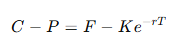
This strategy compares market prices with the parity relationship. When prices deviate significantly from parity, it builds a portfolio that buys undervalued assets and sells overvalued ones to capture arbitrage opportunities. The overall logic is as follows:
Indicator calculation:
- Theoretical futures spread: futures price − discounted strike price;
- Actual options spread: call option price − put option price;
- The ratio of the two is used to measure the degree of deviation.
Arbitrage logic:
- If the spread is too wide (above the upper threshold):
- Buy futures;
- Sell the first out-of-the-money (OTM) call option;
- Buy the first OTM put option.
- If the spread is too narrow (below the lower threshold):
- Sell futures;
- Buy the first OTM call option.
- Sell the first OTM put option.
3.1 Write the Strategy
In the strategy initialization function (initialize), set global parameters such as the upper and lower premium/discount thresholds and the risk-free interest rate.
def initialize(mutable context){
    context["upper"] = 0.005
    context["down"] = 0.007
    context["futuresCode"] = 'IF2306'
    context["callOption"] ="IO2306C4750"
    context["putOption"] ="IO2306P4750"
    context["strikePrice"] = 4750.
    context["rf"] = 0.02
    context["maturity"] = 0.67
}
In the strategy callback function (onBar), calculate the corresponding spread indicators using the logic described above, and use the arbitrage logic to manage position opening and closing.
def onBar(mutable context, msg,indicator){
    futureSpread = msg[context["futuresCode"]]["close"] - context["strikePrice"]*exp(-context["rf"]*context["maturity"])
    optionSpread = msg[context["callOption"]]["close"] -msg[context["putOption"]]["close"]
    futPos = Backtest::getPosition(context.engine, context["futuresCode"], "futures")
    calloptPos = Backtest::getPosition(context.engine, context["callOption"], "option")
    putoptPos = Backtest::getPosition(context.engine, context["putOption"], "option")

    if(double(optionSpread)\double(futureSpread)-1 > context["upper"]){
        if(futPos.longPosition<1 && context["futuresCode"] in msg.keys()){
            futuresPrice = msg[context["futuresCode"]]["close"]
            symbolSource = msg[context["futuresCode"]]["symbolSource"]
            orderMsg=(context["futuresCode"],symbolSource, context.tradeTime, 5, futuresPrice,0. ,,5,1,,0,)
            Backtest::submitOrder(context.engine, orderMsg,"buyOpen future",0,"futures")
        }

        if( calloptPos.shortPosition<1){
            futuresPrice = msg[context["futuresCode"]]["close"]
            level = msg[context["callOption"]]["level"]
            optType = msg[context["callOption"]]["optType"]
            strikePrice = msg[context["callOption"]]["strikePrice"]
            if(int(level)==1 and optType==1 and strikePrice > futuresPrice){
                symbolSource = msg[context["callOption"]]["symbolSource"]
                price = msg[context["callOption"]]["close"]
                orderMsg=(context["callOption"], symbolSource , context.tradeTime, 5, price,0. ,,5,2,,0,)
                Backtest::submitOrder(context["engine"], orderMsg,"sellOpen call option",0,"option")
            }
        }
        if( putoptPos.longPosition<1){
            level = msg[context["putOption"]]["level"]
            optType = msg[context["putOption"]]["optType"]
            strikePrice = msg[context["putOption"]]["strikePrice"]
            price=msg[context["putOption"]]["close"]
            if(int(level)==1 and optType==2 ){
                symbolSource = msg[context["putOption"]]["symbolSource"]
                price = msg[context["putOption"]]["close"]
                orderMsg=(context["putOption"],symbolSource , context.tradeTime, 5, price,0. ,,5,1,,0,)
                Backtest::submitOrder(context["engine"], orderMsg,"buyOpen put option",0,"option")
            }
        }
    }
    ...
}
3.2 Configure Strategy Parameters
In this example, all futures and options positions are managed through a single unified account for capital accounting and risk control. The cashDict dictionary is used to set the account's initial capital. This not only allows margin to be shared and dynamically allocated across different assets, but also more realistically simulates the risk management of a shared multi-asset account in live trading.
startDate=2023.01.01
endDate=2023.02.03
userConfig=dict(STRING,ANY)
userConfig["startDate"]= startDate
userConfig["endDate"]= endDate
userConfig["strategyGroup"]= "multiAsset"
cashDict=dict(STRING,DOUBLE)
cashDict["futures, options"]=100000000.
userConfig["cash"]= cashDict
userConfig["dataType"]=3
userConfig["msgAsTable"]= false
userConfig["frequency"]= 0
userConfig["outputOrderInfo"]= true
userConfig["multiAssetQuoteUnifiedInput"]= false
userConfig["depth"]= 5
userConfig["commission"]= 0.00015
userConfig["tax"]= 0.001
4. Performance Testing
To evaluate the performance of the DolphinDB backtesting engine more intuitively in typical scenarios, we conducted tests based on the two examples above:
Stock-futures hedging strategy: We selected two days of minute-level OHLC bar data for the CSI 300 stocks (144,000 records in total), along with two days of minute-level OHLC bar data for the main CSI 300 stock index futures contract (394 records). Running this strategy in single-threaded, non-JIT mode produced 156 orders, and the backtest completed in about 5.2 seconds.
Futures-options arbitrage strategy: We selected two days of minute-level OHLC bar data for the main CSI 300 stock index futures contract and its corresponding call and put options, totaling about 4,000 market data records. The backtest generated 40 filled orders and completed in just 0.012 seconds.
5. Summary
In quantitative research, cross-asset strategies often involve multiple assets such as stocks, futures, and options. A single-asset backtesting framework cannot fully capture portfolio-level capital usage, risk exposure, and execution paths. This article demonstrates the performance of the DolphinDB multi-asset backtesting framework in complex strategy scenarios using two representative examples: a beta hedging strategy between stocks and stock index futures, and a put-call parity arbitrage strategy involving futures and options. You can manage multiple accounts within a single backtesting engine, flexibly configure capital and margin, and use a hybrid callback mechanism to simulate coordination across assets. Compared with traditional single-asset backtesting, DolphinDB greatly simplifies the implementation of cross-market strategies while maintaining high computational efficiency and fully reconstructing trading details in medium- and high-frequency market data-driven simulations, providing robust support for the validation and deployment of multi-asset strategies.
6. Appendix
Demo of the stock-futures hedging strategy and the required sample data:
Demo of the futures-options arbitrage strategy and sample data: