
Backtesting Case Study of a Multi-Asset Stock Index Futures and Options Arbitrage Strategy
In modern quantitative investment practice, multi-asset strategies have long been a core approach for institutional investors building low-volatility, absolute-return products. As the Chinese derivatives market matures, instruments such as futures and options are no longer merely vehicles for single-direction speculative trading; they are increasingly incorporated into comprehensive allocation frameworks across products and tenors. Compared with traditional single-direction trend-following strategies, arbitrage strategies based on multi-asset pricing can exploit statistical regularities or theoretical pricing relationships among related instruments to capture deterministic returns from price convergence while effectively controlling directional risk. To meet this need, the DolphinDB backtesting engine provides high-performance multi-asset hybrid backtesting capabilities, enabling researchers to implement complex futures and options strategies on a unified platform and thereby validate their performance in live trading environments more faithfully.
All code in this strategy case runs on DolphinDB version 3.00.6, Backtest plugin version 3.00.6.1, and the MatchingEngineSimulator plugin version 3.00.6.1.
1. Introduction
Futures and options, as two core risk management tools, have highly correlated price movements, yet often experience temporary divergences due to microstructure factors. The arbitrage strategy based on put-call parity (PCP) is a mainstream quantitative approach that exploits deviations between the theoretical and actual trading prices of futures and options to capture risk-free or low-risk returns.
However, such strategies face three major challenges in practical implementation: first, cross-instrument coordination is difficult, as futures and options belong to different contract systems and margin accounts, making it hard for traditional single-asset backtesting to simulate actual capital usage and risk hedging; second, high-frequency signals decay quickly, and pricing deviations based on snapshot frequency are often fleeting, imposing extremely high requirements on the time-series processing precision and low-latency simulation capabilities of the backtesting framework; third, execution risk is high, because these strategies involve two-leg or even multi-leg combinations, and if an order for a single leg is not filled or is not canceled in time, it can easily create naked directional risk.
Against this backdrop, this strategy builds a futures-options PCP arbitrage strategy on DolphinDB's high-performance multi-asset backtesting engine. Using the DolphinDB backtesting engine to implement this strategy can reproduce capital flows, market impact costs, and risk exposures in live trading, providing solid technical support for the development and validation of multi-asset arbitrage strategies.
2. Strategy Logic
The strategy uses stock index futures as the underlying spot asset and combines at-the-money (ATM) options to construct a synthetic futures position, capturing arbitrage opportunities by monitoring the price spread deviation between the two in real time. The system includes built-in intelligent rollover logic to address contract expiration risk, introduces a dynamic Delta hedging mechanism to remove the interference from directional market movements, and designs rigorous order status management and order-chasing mechanisms to ensure that the portfolio remains closed even under extreme market conditions.
This strategy uses the DolphinDB backtesting framework to implement multi-asset futures-options PCP arbitrage logic. It conducts snapshot-frequency arbitrage trading around the relative pricing relationship between stock index futures and stock index options. The core approach is as follows:
-
Determine the current main contract underlying based on the expiration dates of futures and options, and roll to the next month at a specified time before expiration;
-
According to the PCP formula, use ATM call and put options with the same underlying and the same expiration month to construct a synthetic price. When the deviation between the synthetic price and the spot price exceeds a threshold, open a position; when the deviation reverts, close the position;
-
During the holding period, hedge the portfolio Delta with futures to reduce directional exposure;
-
Check unfilled option orders and add cancellation and order-chasing logic to prevent risk exposure caused by single-leg position opening.
2.1 Trading Instruments
-
Futures leg: main stock index futures contract (rolled monthly).
-
Options leg: ATM call and put options with the same expiration month as the main futures contract.
-
Arbitrage strategy:
-
Long combination (long synthetic forward): buy call + sell put.
-
Reverse combination (short synthetic forward): sell call + buy put.
-
2.2 Trading Rules
2.2.1 Rollover Rules
Each trading day, first determine the trading month, using the Wednesday of the week before the expiration date of the current-month contract as the cutoff:
-
If the date is before the 'Wednesday of the week before expiration', trade the current-month contract;
-
If the date is on or after the 'Wednesday of the week before expiration', switch to the next-month contract.
2.2.2 ATM Option Selection Rules
From the option pool for the dominant contract month, select the call/put pair with the strike price closest to the latest futures price as the current ATM combination.
2.2.3 Position Opening and Closing Rules
Entry signals:
-
If
C_bid - P_ask + K*DF < F*DF - threshold, open a 'long combination' (buy call, sell put). -
If
C_bid - P_ask + K*DF > F*DF + threshold, open a 'reverse combination' (sell call, buy put).
Where F is the latest futures price, K is the ATM strike price, DF is exp(-r*T), i.e., the discount factor, r is the risk-free rate, and T is the remaining time to expiration in years.
Exit signals:
-
Long combination closing condition:
C_bid - P_ask + K*DF >= F*DF - threshold/2. -
Reverse combination closing condition:
C_bid - P_ask + K*DF > F*DF + threshold/2.
2.2.4 Risk Control
-
Position limit: cap the maximum number of lots held on one side of an options position to prevent unlimited additions to the position.
-
Delta hedging: monitor portfolio Delta in real time and use futures for directional hedging once the limit is exceeded.
-
Order management: when orders time out unfilled, trigger order cancellation or price chasing, prioritizing consistency between the two legs of the combination and reducing single-leg exposure risk.
-
Both legs unfilled: place orders for both legs simultaneously at the current top-of-book quotes. If no fill occurs within 5 seconds, cancel all orders, invalidate the current signal round, and proceed to the next arbitrage signal check;
-
Single leg filled: if one leg is filled within 5 seconds, cancel the other leg and place an order at the opposite-side price to execute the trade.
-
3. Strategy Implementation Workflow
The steps for implementing a multi-asset strategy backtest using the DolphinDB backtesting engine are as follows:
-
Strategy input: prepare the basic information table and market data table
-
Strategy development: use strategy callback functions based on the callback function parameters.
-
Strategy configuration: set strategy parameters
-
Strategy creation and execution: create a backtesting engine and insert market data to run the backtest
-
Strategy output: call the method to obtain backtest results
3.1 Strategy Input: Prepare the Basic Information Table and Market Data Table
3.1.1 Basic Information Table
The basic information table is used to pass the contract information required for strategy backtesting to the backtesting engine. This table is the basis for calculating margins and fees for futures and options trading and for handling delivery dates. You need to process contract information into the basic information table according to the backtesting engine requirements, covering all instruments to be backtested. In addition, when contract information is updated, you can also update the basic information table through setSecurityReference.
3.1.1.1 Option Basic Information Table
Refer to the CFFEX option contract table: CSI 300 Index Options| China Financial Futures Exchange. The Option Basic Information Table for this strategy is configured as follows:
| Field Name | Data Type | Note |
|---|---|---|
| symbol | SYMBOL or STRING | Option contract code |
| assetType | INT | Product type: set to 3 (stock index option) |
| underlyingCode | STRING | Underlying futures code for the option asset |
| optType | INT |
Option type: 1: Call 2: Put |
| strikePrice | DOUBLE | Option strike price |
| multiplier | DOUBLE |
Contract multiplier: For CSI 300 Index Options, it is 100.0. |
| marginRatio | DOUBLE |
Margin ratio: Adjust as needed; currently set to 0.12. |
| tradeUnit | DOUBLE |
Contract unit: Required only for commodity options; set to 1.0 for all others. |
| priceUnit | DOUBLE |
Quote unit: Index points; set to 1. |
| priceTick | DOUBLE | Minimum price increment: set to 0.2 |
| commission | DOUBLE |
Commission: Set to 15.0, representing CNY 15 per lot. |
| deliveryCommissionMode | INT |
Commission calculation method: Set to 1, indicating that commission is calculated per lot. |
| lastTradingDay | DATE | Last trading day of the option contract |
| exerciseDate | DATE | Option exercise date |
| exerciseSettlementDate | DATE | Option settlement date |
3.1.1.2 Futures Basic Information Table
Refer to the CFFEX futures contract table: CSI 300 Index Futures| China Financial Futures Exchange. The Futures Basic Information Table for this strategy is configured as follows:
| Field Name | Data Type | Description |
|---|---|---|
| symbol | SYMBOL or STRING | Futures contract code |
| assetType | INT | Product type: set to 1 (futures) |
| underlyingCode | STRING | Invalid field; used only to align with the base table |
| optType | INT | Invalid field; used only to align with the base table |
| strikePrice | DOUBLE | Invalid field; used only to align with the base table |
| multiplier | DOUBLE |
Contract multiplier: For CSI 300 Index Futures, it is 300.0. |
| marginRatio | DOUBLE |
Margin ratio: Adjust as needed; currently set to 0.12. |
| tradeUnit | DOUBLE |
Contract unit: Required only for commodity options; set to 1.0 for all others. |
| priceUnit | DOUBLE |
Quote unit: Index points; set to 1. |
| priceTick | DOUBLE | Minimum price increment: set to 0.2 |
| commission | DOUBLE |
Commission: Set to 0.000023, i.e., 0.23 per 10,000. |
| deliveryCommissionMode | INT |
Commission calculation method: Set to 2, indicating calculation as trading value * commission. |
| lastTradingDay | DATE | Invalid field; used only to align with the basic information table |
| exerciseDate | DATE | Invalid field; used only to align with the basic information table |
| exerciseSettlementDate | DATE | Invalid field; used only to align with the basic information table |
3.1.2 Market Data Table
The market data table is the most important data input for strategy backtesting. Before you feed the data into the strategy backtesting engine, process the market data into the data structure required by the engine, and then inject the data into the backtesting engine through the method described in Backtest Method References. This strategy uses snapshot-frequency backtesting.
3.1.2.1 Option Market Data Table
The structure of the Option Market Data Table for this strategy is shown in the following table:
| Field Name | Data Type | Description |
|---|---|---|
| symbol | SYMBOL | Underlying symbol |
| symbolSource | STRING |
CCFX (China Financial Futures Exchange) Exchange code reference: Trading Calendar |
| tradingDay | DATE | Trade date |
| timestamp | TIMESTAMP | Market data timestamp |
| lastPrice | DOUBLE | Latest traded price |
| upLimitPrice | DOUBLE | Limit up price |
| downLimitPrice | DOUBLE | Limit down price |
| totalBidQty | LONG | Total bid quantity |
| totalOfferQty | LONG | Total offer quantity |
| bidPrice | DOUBLE[] | Bid price list |
| bidQty | LONG[] | Bid quantity list |
| offerPrice | DOUBLE[] | Offer price list |
| offerQty | LONG[] | Offer quantity list |
| highPrice | DOUBLE | High price |
| lowPrice | DOUBLE | Low price |
| underlyingPrice | DOUBLE | Underlying price (required only for options) |
| Theta | DOUBLE | User-defined field: derivative of the option price with respect to time |
| Vega | DOUBLE | User-defined field: derivative of the option price with respect to volatility |
| Gamma | DOUBLE | User-defined field: second derivative of the option price with respect to the underlying futures price |
| Delta | DOUBLE | User-defined field: option Greeks. The risk control objective of this strategy is to hedge delta risk, and delta is used in futures hedging calculations. |
| IV | DOUBLE | User-defined field: implied volatility; currently set to 0 and reserved for future use. |
| assetType | INT | Product type; 2 indicates an option. When the multiAssetQuoteUnifiedInput parameter is false, you do not need to pass this field; the backtesting engine fills it in internally. |
3.1.2.2 Futures Market Data Table
The structure of the futures market data table for this strategy is shown in the following table:
| Field Name | Data Type | Note |
|---|---|---|
| symbol | SYMBOL | Asset symbol |
| symbolSource | STRING |
"CCFX" (China Financial Futures Exchange) For exchange codes, see Trading Calendar. |
| tradingDay | DATE | Trade date |
| timestamp | TIMESTAMP | Market data timestamp |
| lastPrice | DOUBLE | Latest traded price |
| upLimitPrice | DOUBLE | Limit up price |
| downLimitPrice | DOUBLE | Limit down price |
| totalBidQty | LONG | Total bid quantity |
| totalOfferQty | LONG | Total offer quantity |
| bidPrice | DOUBLE[] | Bid price list |
| bidQty | LONG[] | Bid quantity list |
| offerPrice | DOUBLE[] | Offer price list |
| offerQty | LONG[] | Offer quantity list |
| highPrice | DOUBLE | High price |
| lowPrice | DOUBLE | Low price |
| assetType | INT | Product type; 1 indicates a futures contract. When the multiAssetQuoteUnifiedInput parameter is false, you do not need to pass this field; the backtesting engine fills it in internally. |
3.2 Strategy Development: Strategy Callback Functions and Callback Function Parameters
3.2.1 Strategy Callback Functions
3.2.1.1 initialize Strategy Initialization Function
This function is called once before the strategy starts. It is generally used to initialize strategy global variables, such as the main contract name in this strategy, as shown below:
def initialize(mutable context){
    context['front_month_contract'] = ""                      // Main futures contract name
    context['front_month_contract_latest_price']=double(NULL) // Latest price of the main futures contract
    context['strike_price']=double(NULL)                      // Strike price of the at-the-money (ATM) option contract
    context["maturity"] = double(NULL)                        // Time to expiration: days until expiration / 365
    context["managedOrderIds"] = dict(LONG, BOOL)             // Order management dictionary that records processed order IDs to prevent duplicate cancellations and order chasing
}
3.2.1.2 beforeTrading Pre-Trading Callback Function
This function is called once before trading each day. It is generally used for pre-trading strategy initialization and variable marking. For example, this strategy uses it to handle the contract rollover logic and mark the underlying for the main contract, as shown below:
def beforeTrading(mutable context){
    // Initialize once per day
    context['options'] = dict(STRING, ANY)                    // Main option underlying to latest price mapping
    context["deltas"] = dict(STRING, DOUBLE)                  // Main option delta mapping
    context['ATM_C']=""                                       // At-the-money (ATM) call option contract name
    context['ATM_P']=""                                       // At-the-money (ATM) put option contract name
    // Get current date
    today = context['tradeTime'].date()
    print('Current time: '+context['tradeTime'])

    // ---------------------- Contract Rollover ---------------------
    // Get the current expiration date based on the current date
    context['expiryDate'] = exec expiryDate[0] from context['expiryMap'] where month(expiryDate) =month(today)
    // Mark the underlying of the current main contract
    if(today<transFreq(weekBegin(context['expiryDate']) - 5, "CCFX")){ // If the start date is before the Wednesday one week before expiration, use the current-month contract
        context["maturity"] = temporalDiff(context['expiryDate'],today,"d")\365
        context['front_month_contract'] = exec underlying[0] from context['expiryMap'] where expiryDate = context['expiryDate']
        mainOption = exec symbol[0] from context['expiryMap'] where underlying = context['front_month_contract']
        mainOptions = exec symbol from context['basicInfo'] where startsWith(symbol,mainOption)
    }
    else{ // Otherwise, perform rollover and use the next-month contract
        context['expiryDate'] = exec expiryDate[0] from context['expiryMap'] where month(expiryDate) = month(context['expiryDate'])+1;
        context["maturity"] = temporalDiff(context['expiryDate'],today,"d")\365
        context['front_month_contract'] = exec underlying[0] from context['expiryMap'] where expiryDate = context['expiryDate']
        mainOption = exec symbol[0] from context['expiryMap'] where underlying = context['front_month_contract']
        mainOptions = exec symbol from context['basicInfo'] where startsWith(symbol,mainOption)
    }
    // Build a dictionary of latest prices for the main options
    for(option in mainOptions){
        px = dict(STRING, ANY)
        px["bidPrice"] = double(NULL)
        px["askPrice"] = double(NULL)
        context["options"][option] = px
    }
    // Build a dictionary of delta values for the main options
    for(option in mainOptions){
        context["deltas"][option] = double(NULL)
    }
}
3.2.1.3 onSnapshot and Other Market Data Callback Functions
This function is called once for each incoming market data update. It is generally used for signal calculation and opening or closing positions, and it embodies the main logic of the strategy.
Depending on the market data frequency, use different market data callback functions. For example, onTick handles tick-by-tick data, onSnapshot handles snapshot data, and onBar handles OHLC bar data.
This strategy is an options and futures snapshot-frequency strategy, so it uses the onSnapshot function. Part of the script is shown below; the complete script is in the appendix:
def onSnapshot(mutable context, msg, indicator){
    ......
    //1. Determine whether to take a long position: (C_bid - P_ask + K * DF) < Lastprice(F) * DF - threshold
    if (context['options'][context['ATM_C']]['bidPrice'] != NULL and context['options'][context['ATM_P']]['askPrice'] != NULL){
            c_bid = context['options'][context['ATM_C']]['bidPrice']
            p_ask = context['options'][context['ATM_P']]['askPrice']
            if (callLongPos<context['maxQty'] && putShortPos<context['maxQty'] &&
                ((c_bid-p_ask+strike*discount_factor) < (f_last*discount_factor-threshold)) ){
                // Place order (underlying code, exchange code, time, order type, order price, stop-loss price/take-profit price, order quantity, buy/sell direction, time in force, order expiration time)
                print(context['tradeTime']+": Opening long position") // Buy call, sell put
                print("Buy: "+context['ATM_C'])
                print("Sell: "+context['ATM_P'])
                Backtest::submitOrder(context["engine"],
                    (context['ATM_C'],msg["symbolSource"],context['tradeTime'],5,c_bid, , ,context['orderQty'], 1,,,),"buyOpenCall", 0, 'option')
                Backtest::submitOrder(context["engine"],
                    (context['ATM_P'],msg["symbolSource"],context['tradeTime'],5,p_ask, , ,context['orderQty'], 2,,,),"buyOpenPut",0, 'option')
            }
        }
        //2. Determine whether to take a short position: (C_ask - P_bid + K * DF) > Lastprice(F) * DF + threshold
        if (context['options'][context['ATM_C']]['askPrice'] != NULL and context['options'][context['ATM_P']]['bidPrice'] != NULL){
            c_ask = context['options'][context['ATM_C']]['askPrice']
            p_bid = context['options'][context['ATM_P']]['bidPrice']
            if (callShortPos<context['maxQty'] && putLongPos<context['maxQty'] &&
                (c_ask-p_bid+strike*discount_factor) > (f_last*discount_factor+threshold) ){
                //Place Order
                print(context['tradeTime']+": Opening short position") // Sell call, buy put
                print("Sell: "+context['ATM_C'])
                print("Buy: "+context['ATM_P'])
                Backtest::submitOrder(context["engine"],
                    (context['ATM_C'],msg["symbolSource"],context['tradeTime'],5,c_ask, , ,context['orderQty'], 2,,,),"sellOpenCall", 0, 'option')
                Backtest::submitOrder(context["engine"],
                    (context['ATM_P'],msg["symbolSource"],context['tradeTime'],5,p_bid, , ,context['orderQty'], 1,,,),"sellOpenPut", 0, 'option')
            }
        }
        ......
}
3.2.2 Strategy Callback Function Parameters
The strategy event functions of the backtesting engine take the strategy global variable context, the market data message msg, the market data indicator named indicator, the order information orders, and the trade information trades as parameters. For descriptions of the related variables, see Backtest.
3.2.2.1 context
The strategy global variable context is a dictionary used to set all user-defined variables for the strategy and can be accessed in all callback functions. Access it through context["fieldName"] or context.fieldName. If you want to use JIT optimization, user-defined global variables in context do not support tables; all other DolphinDB data types are supported. The engine maintains four variables internally:
-
context.tradeTime retrieves the latest market data timestamp.
-
context.tradeDate retrieves the current date.
-
context.BarTime is the current Bar timestamp when snapshot data is downsampled to low-frequency market data.
-
context.engine retrieves the backtesting engine instance.
Other context variables are determined by user input parameters. See Sections 3.3.2 External User-Defined Parameters and 3.3.3 Internal User-Defined Parameters.
3.2.2.2 msg
The market data message msg in the backtesting engine's strategy event functions is a dictionary. It is accessed in strategy market data callback functions such as onSnapshot, as follows:
-
In the market data event callback functions
onSnapshotandonTickfor high-frequency strategy backtesting, msg is a dictionary that represents one message. Access it throughmsg["fieldName"]ormsg.fieldName; for example, you can get the latest price throughmsg.lastPriceandmsg.price. Note that bidPrice, bidQty, offerPrice, and offerQty are vectors. To access the best bid and ask prices and quantities, use the corresponding field with index 0, e.g.,msg["bidPrice"][0]. -
The msg in the
onBarmarket data callback function is also a dictionary, but it is a nested dictionary that represents multiple messages. The keys of the first-level dictionary are underlying codes (sym), and the value for each key is the market data for that underlying. For example, you can get the latest closing price throughmsg.sym.close.
For the msg structure used in this strategy, see Multi-Asset Backtesting Configuration or Section 3.1.2 Market Data Table in this tutorial.
An example of a futures market data msg is as follows:
print(msg)

/*output:
symbol->IF2601
symbolSource->CCFX
timestamp->2026.01.05T09:30:01.400
tradingDay->2026.01.05
lastPrice->4651.199999999999818
upLimitPrice->5080.199999999999818
downLimitPrice->4156.600000000000363
totalBidQty->144
totalOfferQty->144
bidPrice->[4651.199999999999818]
bidQty->[3]
offerPrice->[4653.199999999999818]
offerQty->[2]
highPrice->4651.199999999999818
lowPrice->4651.199999999999818
assetType->1*/
An example of an option market data msg is as follows:
print(msg)

/*output:
symbol->IO2603P4100
symbolSource->CFFX
timestamp->2026.01.05T09:30:01.400
tradingDay->2026.01.05
lastPrice->17.600000000000001
upLimitPrice->34.539999999999999
downLimitPrice->12.06
totalBidQty->1
totalOfferQty->1
bidPrice->[13.4]
bidQty->[6]
offerPrice->[31.399999999999998]
offerQty->[6]
highPrice->17.600000000000001
lowPrice->17.600000000000001
underlyingPrice->4636.899999999999636
Theta->-0.537425054003289
Vega->3.643799865018499
Gamma->0.000377611826343
Delta->-0.098767264569741
IV->0
assetType->2*/
3.2.2.3 indicator
indicator represents the dictionary of indicators subscribed to in the strategy. The data type of a market data indicator is the same as the data type of the msg for the corresponding market data. After subscribing to market data indicators using subscribeIndicator in the initialize strategy initialization function, you can access them in market data callbacks such as onSnapshot, as follows:
-
In the high-frequency strategy backtest market data event callbacks
onSnapshotandonTick, indicator is a dictionary representing a single message. You can access it throughindicator["fieldName"]orindicator.fieldName. -
The indicator in the
onBarmarket data callback is also a dictionary, but it is a nested dictionary representing multiple messages. In the outer dictionary, each key is an instrument symbol (sym), and each value contains market data for that instrument. You can access the data using an expression such asindicator.sym.mavg.
The following is an example script for subscribing to indicators in the initialize strategy initialization function:
def initialize(mutable context){
    d=dict(STRING,ANY)
    d["mavg"]=<mavg(lastPrice,20)>
    Backtest::subscribeIndicator(context["engine"], "snapshot", d,'futures')
}
The following is an example of indicator data in the onSnapshot callback:
symbol->IF2603
mavg->4682.590000000000145
3.2.2.4 orders
The orders dictionary contains order information and is available in the onOrder order notification callback. Access its fields using orders["fieldName"] or orders.fieldName. The fields are as follows:
| Field | Data Type | Note |
|---|---|---|
| orderId | LONG | Order ID |
| symbol | STRING | Instrument symbol |
| symbolSource | STRING | Exchange: this strategy always uses "CCFX" (CFFEX). |
| timestamp | TIMESTAMP | Order time |
| qty | LONG | Order quantity |
| price | DOUBLE | Order price |
| status | INT |
Order status 4: Order submitted 0: Partially filled 1: Filled 2: Cancellation successful -1: Approval rejected -2: Cancellation rejected |
| direction | INT |
Order side 1: Buy to open 2: Sell to open 3: Sell to close 4: Buy to close |
| tradeQty | LONG |
Cumulative filled quantity (status = 2 indicates the quantity successfully canceled in this cancellation request.) |
| tradeValue | DOUBLE |
Cumulative trading value (This value is 0 when status is 2.) |
| label | STRING | Remarks |
| updateTime | TIMESTAMP | Update time |
| account | STRING | Asset type. Use "option" for options or "futures" for futures. |
The following is an example of the orders dictionary:
orderId->1
symbol->IO2601C4650
timestamp->2026.01.05T09:30:01.400
qty->1
price->60.200000000000002
status->4
direction->2
tradeQty->0
tradeValue->0
label->sellOpenCall
updateTime->2026.01.05T09:30:01.400
account->option
3.2.2.5 trades
trades is a trade data dictionary that contains information about filled orders. It is used in the onTrade trade callback and can be accessed through trades["fieldName"] or trades.fieldName. The fields are as follows:
| Field Name | Data Type | Description |
|---|---|---|
| orderId | LONG | Order ID |
| symbol | SYMBOL | Instrument symbol |
| tradePrice | DOUBLE | Fill price |
| tradeQty | LONG | Trade quantity |
| tradeValue | DOUBLE | Total trading value |
| totalFee | DOUBLE | Total fees |
| totalVolume | LONG | Cumulative trading volume |
| totalValue | DOUBLE | Cumulative trading value (contract multiplier included) |
| direction | INT |
1: Buy to open 2: Sell to open 3: Sell to close 4: Buy to close |
| tradeTime | TIMESTAMP | Execution time |
| orderPrice | DOUBLE | Order price |
| label | STRING | Remarks (user-defined) |
| account | STRING | Asset type. Use "option" for options or "futures" for futures. |
The following is an example of the trades dictionary:
orderId->5
symbol->IO2601P4650
tradePrice->50
tradeQty->1
tradeValue->50
totalFee->15
totalVolume->1
totalValue->5000
direction->2
tradeTime->2026.01.05T09:30:07.400
orderPrice->49
label->buyOpenPut
account->option
3.3 Strategy Configuration: Set Strategy Parameters
3.3.1 Engine Configuration Parameters
The engine configuration parameters for this strategy are listed in the following table:
| Parameter | Description | Remarks |
|---|---|---|
| startDate | Start date |
Required. DATE For example, 2026.01.01 |
| endDate | End date |
Required. DATE For example, 2026.02.28 |
| strategyGroup | Strategy type | Required, must be "multiAsset" |
| cash | Initial cash |
Required; must be a dictionary. Currently set to multi-asset shared capital, as follows: |
| commission | Commissions on spot instruments such as stocks |
DOUBLE. For futures and options, leave this unset or set it to 0.0. Set this in the basic information table. |
| tax | Stamp duty for spot instruments such as stocks |
DOUBLE. For futures and options, leave this unset or set it to 0.0. Set this in the basic information table. |
| frequency | Aggregate snapshot market data at the configured frequency to trigger onBar | INT. This backtest uses snapshot market data, so onBar does not need to be synthesized; the default is 0. |
| callbackForSnapshot | Callback mode for snapshot market data | INT. The default value is 0, which means only the onSnapshot callback is triggered. |
| dataType | Market data type | INT. Set to 1 for snapshot market data. |
| matchingMode | Order matching mode | INT. When dataType=1, setting this parameter to 1 or 2 has no effect; orders are matched by the order matching simulator by default. |
| benchmark | Benchmark instrument | STRING or SYMBOL; leave unset for now. |
| latency | Order latency | INT, in milliseconds. A value of 0 means no latency. |
| orderBookMatchingRatio | Fill percentage against the market order book | DOUBLE; default 1.0 |
| matchingRatio | Interval matching ratio | DOUBLE; default 1.0 |
| maintenanceMargin | Maintenance margin ratio | DOUBLE; default 0.75 |
| outputQueuePosition | Whether to output the order's position in the order book |
INT. The default value is 0, which means no output. This takes effect only when dataType=0, 5, or 6 and enableSubscriptionToTickQuotes=true. |
| stockDividend | Dividend and Ex-Rights Basic Information Table | TABLE; no setting is required for futures or options. |
| multiAssetQuoteUnifiedInput | Market data input method | BOOL. The default value is true, in which case the multiAsset input table combines market data for different assets. |
| msgAsPiecesOnSnapshot | How onSnapshot is triggered |
BOOL. The default value is false, in which case onSnapshot is triggered sequentially for each data record. |
The table above describes only the parameters relevant to this strategy configuration. For complete descriptions of the engine configuration parameters, see Multi-Asset Backtesting Configuration.
3.3.2 External User-Defined Parameters
External user-defined parameters are variables configured outside the strategy. Typically, you define variables that need adjustment outside the strategy and pass them to the backtesting engine through the context dictionary. The external user-defined parameters for this strategy are listed in the following table:
| Parameter | Description | Note |
|---|---|---|
| basicInfo | Basic Information Table | TABLE. During rollover, this table is used to find the symbols of the dominant option contracts at all strike prices based on the dominant option name. |
| expiryMap | Expiration date mapping table | TABLE, an expiration date mapping table extracted from option market data. It includes option code, futures code, and expiration date columns and is used for rollover and expiration date calculation. |
| threshold | Arbitrage threshold | DOUBLE; currently set to 0.5. Used to determine the threshold for opening and closing positions. The larger the value, the harder it is to trigger arbitrage. |
| rf | Risk-free interest rate | DOUBLE; currently set to 0.02. Used to calculate the discount factor when opening and closing positions. |
| orderQty | Order quantity per order | INT; currently set to 1. Controls the quantity submitted per option opening or closing order. |
| maxQty | Maximum order quantity | INT; currently set to 3. Controls the maximum option order quantity. |
| Delta_Limit | Delta limit | DOUBLE; currently set to 1.0. Used to determine the delta hedging threshold. The larger the value, the higher the delta risk exposure. |
3.3.3 Internal User-Defined Parameters
Internal user-defined parameters are variables defined in strategy callback functions to implement the strategy logic. These variables are defined in the context dictionary, have global scope within the strategy, and can be passed between and accessed by different callback functions. The internal user-defined parameters for this strategy are listed in the following table:
| Parameter | Description | Note |
|---|---|---|
| front_month_contract | Dominant futures contract name | STRING; records the latest dominant futures contract name and is updated during rollover before the market opens each day. |
| front_month_contract_latest_price | Latest price of the dominant futures contract | DOUBLE. This variable records the latest price of the dominant futures contract for use in calculations based on the PCP arbitrage formula. It is updated whenever a market quote for that contract arrives. |
| strike_price | Strike price of the at-the-money (ATM) option contract | DOUBLE. This variable records the strike price of the current at-the-money (ATM) option contract for use in calculations based on the PCP arbitrage formula. It is updated whenever a market quote for the dominant futures contract arrives. |
| maturity | Time to expiration | DOUBLE; the time to expiration of the futures and options measured in years. Updated before the market opens each day and used in PCP arbitrage formula calculations. |
| managedOrderIds | Order management dictionary | dict(LONG,BOOL); records processed order IDs to prevent duplicate cancellations and reorders. |
| options | Dictionary of latest prices for dominant options | dict(STRING,dict(STRING,DOUBLE)); a nested dictionary that maps dominant option contract symbols to dictionaries of their latest prices. It is reinitialized before the market opens each day and updated whenever a market quote for a dominant option contract arrives. It is used to identify at-the-money (ATM) options. |
| deltas | Dominant option delta dictionary | dict(STRING,DOUBLE); records the dominant option underlyings and deltas. Reinitialized before the market opens each day, updated whenever a market quote for a dominant option contract arrives, and used to calculate account delta. |
| ATM_C | At-the-money (ATM) call option contract name | STRING; records the latest at-the-money (ATM) call option contract. Reinitialized before the market opens each day, updated whenever a market quote for the dominant futures contract arrives, and used for opening and closing positions. |
| ATM_P | At-the-money (ATM) put option contract name | STRING; records the latest at-the-money (ATM) put option contract. Reinitialized before the market opens each day, updated whenever a market quote for the dominant futures contract arrives, and used for opening and closing positions. |
| expiryDate | Current expiration date | DATE; updated before the market opens each day. |
3.4 Strategy Output: Retrieve Results Through Method Calls
After the strategy finishes running, you can retrieve the strategy backtest output through the relevant backtesting engine methods. Common strategy outputs are listed below. For complete method documentation, see the Backtest Method References.
3.4.1 Trade Details Table
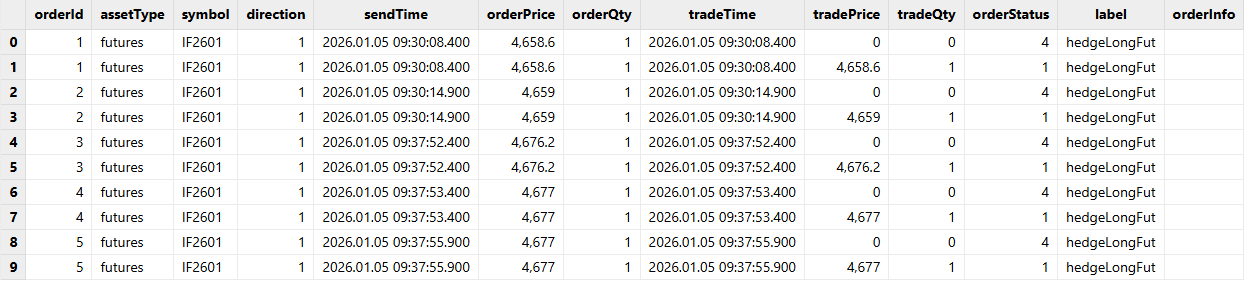
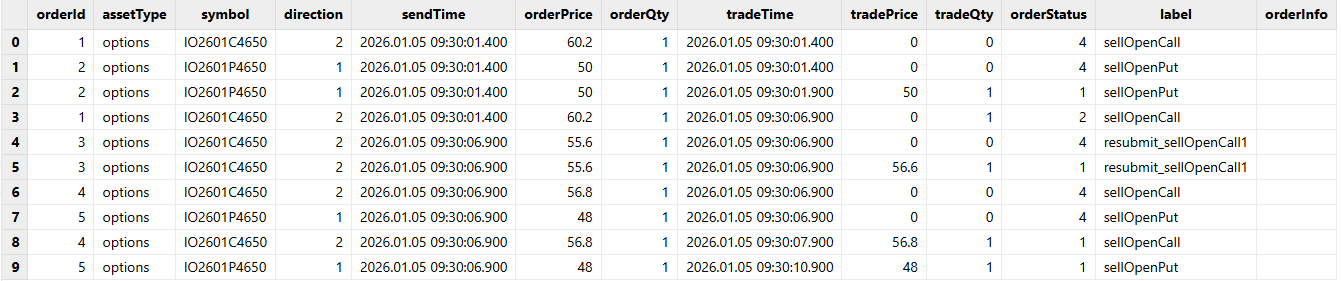
Use the Backtest::getTradeDetails(engine, [assetType]) method to retrieve strategy trade details. For detailed descriptions of the output fields, see the Backtest Method References.
The following figure shows a partial view of the futures trade details:
The following figure shows a partial view of the option trade details:
3.4.2 Daily Account Positions Table
Use the getPosition(engine, [symbol=""], [accountType=""]) method to retrieve daily account positions. For detailed descriptions of the output fields, see the Backtest Method References.
The following figure shows selected position details:

3.4.3 Daily Account Equity Table
Use the Backtest::getDailyTotalPortfolios(engine, [accountType]) method to retrieve daily account equity. For detailed descriptions of the output fields, see the Backtest Method References.
The following figure shows selected daily equity data:

3.4.4 Strategy Return Summary
Use the Backtest::getReturnSummary(engine, [accountType]) method to retrieve the strategy return summary. For detailed descriptions of the output fields, see the Backtest Method References.
The following figure shows the strategy return summary from 2026.01.01 to 2026.02.28.

4. Appendix
Multi-asset stock index futures and options arbitrage strategy demo and simulated data scripts:
Create databases and tables: 0.createDBsTBs.dos
Simulated data: 1.mockData.dos. You can replace it with real market data for backtesting as needed. The results shown above for this strategy are based on backtesting with real market data.
Strategy script: 2.futOptArbitrage.dos