
Backtest
To accurately test and validate how a strategy performs in live trading, DolphinDB provides an event-driven backtesting engine based on distributed storage and computing, a multiparadigm programming language, and the order matching simulator plugin. The engine is provided as a plugin, and its logical architecture is shown in Figure 1-1.
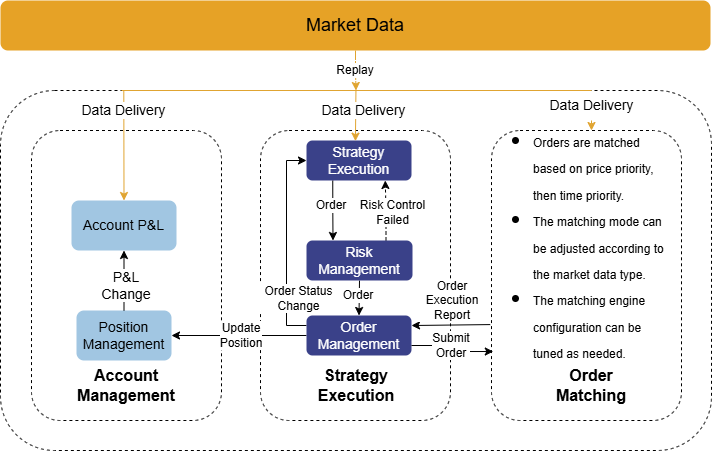
The main workflow of the backtesting engine is as follows:
-
The engine receives a market data stream replayed in chronological order and internally distributes the data to the order matching simulator and the corresponding market data callback functions.
-
The market data callback functions process the strategy logic and submit orders.
-
The backtesting engine performs risk management on orders generated by the strategy.
-
Orders that pass the risk review are sent to the order matching simulator for order matching.
-
The backtesting engine updates positions and cash balances in real time based on execution results.
-
After backtesting is complete, the engine returns results such as the strategy's returns and execution details.
When using the backtesting engine, complete the following steps in order:
-
Define indicators during strategy initialization and write user-defined strategy logic in the callback functions.
-
Configure parameters such as the strategy's market data source, funds, order latency, and execution ratio.
-
Create a backtesting engine.
-
Replay the data and run the strategy backtest.
-
Retrieve the backtest results, including return analysis and execution details.
The backtesting engine supports backtesting for multi-asset strategies, including stocks, options, futures, cryptocurrencies, and interbank bonds. The backtesting engine differs in configuration, market data structures, callback function parameters, and API design depending on the asset type and market data type used. This tutorial focuses on the engine APIs. For details about engine configuration, market data structures, strategy functions, and examples, see the corresponding asset pages: stocks, options, futures, cryptocurrencies, and interbank bonds.
Installation
Version Requirements
DolphinDB Server 2.00.14, 3.00.2, and later versions support x86-64 Linux and Windows. Linux versions support the Linux ABI feature.
Installation Steps
-
In the DolphinDB client, use the
listRemotePluginsfunction to view plugin information in the plugin repository.Note: Only plugins supported by the current operating system and server version are displayed.
login("admin", "123456") listRemotePlugins() -
Use the
installPluginfunction to install the plugin.installPlugin("Backtest") -
Use the
loadPluginfunction to load the plugin.loadPlugin("Backtest")
Plugin Dependencies
The backtesting engine depends on the order matching simulator. Please load the simulator first. Both are available in the Plugin Market.
-
Use the
installPluginfunction to install the order matching simulator plugin.installPlugin("MatchingEngineSimulator") -
Use the
loadPluginfunction to load the order matching simulator plugin.loadPlugin("MatchingEngineSimulator")
Engine Configurations
When creating a backtesting engine, set the engine configuration items using the config parameter of the createBacktester API or the userConfig parameter of the createBacktestEngine API. The configuration items vary depending on the assets being backtested and the market data type used. Complete the configuration according to the corresponding asset page.
| Key | Description | Note |
|---|---|---|
| "startDate" | Start date |
Required. DATE type (e.g., 2020.01.01). |
| "endDate" | End date |
Required. DATE type (e.g., 2020.01.01). |
| "strategyGroup" | Strategy type |
Required. STRING type
|
| "cash" | Initial funds | Required. DOUBLE type |
| "commission" | Commission |
Required for stock backtesting. DOUBLE type For other asset types, you can configure this item in the basic information table. |
| "dataType" | Market data type |
INT type, required. It can be:
|
| "frequency" |
Synthesize snapshots from tick-by-tick data at the specified frequency Or synthesize bars from snapshot data at the specified frequency |
INT type. Default is 0
|
| "msgAsTable" | Market data format |
BOOL type. Default is false
|
| "matchingMode" | Order matching mode |
INT type. The default matching mode for minute-level and daily market data is 1. Valid values:
When dataType is 1 or 2, setting this parameter to 1 or 2 has no effect. By default, orders are matched by the order matching simulator. When matchingMode is set to 3, the strategy's orders are filled at their submitted prices. |
| "benchmark" | Benchmark instrument | STRING type |
| "latency" | Order latency | INT type, in milliseconds. Simulates the latency between the time a user order is submitted and the time order matching begins. The default is 0, which means no delay. |
| "enableIndicatorOptimize" | Whether to enable indicator optimization |
BOOL type. Default is false
|
| "isBacktestMode" | Backtest mode |
BOOL type. Default is true
|
| "dataRetentionWindow" | Data retention window when indicator optimization starts |
STRING type. This parameter takes effect only when
|
| "addTimeColumnInIndicator" | Whether to include a time column in the strategy indicator table |
BOOL type. Default is false
|
| "context" | The strategy logic context, which defines global strategy variables |
DICT type. A dictionary of strategy global variables, for example: |
| "callbackForSnapshot" | Callback mode triggered by snapshot market data |
INT type. Default is 0. Available values are:
When frequency>0, the onBar callback must be triggered; that is, callbackForSnapshot must be set to 1 or 2. |
| "orderBookMatchingRatio" | Fill percentage against the market order book | A positive DOUBLE value. The default is 1.0 for snapshot market data and 0.2 for medium- and low-frequency data. |
| "matchingRatio" | Interval order matching ratio | DOUBLE type. Default is 1.0. The value must be between 0 and 1.0. By default, this value is the same as orderBookMatchingRatio. |
| "tax" | Stamp duty | Supports stock and margin trading and securities lending only. DOUBLE type. |
| "stockDividend" | Basic dividend and ex-rights information table | Supports stock and margin trading and securities lending only. TABLE type. For field descriptions, see the final section on this page. |
| "enableSubscriptionToTickQuotes" | Whether to subscribe to tick-by-tick market data |
Supports stocks only. BOOL type. Default is false. Must be set to true when dataType is 0 or 5, and the onTick market data callback is used. true: Subscribe. false: Do not subscribe. |
| "outputQueuePosition" |
Whether to obtain the order's position in the market. If this information is output, the following five metrics are added to the trade details and unfilled order interfaces:
|
Supports stocks only. INT type. Available values are:
|
| "prevClosePrice" | Closing Price Reference Data |
Supports stocks only. A table with the following three columns: [symbol,tradeDate, prevClose] For tick-by-tick market data from the Shenzhen Stock Exchange, the previous closing price of ChiNext stocks must be provided; otherwise, order matching results may not meet expectations. |
| "maintenanceMargin" | Maintenance margin ratio | Supports margin trading and securities lending only. A FLOAT vector. The vector must be in descending order: [warning ratio, margin call ratio, liquidation threshold]. |
| "enableAlgoOrder" | Whether to enable algorithmic orders |
Supports stocks, futures, and options. BOOL type. Default is false
|
| "futuresType" | The futures product type, such as stock index futures or commodity futures | Supports futures only. STRING type. |
| "lineOfCredit" | Line of credit | Supports margin trading and securities lending only. DOUBLE type. The maximum available financing amount (margin financing + securities lending). |
| "marginTradingInterestRate" | Margin interest rate | Supports margin trading and securities lending only. FLOAT type, such as 0.15. |
| "secuLendingInterestRate" | Securities lending rate | Supports margin trading and securities lending only. FLOAT type. Can be set to a value different from the margin interest rate, such as 0.15. |
| "longConcentration" |
Net long concentration The concentration is calculated as follows: Market value of stock_i holdings / total market value of holdings |
Supports margin trading and securities lending only. A FLOAT vector. Controls the amount of long purchases; for example, [1.0,0.85,0.6]. The three elements control the three warning lines, respectively. The last element is the uppermost line, and the first element is the lowest line. |
| "shortConcentration" |
Net short liability concentration The concentration is calculated as follows: Market value of stock_i holdings / total market value of holdings |
Supports margin trading and securities lending only. A FLOAT vector. Controls the amount of short sales, for example, [1.0,0.85, 0.6]. A lower concentration indicates that the portfolio reduces risk. |
| "outputOrderInfo" | Whether to output risk control logs in the order transaction details |
BOOL type:
|
| "repayWithoutMarginBuy" | Whether securities purchased on margin can be used to repay securities sold short |
Supports margin trading and securities lending only. BOOL type:
|
| "setLastDayPosition" | Sets positions as of the previous day's close | Supports stocks, margin trading, and bonds. This table establishes the target positions for each security in the watch list. |
| "outputSeqNum" | Whether to output the sequence number column in the order transaction details table | BOOL type. Default is false. |
| "outputTradeSeqNum" | Whether to output the tradeSeqNum column for executed orders in the order transaction details table, and whether to add the tradeSeqNum field to the orders parameter of the onOrder callback and the trades parameter of the onTrade callback. | BOOL type. Default is false. |
| "multiAssetQuoteUnifiedInput" | Specifies whether the input market data for multi-asset backtesting is provided in a single table combining multiple assets or separately for each asset. | BOOL type. Default is true. In this case, the input market data multiAsset is a table combining different assets. |
| "msgAsPiecesOnSnapshot" | Specifies whether the onSnapshot callback
function is triggered sequentially for each data record or
simultaneously for all data records with the same timestamp during
backtesting. |
BOOL type. The default value is false. When set to false,
onSnapshot is triggered sequentially for each
data record. |
| "enableMinimumPerTransactionFee" | Whether to enable a minimum transaction fee for each stock trade | DOUBLE type. Supports stock backtesting only. If the transaction fee for a single trade is lower than the configured value, the system automatically charges the configured value. |
| "immediateOrderConfirmation" | Whether to return the order report immediately. | When this parameter is true, the order report is returned immediately. The default value is false. Currently supports only interbank spot bond snapshots, stock snapshots, and stock tick-by-tick data. |
| "immediateCancel" | Whether to cancel the order immediately | When this parameter is true, the order is canceled immediately. The default value is false. Currently supports only interbank spot bond snapshots, stock snapshots, and stock tick-by-tick data. |
The fields of the stock dividend and ex-rights basic information table, stockDividend, are described below:
| Field | Name |
|---|---|
| symbol | Stock symbol |
| endDate | Dividend year |
| annDate | Announcement date of the proposal |
| recordDate | Record date |
| exDate | Ex-rights/ex-dividend date |
| payDate | Dividend payment date |
| divListDate | Bonus share listing date |
| bonusRatio | Bonus share ratio per stock |
| capitalConversion | Capital conversion ratio per stock |
| afterTaxCashDiv | Dividend per stock (after tax) |
| allotPrice | Rights issue price |
| allotRatio | Rights issue ratio per stock |
The following table describes the fields of the setLastDayPosition table for setting positions as of the previous day's close in the engine configuration:
| Field | Type | Note |
|---|---|---|
| symbol | SYMBOL or STRING | Instrument symbol |
| marginSecuPosition | LONG | Collateral purchase position quantity |
| marginSecuAvgPrice | DOUBLE | Average buy execution price |
| marginPosition | LONG | Margin purchase position quantity |
| marginBuyValue | DOUBLE | Margin purchase amount |
| secuLendingPosition | LONG | Securities lending position quantity |
| secuLendingSellValue | DOUBLE | Securities lending amount |
| closePrice | DOUBLE | Closing price |
| conversionRatio | DOUBLE | Collateral conversion rate |
| tradingMargin | DOUBLE | Margin financing ratio |
| lendingMargin | DOUBLE | Securities lending margin ratio |
Market Data Structure
When market data is passed as the msg parameter and inserted into the engine via appendQuotationMsg, its structure varies by backtested asset and market data type. For details, see the page for the corresponding asset.
Strategy Callback Functions
The backtesting engine uses an event-driven mechanism and provides various event functions, including strategy initialization; pre-market and post-market callbacks; callbacks for tick-by-tick, snapshot, and OHLC bar market data; and order and trade execution functions. You can define indicators during strategy initialization and implement user-defined strategies in the appropriate callbacks.
The event functions provided by the backtesting engine are listed in the following table:
| Event Function | Description |
|---|---|
|
Strategy initialization function; triggered only once. The context parameter is the logical context. Use the context parameter in this function to initialize global variables or calculate indicators subscribed to by the strategy. |
|
Pre-market callback function: triggered once before the market opens each day. Use this function to perform preparations before the day's trading begins, such as subscribing to market data. |
|
Tick-by-tick market data callback function: triggered when tick-by-tick orders or tick-by-tick trades are updated. |
|
Snapshot market data callback function. |
|
Low- and medium-frequency market data callback function. |
|
Tick-by-tick trade details callback function; supported only for bonds traded on the Shanghai Stock Exchange. |
|
Order report callback function: triggered whenever an order's status changes. |
|
Trade report callback function: triggered when a trade is executed. |
|
Strategy post-market callback function: triggered once after the market closes each day. Use this function to summarize the day's trades, positions, and other information. Note: Cryptocurrency strategies do not need to define this function. |
|
This function is called once before the strategy ends. |
|
Scheduled callback function: triggered at a specified time or on a specified date. |
context is a dictionary used to set all user-defined variables for the strategy. In addition, the engine maintains four variables internally:
-
context.tradeTime retrieves the latest market data timestamp.
-
context.tradeDate retrieves the current date.
-
context.barTime is the current Bar timestamp when snapshot data is downsampled to low-frequency market data.
-
context.engine retrieves the backtesting engine instance.
indicator represents the indicators subscribed to by the strategy.
msg represents market data.
orders is a dictionary containing order information.
trades is a dictionary containing executed order information.
Note:
The keys and fields of msg, orders, and trades vary depending on the backtested asset and the type of market data used. For details, see the page for the corresponding asset.
The strategy event functions provided by the backtesting engine expose the strategy's global variable context, market data message msg, and market data indicator.
-
The strategy global variable context is a dictionary. When JIT optimization is enabled, user-defined global variables in the context cannot be tables; all other DolphinDB data types are supported.
-
The msg parameter in the market data event callbacks of the backtesting engine is a dictionary. In the high-frequency strategy backtesting market event callback functions
onSnapshotandonTick, msg is a dictionary representing a single message. Usemsg.lastPriceandmsg.priceto retrieve the latest price. In theonBarmarket data callback function, msg is also a dictionary, but it is a nested dictionary representing multiple messages. The key of the first-level dictionary is the symbol code (sym), and its value is the market data for that symbol. Use msg.sym.close and msg.sym.low to retrieve the latest closing price and the latest low price. -
The data type of the market data indicator is the same as that of the corresponding market data msg.
For the order report notification function onOrder, the order report parameter orders is a dictionary containing order information:
For assets other than bonds traded on the Shanghai Stock Exchange, each order record contains the following fields:
| Field | Type | Note |
|---|---|---|
| orderId | LONG | Order ID |
| symbol | STRING | Instrument symbol |
| symbolSource | STRING | Exchange (futures only) |
| timestamp | TIMESTAMP | Order time |
| qty | LONG | Order quantity |
| price | DOUBLE | Order price |
| status | INT |
Order status 4: submitted 0: partially filled 1: filled 2: cancellation successful -1: approval rejected -2: cancellation rejected |
| direction | INT |
Order side 1: buy to open 2: sell to open 3: sell to close 4: buy to close |
| tradeQty | LONG |
Cumulative filled quantity (status = 2 indicates the quantity successfully canceled in this cancellation request.) |
| tradeValue | DOUBLE |
Cumulative trading value (When status is 2, this value is 0.) |
| label | STRING | Label for adding notes to the order |
| updateTime | TIMESTAMP | Update time |
For bonds traded on the Shanghai Stock Exchange, each order record contains the following fields:
| Field | Type | Description |
|---|---|---|
| orderId | LONG | Order ID |
| symbol | STRING | Instrument symbol |
| timestamp | TIMESTAMP | Order time |
| bidQty | LONG | Bid quantity |
| bidPrice | DOUBLE | Bid price |
| bidTotalVolume | LONG |
Cumulative bid fill quantity (status = 2 indicates the quantity successfully canceled in this cancellation request) |
| askQty | LONG | Ask quantity |
| askPrice | DOUBLE | Ask price |
| askTotalVolume | LONG |
Cumulative ask fill quantity (status = 2 indicates the quantity successfully canceled in this cancellation request) |
| status | INT |
Order status. Valid values are: 4: submitted 0: partially filled 1: filled 2: cancellation successful -1: approval rejected -2: cancellation rejected -3: unfilled order |
| direction | INT |
Order side. Valid values are: 1: buy 2: sell 3: bilateral |
| bidTradeValue | DOUBLE |
Cumulative buy trading value (When status is 2, this value is 0.) |
| askTradeValue | DOUBLE |
Cumulative sell trading value (When status is 2, this value is 0.) |
| label | STRING | Tag for adding notes to the order |
| updateTime | TIMESTAMP | Update time |
Trade execution callback function onTrade: The trades parameter is a dictionary containing order execution information. Each order entry contains the following fields:
| Field | Type | Note |
|---|---|---|
| orderId | LONG | Order ID |
| symbol | STRING | Instrument symbol |
| tradePrice | DOUBLE | Execution price |
| tradeQty | LONG | Execution quantity |
| tradeValue | DOUBLE | Execution trading value |
| totalFee | DOUBLE | Total fees |
| bidTotalQty | LONG | Cumulative buy fill quantity |
| bidTotalValue | DOUBLE | Cumulative buy trading value |
| askTotalQty | LONG | Cumulative sell fill quantity |
| askTotalValue | DOUBLE | Cumulative sell trading value |
| direction | INT |
Order side
|
| tradeTime | TIMESTAMP | Execution time |
| orderPrice | DOUBLE | Order price |
| label | STRING | Tag for adding notes to the order |
Backtesting Examples
After completing the strategy implementation in Dlang, using the backtesting engine involves three main steps: engine configuration, engine creation and data replay, and backtest result retrieval. Since different asset classes and market data types affect how the backtesting engine is used, the relevant details are described in the preceding sections. This chapter uses several examples to demonstrate how to create a backtesting engine for different market data frequencies and asset classes:
-
Backtesting a high-frequency stock strategy based on snapshot data;
-
High-frequency stock backtesting that combines tick-by-tick and snapshot (wide-format) data;
-
Minute-level futures strategy backtesting
-
Minute-level cryptocurrency backtesting.
The following sections focus on the key parts of the scripts and provide complete code examples and data references for users to study and use as a reference.
Stock Backtesting with Snapshot Data
This section provides a detailed explanation of a stock backtesting example based on snapshot market data, covering engine configuration, engine creation and data replay, and retrieval of backtest results. The script used in this example is provided in the attachment.
Engine Configuration
We begin with the example script configuration to demonstrate how to set the corresponding backtesting engine options.
userConfig = dict(STRING, ANY)
userConfig["startDate"] = 2023.02.01
userConfig["endDate"] = 2023.02.28
userConfig["strategyGroup"] = "stock" // Strategy type: stock
userConfig["cash"] = 10000000
userConfig["commission"] = 0.0005
userConfig["tax"] = 0.001
userConfig["dataType"] = 1		 // Market data type: snapshot
userConfig["msgAsTable"] = false
userConfig["frequency"] = 0
// Configure global strategy variables
context = dict(STRING,ANY)
context["initPrice"] = dict(SYMBOL,ANY)
context["feeRatio"] = 0.00002
userConfig["context"]= context
The strategy type and market data type should be determined based on the backtesting strategy. In this example, the strategy type is stock and the market data type is snapshot ( userConfig["strategyGroup"] = "stock" and userConfig["dataType"] = 1 ).
The global strategy variable context is a dictionary of user-defined strategy variables, which can be defined according to the requirements of the strategy. In addition, there are several basic strategy configuration options, such as trading latency, commission rate, and initial capital, which can be configured as needed. In this example, the market data messages passed to the market data callback function are dictionaries. Starting with version 3.00.2, the engine can be created using the createBacktester function, with the JIT parameter used to enable or disable JIT optimization, which can significantly improve backtesting efficiency.
Engine Creation and Data Replay
Next, define the backtesting strategy based on the required logic and create the backtesting engine. The following event functions are required to create an engine for this type of stock backtesting based on snapshot data.
def initialize(mutable context){
}
def beforeTrading(mutable context){
}
def onSnapshot(mutable context,msg, indicator){
}
def onOrder(mutable context,orders){
}
def onTrade(mutable context,trades){
}
def afterTrading(mutable context){
}
def finalize(mutable context){
}
Create a backtesting engine:
callbacks = dict(STRING, ANY)
callbacks["initialize"] = initialize
callbacks["beforeTrading"] = beforeTrading
callbacks["onSnapshot"] = onSnapshot
callbacks["onOrder"] = onOrder
callbacks["onTrade"] = onTrade
callbacks["afterTrading"] = afterTrading
callbacks["finalize"] = finalize
strategyName = "Backtest_test1"
try{Backtest::dropBacktestEngine(strategyName)}catch(ex){print ex}
engine = Backtest::createBacktester(strategyName, userConfig, callbacks, )
timer Backtest::appendQuotationMsg(engine, tb)

// Enable JIT optimization
strategyName = "Backtest_test2"
try{Backtest::dropBacktestEngine(strategyName)}catch(ex){print ex}
engine2 = Backtest::createBacktester(strategyName, userConfig, callbacks, true, )
timer Backtest::appendQuotationMsg(engine2, tb)
When creating the engine as described above, the callbacks parameter is a dictionary of strategy callback functions. The corresponding callback functions can be customized based on the strategy requirements. Since the data type in this example is snapshot data, only the onSnapshot market data callback function needs to be specified: callbacks["onSnapshot"] = onSnapshot.
Starting with version 3.00.2, the createBacktester function can be used to create a backtesting engine, with JIT optimization enabled or disabled as needed. The try statement deletes the backtesting engine with the specified name to prevent errors when creating a new engine. This command does not raise an error if the specified engine does not exist.
Data Replay:
Market data fields vary slightly across asset classes and frequencies for the same asset. The data passed to the backtesting engine must conform to the required data structure; otherwise, the backtest will fail. If the existing market data does not match the field names, field order, or data types required by the backtesting engine, the data can be transformed as needed during data import before being passed to the engine. The following describes the required data structure for stock backtesting based on snapshot market data:
colName = ["symbol", "symbolSource", "timestamp", "lastPrice", "upLimitPrice",
"downLimitPrice", "bidPrice", "bidQty",
"offerPrice", "offerQty", "prevClosePrice"]
colType = ["STRING", "STRING", "TIMESTAMP", "DOUBLE", "DOUBLE", "DOUBLE", "DOUBLE[]",
"LONG[]", "DOUBLE[]", "LONG[]", "DOUBLE"]
tb=table(1:0, colName, colType)
// If the data does not meet these requirements, you can convert it as follows:
// tb = select ContractID as symbol,Market as symbolSource,concatDateTime(Date, BarTime) as timestamp,LastPrice as lastPrice,
// UPLimitPrice as upLimitPrice,downLimitPrice as downLimitPrice, //......
// from t
Run the Backtest:
Use appendQuotationMsg to insert normalized market data into the backtesting engine and run the backtest:
Backtest::appendQuotationMsg(engine, tb)After all market data has been written, append a data record with msgType set to “END”. The backtest then terminates and calculates the final results.
Retrieve Backtest Results
Finally, the backtest results can be retrieved through the engine interface as needed.
tradeDetails = Backtest::getTradeDetails(engine)		 	// Trade details
openOrders = Backtest::getOpenOrders(engine) 	// Query the current list of unfilled (incomplete) orders
dailyPosition = Backtest::getDailyPosition(engine)	// Daily positions
The examples above show only some of the available backtest results. For more information about the interfaces, see the preceding sections.
Stock Backtesting with Tick-by-Tick and Snapshot Data (Wide Table)
This section provides a detailed example of stock backtesting based on tick-by-tick and snapshot (wide-table) market data. It covers engine configuration, engine creation and data replay, and retrieval of backtest results. The script used in this section is included in the attachments.
Engine Configuration
We begin with the example script configuration to demonstrate how to set the corresponding backtesting engine options.
userConfig = dict(STRING, ANY)
userConfig["startDate"] = 2023.02.01
userConfig["endDate"] = 2023.02.28
userConfig["strategyGroup"] = "stock" // Strategy type: stock
userConfig["cash"] = 10000000
userConfig["commission"] = 0.0005
userConfig["tax"] = 0.001
userConfig["dataType"] = 6		 // Market data: tick-by-tick and snapshot (wide table)
userConfig["msgAsTable"] = false
userConfig["frequency"] = 0
userConfig["enableSubscriptionToTickQuotes"] = true
userConfig["outputQueuePosition"] = 1
// Configure global strategy variables
context = dict(STRING,ANY)
context["maxBidAskSpread"] = 0.03
context["maxVolatility_1m"] = 0.05
userConfig["context"] = context
The strategy type and market data type should be determined based on the backtesting strategy. In this example, the strategy type is stock and the market data type is tick-by-tick and snapshot data (wide table), so userConfig["strategyGroup"] = "stock" and userConfig["dataType"] = 6 .
The global strategy variable context is a dictionary of user-defined strategy variables, which can be defined according to the requirements of the strategy. The strategy also includes basic configuration options such as trading latency, commission rates, and initial capital, which you can set according to your requirements. In this example, the market data messages passed to the market data callback function are dictionaries. Starting with version 3.00.2, the engine can be created using createBacktester, with the JIT parameter used to enable or disable JIT optimization, which can significantly improve backtesting efficiency.
Engine Creation and Data Replay
Next, define the backtesting strategy based on the required logic and create the backtesting engine. The following event functions are required to create an engine for stock backtesting based on tick-by-tick and snapshot (wide-table) data.
def initialize(mutable context){
}
def beforeTrading(mutable context){
}
def onTick(mutable context, msg, indicator){
}
def onSnapshot(mutable context, msg, indicator){
}
def onOrder(mutable context, orders){
}
def onTrade(mutable context, trades){
}
def afterTrading(mutable context){
}
def finalize(mutable context){
}
Create a backtesting engine:
callbacks = dict(STRING, ANY)
callbacks["initialize"] = initialize
callbacks["beforeTrading"] = beforeTrading
callbacks["onTick"] = onTick
callbacks["onSnapshot"] = onSnapshot
callbacks["onOrder"] = onOrder
callbacks["onTrade"] = onTrade
callbacks["afterTrading"] = afterTrading
callbacks["finalize"] = finalize
strategyName = "Backtest_test1"
try{Backtest::dropBacktestEngine(strategyName)}catch(ex){print ex}
engine = Backtest::createBacktester(strategyName, userConfig, callbacks, )
timer Backtest::appendQuotationMsg(engine, tb)
// Enable JIT optimization
strategyName = "Backtest_test2"
try{Backtest::dropBacktestEngine(strategyName)}catch(ex){print ex}
engine2 = Backtest::createBacktester(strategyName, userConfig, callbacks, true, )
timer Backtest::appendQuotationMsg(engine2, tb)
When creating the engine as described above, the callbacks parameter is a dictionary of strategy callback functions. The corresponding callback functions can be customized based on the strategy requirements. In this example, since the market data combines tick-by-tick and snapshot (wide-table) data, both the onTick and onSnapshot callback functions must be specified: callbacks["onSnapshot"]=onSnapshot.
Starting with version 3.00.2, the createBacktester function can be used to create a backtesting engine, with JIT optimization enabled or disabled as needed. The try statement deletes the backtesting engine with the specified name to prevent errors when creating a new engine. This command does not raise an error if the specified engine does not exist.
Data Replay:
Market data fields vary slightly across asset classes and frequencies for the same asset. The data passed to the backtesting engine must conform to the required data structure; otherwise, the backtest will fail. If the existing market data does not match the field names, field order, or data types required by the backtesting engine, the data can be transformed as needed during data import before being passed to the engine. The following schema is required for stock backtesting based on tick-by-tick and snapshot (wide-table) market data:
colName = ["symbol", "symbolSource", "timestamp", "sourceType", "orderType", "price", "qty", "buyNo",
"sellNo", "direction", "channelNo", "seqNum", "lastPrice", "upLimitPrice",
"downLimitPrice", "totalBidQty", "totalOfferQty", "bidPrice", "bidQty",
"offerPrice", "offerQty", "prevClosePrice"]
colType=["SYMBOL", "STRING", "TIMESTAMP", "INT", "INT", "DOUBLE", "LONG", "LONG",
"LONG", "INT","INT", "LONG", "DOUBLE", "DOUBLE", "DOUBLE", "LONG",
"LONG", "DOUBLE[]", "LONG[]", "DOUBLE[]", "LONG[]", "DOUBLE"]
tb = table(1:0, colName, colType)
//If the data does not meet these requirements, you can convert it as follows:
//tb = select ContractID as symbol,Market as symbolSource,concatDateTime(Date,BarTime) as timestamp,sourceType as sourceType,Price as price,
//Qty as qty,...... from t
Run the Backtest:
Use appendQuotationMsg to insert normalized market data into the backtesting engine and run the backtest:
timer Backtest::appendQuotationMsg(engine, tb)Retrieve Backtest Results
Finally, the backtest results can be retrieved through the engine interface as needed.
tradeDetails = Backtest::getTradeDetails(engine)
openOrders = Backtest::getOpenOrders(engine)
dailyPosition = Backtest::getDailyPosition(engine) //Daily positions
enableCash = Backtest::getAvailableCash(engine) //Available funds
Futures Backtesting with Minute-Level Data
This section provides a detailed example of futures backtesting based on minute-level market data. It covers engine configuration, engine creation and data replay, and retrieval of backtest results. The script used in this section is included in the attachments.
Engine Configuration
We begin with the example script configuration to demonstrate how to set the corresponding backtesting engine options.
userConfig = dict(STRING, ANY)
userConfig["startDate"] = 2023.02.01
userConfig["endDate"] = 2023.02.28
userConfig["strategyGroup"] = "futures" // Strategy type: futures
userConfig["cash"] = 10000000
userConfig["commission"] = 0.0005
userConfig["tax"] = 0.001
userConfig["dataType"] = 3		 // Market data interval: minute
userConfig["frequency"] = 0
context = dict(STRING,ANY) // Global strategy variable context
context["buySignalRSI"] = 70.
context["sellSignalRSI"] = 30.
context["highPrice"] = dict(STRING, ANY)
userConfig["context"] = context
The strategy type and market data type should be determined based on the backtesting strategy. In this example, the strategy type is futures and the market data type is minute-level data, so userConfig["strategyGroup"] = "futures" and userConfig["dataType"] = 3 . The global strategy variable context is a dictionary of user-defined strategy variables, which can be defined according to the requirements of the strategy. In addition, there are several basic strategy configuration options, such as trading latency, commission rate, and initial capital, which can be configured as needed. In this example, the market data messages passed to the market data callback function are dictionaries. Starting with version 3.00.2, the engine can be created using the createBacktester function, with the JIT parameter used to enable or disable JIT optimization, which can significantly improve backtesting efficiency.
Engine Creation and Data Replay
Next, define the backtesting strategy based on the required logic and create the backtesting engine. The following event functions are required to create an engine for this type of backtesting (minute-level futures backtesting).
def initialize(mutable context){
}
def beforeTrading(mutable context){
}
def onBar(mutable context, msg, indicator){
}
def onOrder(mutable context, orders){
}
def onTrade(mutable context, trades){
}
def afterTrading(mutable context){
}
def finalize(mutable context){
}
Create a backtesting engine:
callbacks = dict(STRING, ANY)
callbacks["initialize"] = initialize
callbacks["beforeTrading"] = beforeTrading
callbacks["onBar"] = onBar
callbacks["onOrder"] = onOrder
callbacks["onTrade"] = onTrade
callbacks["afterTrading"] = afterTrading
callbacks["finalize"] = finalize
strategyName = "Backtest_test1"
try{Backtest::dropBacktestEngine(strategyName)}catch(ex){print ex}
engine = Backtest::createBacktester(strategyName, userConfig, callbacks, , securityReference)

// Enable JIT optimization
strategyName = "Backtest_test2"
try{Backtest::dropBacktestEngine(strategyName)}catch(ex){print ex}
engine2 = Backtest::createBacktester(strategyName, userConfig, callbacks, true, securityReference)
When creating the engine as described above, the callbacks parameter is a dictionary of strategy callback functions. The corresponding callback functions can be customized based on the strategy requirements. Since this example uses minute-level data, you only need to specify the onBar callback function: callbacks["onBar"]=onBar. Alternatively, the createBacktester function can be used to create a backtesting engine, with the JIT parameter used to enable or disable JIT optimization.
-
The
trystatement deletes the backtesting engine with the specified name to prevent errors when creating a new engine. This command does not raise an error if the specified engine does not exist. -
Futures backtesting requires the contract reference table securityReference. For related information, see the "Contract Reference Table Description" section on the Futures page.
securityReference = table(symbol as symbol, take(100., size(symbol)) as multiplier, take(0.2, size(symbol)) as marginRatio,
				take(0.01, size(symbol)) as tradeUnit, take(0.02,size(symbol)) as priceUnit,
				take(0.03, size(symbol)) as priceTick, take(1.5, size(symbol)) as commission, take(1, size(symbol)) as deliveryCommissionMode)
Data Replay:
Market data fields vary slightly across asset classes and frequencies for the same asset. The data passed to the backtesting engine must conform to the required data structure; otherwise, the backtest will fail. If the existing market data does not match the field names, field order, or data types required by the backtesting engine, the data can be transformed as needed during data import before being passed to the engine. The following describes the required data structure for minute-level futures backtesting:
colName = ["symbol", "symbolSource", "tradeTime", "tradingDay", "open", "low", "high", "close",
"volume", "amount", "upLimitPrice", "downLimitPrice", "prevClosePrice",
"settlementPrice", "prevSettlementPrice"]
colType = [SYMBOL, SYMBOL, TIMESTAMP, DATE, DOUBLE, DOUBLE, DOUBLE, DOUBLE, LONG, DOUBLE,
DOUBLE, DOUBLE, DOUBLE, DOUBLE, DOUBLE]
tb = table(1:0, colName, colType)
//If the data does not meet these requirements, you can convert it as follows:
//tb = select ContractID as symbol, Market as symbolSource, concatDateTime(Date, BarTime) as tradeTime, TradeDate as tradingDay, OpenPrice as open,
//LowPrice as low, HighPrice as high, ClosePrice as close, long(volume) as volume, Value*1.0 as amount, ULimitPrice as upLimitPrice,
//LLimitPrice as downLimitPrice,...... from t
Run the Backtest:
Insert the market data that meets the requirements into the backtesting engine through the appendQuotationMsg interface, and run the backtest:
timer Backtest::appendQuotationMsg(engine, tb)Retrieve Backtest Results
Finally, the backtest results can be retrieved through the engine interface as needed.
res1 = select * from Backtest::getTradeDetails(engine) where orderStatus in [0,1]
availCash1 = Backtest::getAvailableCash(engine)  // Available funds
dailyPos1 = Backtest::getDailyPosition(engine)  // Positions held at the end of each trading day
Cryptocurrency Backtesting with Minute-Level Data
This section provides a detailed example of cryptocurrency backtesting based on minute-level market data, covering engine configuration, engine creation and data replay, and retrieval of backtest results. The script used in this section is provided in the attachment.
Engine Configuration
We begin with the example script configuration to demonstrate how to set the corresponding backtesting engine options.
userConfig = dict(STRING, ANY)
userConfig["startDate"] = 2023.02.01
userConfig["endDate"] = 2023.02.28
userConfig["strategyGroup"] = "cryptocurrency" // Strategy type: cryptocurrency
userConfig["frequency"] = 0
cash = dict(STRING, DOUBLE)
cash["spot"] = 100000.
cash["futures"] = 100000.
cash["option"] = 100000.
userConfig["cash"] = cash
userConfig["dataType"] = 3 // Minute-level
userConfig["matchingMode"] = 1
userConfig["msgAsTable"] = false
// Funding rate table
// userConfig["fundingRate"] = select symbol, settlementTime,decimal128(lastFundingRate,8) as lastFundingRate from CryptoFundingRate
userConfig["fundingRate"] = table(1:0, [`symbol, `settlementTime, `lastFundingRate], [STRING, TIMESTAMP, DECIMAL128(8)])
// Configure global strategy variables
context = dict(STRING, ANY)
context["initPrice"] = dict(SYMBOL, ANY)
context["feeRatio"] = 0.00002
context["N"] = dict(SYMBOL, ANY)
userConfig["context"] = context
The strategy type and market data type should be determined based on the backtesting strategy. In this example, the strategy type is cryptocurrency and the market data type is minute-level data, so userConfig["strategyGroup"] = "cryptocurrency" and userConfig["dataType"]=3 . Unlike strategies for other asset classes, cryptocurrency strategies require separate initial capital to be set for spot, futures, and options accounts. These amounts should be stored in the userConfig["cash"] dictionary. In addition, the perpetual contract funding rate table must be specified using userConfig["fundingRate"].
The global strategy variable context is a dictionary of user-defined strategy variables, which can be defined according to the requirements of the strategy. In addition, there are several basic strategy configuration options, such as trading latency, commission rate, and initial capital, which can be configured as needed. In this example, the market data messages passed to the market data callback function are dictionaries.
Engine Creation and Data Replay
Next, define the backtesting strategy based on the required logic and create the backtesting engine. The following event functions are required to create an engine for this type of backtesting (minute-level cryptocurrency backtesting).
def initialize(mutable context){
}
def beforeTrading(mutable context){
}
def onBar(mutable context,msg,indicator){
}
def onOrder(mutable context,orders){
}
def onTrade(mutable context,trades){
}
def finalize(mutable context){
}
Create a backtesting engine:
callbacks = dict(STRING, ANY)
callbacks["initialize"] = initialize
callbacks["beforeTrading"] = beforeTrading
callbacks["onBar"] = onBar
callbacks["onOrder"] = onOrder
callbacks["onTrade"] = onTrade
callbacks["finalize"] = finalize
strategyName = "Backtest_test1"
try{Backtest::dropBacktestEngine(strategyName)}catch(ex){print ex}
engine = Backtest::createBacktester(strategyName, userConfig, callbacks, , securityReference,
initialize, beforeTrading, onBar, onOrder, onTrade, finalize)
go
When creating the engine as described above, the corresponding strategy callback functions can be customized based on the strategy requirements and specified when creating the engine. Since the data type in this example is minute-level data, only the onBar market data callback function needs to be specified. In addition, the createBacktestEngine interface can be used to create the backtesting engine. For the unused onSnapshot market data callback function, a space must be provided as a placeholder for the corresponding parameter.
-
The
trystatement deletes the backtesting engine with the specified name to prevent errors when creating a new engine. This command does not raise an error if the specified engine does not exist. -
Cryptocurrency backtesting requires you to set securityReference.
securityReference=select last(contractType)  as contractType from tb group by symbol
update securityReference set optType=1
update securityReference set strikePrice=decimal128(0, 8)
update securityReference set contractSize=decimal128(100.,8) //......
Data Replay
Market data fields vary slightly across asset classes and frequencies for the same asset. The data passed to the backtesting engine must conform to the required data structure; otherwise, the backtest will fail. If the existing market data does not match the field names, field order, or data types required by the backtesting engine, the data can be transformed as needed during data import before being passed to the engine. The following describes the schema requirements for backtesting cryptocurrency minute-level market data:
colName = [`symbol, `symbolSource, `tradeTime, `tradingDay, `open, `low, `high, `close, `volume, `amount, `upLimitPrice,
 `downLimitPrice, `prevClosePrice, `settlementPrice, `prevSettlementPrice, `contractType]
colType = [SYMBOL, SYMBOL, TIMESTAMP, DATE, DECIMAL128(8), DECIMAL128(8), DECIMAL128(8), DECIMAL128(8), DECIMAL128(8),
DECIMAL128(8), DECIMAL128(8), DECIMAL128(8), DECIMAL128(8), DECIMAL128(8), DECIMAL128(8), INT]
tb=table(1:0, colName, colType)
// If the data does not meet these requirements, you can convert it as follows:
tb = select symbol+"_"+string(contractType) as symbol,symbolSource,tradeTime,tradingDay,decimal128(open,8) as open,decimal128(low,8) as low,
decimal128(high,8) as high,decimal128(close,8) as close,decimal128(volume,8) as volume,decimal128(amount,8) as amount,
decimal128(upLimitPrice,8) as upLimitPrice,decimal128(downLimitPrice,8) as downLimitPrice,decimal128(prevClosePrice,8) as prevClosePrice,
decimal128(settlementPrice,8) as settlementPrice,decimal128(prevSettlementPrice,8) as prevSettlementPrice,contractType from Crypto1minData
Retrieve Backtest Results
Finally, the backtest results can be retrieved through the engine interface as needed.
tradeDetails_spot = Backtest::getTradeDetails(engine, "spot") // Trade details
tradeDetails_futures = Backtest::getTradeDetails(engine, "futures")
Backtest::getDailyPosition(engine, "spot") // Daily positions
The examples above show some of the available backtest results. Some cryptocurrency APIs require you to specify the account type (spot, futures, or option).
Appendix
-
Stocks (snapshot): demoStock_type1.dos
-
Stocks (tick and snapshot in a wide table): demoStock_type6.dos
-
Futures (minute-level): demoFutures_min.dos
-
Cryptocurrencies (minute-level): demoCrypto_min.dos