
DolphinDB High-Availability MVCC Tables Guide
1. Overview
DolphinDB high-availability MVCC table (HA MVCC table) is a high-availability version of the MVCC table built on the Raft consensus protocol. It is designed to provide a strongly consistent, highly available data storage solution for mission-critical workloads. Unlike standard MVCC tables, all write operations on HA MVCC tables (such as append and update) first go through log replication and consensus at the Raft layer before being applied to the table, ensuring that data is not lost if a node fails. While read operations can access local replicas directly without going through Raft consensus, thus avoiding extra latency.
Besides, HA MVCC tables use a checkpoint mechanism to further keep the system lightweight and enable fast recovery. The mechanism periodically persists the in-memory state to disk and removes expired Raft logs, preventing unbounded disk growth by truncating old logs. It also allows the node to load the latest checkpoint file first and quickly recover to a specific point in time after a restart. Then, it only needs to replay a small amount of subsequent logs to synchronize with the latest cluster state, significantly reducing failover recovery time. In addition, as a complete physical snapshot of both the table schema and the data, the checkpoint also provides a basic safeguard for data security.
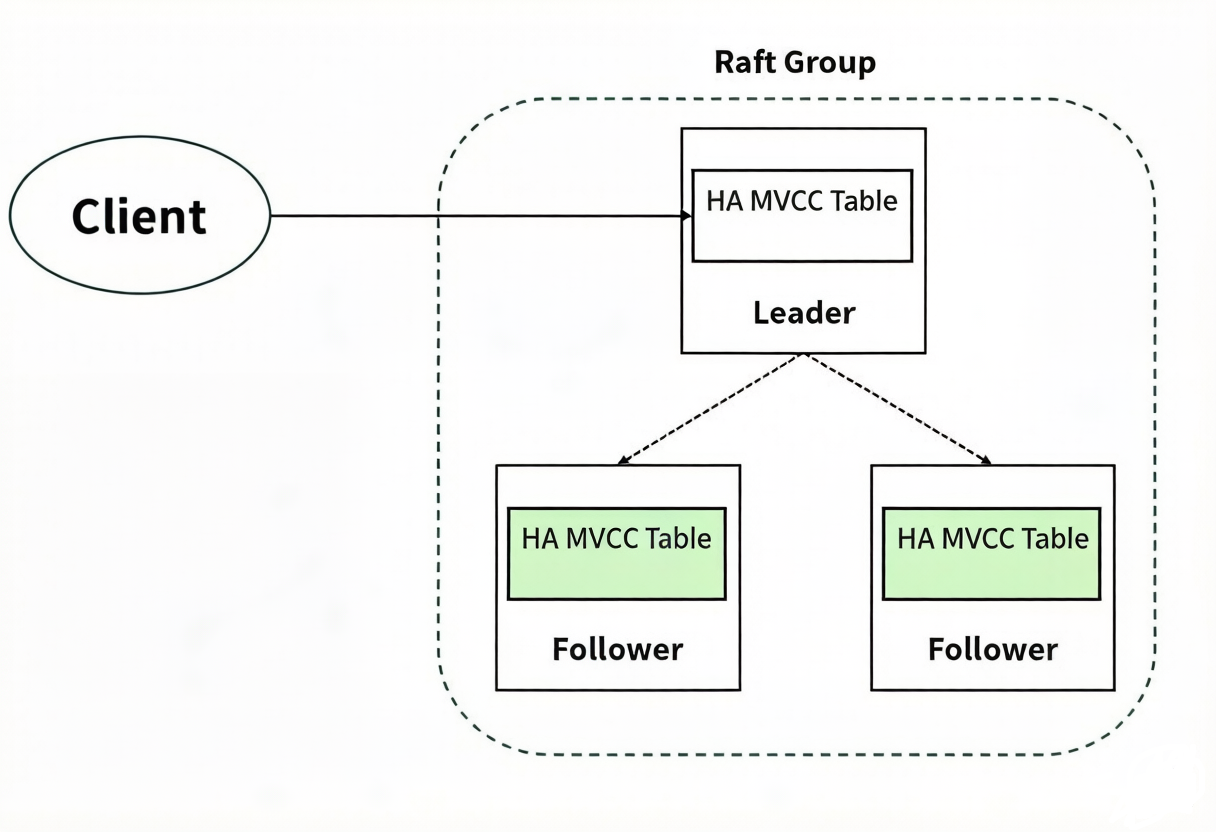
As shown in the diagram above, HA MVCC tables use a high availability and multi-replica architecture based on the Raft protocol. Replicas of the same table are stored on different data nodes within a Raft group, and the Raft protocol ensures consistency across them. A Raft group can recover automatically and tolerate failures of fewer than half of the nodes. For example, a three-node group can tolerate one node failure; a five-node group can tolerate two node failures. Normally, each Raft group has only one Leader, which handles operation requests and serves clients. All other nodes are Followers.
In DolphinDB, HA MVCC tables have the following features and usage constraints:
- You can define one or more Raft groups on each node, and each Raft group can contain multiple HA MVCC tables.
- When creating an HA MVCC table, you must assign it to one Raft group.
- All transactional operations, such as append and update, can only be performed on the Leader.
- Read operations do not introduce additional latency at the consensus layer. However, reads on a Follower may return stale data due to potential delays in log synchronization. Therefore, it is recommended to read data on the Leader.
This tutorial explains in detail how to configure and use HA MVCC tables.
2. Configure and Manage HA MVCC Tables
2.1 Configurations
To use HA MVCC tables, configure at least three data nodes or compute nodes in the cluster.
The main configurations are as follows:
- mvccTableRaftGroups: Configures Raft groups. The format is
"groupId:node_name1:node_name2:node_name3".
- The groupId is the Raft group ID and must be an integer greater than or equal to 2.
- The node_name is the name of a data node or compute node. You must specify at least three nodes, separated by colons.
- You can also configure multiple groups, separated by commas. We recommend placing the nodes on different servers to prevent a situation where, if one server goes down, all nodes in the group become unavailable.
Note:If the system also includes other HA groups based on Raft, make sure the groupId in mvccTableRaftGroups differs from any other groupIds. - mvccTableHADir: Specifies the persistent storage directory for HA MVCC tables. The default directory is "<HomeDir>/log/mvccHA". In cluster mode, make sure that data nodes or compute nodes on the same server use different mvccTableHADirs.
- mvccTableCheckpointInterval: Specifies the checkpoint interval in seconds. The default value is 300 seconds.
You need to configure the parameters above in the cluster configuration file (cluster.cfg). The following example configures two Raft groups: Group 2 contains three data nodes: datanode2, datanode3, and datanode4. Group 3 contains three data nodes: datanode5, datanode6, and datanode7.
mvccTableRaftGroups=2:datanode2:datanode3:datanode4,3:datanode5:datanode6:datanode7
mvccTableCheckpointInterval=300
2.2 Retrieve Raft Groups
Use the getHaMvccRaftGroups function to get the Raft groups
configured in the cluster. It returns the Raft group ID of the current node for
creating tables later.
This function can return only the Raft groups configured on the current node. For
example, running getHaMvccRaftGroups() on datanode2 in the
example above will produce the following output:
| id | sites |
|---|---|
| 2 | datanode2,datanode3,datanode4 |
2.3 Retrieve the Leader
After configuring Raft groups in the cluster, each Raft group automatically selects one Leader node, while the other nodes act as Followers. The Leader receives and processes client requests. If the Leader fails, the system automatically starts an election to select a new Leader, ensuring high availability.
Use the getHaMvccLeader function to retrieve the Leader node
name of the specified Raft group.
getHaMvccLeader(groupId)The parameter groupId is the ID of the Raft group.
Note that this function can only be run on data nodes configured for that Raft group. For example, to get the Leader of Raft group 2 in the example above, run the following code on datanode2, datanode3, or datanode4:
getHaMvccLeader(2)To get the Leader of group 2 from a node not configured for that group, first
retrieve any node configured for that group, and then use the
rpc function on that node to retrieve the Leader. For
example:
t=exec top 1 id,node from pnodeRun(getHaMvccRaftGroups) where id =2
leader=rpc(t.node[0],getHaMvccLeader,t.id[0])
2.4 Create HA MVCC Tables
Use the haMvccTable function to create an HA MVCC table. See
haMvccTable for details.
A Raft group can contain multiple HA MVCC tables. Note:
- HA MVCC tables persist the table schema in the log, so there is no need to recreate the table after a restart.
- The function to create an HA MVCC table can only be executed on the Leader.
The following example creates an HA MVCC table named hmt in Raft group 2, specifies default values for each column, and allows the name and value columns to contain null values.
schemaTb = table(10:0, `name`id`value, [STRING,INT,DOUBLE])
haMvccTable(2:2, schemaTb, `hmt, 2,(`str,2,3),[true,false,true])
2.5 Retrieve the Metadata for HA MVCC Tables
Use the getHaMvccTableInfo function to retrieve the metadata of
all HA MVCC tables in the specified Raft group. See getHaMvccTableInfo for
details.
To query metadata for HA MVCC tables with groupId=x, you must execute this O&M function on a Raft member node whose raftGroup is x.
For example, first create an HA MVCC table on the Leader node of Raft group 2:
schemaTb = table(10:0, `name`id`value, [STRING,INT,DOUBLE])
haMvccTable(10:0, schemaTb, `t1, 2)
Run getHaMvccTableInfo(2) on any node in Raft group 2 to get the
following metadata of table t1:
| tableName | rows | memoryUsed | schema | defaultValues | allowNull |
|---|---|---|---|---|---|
| t1 | 0 | 568 | name:STRING, id:INT, value:DOUBLE | NULL, NULL,NULL | true, true, true |
2.6 Read HA MVCC Tables
You need to get the table handle before reading data from an HA MVCC table. Use
loadHaMvccTable on any node in the Raft group to get the
specified handle, and then query the table data with the SELECT statement. For
example, query the data of the hmt table in 2.5 on datanode2:
t=loadHaMvccTable(`hmt)
select * from t
The output:
| name | id | value |
|---|---|---|
| str | 2 | 3.0000 |
| str | 2 | 3.0000 |
2.7 Drop HA MVCC Tables
Use dropHaMvccTable to drop the specified HA MVCC table. See
dropHaMvccTable for
details.
3. Data Operations on HA MVCC Tables
HA MVCC tables support data operations, such as insert, update, and delete, as well as schema operations, such as adding and modifying columns.
The following operations are not supported: addColumn,
reorderColumns!, upsert!,
drop, erase!.
Create a table in Raft group 2:
schemaTb = table(10:0, ["sym","date","price1","price2","price3","price4","price5","price6","qty1","qty2","qty3","qty4","qty5","qty6"], ["SYMBOL","DATE","DOUBLE","DOUBLE","DOUBLE","DOUBLE","DOUBLE","DOUBLE","INT","INT","INT","INT","INT","INT"])
trades=haMvccTable(10:0, schemaTb, `trades,2)
3.1 Insert Data
You can insert data into HA MVCC tables in the following ways:
- SQL INSERT statement
//Insert data into the specified columns. insert into trades(sym,date) values(`S,2000.12.31) //Insert data into all columns insert into trades values(`S`IBM,[2000.12.31,2000.12.30],[10.0,20.0],[10.0,20.0],[10.0,20.0],[10.0,20.0],[10.0,20.0],[10.0,20.0],[10,20],[10,20],[10,20],[10,20],[10,20],[10,20]) append!When using the
append!function to insert data into a table, the new data must be a table.tmp=table(`S`IBM as col1,[2000.12.31,2000.12.30] as col2,[10.0,20.0] as col3,[10.0,20.0] as col4,[10.0,20.0] as col5,[10.0,20.0] as col6,[10.0,20.0] as col7,[10.0,20.0] as col8,[10,20] as col9,[10,20] as col10,[10,20] as col11,[10,20] as col12,[10,20] as col13,[10,20] as col14) trades.append!(tmp)tableInsertThe
tableInsertfunction returns the number of inserted rows.If you use the
tableInsertfunction to insert data into a table, the new data must be a table.tmp=table(`S`IBM as col1,[2000.12.31,2000.12.30] as col2,[10.0,20.0] as col3,[10.0,20.0] as col4,[10.0,20.0] as col5,[10.0,20.0] as col6,[10.0,20.0] as col7,[10.0,20.0] as col8,[10,20] as col9,[10,20] as col10,[10,20] as col11,[10,20] as col12,[10,20] as col13,[10,20] as col14) trades.tableInsert(tmp) //ouput: 2- High-Availability Writes
The Java, C++, and Python APIs support high-availability writes to HA MVCC tables. In the
connectfunction, specify multiple Candidate nodes using the highAvailabilitySites parameter, which accepts an array ofhost:portpairs. When the Leader changes, the APIs automatically catch the exception, retrieve the new Leader information, and switch to the new Leader to continue writing, ensuring that write tasks are not interrupted when a node fails. Here is an example using the Python API:host = "127.0.0.1" port = 26903 sites = [host+":26903",host+":26904", host+":26905"] s.connect(host=host, port=port, userid="admin", password="123456", highAvailability=True, highAvailabilitySites=sites, reconnect=True)
3.2 Update Existing Columns
You can update columns in HA MVCC tables in the following ways:
- SQL UPDATE statement
update trades set qty1=qty1+10; update trades set qty1=qty1+10 where sym=`IBM; update!trades.update!(`qty1, <qty1+10>); trades.update!(`qty1, <qty1+10>, <sym=`IBM>);sqlUpdatesqlUpdate(trades,<qty1+10 as qty1>).eval()- Assignment statement
trades[`qty1] = <qty1+10>;
trades[`qty1, <sym=`IBM>] = <qty1+10>;
3.3 Delete Rows
You can delete rows from HA MVCC tables in the following ways:
- SQL DELETE statement
delete from trades where qty3<20; sqlDeletesqlDelete(trades,< qty3<30 >).eval()
3.4 Add Columns
You can add columns to HA MVCC tables in the following ways:
- SQL UPDATE statement
update trades set logPrice1=log(price1), newQty1=double(qty1); update!trades.update!(`logPrice1`newQty1, <[log(price1), double(qty1)]>);- Assignment statement
trades[`logPrice1`newQty1] = <[log(price1), double(qty1)]>;
3.5 Delete Columns
drop!trades.drop!("qty1");dropColumns!dropColumns!(trades,`qty3)
3.6 Rename Columns
Rename columns with rename!.
trades.rename!("qty2", "qty2New");3.7 Modify Columns
Use replaceColumn! to modify columns.
replaceColumn!(trades,`qty4,trades[`qty5])3.8 Set Column Attributes
Use setHaMvccColumnNullability to specify whether the columns in
HA MVCC tables can contain null values. See setHaMvccColumnNullability for details.
Use setHaMvccColumnDefaultValue to specify the default values
for the specified columns in HA MVCC tables. See setHaMvccColumnDefaultValue for details.
4. HA MVCC Table O&M
Checkpoint Management
DolphinDB provides two O&M functions for managing checkpoints for HA MVCC tables:
checkpointHaMvccThe
checkpointHaMvccfunction manually triggers a checkpoint on a node in the Raft group. For example, run the following code on any node in Raft group 2:checkpointHaMvcc(2)isCheckpointingHaMvccThe
isCheckpointingHaMvccfunction checks whether the specified HA MVCC Raft group is currently performing a checkpoint. This helps with system health checks and O&M diagnostics, making it easier to understand the status of background tasks. For example, run the following code on any node in Raft group 2:isCheckpointingHaMvcc(2)
5. FAQ
This section summarizes common errors that may occur when using HA MVCC tables, and provides solutions to help you quickly identify and troubleshoot issues.
- Leader Election Not Completed
- Error message: The leader has not been elected. Try again later.
- Cause: The Leader election is still in progress.
- Solution: First, ensure that a majority of nodes in the Raft group (e.g., at least 2 nodes in a 3-node group) are running normally and that the network is connected. Normally, Leader election for a three-node Raft group takes 1–2 minutes. It is recommended to add a retry mechanism to your application: when this error occurs, wait 30 seconds, then retry the operation, and repeat until the operation succeeds.
- Error When Performing an Operation on a Non-Leader Node
- Error message: <NotLeader>.
- Cause: A table operation was performed on a non-Leader node.
- Solution: If you are running the operation on the DolphinDB server, manually switch to the Leader node before executing. If the error occurs in an API and high availability is configured correctly, it will automatically switch to the Leader node.
- Write Delay After Leader Election
- Error message: Leader is not ready for writes (timeout waiting for logs to be applied).
- Cause: The newly elected Leader must complete internal state synchronization before it can accept write services.
- Solution: The time for write services to resume automatically after a Leader election depends on factors such as checkpoint duration and downtime. It is recommended to implement a retry mechanism in your script: when this error occurs, wait 1–2 seconds, retry the write, and repeat this process until the write succeeds.
- Large Data Volume Error
- Error message: Write error: Append failed in raft group 2, reason: 3, detail: serialize failed: data too large.Update error: Raft propose failed: 3, detail: serialize failed: data too large.
- Cause: To ensure the stability of HA MVCC tables, DolphinDB limits the maximum data size for a single write or update operation.
- Solution: It is recommended to write or update data in multiple batches, keeping each batch under 128 MB.
- Write/Update Error
- Error message: Append failed in raft group 2, reason: 2.
- Cause: This error may occur if a Leader switch happens during the execution of a transaction. However, the transaction may still be executed successfully.
- Solution: We recommend using try-catch to ignore this error.
6. Summary
HA MVCC tables are multi-version concurrency control tables designed for critical applications that require strong consistency and high availability. They realize automatic failover and prevent data loss using the Raft protocol. Although their write performance is lower than that of standard MVCC tables (about half), they excel in updates and queries. Choose between the two types based on your requirements for data consistency and write throughput.