
O&M and Permission Control
To ensure the stable operation of stream computing tasks and support efficient troubleshooting, Orca provides a comprehensive set of operational interfaces and visual monitoring tools.
Stream Graph O&M
Orca offers a rich set of maintenance and monitoring functions. For a detailed list of functions, see the Declarative Stream API.
Visual Interface Support
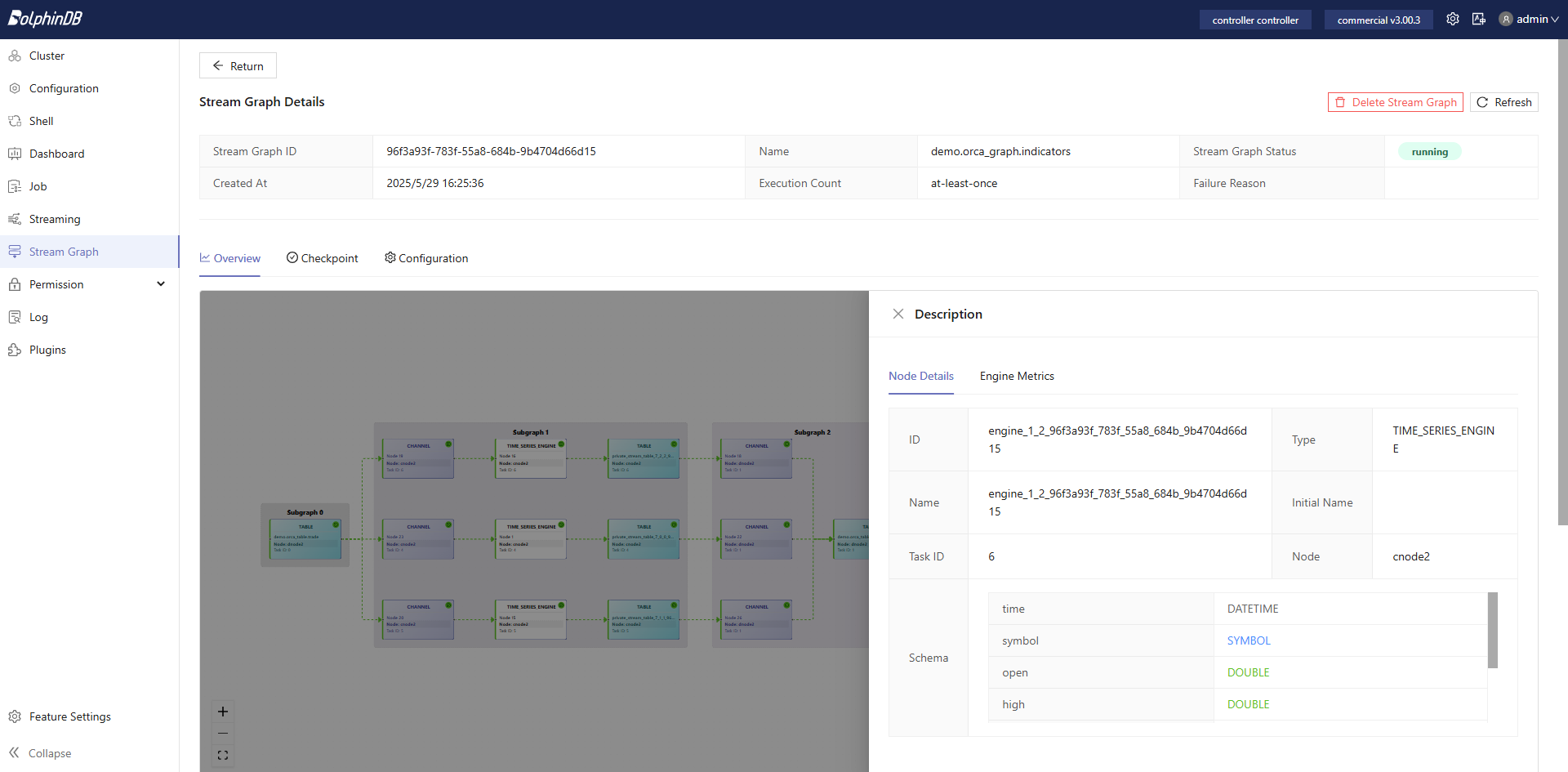
In addition to operational functions, Orca includes a web-based visualization module that graphically displays the structure and runtime status of stream graphs. This module presents all stream graphs in the cluster.
Figure 1-1 shows the status of a node within a stream graph:
Permissions Control
Orca’s access control is built on top of the unified DolphinDB permission system and introduces Orca-specific privileges to provide fine-grained control over operations on stream graphs, stream tables, and streaming engines.
Operations on stream graphs that involve computing resources—such as submitting, deleting, or starting graphs—still require the corresponding base DolphinDB privileges, for example COMPUTE_GROUP_EXEC, which controls access to computing resources (compute groups).
Orca Privilege Types
On top of the required base compute privileges, Orca provides the following ORCA-related privileges to further control operations on stream graphs, stream tables, and streaming engines.
These privileges can be granted at the Catalog level, object level (stream graph / stream table / streaming engine), or global level, enabling fine-grained permission isolation in multi-user environments.
| Privilege Object | Privilege Type | Description | Scope |
|---|---|---|---|
| Orca Graph | ORCA_GRAPH_CREATE | Create Orca graphs | Catalog level |
| ORCA_GRAPH_DROP | Drop Orca graphs | Catalog level | |
| ORCA_GRAPH_CONTROL | Operate and manage Orca graphs, including starting, stopping, resubmitting, and configuring graph parameters | Catalog or graph level | |
| Streaming Table | ORCA_TABLE_CREATE | Create streaming tables | Catalog level |
| ORCA_TABLE_DROP | Drop streaming tables | Catalog level | |
| ORCA_TABLE_READ | Read data from streaming tables | Catalog or table level | |
| ORCA_TABLE_WRITE | Write data to streaming tables | Catalog or table level | |
| ORCA_ENGINE_MANAGE | Manage streaming engine operations, including
warmupOrcaStreamEngine,
stopTimerEngine,
resumeTimerEngine, and
useOrcaStreamEngine |
Catalog or engine level | |
| Orca Administration | ORCA_MANAGE | Orca administration privilege, which includes all ORCA-related privileges | Global or Catalog level |
Privilege Scope
Global-Level Privileges
After a global-level privilege is granted, the user has the corresponding permission on all stream graphs, streaming tables, and streaming engines across all catalogs.
Currently, only the ORCA_MANAGE privilege can be granted at the global level.
Catalog-Level Privileges
After a privilege is granted at the Catalog level, the user has the corresponding permission on all stream graphs, streaming tables, or streaming engines within that Catalog.
Object-Level Privileges
Object-level privileges allow permissions to be granted on a specific stream graph, streaming table, or streaming engine.
When granting object-level privileges, the target object must be specified using its fully qualified name (FQN):
-
Stream graph:
catalog.orca_graph.graphName -
Streaming table:
catalog.orca_table.tableName
Examples
Grant user1 the privilege to create stream graphs in myCatalog:
grant("user1", ORCA_GRAPH_CREATE, "myCatalog")Grant user1 the privilege to drop stream graphs in myCatalog:
grant("user1", ORCA_GRAPH_DROP, "myCatalog")Grant user1 the privilege to operate stream graphs:
// Grant permission to operate all stream graphs in myCatalog
grant("user1", ORCA_GRAPH_CONTROL, "myCatalog")
// Grant permission to operate a specific stream graph
grant("user1", ORCA_GRAPH_CONTROL, "myCatalog.orca_graph.myGraph")
Grant user1 the privilege to create streaming tables in myCatalog:
grant("user1", ORCA_TABLE_CREATE, "myCatalog")Grant user1 the privilege to drop streaming tables in myCatalog:
grant("user1", ORCA_TABLE_DROP, "myCatalog")Grant user1 the privilege to read streaming tables:
// Grant permission to read all streaming tables in myCatalog
grant("user1", ORCA_TABLE_READ, "myCatalog")
// Grant permission to read a specific streaming table
grant("user1", ORCA_TABLE_READ, "myCatalog.orca_table.myTable")
Grant user1 the privilege to write to streaming tables:
// Grant permission to write to all streaming tables in myCatalog
grant("user1", ORCA_TABLE_WRITE, "myCatalog")
// Grant permission to write to a specific streaming table
grant("user1", ORCA_TABLE_WRITE, "myCatalog.orca_table.myTable")
Grant user1 the ORCA management privilege:
// Grant ORCA management privileges within myCatalog
grant("user1", ORCA_MANAGE, "myCatalog")
// Grant ORCA management privileges globally (across all catalogs)
grant("user1", ORCA_MANAGE, "*")
Permission Evaluation and Effective Rules
Admin users are super administrators (not regular administrators) and have all Orca-related permissions. They are not subject to any permission checks.
The user who creates a stream graph or stream table is automatically considered the owner of that resource and is granted full operational permissions on the corresponding stream graph or stream table.
When creating a new stream graph, the system performs permission checks on any referenced stream tables. The stream graph can be created only if the user has both read and write permissions on the referenced stream tables.
Users with the ORCA_MANAGE permission automatically obtain all Orca permissions under the corresponding Catalog and do not need to be granted permissions on individual stream graphs or stream tables.
When Catalog-level permissions (broad scope) and stream graph / stream table–level permissions (narrow scope) coexist, the effective permissions follow these rules:
-
If you
grant/revoke/denyat a smaller scope, and then manage permissions at a larger scope, the smaller scope permissions will be invalidated and overridden by the larger scope permissions. -
If you
allowat a larger scope, and thendenyat a smaller scope, thedenyoperation will take effect while theallowpermissions still apply to the objects outside of the deny scope. -
If you
allow/denyat a larger scope, and thenrevokeat a smaller scope, therevokeoperation will be invalid while the allow permissions still apply to the original scope. -
If you
revokein a large scope, and then manage permissions at a smaller scope, the smaller scope permissions will take effect.