
Generate Real-Time Order Book Snapshots at User-Defined Frequencies with DolphinDB INSIGHT and the Order Book Engine
INSIGHT is a market data service solution from Huatai Securities, leveraging its expertise in big data storage and real-time analytics. By integrating high-frequency market data feeds from multiple Chinese exchanges, INSIGHT provides investors with integrated capabilities for market data access, distribution, backtesting, calculation, and analysis. Based on the official INSIGHT Market Data Service C++ SDK (TCP version), DolphinDB has developed the INSIGHT plugin, which enables users to conveniently ingest real-time market data into DolphinDB through DolphinDB scripts for subsequent analytics and storage.
An order book is a list of buy and sell orders at different price levels in a trading market. Order book snapshots reflect trading intentions in the market at a specific point in time. It plays an important role in quantitative finance, including trading strategies, risk management, and market analysis. Leveraging its expertise in high-performance stream processing capabilities and close collaboration with financial clients, DolphinDB provides a high-performance order book engine that has been rigorously validated for correctness. You only need to define an order book engine with the createOrderbookSnapshotEngine function, and then feed the engine tick-by-tick trade data and order data that conform to the required schema to generate the order book.
This tutorial demonstrates how to use the INSIGHT plugin to stream tick-by-tick trade data and order data into the order book engine in real time, enabling the generation of 1-second order book snapshots. In addition, it introduces methods for automatically subscribing to market data and starting order book reconstruction when a DolphinDB node starts, as well as scripts for batch writing daily market data into a DFS database after market close.
The order book engine requires an additional license feature on top of the DolphinDB commercial edition license. Please contact DolphinDB sales or technical support to request a trial. All code examples in this tutorial require DolphinDB Server version 2.00.12 or later. Because the INSIGHT plugin is supported only on Linux, all scripts provided in this tutorial must be executed in a Linux environment.
Please note that INSIGHT market data accounts are not provided as part of this tutorial. To run the market data subscription examples, modify the relevant code sections using your own INSIGHT account credentials. DolphinDB also provides market data plugins such as amdQuote, MDL, and NSQ. The INSIGHT-specific market data subscription examples presented in this tutorial can be adapted to other supported market data sources.
1. Get Started with the INSIGHT Plugin
1.1 Install the Plugin
After the node starts, connect to it and run the installPlugin function in a GUI Clients such as the GUI, VS Code, or Web UI. This function downloads the INSIGHT plugin files compatible with the current server version, including the plugin description file and the plugin binary.
login("admin", "123456")
installPlugin("insight")
A successful return from the installPlugin function indicates
that the plugin has been downloaded and installed. Its return value is the
installation path of the plugin description file (PluginInsight.txt), for
example:
/path_to_dolphindb_server/server/plugins/insight/PluginInsight.txtThe installPlugin function downloads the plugin files from a
remote file server to the machine hosting the DolphinDB server, taking about one
minute to complete.
1.2 Load the Plugin
Before calling any functions provided by the INSIGHT plugin, you must use the
loadPlugin function to load it. The following example uses the plugin name as
the input argument. Alternatively, you can specify the absolute path returned by
installPlugin, for example:
/path_to_dolphindb_server/server/plugins/insight/PluginInsight.txt.
loadPlugin("insight")A successful return from the loadPlugin function indicates that
the plugin has been loaded. In VS Code, for example, the first successful load
returns the following partial information. The return value lists all functions
provided by the INSIGHT plugin.

Note:
-
After a node starts, the INSIGHT plugin can only be loaded once. Once loaded, the functions provided by the plugin can be called from any session connected to the node. If
loadPluginis executed again after the plugin has already been loaded, DolphinDB returns the following error:
The module [insight] is already in use.To prevent this error from interrupting the execution of subsequent script code, you can catch the error with a try-catch statement:
try{ loadPlugin("Insight") }catch(ex){print ex}-
If the node is restarted, the plugin must be loaded again before it can be used.
2. Generate 1-Second Order Book Snapshots in Real-Time
This tutorial uses the INSIGHT market data plugin together with the order book engine (createOrderBookSnapshotEngine) to generate 1-second order book snapshots for all market stocks and funds in real time based on tick-by-tick trade data and order data.
The real-time data processing workflow is as follows. This chapter breaks the real-time generation script into multiple steps and explains them in detail. For the complete script, see the Appendix:
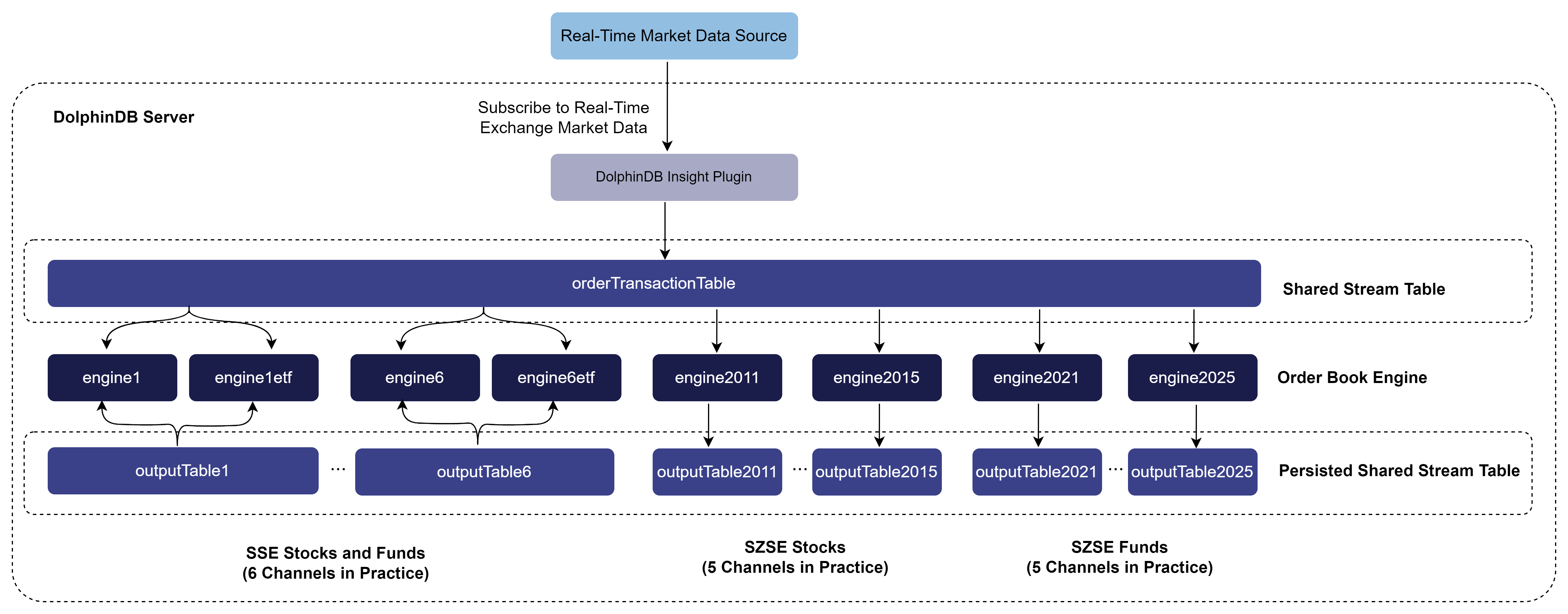
In practice, the solution uses a total of 14 result stream tables, corresponding to different INSIGHT market data channels:
-
Shanghai Stock Exchange (SSE) stock and fund channels: 1, 2, 3, 4, 5, and 6
-
Shenzhen Stock Exchange (SZSE) stock channels: 2011, 2012, 2013, 2014, and 2015
-
SZSE fund channels: 2021, 2022, 2023, 2024, and 2025
Channels 2015 and 2025 were introduced by the SZSE in December 2024.
In a production environment, it is often desirable to persist both the input market data and the generated order book snapshots to a database. Based on the workflow shown above, additional subscriptions can be created on both the input and output stream tables to enable real-time database ingestion. Alternatively, when computing resources are limited, data persistence can be deferred until after market close. In this approach, the full day's data is written to the database in batch mode after trading hours. Chapter 3 introduces a script for storing the full day’s data in the database during post-market processing.
2.1 Clean Up the Environment (Optional)
Because streaming engines, stream tables, and subscriptions with the same names cannot be defined more than once, you must first cancel the relevant subscriptions and clear the stream tables and streaming engines required by the script before running it again. To ensure that the sample script in this tutorial can be run repeatedly, the following script is provided to clean up the streaming environment.
def cleanEnvironment(){
    try {
        tcpClient  = insight::getHandle()
        insight::unsubscribe(tcpClient)
        insight::close(tcpClient)
    } catch(ex) { print(ex) }
    for(channelno_ in 1..6){
        try { unsubscribeTable(tableName="orderTransactionTable" + string(channelno_), actionName="orderbookDemo" + string(channelno_)) } catch(ex) { print(ex) }
        try { unsubscribeTable(tableName="orderTransactionTable" + string(channelno_), actionName="orderbookDemo" + string(channelno_) + "etf") } catch(ex) { print(ex) }
        try { unsubscribeTable(tableName="orderTransactionTable" + string(channelno_), actionName="orderTransactionTableInsert" + string(channelno_)) } catch(ex) { print(ex) }
        try { unsubscribeTable(tableName="outputTable" + string(channelno_), actionName="outputTableInsert" + string(channelno_)) } catch(ex) { print(ex) }
        try { dropStreamEngine("orderbookEngine" + string(channelno_)) } catch(ex) { print(ex) }
        try { dropStreamEngine("orderbookEngine" + string(channelno_) + "etf") } catch(ex) { print(ex) }
        try { dropStreamTable("orderTransactionTable" + string(channelno_)) } catch(ex) { print(ex) }
        try { dropStreamTable("outputTable" + string(channelno_)) } catch(ex) { print(ex) }
    }
    for(channelno_ in 2011..2015){
        try { unsubscribeTable(tableName="orderTransactionTable" + string(channelno_), actionName="orderbookDemo" + string(channelno_)) } catch(ex) { print(ex) }
        try { unsubscribeTable(tableName="orderTransactionTable" + string(channelno_), actionName="orderTransactionTableInsert" + string(channelno_)) } catch(ex) { print(ex) }
        try { unsubscribeTable(tableName="outputTable" + string(channelno_), actionName="outputTableInsert" + string(channelno_)) } catch(ex) { print(ex) }
        try { dropStreamEngine("orderbookEngine" + string(channelno_)) } catch(ex) { print(ex) }
        try { dropStreamTable("orderTransactionTable" + string(channelno_)) } catch(ex) { print(ex) }
        try { dropStreamTable("outputTable" + string(channelno_)) } catch(ex) { print(ex) }
    }
	for(channelno_ in 2021..2025){
        try { unsubscribeTable(tableName="orderTransactionTable" + string(channelno_), actionName="orderbookDemo" + string(channelno_)) } catch(ex) { print(ex) }
        try { unsubscribeTable(tableName="orderTransactionTable" + string(channelno_), actionName="orderTransactionTableInsert" + string(channelno_)) } catch(ex) { print(ex) }
        try { unsubscribeTable(tableName="outputTable" + string(channelno_), actionName="outputTableInsert" + string(channelno_)) } catch(ex) { print(ex) }
        try { dropStreamEngine("orderbookEngine" + string(channelno_)) } catch(ex) { print(ex) }
        try { dropStreamTable("orderTransactionTable" + string(channelno_)) } catch(ex) { print(ex) }
        try { dropStreamTable("outputTable" + string(channelno_)) } catch(ex) { print(ex) }
    }
	undef all
}
cleanEnvironment()
2.2 Create Tables
2.2.1 Retrieve the Schema for the Order Book Engine Input Table
The order book engine requires tick-by-tick order data and trade data to be placed in the same table as input. The INSIGHT market data plugin supports this requirement by receiving tick-by-tick trades and orders simultaneously, transforming them into the table schema required by the order book engine, and writing the resulting records into a DolphinDB stream table.
Call the insight::getSchema method to get the schema of each market data table. The following code obtains the schema of the combined table for tick-by-tick trades and orders:
orderTransactionSchema = insight::getSchema(`OrderTransaction)2.2.2 Create Stream Tables for INSIGHT Market Data
After obtaining the schema of the market data table, use it to create a stream table.
capacity = 10000000
colName = orderTransactionSchema[`name]
colType = orderTransactionSchema[`type]
//SSE stocks and funds
for(channelno_ in 1..6){
    share(streamTable(capacity:0, colName, colType), `orderTransactionTable + string(channelno_))
}
//SZSE stocks
for(channelno_ in 2011..2015){
	share(streamTable(capacity:0, colName, colType), `orderTransactionTable + string(channelno_))
}
// SZSE funds
for(channelno_ in 2021..2025){
	share(streamTable(capacity:0, colName, colType), `orderTransactionTable + string(channelno_))
}-
The capacity parameter controls the amount of memory preallocated when the table is created, measured in rows. Setting a larger capacity can reduce the frequency of latency spikes. The appropriate value depends on both the expected volume of tick-by-tick data and the amount of memory available in the deployment environment. For details about the optimization principles, see Latency Measurement and Performance Improvement of Stream Computing .
2.2.3 Create a Persisted Stream Table for Order Book Snapshots
When creating an order book engine, you can specify the fields to be included in the output. In this tutorial, the engine uses the default output schema, so the snapshot table contains approximately 80 columns. Because of the large number of output columns, a persisted stream table is used as the result table to reduce memory pressure. If sufficient memory resources are available, a shared stream table may also be used in practice.
// Create a persisted stream table
cacheSize = 10000000
preCache = 0
depth = 10
suffix = string(1..depth)
colNames = `SecurityID`timestamp`lastAppSeqNum`tradingPhaseCode`modified`turnover`volume`tradeNum`totalTurnover`totalVolume`totalTradeNum`lastPx`highPx`lowPx`ask`bid`askVol`bidVol`preClosePx`invalid  join ("bids" + suffix) join ("bidVolumes" + suffix) join ("bidOrderNums" + suffix) join ("asks" + suffix)  join ("askVolumes" + suffix) join ("askOrderNums" + suffix)
colTypes = [SYMBOL,TIMESTAMP,LONG,INT,BOOL,DOUBLE,LONG,INT,DOUBLE,LONG,INT,DOUBLE,DOUBLE,DOUBLE,DOUBLE,DOUBLE,LONG,LONG,DOUBLE,BOOL] join take(DOUBLE, depth) join take(LONG, depth) join take(INT, depth) join take(DOUBLE, depth) join take(LONG, depth) join take(INT, depth)
cacheSize=5000000
preCache=0

for(channelno_ in 1..6){
    enableTableShareAndPersistence(table=streamTable(cacheSize:0, colNames, colTypes), tableName=`outputTable + string(channelno_), cacheSize=cacheSize, preCache=preCache)
}
for(channelno_ in 2011..2015){
	enableTableShareAndPersistence(table=streamTable(cacheSize:0, colNames, colTypes), tableName=`outputTable + string(channelno_), cacheSize=cacheSize, preCache=preCache)
}
for(channelno_ in 2021..2025){
	enableTableShareAndPersistence(table=streamTable(cacheSize:0, colNames, colTypes), tableName=`outputTable + string(channelno_), cacheSize=cacheSize, preCache=preCache)
}-
To enable the successful execution of the
enableTableShareAndPersistencefunction, specify the configuration parameter persistenceDir in the configuration file before starting the node. For standalone mode, use dolphindb.cfg; for a cluster, use cluster.cfg. For configuration details, see Reference. -
The cacheSize parameter in the second line of the code controls both the amount of memory preallocated during table creation and the maximum number of rows that can be cached in memory by the persisted stream table. Setting a larger cacheSize can reduce the frequency of latency spikes. Determine the specific value based on the actual amount of available memory. For details about the optimization principles, see Latency Measurement and Performance Improvement of Stream Computing.
2.3 Create the Order Book Engines
An order book engine should be created for each market data channel. Do not feed multiple channels into a single engine instance, as doing so may compromise the correctness of the generated results. For details about how the order book engine works and how to use it, see DolphinDB Order Book Engine: Build High-Frequency Order Books from Tick-by-Tick Data.
// Create order book engines
// Map the input table column names to the variables required by the order book engine for internal calculation
inputColMap = dict(`codeColumn`timeColumn`typeColumn`priceColumn`qtyColumn`buyOrderColumn`sellOrderColumn`sideColumn`msgTypeColumn`seqColumn, `SecurityID`MDTime`Type`Price`Qty`BuyNo`SellNo`BSFlag`SourceType`ApplSeqNum)
// Create a dictionary to define the previous day's closing prices, which will be passed to the prevClose parameter. prevClose does not affect any output columns other than the previous day's closing prices.
prevClose = dict(SYMBOL, DOUBLE)

// Define the engine to calculate and output 10-level bid and ask order books every 1 second
for(channelno_ in 1..6){
    createOrderBookSnapshotEngine(name="orderbookEngine" + string(channelno_), exchange="XSHG", orderbookDepth=10, intervalInMilli=1000, date=date(now()), startTime=09:30:00.000, prevClose=prevClose, dummyTable=objByName("orderTransactionTable" + string(channelno_)), inputColMap=inputColMap, outputTable=objByName("outputTable" + string(channelno_)), orderBySeq=true)
    createOrderBookSnapshotEngine(name="orderbookEngine" + string(channelno_) + "etf", exchange="XSHGFUND", orderbookDepth=10, intervalInMilli=1000, date=date(now()), startTime=09:30:00.000, prevClose=prevClose, dummyTable=objByName("orderTransactionTable" + string(channelno_)), inputColMap=inputColMap, outputTable=objByName("outputTable" + string(channelno_)), orderBySeq=true)
}

for(channelno_ in 2011..2015){
    createOrderBookSnapshotEngine(name="orderbookEngine" + string(channelno_), exchange="XSHE", orderbookDepth=10, intervalInMilli=1000, date=date(now()), startTime=09:30:00.000, prevClose=prevClose, dummyTable=objByName("orderTransactionTable" + string(channelno_)), inputColMap=inputColMap, outputTable=objByName("outputTable" + string(channelno_)), orderBySeq=true)
}

for(channelno_ in 2021..2025){
    createOrderBookSnapshotEngine(name="orderbookEngine" + string(channelno_), exchange="XSHEFUND", orderbookDepth=10, intervalInMilli=1000, date=date(now()), startTime=09:30:00.000, prevClose=prevClose, dummyTable=objByName("orderTransactionTable" + string(channelno_)), inputColMap=inputColMap, outputTable=objByName("outputTable" + string(channelno_)), orderBySeq=true)
}-
The exchange parameter specifies XSHG, XSHGFUND, XSHE, and XSHEFUND, which indicate SSE stocks, SSE funds, SZSE stocks, and SZSE funds, respectively.
-
orderbookDepth specifies the order book depth. In this example, it is set to 10 levels.
-
intervalInMilli specifies the output interval in milliseconds, which determines the order book frequency. In this example, it is set to 1000 (1 second).
-
The inputColMap parameter specifies the mapping between fields in the engine input table and the key variables required for internal calculation.
-
The prevClose parameter indicates the previous closing price. It is passed to the engine as static data and does not affect order book construction. However, it is included in the corresponding field of the output result. This example passes an empty dictionary as the previous closing price. In practice, you can obtain the previous closing price from historical data.
-
Set
orderBySeq=truebecause the INSIGHT TCP interface does not ensure that tick-by-tick data within a channel arrives ordered byseqColumn. If your data source delivers ordered data, set this to false.
The scripts above and in the appendix use a 10-level order book output at a 1-second frequency as an example, primarily to help you understand the complete workflow of real-time order book generation. Based on this foundation, you can implement more customized real-time outputs by making simple changes to the scripts for creating the engine in this section and the order book result table in Section 2.2, meeting the requirements for order books and derived metrics in different business scenarios. Next, we describe how to modify the scripts to meet different output requirements. Note that if you need to store the data in a DFS table, you must also modify the schema of the DFS database and tables accordingly. This topic is not discussed here.
You can optionally skip the following content for now and go directly to Section 2.4 to continue learning how to ingest INSIGHT market data into the order book engine in real time. After completing the basic real-time order book construction workflow in this tutorial, you can return to this section to explore advanced output customization options.
-
Modify the Order Book Depth
createOrderBookSnapshotEngine(name="orderbookEngine" + string(channelno_), exchange="XSHE", orderbookDepth=20, intervalInMilli=1000, date=date(now()), startTime=09:30:00.000, prevClose=prevClose, dummyTable=objByName("orderTransactionTable" + string(channelno_)), inputColMap=inputColMap, outputTable=objByName("outputTable" + string(channelno_)), orderBySeq=true)The order book depth is specified by the orderbookDepth parameter of the createOrderBookSnapshotEngine function. The code above changes the order book depth to 20 levels. Because the example scripts in this tutorial do not use array vectors to store market depth data, if you change the depth output by the order book engine, you must also modify the schema of the result stream table in Section 2.2 accordingly. The following statement creates a 20-level order book table; set the depth variable to 20.
depth = 20
suffix = string(1..depth)
colNames = `SecurityID`timestamp`lastAppSeqNum`tradingPhaseCode`modified`turnover`volume`tradeNum`totalTurnover`totalVolume`totalTradeNum`lastPx`highPx`lowPx`ask`bid`askVol`bidVol`preClosePx`invalid  join ("bids" + suffix) join ("bidVolumes" + suffix) join ("bidOrderNums" + suffix) join ("asks" + suffix)  join ("askVolumes" + suffix) join ("askOrderNums" + suffix)
colTypes = [SYMBOL,TIMESTAMP,LONG,INT,BOOL,DOUBLE,LONG,INT,DOUBLE,LONG,INT,DOUBLE,DOUBLE,DOUBLE,DOUBLE,DOUBLE,LONG,LONG,DOUBLE,BOOL] join take(DOUBLE, depth) join take(LONG, depth) join take(INT, depth) join take(DOUBLE, depth) join take(LONG, depth) join take(INT, depth)-
Modify the Order Book Frequency
createOrderBookSnapshotEngine(name="orderbookEngine" + string(channelno_), exchange="XSHE", orderbookDepth=10, intervalInMilli=500, date=date(now()), startTime=09:30:00.000, prevClose=prevClose, dummyTable=objByName("orderTransactionTable" + string(channelno_)), inputColMap=inputColMap, outputTable=objByName("outputTable" + string(channelno_)), orderBySeq=true)The order book frequency is specified by the intervalInMilli parameter of the createOrderBookSnapshotEngine function. The code above changes the order book frequency to 500 milliseconds. Changing the order book frequency does not affect the output table schema. Therefore, there is no need to modify the table definition in Section 2.2. This change only impacts the volume of generated output data.
-
Output Derived Metrics
depth = 10
orderBookAsArray = true
outputColMap = genOutputColumnsForOBSnapshotEngine(basic=true, time=true, depth=(depth, orderBookAsArray), tradeDetail=true, orderDetail=false, withdrawDetail=false, orderBookDetailDepth=0, prevDetail=false)[0]
createOrderBookSnapshotEngine(name="orderbookEngine" + string(channelno_), exchange="XSHE", orderbookDepth=depth, intervalInMilli=1000, date=date(now()), startTime=09:30:00.000,  prevClose=prevClose, dummyTable=objByName("orderTransactionTable" + string(channelno_)), inputColMap=inputColMap, outputTable=objByName("outputTable" + string(channelno_)), orderBySeq=true, outputColMap=outputColMap, orderBookAsArray=orderBookAsArray)
When creating the engine, you can use the outputColMap parameter to select the fields to output. For all metric fields that the engine can output, see the createOrderBookSnapshotEngine appendix. The order book created by the script above calculates and outputs 10-level market depth data for SZSE stocks every 1 second. It also includes extended tick-by-tick trade detail fields and stores the 10-level market depth data in array vectors.
To facilitate field selection, DolphinDB provides the function genOutputColumnsForOBSnapshotEngine, which returns both the required output fields and the corresponding output table schema. The parameters of the genOutputColumnsForOBSnapshotEngine function specify the fields to be output by the order book engine. In this section, basic, time, depth, and tradeDetail are set to true, while all other parameters are set to false. This means that only basic trade information, time, order book, and trade detail fields are required.
Note that if you use the outputColMap parameter to select derived metrics for output, you should modify the schema of the result stream table in Section 2.2 accordingly.
depth = 10
orderBookAsArray = true
outputTableSch = genOutputColumnsForOBSnapshotEngine(basic=true, time=true, depth=(depth, orderBookAsArray), tradeDetail=true, orderDetail=false, withdrawDetail=false, orderBookDetailDepth=0, prevDetail=false)[1]
colNames = outputTableSch.schema().colDefs.name
colTypes = outputTableSch.schema().colDefs.typeString
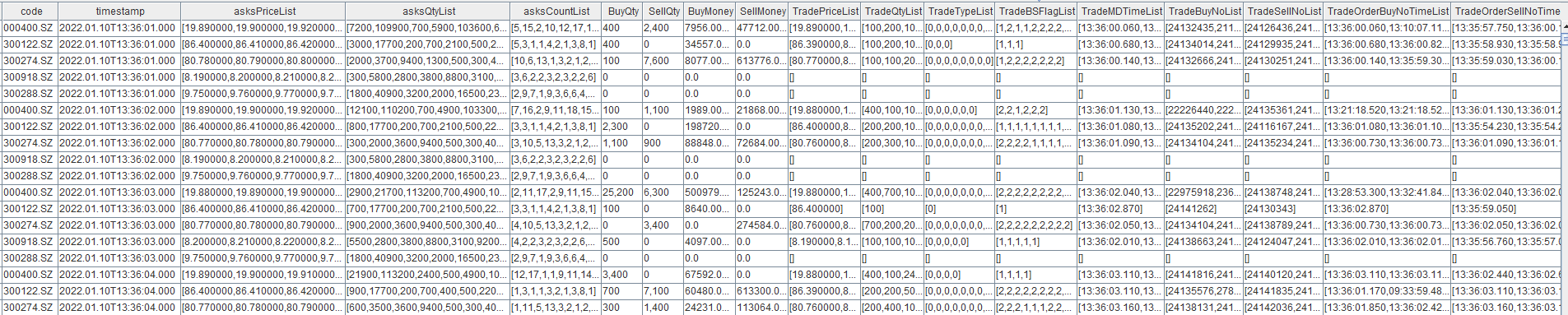
The output, which includes tick-by-tick trade details, is shown below. Tick-by-tick trade details refer to all trade data between two order book snapshots, stored as array vectors, including metrics such as trading volume, trade price, and trade direction. By default, derived indicators are appended as the last several columns in the output table. In the figure below, the column order has been rearranged for presentation purposes to improve readability.
-
Output User-Defined Metrics
depth = 10
orderBookAsArray =true
outputColMap = genOutputColumnsForOBSnapshotEngine(basic=true, time=false, depth=(depth, orderBookAsArray), tradeDetail=true, orderDetail=false, withdrawDetail=true, orderBookDetailDepth=0, prevDetail=false)[0]
// User-defined factors
def userDefinedFunc(t){
        AvgBuyDuration = rowAvg(t.TradeMDTimeList-t.TradeOrderBuyNoTimeList).int()
        AvgSellDuration = rowAvg(t.TradeMDTimeList-t.TradeOrderSellNoTimeList).int()
        BuyWithdrawQty = rowSum(t.WithdrawBuyQtyList)
        SellWithdrawQty = rowSum(t.WithdrawSellQtyList)
        return (AvgBuyDuration, AvgSellDuration, BuyWithdrawQty, SellWithdrawQty)
}
createOrderBookSnapshotEngine(name="orderbookEngine" + string(channelno_), exchange="XSHE", orderbookDepth=depth, intervalInMilli=1000, date=date(now()), startTime=09:30:00.000,  prevClose=prevClose, dummyTable=objByName("orderTransactionTable" + string(channelno_)), inputColMap=inputColMap, outputTable=objByName("outputTable" + string(channelno_)), orderBySeq=true, outputColMap=outputColMap, orderBookAsArray=orderBookAsArray, userDefinedMetrics=userDefinedFunc)
When creating the engine, specify the userDefinedMetrics parameter to make the engine output user-defined metrics. The order book created by the script above calculates and outputs 10-level order books for SZSE stocks every 1 second, and extends the output with four user-defined metrics. The metrics are defined as follows:
| Metric Name | Description |
|---|---|
| AvgBuyDuration | Average order duration of buy orders involved in trades over the past 1 second |
| AvgSellDuration | Average order duration of sell orders involved in trades over the past 1 second |
| BuyWithdrawQty | Total buy-side cancellation volume over the past 1 second |
| SellWithdrawQty | Total sell-side cancellation volume over the past 1 second |
The userDefinedMetrics parameter is a unary function that defines the calculation logic for user-defined metrics. The input to this function must be a table, where each row represents a single instrument snapshot, and each column corresponds to a built-in engine metric defined in outputColMap. You can use these built-in metrics to derive user-defined metrics. Here, the tick-by-tick trade details and cancellation details between two order book snapshots provided by the engine are used to calculate metrics within this window, such as order duration and cancellation volume.
When the userDefinedMetrics parameter is specified, the output schema of the engine no longer corresponds one-to-one with the fields defined in outputColMap. Instead, it contains only two parts: the basic and depth metrics corresponding to the genOutputColumnsForOBSnapshotEngine function, and the user-defined metrics. Accordingly, the schema of the result stream table described in Section 2.2 must be updated to reflect this change.
depth = 10
orderBookAsArray =true
outputTableSch = genOutputColumnsForOBSnapshotEngine(basic=true, time=false, depth=(depth, orderBookAsArray), tradeDetail=false, orderDetail=false, withdrawDetail=false, orderBookDetailDepth=0, prevDetail=false)[1]
colNames = outputTableSch.schema().colDefs.name join (`AvgBuyDuration`AvgSellDuration`BuyWithdrawQty`SellWithdrawQty)
colTypes = outputTableSch.schema().colDefs.typeString join (`INT`INT`INT`INT)
The output that includes user-defined metrics is shown below. The red box highlights the user-defined metrics. By default, user-defined metrics are appended to the last several columns of the output table. In the figure, the column order has been rearranged for presentation clarity.

2.4 Subscribe to a Stream Table and Writing Incremental INSIGHT Market Data to the Order Book Engine
Subscribe to the stream table that receives INSIGHT market data in Section 2.2, and write incremental data to the order book engine in real time. The engine outputs snapshots to the result stream table in real time.
subscribeTable(tableName="orderTransactionTable1", actionName="orderbookDemo1", handler=getStreamEngine("orderbookEngine1"), msgAsTable=true, batchSize=1, throttle=0.001, reconnect=true, hash=0)
subscribeTable(tableName="orderTransactionTable2", actionName="orderbookDemo2", handler=getStreamEngine("orderbookEngine2"), msgAsTable=true, batchSize=1, throttle=0.001, reconnect=true, hash=1)
subscribeTable(tableName="orderTransactionTable3", actionName="orderbookDemo3", handler=getStreamEngine("orderbookEngine3"), msgAsTable=true, batchSize=1, throttle=0.001, reconnect=true, hash=2)
subscribeTable(tableName="orderTransactionTable4", actionName="orderbookDemo4", handler=getStreamEngine("orderbookEngine4"), msgAsTable=true, batchSize=1, throttle=0.001, reconnect=true, hash=3)
subscribeTable(tableName="orderTransactionTable5", actionName="orderbookDemo5", handler=getStreamEngine("orderbookEngine5"), msgAsTable=true, batchSize=1, throttle=0.001, reconnect=true, hash=4)
subscribeTable(tableName="orderTransactionTable6", actionName="orderbookDemo6", handler=getStreamEngine("orderbookEngine6"), msgAsTable=true, batchSize=1, throttle=0.001, reconnect=true, hash=5)

subscribeTable(tableName="orderTransactionTable1", actionName="orderbookDemo1etf", handler=getStreamEngine("orderbookEngine1etf"), msgAsTable=true, batchSize=1, throttle=0.001, reconnect=true, hash=0)
subscribeTable(tableName="orderTransactionTable2", actionName="orderbookDemo2etf", handler=getStreamEngine("orderbookEngine2etf"), msgAsTable=true, batchSize=1, throttle=0.001, reconnect=true, hash=1)
subscribeTable(tableName="orderTransactionTable3", actionName="orderbookDemo3etf", handler=getStreamEngine("orderbookEngine3etf"), msgAsTable=true, batchSize=1, throttle=0.001, reconnect=true, hash=2)
subscribeTable(tableName="orderTransactionTable4", actionName="orderbookDemo4etf", handler=getStreamEngine("orderbookEngine4etf"), msgAsTable=true, batchSize=1, throttle=0.001, reconnect=true, hash=3)
subscribeTable(tableName="orderTransactionTable5", actionName="orderbookDemo5etf", handler=getStreamEngine("orderbookEngine5etf"), msgAsTable=true, batchSize=1, throttle=0.001, reconnect=true, hash=4)
subscribeTable(tableName="orderTransactionTable6", actionName="orderbookDemo6etf", handler=getStreamEngine("orderbookEngine6etf"), msgAsTable=true, batchSize=1, throttle=0.001, reconnect=true, hash=5)

subscribeTable(tableName="orderTransactionTable2011", actionName="orderbookDemo2011", handler=getStreamEngine("orderbookEngine2011"), msgAsTable=true, batchSize=1, throttle=0.001, reconnect=true, hash=6)
subscribeTable(tableName="orderTransactionTable2012", actionName="orderbookDemo2012", handler=getStreamEngine("orderbookEngine2012"), msgAsTable=true, batchSize=1, throttle=0.001, reconnect=true, hash=7)
subscribeTable(tableName="orderTransactionTable2013", actionName="orderbookDemo2013", handler=getStreamEngine("orderbookEngine2013"), msgAsTable=true, batchSize=1, throttle=0.001, reconnect=true, hash=8)
subscribeTable(tableName="orderTransactionTable2014", actionName="orderbookDemo2014", handler=getStreamEngine("orderbookEngine2014"), msgAsTable=true, batchSize=1, throttle=0.001, reconnect=true, hash=9)
subscribeTable(tableName="orderTransactionTable2015", actionName="orderbookDemo2015", handler=getStreamEngine("orderbookEngine2015"), msgAsTable=true, batchSize=1, throttle=0.001, reconnect=true, hash=10)

subscribeTable(tableName="orderTransactionTable2021", actionName="orderbookDemo2021", handler=getStreamEngine("orderbookEngine2021"), msgAsTable=true, batchSize=1, throttle=0.001, reconnect=true, hash=6)
subscribeTable(tableName="orderTransactionTable2022", actionName="orderbookDemo2022", handler=getStreamEngine("orderbookEngine2022"), msgAsTable=true, batchSize=1, throttle=0.001, reconnect=true, hash=7)
subscribeTable(tableName="orderTransactionTable2023", actionName="orderbookDemo2023", handler=getStreamEngine("orderbookEngine2023"), msgAsTable=true, batchSize=1, throttle=0.001, reconnect=true, hash=8)
subscribeTable(tableName="orderTransactionTable2024", actionName="orderbookDemo2024", handler=getStreamEngine("orderbookEngine2024"), msgAsTable=true, batchSize=1, throttle=0.001, reconnect=true, hash=9)
subscribeTable(tableName="orderTransactionTable2025", actionName="orderbookDemo2025", handler=getStreamEngine("orderbookEngine2025"), msgAsTable=true, batchSize=1, throttle=0.001, reconnect=true, hash=10)-
You can control how frequently data is written to the DFS database by changing the subscribeTable function's batchSize and throttle parameters.
-
batchSize =1 and throttle =0.001 indicate that data inserted into the stream table is processed immediately.
-
hash specifies the background worker thread that processes streaming data. To improve CPU utilization and workload distribution, different subscription tasks can be assigned to different threads during subscription setup.
-
2.5 Subscribe to INSIGHT Market Data and Writing Incremental Data into Stream Tables
2.5.1 Establish an INSIGHT Connection
Configure your INSIGHT account information and use the insight::connect function to connect. handles specifies the stream tables that receive market data. You can write data to different stream tables by channel number. The INSIGHT plugin can receive tick-by-tick trade data and order data into the same table, which can then be used directly as input to the order book engine. To satisfy the requirement that order book snapshots must be generated separately for each channel, the INSIGHT plugin requires specifying the set of channel IDs to subscribe to during data ingestion. For example, the channel numbers for SZSE stocks are 2011 to 2015.
// Configure account information
HOST = "111.111.111.111"
PORT = 111
USER = "111"
PASSWORD = "111"
// Subscribe to INSIGHT market data: stocks and funds
handles = dict(['OrderTransaction'], [dict([1,2,3,4,5,6,2011,2012,2013,2014,2015,2021,2022,2023,2024,2025], [orderTransactionTable1,orderTransactionTable2,orderTransactionTable3,orderTransactionTable4,orderTransactionTable5,orderTransactionTable6,orderTransactionTable2011,orderTransactionTable2012,orderTransactionTable2013,orderTransactionTable2014,orderTransactionTable2015,orderTransactionTable2021,orderTransactionTable2022,orderTransactionTable2023,orderTransactionTable2024,orderTransactionTable2025])])
tcpClient= insight::connect(handles,HOST, PORT, USER, PASSWORD,,,true)
2.5.2 Subscribe to Market Data
Use the insight::subscribe function to subscribe to INSIGHT market data. Once subscribed, incoming market data will be written into the corresponding stream tables in real time.
insight::subscribe(tcpClient, [`MD_ORDER_TRANSACTION], `XSHE, `StockType)
insight::subscribe(tcpClient, [`MD_ORDER_TRANSACTION], `XSHG, `StockType)
insight::subscribe(tcpClient, [`MD_ORDER_TRANSACTION], `XSHG, `FundType)
insight::subscribe(tcpClient, [`MD_ORDER_TRANSACTION], `XSHE, `FundType)
2.6 Check INSIGHT Market Data Reception Status
During runtime, the status of INSIGHT market data ingestion can be monitored. First call the insight::getHandle function to obtain the connection handle, and then use insight::getStatus to query the reception status of INSIGHT market data.
tcpClient = insight::getHandle()
insight::getStatus(tcpClient)
3 Batch Write Intraday Data to a DFS Database
Based on the implementation in Chapter 2, real-time ingestion of tick-by-tick data and snapshot data into a DFS database can be achieved via the subscribeTable function. However, when computing resources are limited, you can also write all intraday data to the DFS database in a post-market batch process. This chapter introduces a script for batch writing the full day's data to the database after market close.
3.1 Create a DFS Database
Before running the database creation statements, log in with an account that has the required creation permissions. Run the following code to log in to the default administrator account:
login("admin", "123456")To store market data and generated snapshots in a DFS database, tables should be created according to the schema obtained from previous sections. The partitioning strategy follows Best Practices for Financial Data Storage. In this example, SSE and SZSE data are stored in two separate databases.
if(!existsDatabase("dfs://SZ_TB")) {
	// Create a DFS database
	dbDate = database(, partitionType=VALUE, partitionScheme=2023.01.01..2024.01.01)
	dbID = database(, partitionType=HASH, partitionScheme=[SYMBOL, 25])
	db = database(directory="dfs://SZ_TB", partitionType=COMPO, partitionScheme=[dbDate, dbID],engine='TSDB',atomic='CHUNK')
}

if(!existsDatabase("dfs://SH_TB")) {
	// Create a DFS database
	dbDate = database(, partitionType=VALUE, partitionScheme=2023.01.01..2024.01.01)
	dbID = database(, partitionType=HASH, partitionScheme=[SYMBOL, 25])
	db = database(directory="dfs://SH_TB", partitionType=COMPO, partitionScheme=[dbDate, dbID],engine='TSDB',atomic='CHUNK')
}

if(!existsTable("dfs://SZ_TB", "orderTransactionTable")) {
	db = database("dfs://SZ_TB")
	// Create a DFS table to store market data
	colName = `SecurityID`MDDate`MDTime`SecurityIDSource`SecurityType`Index`SourceType`Type`Price`Qty`BSFlag`BuyNo`SellNo`ApplSeqNum`ChannelNo`receivedTime
	colType = [SYMBOL,DATE,TIME,SYMBOL,SYMBOL,LONG,INT,INT,LONG,LONG,INT,LONG,LONG,LONG,INT,NANOTIMESTAMP]
	tbSchema = table(1:0, colName, colType)
	db.createPartitionedTable(table=tbSchema,tableName="orderTransactionTable",partitionColumns=`MDDate`SecurityID,sortColumns=`SecurityID`MDTime)
}

if(!existsTable("dfs://SH_TB", "orderTransactionTable")) {
	db = database("dfs://SH_TB")
	// Create a DFS table to store market data
	colName = `SecurityID`MDDate`MDTime`SecurityIDSource`SecurityType`Index`SourceType`Type`Price`Qty`BSFlag`BuyNo`SellNo`ApplSeqNum`ChannelNo`receivedTime
	colType = [SYMBOL,DATE,TIME,SYMBOL,SYMBOL,LONG,INT,INT,LONG,LONG,INT,LONG,LONG,LONG,INT,NANOTIMESTAMP]
	tbSchema = table(1:0, colName, colType)
	db.createPartitionedTable(table=tbSchema,tableName="orderTransactionTable",partitionColumns=`MDDate`SecurityID,sortColumns=`SecurityID`MDTime)
}

if(!existsTable("dfs://SZ_TB", "tick1sTable")) {
	db = database("dfs://SZ_TB")
	// Create a DFS table to store generated snapshot data
	depth = 10
	suffix = string(1..depth)
	colName = `SecurityID`timestamp`lastAppSeqNum`tradingPhaseCode`modified`turnover`volume`tradeNum`totalTurnover`totalVolume`totalTradeNum`lastPx`highPx`lowPx`ask`bid`askVol`bidVol`preClosePx`invalid  join ("bids" + suffix) join ("bidVolumes" + suffix) join ("bidOrderNums" + suffix) join ("asks" + suffix)  join ("askVolumes" + suffix) join ("askOrderNums" + suffix)
	colType = [SYMBOL,TIMESTAMP,LONG,INT,BOOL,DOUBLE,LONG,INT,DOUBLE,LONG,INT,DOUBLE,DOUBLE,DOUBLE,DOUBLE,DOUBLE,LONG,LONG,DOUBLE,BOOL] join take(DOUBLE, depth) join take(LONG, depth) join take(INT, depth) join take(DOUBLE, depth) join take(LONG, depth) join take(INT, depth)
	tbSchema = table(1:0, colName, colType)
	db.createPartitionedTable(table=tbSchema,tableName="tick1sTable",partitionColumns=`timestamp`SecurityID,sortColumns=`SecurityID`timestamp)
}

if(!existsTable("dfs://SH_TB", "tick1sTable")) {
	db = database("dfs://SH_TB")
	// Create a DFS table to store generated snapshot data
	depth = 10
	suffix = string(1..depth)
	colName = `SecurityID`timestamp`lastAppSeqNum`tradingPhaseCode`modified`turnover`volume`tradeNum`totalTurnover`totalVolume`totalTradeNum`lastPx`highPx`lowPx`ask`bid`askVol`bidVol`preClosePx`invalid  join ("bids" + suffix) join ("bidVolumes" + suffix) join ("bidOrderNums" + suffix) join ("asks" + suffix)  join ("askVolumes" + suffix) join ("askOrderNums" + suffix)
	colType = [SYMBOL,TIMESTAMP,LONG,INT,BOOL,DOUBLE,LONG,INT,DOUBLE,LONG,INT,DOUBLE,DOUBLE,DOUBLE,DOUBLE,DOUBLE,LONG,LONG,DOUBLE,BOOL] join take(DOUBLE, depth) join take(LONG, depth) join take(INT, depth) join take(DOUBLE, depth) join take(LONG, depth) join take(INT, depth)
	tbSchema = table(1:0, colName, colType)
	db.createPartitionedTable(table=tbSchema,tableName="tick1sTable",partitionColumns=`timestamp`SecurityID,sortColumns=`SecurityID`timestamp)
}
3.2 Batch Write Intraday Data into the DFS Database
Tick-by-tick data is stored in a shared stream table, which remains fully in memory during runtime. Therefore, the complete dataset can be directly accessed for batch writing. In contrast, order book snapshot data is stored in persisted stream tables, where part of the data may already have been flushed to disk. As a result, snapshot data is written into the DFS database incrementally via subscription-based ingestion. The following example script demonstrates the batch writing process. When the log output shows All data has been written to the dfs database., all intraday data has been successfully persisted to the DFS database.
SZ_orderTransaction = loadTable("dfs://SZ_TB", "orderTransactionTable")
SZ_output = loadTable("dfs://SZ_TB", "tick1sTable")
SH_orderTransaction = loadTable("dfs://SH_TB", "orderTransactionTable")
SH_output = loadTable("dfs://SH_TB", "tick1sTable")

for(channelno_ in 1..6){
    SH_orderTransaction.append!(objByName(`orderTransactionTable + string(channelno_)))
}

for(channelno_ in 2011..2015){
    SZ_orderTransaction.append!(objByName(`orderTransactionTable + string(channelno_)))
}

for(channelno_ in 2021..2025){
    SZ_orderTransaction.append!(objByName(`orderTransactionTable + string(channelno_)))
}

for(channelno_ in 1..6){
    subscribeTable(tableName="outputTable" + string(channelno_), actionName="outputTableInsert" + string(channelno_), offset=0, handler=tableInsert{SH_output}, msgAsTable=true, batchSize=20000, throttle=5, reconnect=true, hash=13)
}

for(channelno_ in 2011..2015){
    subscribeTable(tableName="outputTable" + string(channelno_), actionName="outputTableInsert" + string(channelno_), offset=0, handler=tableInsert{SZ_output}, msgAsTable=true, batchSize=20000, throttle=5, reconnect=true, hash=14)
}

for(channelno_ in 2021..2025){
    subscribeTable(tableName="outputTable" + string(channelno_), actionName="outputTableInsert" + string(channelno_), offset=0, handler=tableInsert{SZ_output}, msgAsTable=true, batchSize=20000, throttle=5, reconnect=true, hash=15)
}

SH_Count = exec count(*) from SH_output where date(timestamp) = date(now())
SZ_Count = exec count(*) from SZ_output where date(timestamp) = date(now())

SH_Total_Count = 0
SZ_Total_Count = 0
for(channelno_ in 1..6){
    SH_Total_Count += getPersistenceMeta(objByName(`outputTable + string(channelno_)))[`totalSize]
}

for(channelno_ in 2011..2015){
    SZ_Total_Count += getPersistenceMeta(objByName(`outputTable + string(channelno_)))[`totalSize]
}

for(channelno_ in 2021..2025){
    SZ_Total_Count += getPersistenceMeta(objByName(`outputTable + string(channelno_)))[`totalSize]
}

do{
    SH_Count = exec count(*) from SH_output where date(timestamp) = date(now())
    SZ_Count = exec count(*) from SZ_output where date(timestamp) = date(now())
}while(SH_Count != SH_Total_Count || SZ_Count != SZ_Total_Count)
4 Automatically Subscribe to INSIGHT and Real-Time Order Book Generation at Node Startup
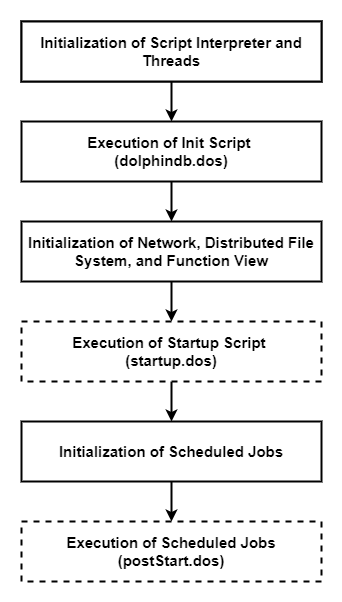
The DolphinDB system startup process is shown below:
-
System initialization script (dolphindb.dos)
The system initialization script is required. By default, DolphinDB loads dolphindb.dos from the server directory. It is strongly recommended not to modify this file, as it will be overwritten when upgrading to a new version of DolphinDB.
-
User startup script (startup.dos)
The user startup script runs only after you configure the startup parameter. In standalone mode, configure it in dolphindb.cfg. In cluster mode, configure it in cluster.cfg. The script path can be either absolute or relative. If a relative path is provided or no directory is specified, the system searches in the following order: Node home directory, Working directory, Directory containing the executable
Example configuration:
startup=/DolphinDB/server/startup.dosAdd the real-time order book generation script (provided in the Appendix) to a startup.dos file in the
/DolphinDB/serverdirectory, and configure the startup parameter in the corresponding configuration file. This completes the automatic subscription deployment at node startup. -
Scheduled job script (postStart.dos)
Scheduled jobs defined by the
scheduleJobfunction in DolphinDB are persisted. Therefore, when a node restarts, the system first runs the user startup script and then loads persisted scheduled jobs when it initializes the scheduled job module. After the preceding steps are complete, the postStart.dos script (if configured) is executed, allowing users to define additional scheduled jobs viascheduleJob.Configure the postStart parameter in the configuration file to enable automatic execution of the
postStart.dosscript at startup. This feature is not used in this tutorial.
Note
-
You must modify the INSIGHT account information based on your actual environment.
-
When
Start orderbook service successfully!appears in the log, the script has run successfully.
Appendix
-
For detailed information on startup script configuration, refer to the documentation Startup Scripts.
-
Real-time order book generation script (requires user-specific INSIGHT credentials)
login("admin", "123456")
try{ loadPlugin("insight") }catch(ex){print ex}
go
def cleanEnvironment(){
    try {
        tcpClient  = insight::getHandle()
        insight::unsubscribe(tcpClient)
        insight::close(tcpClient)
    } catch(ex) { print(ex) }
    for(channelno_ in 1..6){
        try { unsubscribeTable(tableName="orderTransactionTable" + string(channelno_), actionName="orderbookDemo" + string(channelno_)) } catch(ex) { print(ex) }
        try { unsubscribeTable(tableName="orderTransactionTable" + string(channelno_), actionName="orderbookDemo" + string(channelno_) + "etf") } catch(ex) { print(ex) }
        try { unsubscribeTable(tableName="orderTransactionTable" + string(channelno_), actionName="orderTransactionTableInsert" + string(channelno_)) } catch(ex) { print(ex) }
        try { unsubscribeTable(tableName="outputTable" + string(channelno_), actionName="outputTableInsert" + string(channelno_)) } catch(ex) { print(ex) }
        try { dropStreamEngine("orderbookEngine" + string(channelno_)) } catch(ex) { print(ex) }
        try { dropStreamEngine("orderbookEngine" + string(channelno_) + "etf") } catch(ex) { print(ex) }
        try { dropStreamTable("orderTransactionTable" + string(channelno_)) } catch(ex) { print(ex) }
        try { dropStreamTable("outputTable" + string(channelno_)) } catch(ex) { print(ex) }
    }
    for(channelno_ in 2011..2015){
        try { unsubscribeTable(tableName="orderTransactionTable" + string(channelno_), actionName="orderbookDemo" + string(channelno_)) } catch(ex) { print(ex) }
        try { unsubscribeTable(tableName="orderTransactionTable" + string(channelno_), actionName="orderTransactionTableInsert" + string(channelno_)) } catch(ex) { print(ex) }
        try { unsubscribeTable(tableName="outputTable" + string(channelno_), actionName="outputTableInsert" + string(channelno_)) } catch(ex) { print(ex) }
        try { dropStreamEngine("orderbookEngine" + string(channelno_)) } catch(ex) { print(ex) }
        try { dropStreamTable("orderTransactionTable" + string(channelno_)) } catch(ex) { print(ex) }
        try { dropStreamTable("outputTable" + string(channelno_)) } catch(ex) { print(ex) }
    }
	for(channelno_ in 2021..2025){
        try { unsubscribeTable(tableName="orderTransactionTable" + string(channelno_), actionName="orderbookDemo" + string(channelno_)) } catch(ex) { print(ex) }
        try { unsubscribeTable(tableName="orderTransactionTable" + string(channelno_), actionName="orderTransactionTableInsert" + string(channelno_)) } catch(ex) { print(ex) }
        try { unsubscribeTable(tableName="outputTable" + string(channelno_), actionName="outputTableInsert" + string(channelno_)) } catch(ex) { print(ex) }
        try { dropStreamEngine("orderbookEngine" + string(channelno_)) } catch(ex) { print(ex) }
        try { dropStreamTable("orderTransactionTable" + string(channelno_)) } catch(ex) { print(ex) }
        try { dropStreamTable("outputTable" + string(channelno_)) } catch(ex) { print(ex) }
    }
	undef all
}
cleanEnvironment()
go

// Create stream tables for INSIGHT market data ingestion
orderTransactionSchema = insight::getSchema(`OrderTransaction);
capacity = 10000000
colName = orderTransactionSchema[`name]
colType = orderTransactionSchema[`type]
//SSE stocks and funds
for(channelno_ in 1..6){
    share(streamTable(capacity:0, colName, colType), `orderTransactionTable + string(channelno_))
}
//SZSE stocks
for(channelno_ in 2011..2015){
	share(streamTable(capacity:0, colName, colType), `orderTransactionTable + string(channelno_))
}
// SZSE funds
for(channelno_ in 2021..2025){
	share(streamTable(capacity:0, colName, colType), `orderTransactionTable + string(channelno_))
}

// Create a persisted stream table
cacheSize = 10000000
preCache = 0
depth = 10
suffix = string(1..depth)
colNames = `SecurityID`timestamp`lastAppSeqNum`tradingPhaseCode`modified`turnover`volume`tradeNum`totalTurnover`totalVolume`totalTradeNum`lastPx`highPx`lowPx`ask`bid`askVol`bidVol`preClosePx`invalid  join ("bids" + suffix) join ("bidVolumes" + suffix) join ("bidOrderNums" + suffix) join ("asks" + suffix)  join ("askVolumes" + suffix) join ("askOrderNums" + suffix)
colTypes = [SYMBOL,TIMESTAMP,LONG,INT,BOOL,DOUBLE,LONG,INT,DOUBLE,LONG,INT,DOUBLE,DOUBLE,DOUBLE,DOUBLE,DOUBLE,LONG,LONG,DOUBLE,BOOL] join take(DOUBLE, depth) join take(LONG, depth) join take(INT, depth) join take(DOUBLE, depth) join take(LONG, depth) join take(INT, depth)
cacheSize=5000000
preCache=0

for(channelno_ in 1..6){
    enableTableShareAndPersistence(table=streamTable(cacheSize:0, colNames, colTypes), tableName=`outputTable + string(channelno_), cacheSize=cacheSize, preCache=preCache)
}
for(channelno_ in 2011..2015){
	enableTableShareAndPersistence(table=streamTable(cacheSize:0, colNames, colTypes), tableName=`outputTable + string(channelno_), cacheSize=cacheSize, preCache=preCache)
}
for(channelno_ in 2021..2025){
	enableTableShareAndPersistence(table=streamTable(cacheSize:0, colNames, colTypes), tableName=`outputTable + string(channelno_), cacheSize=cacheSize, preCache=preCache)
}

go
// Create an order book engine
// Map the input table column names to the variables required by the order book engine for internal calculation
inputColMap = dict(`codeColumn`timeColumn`typeColumn`priceColumn`qtyColumn`buyOrderColumn`sellOrderColumn`sideColumn`msgTypeColumn`seqColumn, `SecurityID`MDTime`Type`Price`Qty`BuyNo`SellNo`BSFlag`SourceType`ApplSeqNum)
// Create a dictionary to define the previous day's closing prices, which will be passed to the prevClose parameter. prevClose does not affect any output columns other than the previous day's closing prices.
prevClose = dict(SYMBOL, DOUBLE)

for(channelno_ in 1..6){
    createOrderBookSnapshotEngine(name="orderbookEngine" + string(channelno_), exchange="XSHG", orderbookDepth=10, intervalInMilli=1000, date=date(now()), startTime=09:30:00.000, prevClose=prevClose, dummyTable=objByName("orderTransactionTable" + string(channelno_)), inputColMap=inputColMap, outputTable=objByName("outputTable" + string(channelno_)), orderBySeq=true)
    createOrderBookSnapshotEngine(name="orderbookEngine" + string(channelno_) + "etf", exchange="XSHGFUND", orderbookDepth=10, intervalInMilli=1000, date=date(now()), startTime=09:30:00.000, prevClose=prevClose, dummyTable=objByName("orderTransactionTable" + string(channelno_)), inputColMap=inputColMap, outputTable=objByName("outputTable" + string(channelno_)), orderBySeq=true)
}

for(channelno_ in 2011..2015){
    createOrderBookSnapshotEngine(name="orderbookEngine" + string(channelno_), exchange="XSHE", orderbookDepth=10, intervalInMilli=1000, date=date(now()), startTime=09:30:00.000, prevClose=prevClose, dummyTable=objByName("orderTransactionTable" + string(channelno_)), inputColMap=inputColMap, outputTable=objByName("outputTable" + string(channelno_)), orderBySeq=true)
}

for(channelno_ in 2021..2025){
    createOrderBookSnapshotEngine(name="orderbookEngine" + string(channelno_), exchange="XSHEFUND", orderbookDepth=10, intervalInMilli=1000, date=date(now()), startTime=09:30:00.000, prevClose=prevClose, dummyTable=objByName("orderTransactionTable" + string(channelno_)), inputColMap=inputColMap, outputTable=objByName("outputTable" + string(channelno_)), orderBySeq=true)
}

// Subscribe to the stream table, synthesize snapshots, and output them to the order book engine
subscribeTable(tableName="orderTransactionTable1", actionName="orderbookDemo1", handler=getStreamEngine("orderbookEngine1"), msgAsTable=true, batchSize=1, throttle=0.001, reconnect=true, hash=0)
subscribeTable(tableName="orderTransactionTable2", actionName="orderbookDemo2", handler=getStreamEngine("orderbookEngine2"), msgAsTable=true, batchSize=1, throttle=0.001, reconnect=true, hash=1)
subscribeTable(tableName="orderTransactionTable3", actionName="orderbookDemo3", handler=getStreamEngine("orderbookEngine3"), msgAsTable=true, batchSize=1, throttle=0.001, reconnect=true, hash=2)
subscribeTable(tableName="orderTransactionTable4", actionName="orderbookDemo4", handler=getStreamEngine("orderbookEngine4"), msgAsTable=true, batchSize=1, throttle=0.001, reconnect=true, hash=3)
subscribeTable(tableName="orderTransactionTable5", actionName="orderbookDemo5", handler=getStreamEngine("orderbookEngine5"), msgAsTable=true, batchSize=1, throttle=0.001, reconnect=true, hash=4)
subscribeTable(tableName="orderTransactionTable6", actionName="orderbookDemo6", handler=getStreamEngine("orderbookEngine6"), msgAsTable=true, batchSize=1, throttle=0.001, reconnect=true, hash=5)

subscribeTable(tableName="orderTransactionTable1", actionName="orderbookDemo1etf", handler=getStreamEngine("orderbookEngine1etf"), msgAsTable=true, batchSize=1, throttle=0.001, reconnect=true, hash=0)
subscribeTable(tableName="orderTransactionTable2", actionName="orderbookDemo2etf", handler=getStreamEngine("orderbookEngine2etf"), msgAsTable=true, batchSize=1, throttle=0.001, reconnect=true, hash=1)
subscribeTable(tableName="orderTransactionTable3", actionName="orderbookDemo3etf", handler=getStreamEngine("orderbookEngine3etf"), msgAsTable=true, batchSize=1, throttle=0.001, reconnect=true, hash=2)
subscribeTable(tableName="orderTransactionTable4", actionName="orderbookDemo4etf", handler=getStreamEngine("orderbookEngine4etf"), msgAsTable=true, batchSize=1, throttle=0.001, reconnect=true, hash=3)
subscribeTable(tableName="orderTransactionTable5", actionName="orderbookDemo5etf", handler=getStreamEngine("orderbookEngine5etf"), msgAsTable=true, batchSize=1, throttle=0.001, reconnect=true, hash=4)
subscribeTable(tableName="orderTransactionTable6", actionName="orderbookDemo6etf", handler=getStreamEngine("orderbookEngine6etf"), msgAsTable=true, batchSize=1, throttle=0.001, reconnect=true, hash=5)

subscribeTable(tableName="orderTransactionTable2011", actionName="orderbookDemo2011", handler=getStreamEngine("orderbookEngine2011"), msgAsTable=true, batchSize=1, throttle=0.001, reconnect=true, hash=6)
subscribeTable(tableName="orderTransactionTable2012", actionName="orderbookDemo2012", handler=getStreamEngine("orderbookEngine2012"), msgAsTable=true, batchSize=1, throttle=0.001, reconnect=true, hash=7)
subscribeTable(tableName="orderTransactionTable2013", actionName="orderbookDemo2013", handler=getStreamEngine("orderbookEngine2013"), msgAsTable=true, batchSize=1, throttle=0.001, reconnect=true, hash=8)
subscribeTable(tableName="orderTransactionTable2014", actionName="orderbookDemo2014", handler=getStreamEngine("orderbookEngine2014"), msgAsTable=true, batchSize=1, throttle=0.001, reconnect=true, hash=9)
subscribeTable(tableName="orderTransactionTable2015", actionName="orderbookDemo2015", handler=getStreamEngine("orderbookEngine2015"), msgAsTable=true, batchSize=1, throttle=0.001, reconnect=true, hash=10)

subscribeTable(tableName="orderTransactionTable2021", actionName="orderbookDemo2021", handler=getStreamEngine("orderbookEngine2021"), msgAsTable=true, batchSize=1, throttle=0.001, reconnect=true, hash=6)
subscribeTable(tableName="orderTransactionTable2022", actionName="orderbookDemo2022", handler=getStreamEngine("orderbookEngine2022"), msgAsTable=true, batchSize=1, throttle=0.001, reconnect=true, hash=7)
subscribeTable(tableName="orderTransactionTable2023", actionName="orderbookDemo2023", handler=getStreamEngine("orderbookEngine2023"), msgAsTable=true, batchSize=1, throttle=0.001, reconnect=true, hash=8)
subscribeTable(tableName="orderTransactionTable2024", actionName="orderbookDemo2024", handler=getStreamEngine("orderbookEngine2024"), msgAsTable=true, batchSize=1, throttle=0.001, reconnect=true, hash=9)
subscribeTable(tableName="orderTransactionTable2025", actionName="orderbookDemo2025", handler=getStreamEngine("orderbookEngine2025"), msgAsTable=true, batchSize=1, throttle=0.001, reconnect=true, hash=10)
go

// Configure account information
HOST = "111.111.111.111"
PORT = 111
USER = "111"
PASSWORD = "111"
// Subscribe to INSIGHT market data: stocks and funds
handles = dict(['OrderTransaction'], [dict([1,2,3,4,5,6,2011,2012,2013,2014,2015,2021,2022,2023,2024,2025], [orderTransactionTable1,orderTransactionTable2,orderTransactionTable3,orderTransactionTable4,orderTransactionTable5,orderTransactionTable6,orderTransactionTable2011,orderTransactionTable2012,orderTransactionTable2013,orderTransactionTable2014,orderTransactionTable2015,orderTransactionTable2021,orderTransactionTable2022,orderTransactionTable2023,orderTransactionTable2024,orderTransactionTable2025])])
tcpClient= insight::connect(handles,HOST, PORT, USER, PASSWORD,,,true)
insight::subscribe(tcpClient, [`MD_ORDER_TRANSACTION], `XSHE, `StockType)
insight::subscribe(tcpClient, [`MD_ORDER_TRANSACTION], `XSHG, `StockType)
insight::subscribe(tcpClient, [`MD_ORDER_TRANSACTION], `XSHG, `FundType)
insight::subscribe(tcpClient, [`MD_ORDER_TRANSACTION], `XSHE, `FundType)
writeLog("Start orderbook service successfully!")-
Batch write intraday data into the DFS database
// Create a DFS table
if(!existsDatabase("dfs://SZ_TB")) {
	// Create a DFS database
	dbDate = database(, partitionType=VALUE, partitionScheme=2023.01.01..2025.01.01)
	dbID = database(, partitionType=HASH, partitionScheme=[SYMBOL, 25])
	db = database(directory="dfs://SZ_TB", partitionType=COMPO, partitionScheme=[dbDate, dbID],engine='TSDB',atomic='CHUNK')
}

if(!existsDatabase("dfs://SH_TB")) {
	// Create a DFS database
	dbDate = database(, partitionType=VALUE, partitionScheme=2023.01.01..2025.01.01)
	dbID = database(, partitionType=HASH, partitionScheme=[SYMBOL, 25])
	db = database(directory="dfs://SH_TB", partitionType=COMPO, partitionScheme=[dbDate, dbID],engine='TSDB',atomic='CHUNK')
}

if(!existsTable("dfs://SZ_TB", "orderTransactionTable")) {
	db = database("dfs://SZ_TB")
	// Create a DFS table to store market data
	colName = `SecurityID`MDDate`MDTime`SecurityIDSource`SecurityType`Index`SourceType`Type`Price`Qty`BSFlag`BuyNo`SellNo`ApplSeqNum`ChannelNo`receivedTime
	colType = [SYMBOL,DATE,TIME,SYMBOL,SYMBOL,LONG,INT,INT,LONG,LONG,INT,LONG,LONG,LONG,INT,NANOTIMESTAMP]
	tbSchema = table(1:0, colName, colType)
	db.createPartitionedTable(table=tbSchema,tableName="orderTransactionTable",partitionColumns=`MDDate`SecurityID,sortColumns=`SecurityID`MDTime)
}

if(!existsTable("dfs://SH_TB", "orderTransactionTable")) {
	db = database("dfs://SH_TB")
	// Create a DFS table to store market data
	colName = `SecurityID`MDDate`MDTime`SecurityIDSource`SecurityType`Index`SourceType`Type`Price`Qty`BSFlag`BuyNo`SellNo`ApplSeqNum`ChannelNo`receivedTime
	colType = [SYMBOL,DATE,TIME,SYMBOL,SYMBOL,LONG,INT,INT,LONG,LONG,INT,LONG,LONG,LONG,INT,NANOTIMESTAMP]
	tbSchema = table(1:0, colName, colType)
	db.createPartitionedTable(table=tbSchema,tableName="orderTransactionTable",partitionColumns=`MDDate`SecurityID,sortColumns=`SecurityID`MDTime)
}

if(!existsTable("dfs://SZ_TB", "tick1sTable")) {
	db = database("dfs://SZ_TB")
	// Create a DFS table to store generated snapshot data
	depth = 10
	suffix = string(1..depth)
	colName = `SecurityID`timestamp`lastAppSeqNum`tradingPhaseCode`modified`turnover`volume`tradeNum`totalTurnover`totalVolume`totalTradeNum`lastPx`highPx`lowPx`ask`bid`askVol`bidVol`preClosePx`invalid  join ("bids" + suffix) join ("bidVolumes" + suffix) join ("bidOrderNums" + suffix) join ("asks" + suffix)  join ("askVolumes" + suffix) join ("askOrderNums" + suffix)
	colType = [SYMBOL,TIMESTAMP,LONG,INT,BOOL,DOUBLE,LONG,INT,DOUBLE,LONG,INT,DOUBLE,DOUBLE,DOUBLE,DOUBLE,DOUBLE,LONG,LONG,DOUBLE,BOOL] join take(DOUBLE, depth) join take(LONG, depth) join take(INT, depth) join take(DOUBLE, depth) join take(LONG, depth) join take(INT, depth)
	tbSchema = table(1:0, colName, colType)
	db.createPartitionedTable(table=tbSchema,tableName="tick1sTable",partitionColumns=`timestamp`SecurityID,sortColumns=`SecurityID`timestamp)
}

if(!existsTable("dfs://SH_TB", "tick1sTable")) {
	db = database("dfs://SH_TB")
	// Create a DFS table to store generated snapshot data
	depth = 10
	suffix = string(1..depth)
	colName = `SecurityID`timestamp`lastAppSeqNum`tradingPhaseCode`modified`turnover`volume`tradeNum`totalTurnover`totalVolume`totalTradeNum`lastPx`highPx`lowPx`ask`bid`askVol`bidVol`preClosePx`invalid  join ("bids" + suffix) join ("bidVolumes" + suffix) join ("bidOrderNums" + suffix) join ("asks" + suffix)  join ("askVolumes" + suffix) join ("askOrderNums" + suffix)
	colType = [SYMBOL,TIMESTAMP,LONG,INT,BOOL,DOUBLE,LONG,INT,DOUBLE,LONG,INT,DOUBLE,DOUBLE,DOUBLE,DOUBLE,DOUBLE,LONG,LONG,DOUBLE,BOOL] join take(DOUBLE, depth) join take(LONG, depth) join take(INT, depth) join take(DOUBLE, depth) join take(LONG, depth) join take(INT, depth)
	tbSchema = table(1:0, colName, colType)
	db.createPartitionedTable(table=tbSchema,tableName="tick1sTable",partitionColumns=`timestamp`SecurityID,sortColumns=`SecurityID`timestamp)
}

// Store market data and snapshot data in the DFS database
SZ_orderTransaction = loadTable("dfs://SZ_TB", "orderTransactionTable")
SZ_output = loadTable("dfs://SZ_TB", "tick1sTable")
SH_orderTransaction = loadTable("dfs://SH_TB", "orderTransactionTable")
SH_output = loadTable("dfs://SH_TB", "tick1sTable")

for(channelno_ in 1..6){
    SH_orderTransaction.append!(objByName(`orderTransactionTable + string(channelno_)))
}

for(channelno_ in 2011..2015){
    SZ_orderTransaction.append!(objByName(`orderTransactionTable + string(channelno_)))
}

for(channelno_ in 2021..2025){
    SZ_orderTransaction.append!(objByName(`orderTransactionTable + string(channelno_)))
}

for(channelno_ in 1..6){
    subscribeTable(tableName="outputTable" + string(channelno_), actionName="outputTableInsert" + string(channelno_), offset=0, handler=tableInsert{SH_output}, msgAsTable=true, batchSize=20000, throttle=5, reconnect=true, hash=13)
}

for(channelno_ in 2011..2015){
    subscribeTable(tableName="outputTable" + string(channelno_), actionName="outputTableInsert" + string(channelno_), offset=0, handler=tableInsert{SZ_output}, msgAsTable=true, batchSize=20000, throttle=5, reconnect=true, hash=14)
}

for(channelno_ in 2021..2025){
    subscribeTable(tableName="outputTable" + string(channelno_), actionName="outputTableInsert" + string(channelno_), offset=0, handler=tableInsert{SZ_output}, msgAsTable=true, batchSize=20000, throttle=5, reconnect=true, hash=15)
}

SH_Count = exec count(*) from SH_output where date(timestamp) = date(now())
SZ_Count = exec count(*) from SZ_output where date(timestamp) = date(now())

SH_Total_Count = 0
SZ_Total_Count = 0
for(channelno_ in 1..6){
    SH_Total_Count += getPersistenceMeta(objByName(`outputTable + string(channelno_)))[`totalSize]
}

for(channelno_ in 2011..2015){
    SZ_Total_Count += getPersistenceMeta(objByName(`outputTable + string(channelno_)))[`totalSize]
}

for(channelno_ in 2021..2025){
    SZ_Total_Count += getPersistenceMeta(objByName(`outputTable + string(channelno_)))[`totalSize]
}

do{
    SH_Count = exec count(*) from SH_output where date(timestamp) = date(now())
    SZ_Count = exec count(*) from SZ_output where date(timestamp) = date(now())
}while(SH_Count != SH_Total_Count || SZ_Count != SZ_Total_Count)

writeLog("All data has been written to the dfs database.")