
Write Data
This article describes how to use the DolphinDB C++ API to write data to DolphinDB. It covers three topics: application scenarios, write mechanisms, and practical examples.
Application Scenarios
Big data technologies are now widely used in industries such as finance and the Internet of Things (IoT), and high-volume data write is the foundation of big data processing and analytics. In real-world applications, data is generated and collected through a wide range of methods. As a lightweight big data platform, DolphinDB offers multiple data write methods, allowing you to choose the method best suited to each application scenario.
In an industrial IoT scenario, for example, device data write typically falls into two categories.
Distributed write of data from multiple devices.
For example, a factory may have 100 devices, each sending data over its own connection to an API endpoint. The endpoint then ingests the data into DolphinDB centrally.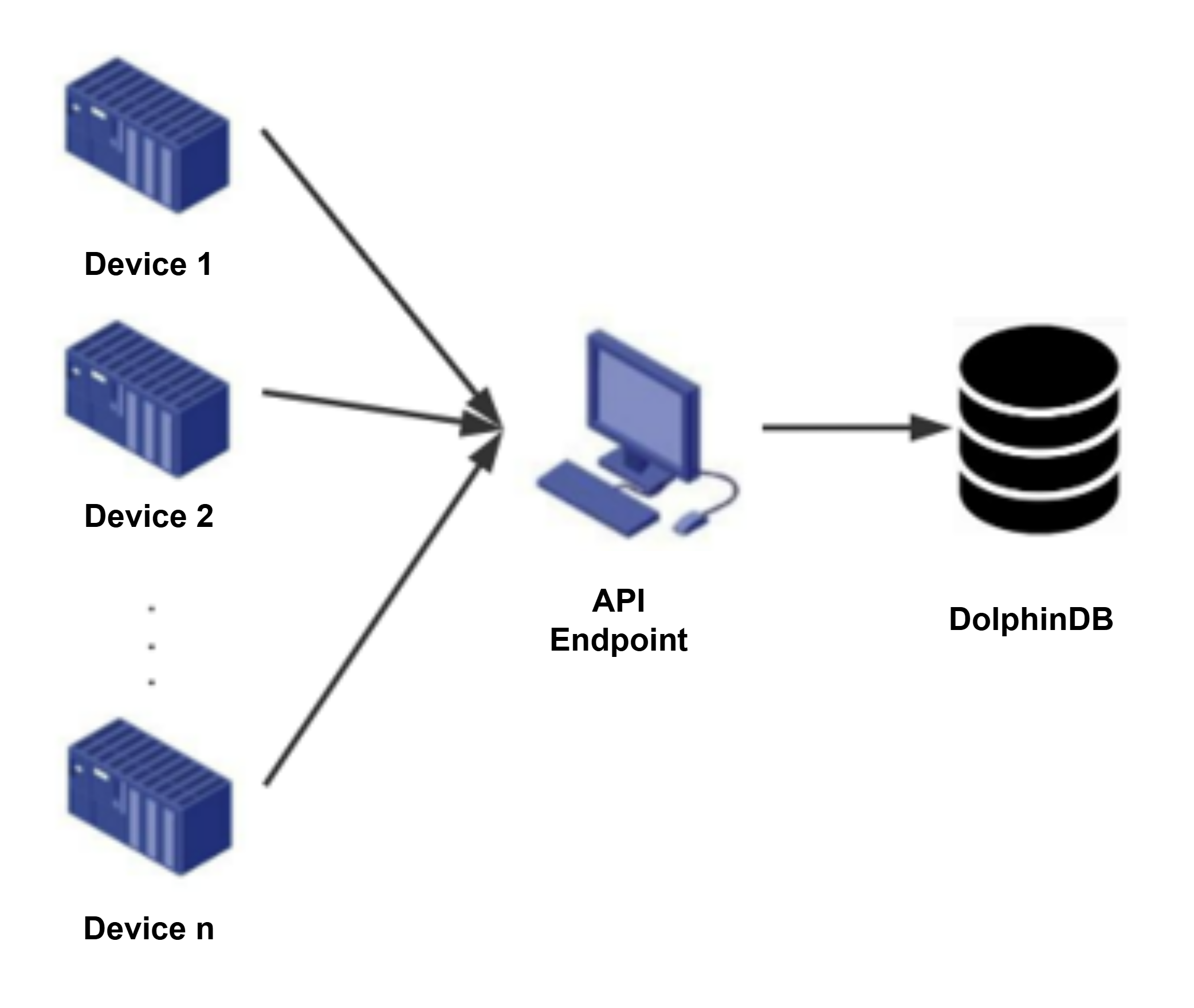
Figure 1. Distributed Write of Data from Multiple Devices Data is aggregated before being written via the API.
For example, a factory may have 100 devices sending data to an aggregation service such as Kafka, which then writes the data to DolphinDB centrally via the API.Figure 2. Aggregated Device Data Write 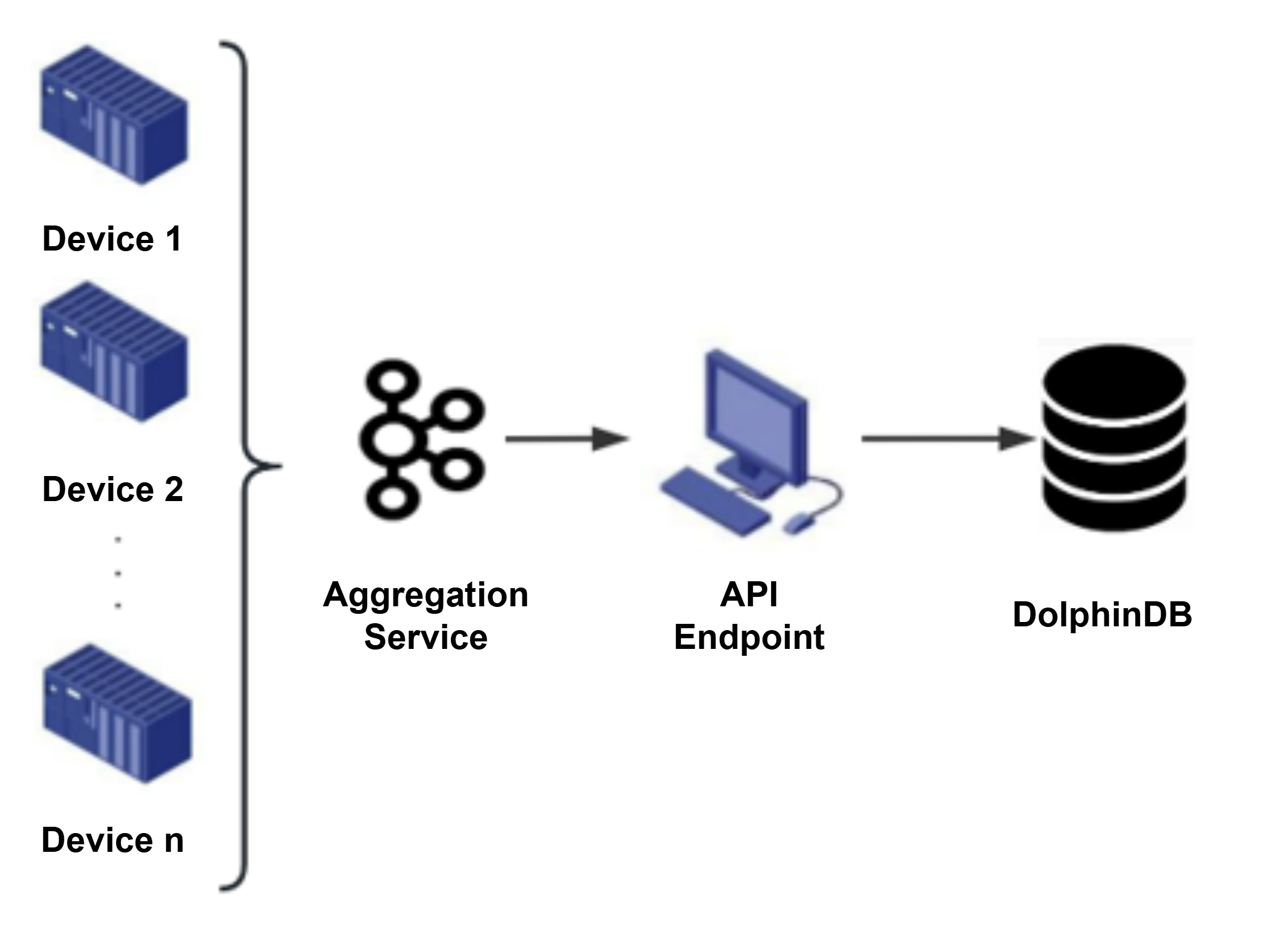
For these scenarios, the DolphinDB C++ API provides several write methods for efficiently writing data from different sources:
| Scenario | Type of DolphinDB Table | DolphinDB Function | Implementation Method |
|---|---|---|---|
| Data from multiple devices is written separately, one record at a time | ALL | MTW (MultithreadedTableWriter) | Buffers row data before writing it in parallel. |
| Aggregated device data write | ALL | MTW (MultithreadedTableWriter) | Writes merged row data in parallel. |
| Aggregated device data write | ALL | AFTA (AutoFitTableAppender) / AFTU (AuoFitTableUpsert) | Batch writes columnar data in a single thread. |
| Aggregated device data write | In-memory table | tableInsert | Writes to a single table. |
| Aggregated device data write | DFS table | PTA (PartitionedTableAppender) | Batch writes columnar data in multiple thread. |
The MTW method supports a wide variety of write scenarios. We recommend that you use
MTW if you are new to DolphinDB. The tableInsert method provides a
simple and fast way to write aggregated data to an in-memory table. For DFS tables,
the C++ API provides the PTA method for parallel writes, as well as the AFTA/AFTU
methods, which are easier to use and can automatically convert the data types of the
fields being written.
How It Works
Developers are often familiar with row-based storage in relational databases, where data is submitted and written one row or multiple rows at a time. This approach is easy to understand, but row-based databases are not designed for big data processing, and high-volume writes can quickly become a performance bottleneck.
DolphinDB uses column-based storage and maintains a cache engine in memory. When data is written to files, it is not written directly to disk. Instead, it is first written to the operating system's buffer pages and then flushed to disk in batches. To ensure that written data is not lost from memory, DolphinDB uses a Write-Ahead Logging (WAL) mechanism.
Consider a table with five columns (fields). To write 1 million rows, row-based storage writes the data one row at a time, resulting in 1 million file write operations. In contrast, columnar storage writes data one column at a time. It can write 1 million values for a single column in one batch, requiring as few as five file operations. The performance difference between the two write approaches is substantial when processing massive volumes of data.
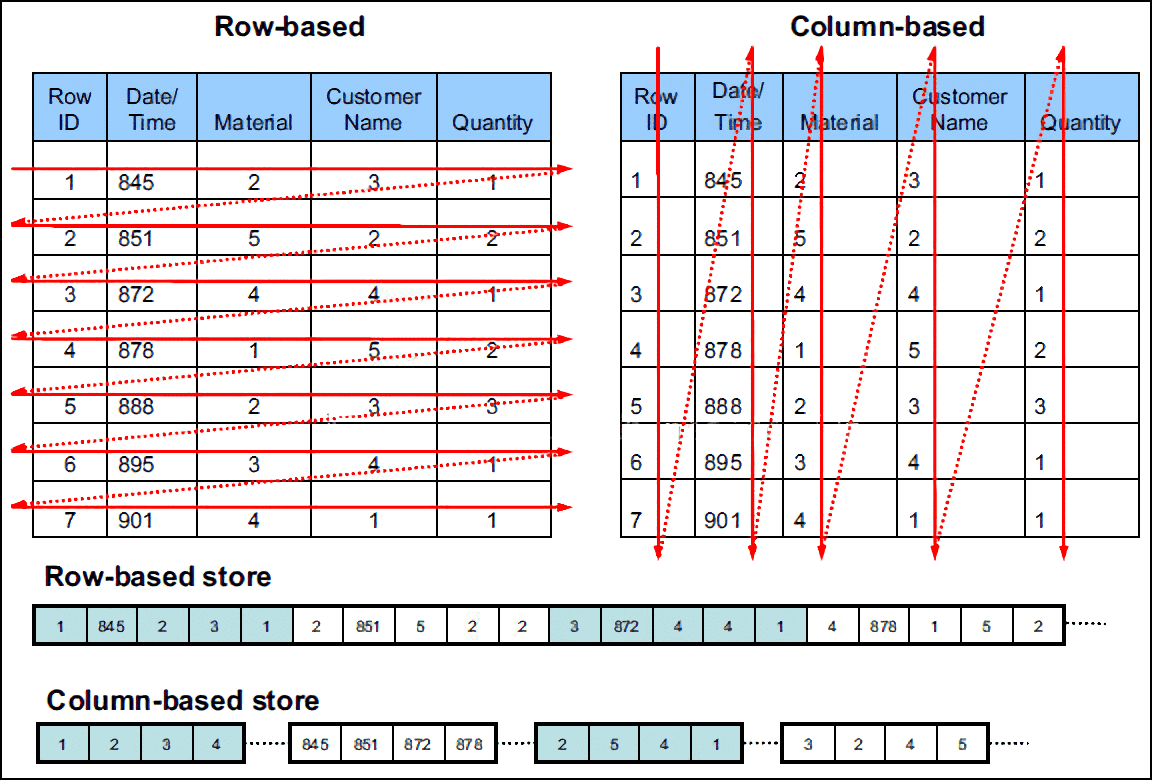
Before planning an ingestion strategy for big data applications, it is necessary to understand the column-based write model described above. Columnar batch writes maximize the advantages of column-based storage. When data from multiple devices arrives in a relatively scattered manner, you can use an API with data buffering, such as MTW, to achieve optimal write performance.
The DolphinDB C++ API provides multiple data write methods for different write scenarios. Their main characteristics are as follows:
| Write Method | Characteristics |
|---|---|
| MTW |
|
| tableInsert |
|
| PTA |
|
| AFTA |
|
| AFTU | Update-write version of AFTA |
| BatchTableWriter CAUTION: No
longer maintained and not recommended |
|
- MTW supports efficient row-based writes. With its built-in data buffering queue, MTW sends data to DolphinDB in a unified manner, ensuring efficient single-record writes. It is well-suited to scenarios where data from multiple devices arrives sparsely and must be written one record at a time. When performance requirements are modest, you can also use it for batch-write scenarios in which a third-party platform first aggregates the data.
- MTW is an upgraded version of BatchTableWriter (legacy version). Both support scenarios in which data is transferred in a dispersed manner from a third-party platform to the client. By default, MTW provides the same functionality as BatchTableWriter, but it also supports concurrent multi-threaded writes. MTW has completely replaced BatchTableWriter, which is now retained only for compatibility.
- tableInsert is simple and efficient, and supports scenarios in which aggregated data is written in batches. If the target DolphinDB table is an in-memory table, you can use either tableInsert or PTA. However, tableInsert does not guarantee partition-aware writes. If transactions are enabled, it is not recommended for writing to DFS tables.
- PTA can automatically perform synchronous parallel writes by partition, making it suitable for aggregated data write scenarios. Its column-parallel write mechanism gives PTA a performance advantage in batch write scenarios.
- AFTA automatically converts C++ field types to DolphinDB field types during writes, making it easier to use than PTA. It is also suitable for writing aggregated data. PTA writes faster than AFTA. If write performance matters and you only need append writes, PTA is the preferred choice.
- AFTU is the update-write version of AFTA and is better suited to scenarios with duplicate data. If newly read data contains no duplicates, it is inserted directly. If duplicates exist, the existing records are updated. The C++ API provides different write methods based on whether incoming data should update existing records. If the data being written has the same primary key or the same specified fields as data already in the database, you can either update the existing record or insert a new one directly. MTW internally supports both update writes and append writes, which are exposed through the mode parameter; whereas PTA supports only append writes.
MTW, PTA, AFTA, and AFTU together cover the vast majority of write scenarios. All
four are built on tableInsert or upsert!. For more
information about tableInsert, see tableInsert.
Practical Examples
The following example shows how to write data using the DolphinDB C++ API:
A device testing platform is connected to 100 devices, each with 1,000 measurements. The platform needs to collect measurement data from these devices to evaluate their usage.
The platform stores measurement data as individual values. Every 5 minutes, each device collects data for all 1,000 measurements. After aggregating the data from all devices, the platform sends it uniformly to the API endpoint through the messaging middleware. The platform must support batch writes while maintaining data type consistency, and it does not require automatic data type conversion. If the client crashes unexpectedly, the API must be able to resume receiving data after a restart. In this scenario, the MTW method is used to write real-time data to the database. The workflow is shown below:
Dataset:
- Record description: 100 devices, 1,000 measurements per device, one collection every 5 minutes, over a period of 10 days
- Row count: 260 million rows
- Disk usage: 1116 MB
- Number of fields: 6
-
Fields:
- ts: Data collection time
- deviceCode: Device code
- logicalPostionId: Logical position ID
- physicalPostionId: Physical position ID
- propertyCode: Measurement property code
- propertyValue: Measurement value (cumulative output)
Preparation:
First, create the DFS database (db_demo) and the partitioned table (collect) on the server side:
// Create the DFS database and partitioned table
dbname="dfs://db_demo"
tablename="collect"
cols_info=`ts`deviceCdoe`logicalPostionId`physicalPostionId`propertyCode`propertyValue
cols_type=[DATETIME,SYMBOL,SYMBOL,SYMBOL,SYMBOL,INT]
t=table(1:0,cols_info,cols_type)
db=database(dbname,VALUE,[2022.11.01],engine=`TSDB)
pt=createPartitionedTable(db,t,tablename,`ts,,`deviceCdoe`ts)
Then create a stream table named streamtable. Use MTW to write data to this stream table, and then subscribe to the stream table so that the data flows from the stream table into the partitioned table (collect):
// Create the stream table
def saveToDFS(mutable dfstable, msg): dfstable.append!(msg)
share streamTable(1:0, cols_info, cols_type) as streamtable;
subscribeTable(tableName="streamtable", actionName="savetodfs", offset=0, handler=saveToDFS{pt}, msgAsTable=true, batchSize=1000, throttle=1)
You can also run this code directly in C++ by calling conn.run(script).
API call:
Create an MTW object and subscribe to the stream table
// Create the writer object
MultithreadedTableWriter writer(
            "183.136.170.167", 9900, "admin","123456","","streamtable",NULL,false,NULL,1000,1,5,"deviceid", &compress);
MultithreadedTableWriter::Status status;  // Save the writer's state
This article focuses on API-based writes and uses a simulation to demonstrate the process, from collecting data on a third-party platform to writing it through the API. In this scenario, the API performs writes in a single thread. Depending on your use case, you can improve write performance on the API side by using multiple threads. For the complete code, see API_mtw.cpp in the appendix.
// Simulate receiving batch data and create a single-threaded writer
// bt simulates receiving data sent by the messaging middleware and traverses the collected data by device (1,000 records per device)
for(int i=0;i < (bt->rows())/1000;i++){
	system_clock::duration begin = system_clock::now().time_since_epoch();
	milliseconds milbegin = duration_cast<milliseconds>(begin);
	// Each device has 1,000 measurements, so 1,000 rows are written
	for(int j=i*1000;j<(i+1)*1000;j++){
		ErrorCodeInfo pErrorInfo;
		// Simulate writing the six fields of a single record
		writer.insert(pErrorInfo,
			datas[i*6+0], datas[i*6+1], datas[i*6+2], datas[i*6+3], datas[i*6+4], datas[i*6+5]
		)
	}
	system_clock::duration end = system_clock::now().time_since_epoch();
	milliseconds milend = duration_cast<milliseconds>(end);
	if((milend.count()-milbegin.count())<5000){
		// Control the simulated write frequency
		sleep_for(std::chrono::milliseconds(5000-(milend.count()-milbegin.count())));
	}
}
If an error occurs in a background thread, MTW may exit before all data has been written to the server (including the batch that caused the background-thread error; that batch may or may not have been written to the server).
// Check the MTW status after the write completes
writer.getStatus(status);
In this case, first retrieve the data that was not fully written.
// Get the unwritten data
std::vector<std::vector<ConstantSP>*> unwrittenData;
writer.getUnwrittenData(unwrittenData);
cout << "Unwritten data length " << unwrittenData.size() << endl;
Rewrite the data above
// Rewrite the data. The original MTW is no longer usable because it exited abnormally, so a new MTW must be created.
MultithreadedTableWriter newWriter("192.168.0.61", 8848, "admin", "123456", "dfs://test_MultithreadedTableWriter", "collect", NULL,false,NULL,10000,1,10,"deviceid", &compress);
ErrorCodeInfo errorInfo;
// Insert the unwritten data that was retrieved
if (newWriter.insertUnwrittenData(unwrittenData, errorInfo)) {
	// Wait for the write to complete, then check the status
	newWriter.waitForThreadCompletion();
	newWriter.getStatus(status);
	if (status.hasError()) {
		cout << "error in write again: " << status.errorInfo << endl;
	}
}
else {
	cout << "error in write again: " << errorInfo.errorInfo << endl;
}